1. Nhanganyaya
This manual provides essential information for the proper setup, operation, and maintenance of your ZEISS DTI 6/20 Thermal Imaging Camera. Please read these instructions carefully before using the device to ensure optimal performance and longevity.
2. Chii chiri muBhokisi
Tarisa kuti zvese zvinotevera zvinosanganisirwa mupakeji yako:
- Thermal imaging kamera
- Lens (20 mm)
- Neoprene tambo
- Carrying case including shoulder strap
- USB tambo
- Optics kuchenesa jira
- Lithium-ion bhatiri
- Kurumidza Kutungamira
- Safety notes
- Warranty card
- EULA gwaro
3. Chigadzirwa Pamusoroview
The ZEISS DTI 6/20 is a high-resolution thermal imaging monocular designed for detailed observation in low-light conditions. It features advanced image processing and ergonomic design for ease of use.

Mufananidzo 1: Angled view of the ZEISS DTI 6/20 Thermal Imaging Camera. This image displays the overall design, including the objective lens, eyepiece, and the ZEISS branding on the side.
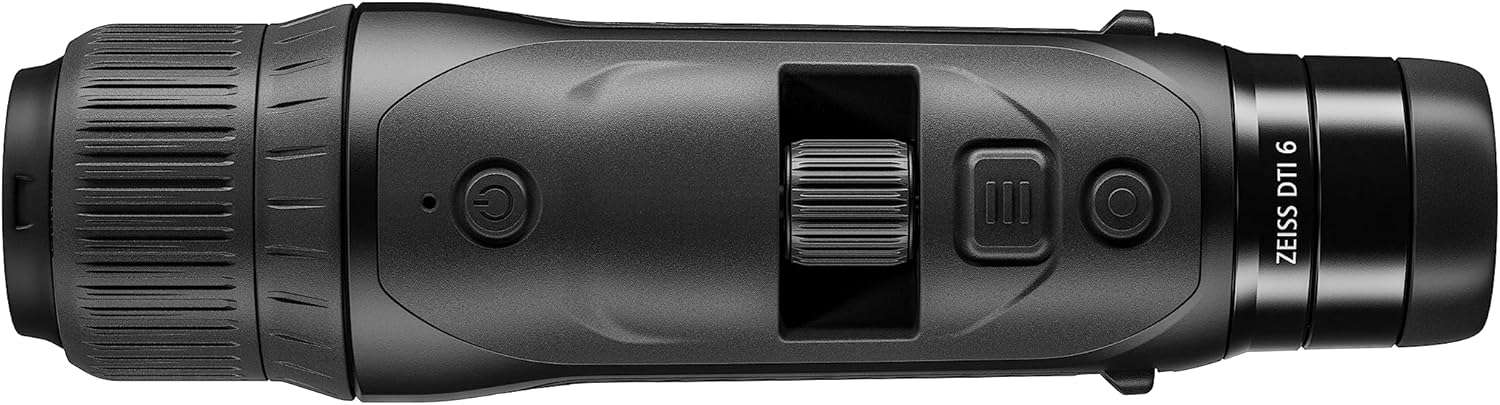
Mufananidzo 2: Top view of the ZEISS DTI 6/20, highlighting the power button, scroll wheel for magnification control, and other operational buttons. The ergonomic placement of controls is visible.
Zvinokosha:
- ZSIP Pro Image Technology: Delivers sharp, high-contrast thermal images.
- High-Resolution Display: AMOLED display with 1024x768 resolution, paired with a 640x480 sensor and 12µm pixel pitch.
- Kukudza: 1.5x optical magnification with up to 10x digital zoom, controlled by a scroll wheel.
- Customization: 4 preset scene modes and up to 5 user-created layouts. Adjustable zoom settings, display brightness, and color palettes.
- Kuchengetera Kwemukati: 16GB for capturing images and videos.
- Hupenyu hwebhatiri: Up to 6.5 hours of continuous operation with a removable lithium-ion battery.
- Ergonomic Dhizaini: Suitable for both left and right-handed users, with controls positioned for natural access even with gloves.
- App Connectivity: Seamless data transfer and live streaming to smartphones via the ZEISS Hunting App using Bluetooth, USB, or WLAN.
4. Setup
4.1 Kuiswa kwebhatiri
- Tsvaga nzvimbo yebhatiri pane mudziyo.
- Vhura chivharo chekamuri.
- Isa bhatiri re lithium-ion rakapihwa, zvichiita kuti pave ne polarity yakakwana.
- Vhara chivharo chebhatiri zvakachengeteka.
4.2 Simba rekutanga Rakabatidzwa
- Press and hold the power button (refer to Figure 2) until the ZEISS logo appears on the display.
- Allow the device to initialize. This may take a few seconds.
- Adjust the diopter on the eyepiece for clear focus according to your vision.
5. Operating Instructions
5.1 Simba On/Kudzima
- Kubatidza: Dzvanya uye bata bhatani remagetsi.
- Kudzima: Press and hold the power button until the shutdown sequence initiates.
5.2 Magnification Control
Use the scroll wheel located on the top of the device (refer to Figure 2) to adjust the digital zoom level. Rotate the wheel forward to increase magnification and backward to decrease it.
5.3 Scene Modes
The DTI 6/20 offers 4 preset scene modes optimized for different observation conditions. Access these modes through the device's menu to enhance image clarity based on your environment.
5.4 Kugadzirisa
The device allows for extensive personalization:
- User Layouts: Create and save up to 5 custom display layouts.
- Display Settings: Adjust display brightness to suit ambient light conditions.
- Color Palettes: Select from various color palettes to optimize thermal contrast and target identification.
5.5 App Connectivity (ZEISS Hunting App)
Enhance your experience by connecting the DTI 6/20 to the ZEISS Hunting App on your smartphone.

Mufananidzo 3: A user operating the ZEISS DTI 6/20 thermal imaging camera in an outdoor environment, demonstrating its ergonomic handling and practical application.
- Kuendesa Data: Transfer images and videos from the device's 16GB internal storage to your smartphone via Bluetooth, USB, or WLAN.
- Live Streaming: Stream live thermal footage directly to your smartphone for shared viewkunyora kana kurekodha.
- Further Customization: The app provides additional options for device settings and management.
6. Kuchengeta
6.1 Kuchenesa
- Use the provided optics cleaning cloth to gently wipe the lenses. Avoid abrasive materials.
- For the device body, use a soft, damp jira. Usashandise makemikari ane hasha kana zvinonyungudutsa.
- Iva nechokwadi chekuti mudziyo wadzimwa usati wachenesa.
6.2 Kuchengeta Battery
- Chaja bhatiri zvizere usati watanga kushandisa.
- Store the device and battery in a cool, dry place when not in use for extended periods.
- Dzivisa kuisa bhatiri kune tembiricha yakanyanyisa.
7. Kugadzirisa matambudziko
7.1 Chishandiso Chisingabatike
- Ita shuwa kuti bhatiri rakaiswa nemazvo uye rakazara.
- Try charging the battery for at least 30 minutes before attempting to power on again.
7.2 Image Appears Blurry
- Adjust the diopter on the eyepiece for your vision.
- Ensure the objective lens is clean and free from smudges or debris.
- Check the focus of the thermal image using the manual focus ring if available.
7.3 Connectivity Issues with ZEISS Hunting App
- Ensure Bluetooth or WLAN is enabled on both the device and your smartphone.
- Verify that the ZEISS Hunting App is updated to the latest version.
- Restart both the thermal camera and your smartphone.
8. Zvinotsanangurwa
| Feature | Tsanangudzo |
|---|---|
| Product Dimensions | 9.06 x 2.44 x 2.68 inches |
| Item Weight | Mapaundi 1.52 (24.33 Ounces) |
| Item Model Number | 527020-9911-000 |
| Brand | ZEISS |
| Model Name | DTI 6/20 |
| Eye Piece Lens Tsanangudzo | Plössl |
| Focus Type | Manual Focus |
| Simba Source | Inoshandisa Bhatiri (Lithium-ion) |
| Inowirirana Devices | Smartphone |
| Focal Length Description | 300mm |
| Munda we View | 10 madhigirii |
| Zoom Ratio | 3x Optical, up to 10x Digital |
| Sensor Resolution | 640 x 480 with 12 micron pixel pitch |
| Display Resolution | 1024 x 768 HD AMOLED |
| Kuchengeta Kwemukati | 16GB |
| Battery Run Nguva | Maawa makumi maviri nemana (zvinoenderera) |
9. Warranty uye Tsigiro
The ZEISS DTI 6/20 Thermal Imaging Camera is manufactured by ZEISS. For detailed warranty information, please refer to the included warranty card or visit the official ZEISS website. For technical support, service, or inquiries, please contact ZEISS customer service through their official channels.
Mugadziri: ZEISS


