1. Nhanganyaya
Thank you for choosing the Livoo WASH'UP DOH145 Robot Vacuum Cleaner and Mop. This device is designed to simplify your daily cleaning routine by sweeping, vacuuming, and mopping your floors simultaneously. This manual provides essential information for safe operation, setup, maintenance, and troubleshooting to ensure optimal performance of your robot cleaner.
2. Mirayiridzo Yekuchengetedza
Ndokumbira uverenge mirairo yese yekuchengetedza zvakanaka usati washandisa mudziyo uye chengeta bhuku rino kuti ugozorishandisa mune ramangwana. Kutadza kutevedzera mirairo iyi kunogona kukonzera kuvhunduka kwemagetsi, moto, kana kukuvara zvakanyanya.
- Chishandiso ichi hachina kuitirwa kuti chishandiswe nevanhu (kusanganisira vana) vane hunyanzvi hwemuviri, hwekunzwa, kana pfungwa, kana kushaya ruzivo neruzivo, kunze kwekunge vapihwa tarisiro kana murairo maererano nekushandiswa kwemudziyo nemunhu ane mutoro wekuchengetedza kwavo. .
- Vana vanofanira kutariswa kuti vaone kuti havasi kutamba nemudziyo wacho.
- Only use the original power adapter and charging base provided with the robot.
- Do not use the robot in wet environments or near water.
- Ensure the robot is placed on a stable, flat surface during operation and charging.
- Remove any loose cables, small objects, or fragile items from the cleaning area before operation to prevent entanglement or damage.
- Do not block the robot's air vents or exhaust ports.
- Turn off the robot and unplug it from the power source before cleaning or performing maintenance.
3. Chigadzirwa Pamusoroview
Familiarize yourself with the components of your Livoo WASH'UP DOH145 robot cleaner.
3.1 Package Zviri mukati
- Livoo WASH'UP DOH145 Robot Vacuum Cleaner and Mop
- Charge Base
- Power Adapter
- Remote Control
- Mabhurasho ekudivi (4x)
- Microfiber Cloth (1x)
- Cleaning Brush (1x)
- Dust Tank (1x)
- Water Tank (1x)

Image: All included accessories for the Livoo WASH'UP DOH145.
3.2 Robot Components
- Top View: Power button, Wi-Fi indicator, charging indicator.
- Side View: Charging port, exhaust vent, water tank release.
- Pasi View: Driving wheels, side brushes, main brush (if applicable), infrared sensors, mop attachment area.

Mufananidzo: Pamusoro view of the Livoo WASH'UP DOH145 robot cleaner with remote and mop.

Mufananidzo: Side view of the Livoo WASH'UP DOH145 robot cleaner.

Mufananidzo: Pazasi view of the Livoo WASH'UP DOH145 robot cleaner.
4. Setup
4.1 Kutanga Kuchaja
- Place the charging base against a wall in an open area, ensuring there are no obstacles within 1 meter to the sides and 2 meters in front.
- Batanidza adapta yemagetsi pachigadziko chekuchaja woibatanidza mugomba rekuburitsa magetsi pamadziro.
- Place the robot onto the charging base. Ensure the charging contacts on the robot align with those on the base. The charging indicator will illuminate.
- Allow the robot to charge completely before first use (approximately 4-5 hours).
4.2 App Connection (Smart Life)
The Livoo WASH'UP DOH145 can be controlled via the Smart Life app (available on Android and iOS).
- Dhawunirodha app ye'Smart Life' kubva kuchitoro chemaapp chemudziyo wako.
- Nyorera kana kuti pinda muakaundi yako yeSmart Life.
- Ensure your smartphone is connected to a 2.4GHz Wi-Fi network. The robot does not support 5GHz Wi-Fi.
- Follow the in-app instructions to add your device. You may need to put the robot into pairing mode (refer to the app's specific instructions for your device model).
4.3 Voice Assistant Integration (Alexa & Google Home)
Once connected to the Smart Life app, you can integrate your robot with Amazon Alexa or Google Home for voice control.
- Open the Alexa or Google Home app on your smartphone.
- Navigate to the 'Skills' or 'Works with Google' section.
- Tsvaga and enable the 'Smart Life' skill/service.
- Link your Smart Life account when prompted.
- Discover devices. Your Livoo WASH'UP DOH145 should now be controllable via voice commands.
5. Kushandisa Robot
The robot offers various cleaning modes and control options for flexible cleaning.
5.1 Kuchenesa Modes
The robot features 4 cleaning modes:
- Random Mode: The robot cleans in a random pattern, covering the entire area.
- Along Walls Mode: The robot cleans along the edges and corners of the room.
- Spiral Mode: The robot cleans in a spiral pattern, ideal for concentrated cleaning of a specific dirty area.
- Manual Control: You can direct the robot's movement using the remote control or the Smart Life app.

Image: Robot operating in Random Mode.

Image: Robot operating in Along Walls Mode.
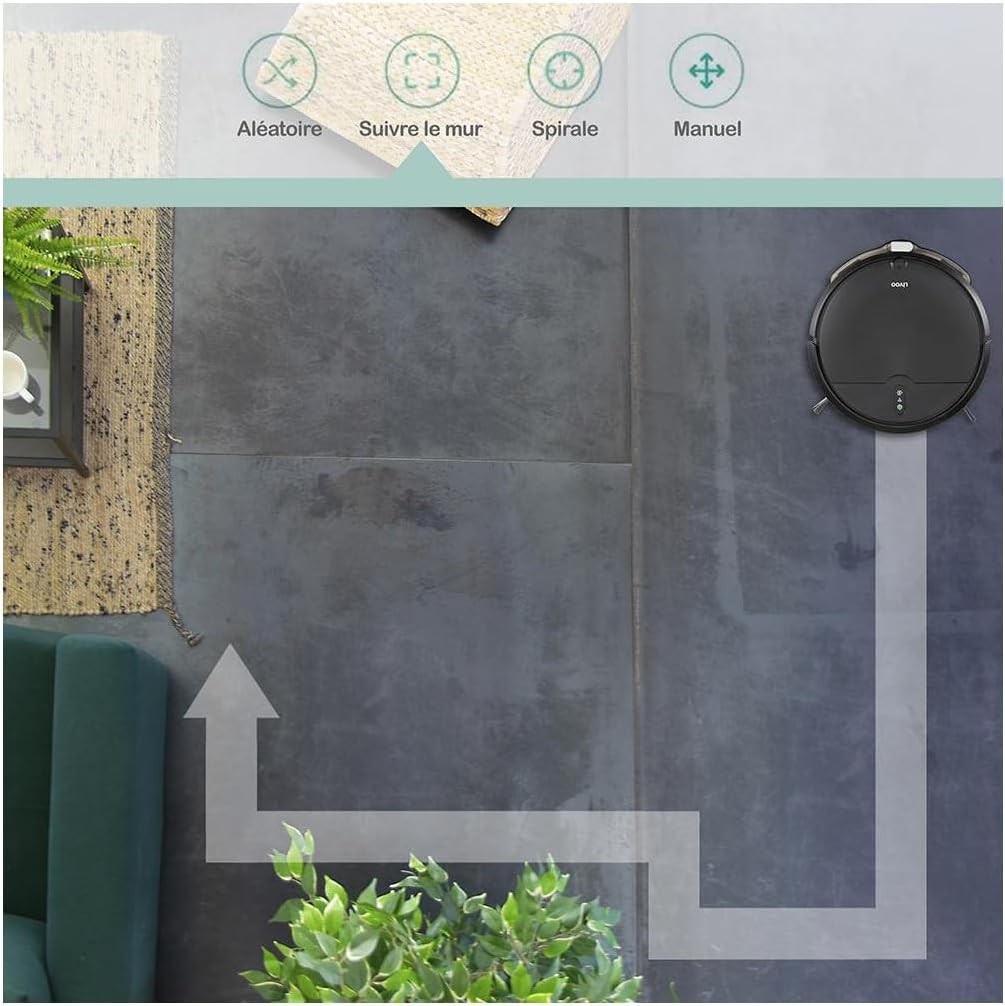
Image: Robot operating in Spiral Mode.

Image: Robot operating with Manual Control via app.
5.2 Kutanga uye Kumisa Kuchenesa
- Kuburikidza neRobhoti: Dzvanya bhatani rekudzima magetsi parobhoti kuti utange kana kumbomira kuchenesa.
- Via Remote Control: Use the designated buttons on the remote to start, pause, or select cleaning modes.
- Via Smart Life App: Use the app interface to start, pause, select modes, or schedule cleaning.
5.3 Kuronga Kucheneswa
Use the Smart Life app to set up cleaning schedules for automated cleaning sessions.
- Open the Smart Life app and select your Livoo WASH'UP DOH145 device.
- Navigate to the 'Schedule' or 'Timer' section.
- Set your desired cleaning times and days.
- Confirm the schedule. The robot will automatically start cleaning at the programmed times.
5.4 Automatic Return to Charging Base
The robot will automatically return to its charging base when its battery is low or when a cleaning cycle is complete. You can also manually send it back using the remote control or the app.
6. Kuchengeta
Regular maintenance ensures the longevity and optimal performance of your robot cleaner.
6.1 Kubvisa Dustbin
Empty the dustbin after each cleaning cycle or when the 'full' indicator (if available) illuminates.
- Dzvanya bhatani rekuburitsa dustbin wobva waburitsa dustbin.
- Vhura chivharo chedustbin wodurura zvirimo mugaba remarara.
- Clean the dustbin with a dry cloth. Do not wash the dustbin with water unless specified in the product's detailed instructions.
- Reinsert the dustbin until it clicks into place.
6.2 Kuchenesa Sefa
The removable filter should be cleaned regularly to maintain suction power.
- Bvisa dustbin sezvatsanangurwa pamusoro apa.
- Take out the filter from the dustbin.
- Tap the filter gently to remove dust and debris. You can also use the provided cleaning brush.
- Usageza sefa nemvura.
- Isazve firita nebhini remarara.
6.3 Maintaining the Water Tank and Microfiber Cloth
For mopping functionality, maintain the water tank and cloth.
- Bvisa tangi remvura kubva parobhoti.
- Open the water tank cap and fill it with clean water. Do not use detergents or harsh chemicals.
- Attach the microfiber cloth securely to the water tank.
- After mopping, remove the microfiber cloth and wash it by hand or machine. Allow it to air dry completely before reattaching.
- Empty any remaining water from the tank and allow it to dry.
6.4 Kuchenesa Side Brushes
Inspect and clean the side brushes regularly to remove tangled hair or debris.
- Dzorera robhoti pamusoro.
- Dhonza zvinyoro nyoro mabhurashi ekudivi kumusoro kuti uabvise.
- Remove any hair or debris tangled around the brushes or their shafts. Use the cleaning brush if necessary.
- Reattach the brushes, ensuring they click into place. Replace worn brushes with new ones from the accessory kit.
6.5 Kuchenesa maSensors uye Kuchaja Mazita
Wipe the infrared sensors and charging contacts on both the robot and the charging base with a clean, dry cloth.
7. Kugadzirisa matambudziko
If you encounter issues with your Livoo WASH'UP DOH145, refer to the following common problems and solutions.
| Dambudziko | Zvinogona Kukonzera | Solution |
|---|---|---|
| Robhoti haribatike | Bhatiri rakaderera; Bhatani remagetsi harina kudzvanywa zvakanaka | Charge the robot; Press and hold the power button for a few seconds. |
| Robhoti harichaji | Charging contacts dirty; Power adapter not connected; Robot not properly aligned on base | Clean charging contacts; Ensure adapter is plugged in; Reposition robot on base. |
| Simba rekusveta risina kunaka | Dustbin full; Filter clogged; Suction inlet blocked | Empty dustbin; Clean filter; Check and clear suction inlet. |
| Robhoti inonamira kazhinji | Obstacles in cleaning path; Side brushes tangled | Clear floor of cables and small objects; Clean side brushes. |
| Wi-Fi nyaya dzekubatanidza | Incorrect Wi-Fi band (5GHz); Weak signal; Incorrect password | Ensure 2.4GHz Wi-Fi; Move robot closer to router; Re-enter Wi-Fi password in app. |
8. Zvinotsanangurwa
| Feature | Tsanangudzo |
|---|---|
| Model Number | DOH145 |
| Dimensions | 31.5 x 29 x 7.8 cm |
| Kurema | 2.94 kg |
| Material | Plastiki |
| Bhatiri | 2000 mAh Lithium Battery |
| Runtime | Kusvikira kumaminitsi makumi matatu |
| Nzvimbo yekuvhara | Kusvika ku60 m² |
| Dustbin Capacity | 370 ml |
| Mvura Tangi Kugona | 150 ml |
| Suction Power | 1000 Pa |
| Noise Level | Kuwedzera 64 dB |
| Obstacle Climbing Ability | Kusvika ku1.5 cm |
| Kubatana | Wi-Fi 2.4G, Alexa, Google Home |
| Kuchenesa Modes | Random, Along Walls, Spiral, Manual |
9. Warranty uye Tsigiro
For warranty information, please refer to the warranty card included with your product or contact your retailer. For technical support or further assistance, please visit the official LIVOO websaiti kana kubata dhipatimendi ravo rebasa revatengi.


