Masajoy Wireless Headset User Manual
Muenzaniso: Spark 06
Nhanganyaya
The Masajoy Wireless Headset with Mic for Work (Model: Spark 06) is designed to provide clear and reliable audio communication for various professional and personal uses. Featuring multiple connection modes, AI noise cancellation, and a comfortable design, this headset is ideal for business video conferencing, online courses, and call center environments.

Figure 1: Masajoy Wireless Headset and included accessories.
Chii chiri muBhokisi
Ndapota simbisai kuti zvikamu zvese zviripo mupakeji:
- Wireless Headset with Mic for Work
- USB A / C Dongle
- USB C to 3.5MM Cable
- Type C kuchaja Cable
- User Manual
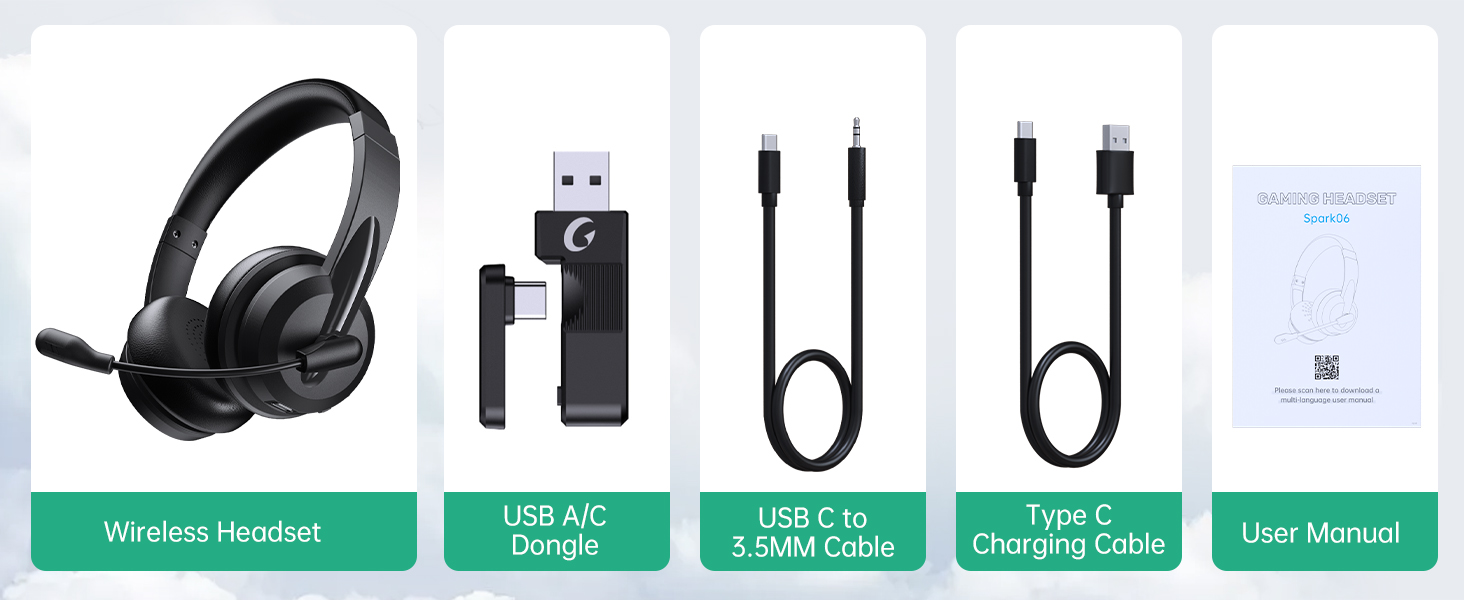
Mufananidzo 2: Zviri Mukati mePakeji.
Gadzirira
Kuchaja mahedhifoni
Before first use, fully charge the headset. Connect the Type C Charging Cable to the headset's charging port and the other end to a USB power source (e.g., computer USB port, wall adapter). The charging indicator light will show the charging status.
- Yakazara Kuchaja Nguva: Inenge 2.5 maawa
- Nguva Yekutaura: Kusvika kumaawa gumi nematatu
- Nguva Yekuridza Mumhanzi: Kusvika kumaawa gumi nemaviri

Figure 3: Long Battery Life for Extended Use.
Connection Modes
The Masajoy headset supports three connection modes:
-
Bluetooth V5.3 Connection:
For wireless connection to Bluetooth-enabled devices (e.g., smartphones, laptops). Ensure the headset is in pairing mode (refer to operating instructions for details). Tsvaga "Spark 06" in your device's Bluetooth settings and connect.
-
2.4G Wireless (USB A/C Dongle):
For wireless connection to computers without Bluetooth or for a dedicated connection. Plug the USB A or USB C dongle into an available USB port on your computer. The headset will automatically connect to the dongle.
-
Wired 3.5mm Audio Cable:
For a wired connection to devices with a 3.5mm audio jack. Connect one end of the USB C to 3.5MM Cable to the headset's USB-C port and the other end to your device's 3.5mm audio jack. This mode is useful when battery is low or for devices that do not support wireless connections.

Figure 4: Dual Connection Options (Bluetooth & 2.4G Wireless).
NOTE: This headset does not support dual device connection simultaneously.
Operating Instruction
Simba On/Kudzima
- To Power On: Press and hold the Power button until you hear a voice prompt.
- To Power Off: Press and hold the Power button until you hear a voice prompt.
Volume Control
Use the volume control buttons located on the headset to adjust the listening volume.
AI Noise Cancelling Microphone
The headset features advanced AI noise cancellation to reduce background noise during calls. This feature enhances clarity for the listener.
NOTE: This AI Noise Cancelling feature is only available when connected via Bluetooth.

Figure 5: AI Noise Cancelling in action.
Maikorofoni Mute Basa
To mute the microphone, simply rotate the microphone boom to the upright position. A voice prompt will confirm "MIC mute". To unmute, rotate the microphone boom back down.

Figure 6: Microphone Mute Control by Rotation.
Nyaradzo uye Dhizaini
The headset is designed for all-day wear with protein memory foam ear cups that are soft and breathable, preventing overheating. The adjustable and expandable headband ensures a comfortable fit for most head shapes.

Figure 7: Comfortable and Breathable Design.
Zvinotsanangurwa
| Feature | Detail |
|---|---|
| Model Name | Spark 06 |
| Kubatana Technology | Wireless (Bluetooth V5.3, 2.4G), Wired (3.5mm) |
| Noise Control | AI Noise Cancellation (Bluetooth mode only), Passive Noise Cancellation |
| Hupenyu hwebhatiri (Nguva yekutaura) | Kusvikira kumaawa makumi maviri nemashanu |
| Hupenyu hwebhatiri (Mumhanzi Kutamba) | Kusvikira kumaawa makumi maviri nemashanu |
| Kuchaja Nguva | Approx. 2.5 maawa |
| Wireless Range | Up to 36 feet (11 meters) for Bluetooth |
| Audio Driver Size | 40 mamirimita |
| Maikorofoni Sensitivity | 43 dB |
| Maheadphone Jack | USB-C (for charging/wired audio) |
| Inowirirana Devices | PC, Mac, Laptop, Chromebook, tablet, smartphones, MP3 players, PS5, PS4, Xbox one, gaming systems with an aux port |
| Material | Faux Leather, Polycarbonate (PC), Metal, Acrylonitrile Butadiene Styrene (ABS) |
| Item Weight | 10.2 ounces |
| Color | Nhema |
Maintenance
- Kuchenesa: Shandisa jira rakapfava, rakaoma kuchenesa mahedhifoni. Usashandise abrasive cleaners kana solvents.
- Kuchengeta: Chengetedza mahedhifoni munzvimbo inotonhorera, yakaoma kure nechiedza chezuva uye tembiricha yakanyanyisa.
- Battery Care: Kuti bhatiri rirambe richishanda kwenguva refu, dzivisa kuburitsa mahedhifoni ese nguva nenguva. Ichaje nguva dzose, kunyangwe isingashandiswe kwenguva yakareba.
- Kubata: Avoid dropping the headset or subjecting it to strong impacts. Do not twist or bend the microphone boom excessively beyond its intended rotation.
Kugadzirisa matambudziko
| Dambudziko | Zvinogona Kukonzera | Solution |
|---|---|---|
| Headset haibatike. | Bhatiri rakaderera. | Charge the headset fully using the provided Type C charging cable. |
| Haikwanise kubatana neBluetooth. | Headset not in pairing mode; device Bluetooth off; out of range. | Ensure headset is in pairing mode. Turn Bluetooth on your device. Move headset closer to the device (within 36 feet). |
| Hapana ruzha kubva kumahedhifoni. | Volume too low; incorrect audio output selected on device; headset not connected. | Increase headset volume. Check device's audio output settings. Re-establish connection. |
| Maikorofoni haisi kushanda. | Microphone muted; incorrect input device selected; AI Noise Cancellation issue. | Ensure microphone boom is not in the upright (muted) position. Check device's microphone input settings. Note that AI Noise Cancellation is only active in Bluetooth mode. |
| Poor sound quality / static. | Kupindira; kure kure; bhatiri shoma. | Move away from other wireless devices. Move closer to the connected device. Charge the headset. |
Warranty uye Support
Masajoy products are designed for reliability and performance. For warranty information and technical support, please refer to the official Masajoy website or contact customer service using the details provided in the original product packaging or purchase receipt.
Unogonawo kushanyira Masajoy Store on Amazon kune rumwe ruzivo rwechigadzirwa uye zviwanikwa zvekutsigira.


