1. Nhanganyaya
This manual provides detailed instructions for the safe and effective use of your TOTAL TMT57026 Laser Distance Meter. Please read this manual thoroughly before operating the device and keep it for future reference. This device is designed for accurate distance measurements up to 70 meters, suitable for various professional and DIY applications.
2. Mirayiridzo Yekuchengetedza
- Laser radiation: This device emits Class 2 laser radiation. Do not stare into the laser beam or direct it at other people or animals.
- Kudzivirira Kweziso: Dzivisa ziso rakananga kuratidzwa kune laser beam.
- Operating Environment: Usashandise mudziyo mumhepo inoputika kana pedyo nezvinhu zvinobvira moto.
- Kuramba Mvura: mudziyo uyu kwete kudzivirira mvuraDzivisa kubatwa nemvura kana hunyoro hwakawanda.
- Maintenance: Only qualified personnel should repair the device.
- Mabhatiri: Use only specified AAA batteries. Do not mix old and new batteries or different types of batteries.
3. Chigadzirwa Pamusoroview
Familiarize yourself with the components of your TOTAL TMT57026 Laser Distance Meter.
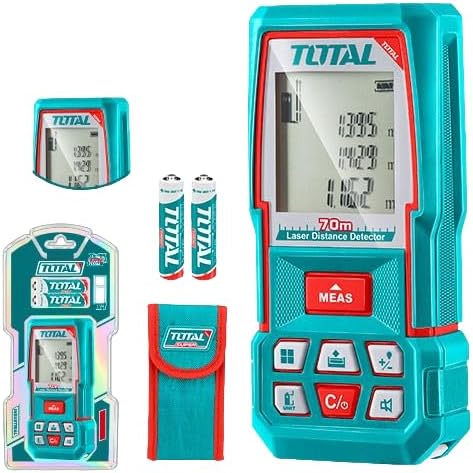
Figure 1: The TOTAL TMT57026 Laser Distance Meter, showing the device itself, two AAA batteries, a carrying pouch, and retail packaging. The device features a digital display and multiple function buttons.
Zvikamu Zvikuru:
- Mutumi/Mugamuchiri weLaser: Iri pamusoro pemudziyo.
- Ratidza Sikirini: Shows measurements, units, and mode indicators.
- Bhatani reMEAS: Initiates single or continuous measurement.
- UNIT Bhatani: Changes measurement units (e.g., meters, feet, inches).
- C/O Button: Clears the last measurement or turns the device off.
- Mabhatani ebasa: For area, volume, addition, subtraction, and other calculations.
- Battery Compartment: Iri kumashure kwechishandiso.
4. Setup
4.1 Kuiswa kwebhatiri
- Tsvaga chivharo chebhatiri kuseri kwemudziyo.
- Svetera kana kusunungura chivharo kuti uvhure.
- Insert two (2) AAA 1.5V disposable batteries, ensuring correct polarity (+/-). The device includes two AAA batteries.
- Vhara chivharo chebhatiri zvakachengeteka.
4.2 Kubatidza/Kudzima
- Kubatidza: Press the MEAS bhatani kwenguva pfupi. Chiratidziro chichabatidza.
- Kudzima: Dzvanya uye ubate iyo C/O button for approximately 3 seconds. The device will also automatically power off after a period of inactivity to conserve battery life.
5. Operating Instructions
5.1 Basic Distance Measurement
- Ita shuwa kuti mudziyo wakabatidzwa.
- Nongedza danda relaser panzvimbo inotarirwa.
- Press the MEAS button once. The laser will activate, and the measurement will appear on the display.
- The measurement will be held on the screen until a new measurement is taken or the device is turned off.
5.2 Kuyera Kunoenderera Mberi (Kutevera)
- Dzvanya uye ubate iyo MEAS bhatani kwemasekonzi matatu.
- The device will enter continuous measurement mode, displaying real-time distance as you move the device.
- Press the MEAS button again to stop continuous measurement and hold the last value.
5.3 Kuchinja Measurement Units
- Press the UNIT button repeatedly to cycle through available units: meters (m), feet (ft), and inches (in).
- Chigadzirwa chakasarudzwa chicharatidzwa pachiratidziro.
5.4 Kuyera Nzvimbo neVhoriyamu
The device supports calculation of area and volume. Refer to the icons on the function buttons for specific modes.
- Press the appropriate function button (e.g., the button with the square icon for area, or cube icon for volume).
- Tevedzera zvinokurudzirwa pachikirini kuti utore zviyero zvinodiwa (semuenzaniso, kureba, upamhi hwenzvimbo; kureba, upamhi, kukwirira kwevhoriyamu).
- Mhedzisiro yakaverengerwa icharatidzwa.
5.5 Kuwedzera nekubvisa
Shandisa iyo +/- button to add or subtract measurements.
- Take the first measurement.
- Press the +/- button to select addition or subtraction mode.
- Take the second measurement. The device will automatically perform the calculation and display the result.
6. Kuchengeta
6.1 Kuchenesa
- Pukuta mudziyo nekanyoro, damp jira. Usashandise abrasive cleaners kana solvents.
- Clean the laser lens carefully with a soft, lint-free cloth, similar to cleaning camera lenses.
6.2 Kuchengeta
- Chengeta mudziyo wacho munzvimbo yakaoma, inotonhorera, kure nezuva rakananga uye tembiricha yakanyanya.
- Kana uchichengeta kwenguva yakareba, bvisa mabhatiri kudzivirira kubuda.
6.3 Kutsiviwa kwebhatiri
- When the battery indicator on the display shows low power, replace both AAA batteries following the instructions in Section 4.1.
7. Kugadzirisa matambudziko
| Dambudziko | Zvinogona Kukonzera | Solution |
|---|---|---|
| Mudziyo haubatike. | Mabhatiri akafa kana kuiswa zvisirizvo. | Tarisa polarity yebhatiri kana kuti tsiva nemabhatiri matsva eAAA. |
| Zviyero zvisina kururama. | Laser lens is dirty; target surface is too reflective/non-reflective; device is unstable. | Clean the laser lens. Measure against a suitable, stable surface. Ensure device is held steady. |
| Benzi reLaser harionekwe. | Bright ambient light; laser is off. | Operate in lower light conditions. Ensure device is powered on and MEAS button is pressed. |
| Chiratidziro chinoratidza kodhi yezvikanganiso. | Kuyerwa kuri kure; kukanganisa kwemukati. | Ensure target is within 0.05m to 70m range. Try restarting the device. If error persists, contact support. |
8. Zvinotsanangurwa
- Muenzaniso: TMT57026
- Brand: TOTAL
- Kuyera Range: 0.05 kusvika 70 metres
- Measurement Units: Meters (m), Feet (ft), Inches (in)
- Laser Kirasi: Kirasi 2
- Mabhatiri: 2 x AAA, 1.5V (included)
- Bhatiri Type: Disposable
- Automatic Laser Shut-off: Yes (after inactivity)
- Automatic Device Shut-off: Yes (after inactivity)
- Zviyero zvechigadzirwa: Zvinenge 17 x 5 x 0.1 cm
- Chinhu Weight: Approximately 160 g (0.16 Kilograms)
- Material: Plastiki
- Ruvara: Turquoise
- Mvura Inodzivisa Level: Kwete Kudzivirira Mvura
- Mugadziri: Total
- Nyika Yekwakabva: China
9. Warranty uye Tsigiro
For warranty information and technical support, please contact TOTAL customer service. Keep your purchase receipt as proof of purchase.
For further assistance, please refer to the official TOTAL websaiti kana kubata muparidzi wenzvimbo yako.


