Nhanganyaya
Welcome and thank you for choosing the HTC Wireless Earbuds TWS6 5.3. This manual provides detailed instructions to help you set up, operate, and maintain your earbuds for optimal performance. Please read this manual thoroughly before using your device.
Package Zviri mukati
Ndokumbira utarise kuti zvinhu zvese zvirimo mupasuru yako:
- 2 x HTC Earbuds
- 1 x USB-C Yekuchaja Cable
- 1 x Kuchaja Nyaya
- 2 Pairs x Rubber Eartips (S/L)
- 1 x Quick Start Guide (physical document)

Product Overview
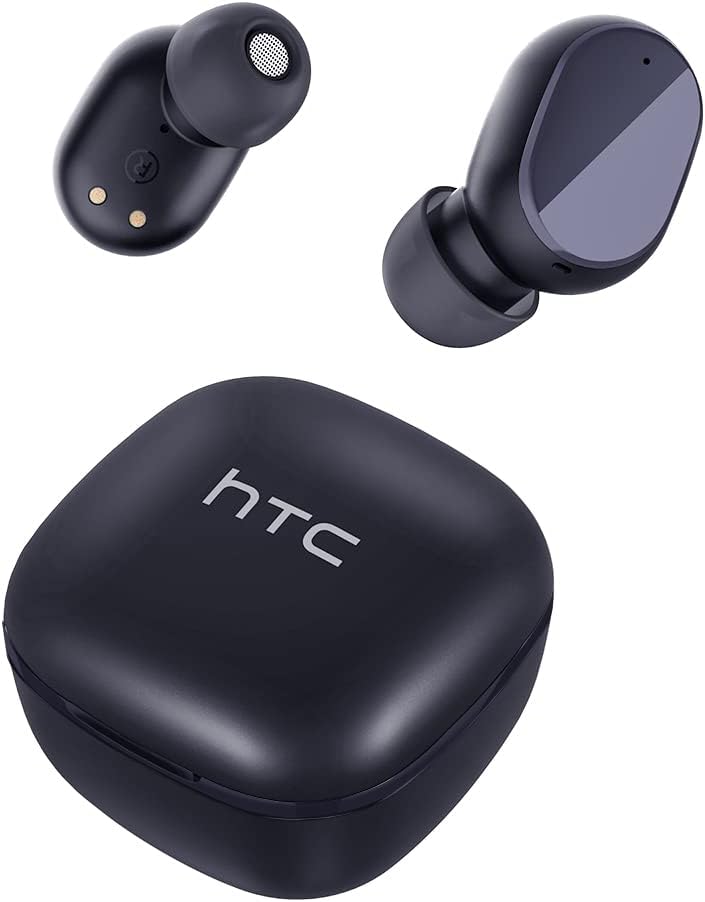
Familiarize yourself with the components of your HTC TWS6 earbuds.

Gadzirira
Kuchaja maEarbuds uye Case
Usati watanga kushandisa, chaja zvizere maearbud nekesi yekuchaja.
- Isa maearbuds muchesi yekuchaja.
- Batanidza tambo yeUSB-C kune chinochaja chiri pabhokisi uye panobva simba.
- Chiedza chemwenje pane iyo kesi icharatidza mamiriro ekuchaja.
- A full charge provides approximately 5 hours of playback for earbuds and up to 22 hours with the charging case.

Bluetooth Kubatanidza
Tevedza matanho aya kuti ubatanidze mahedhifoni ako nemudziyo wako:
- Vhura kesi yekuchaja. Maearbuds anozopinda otomatiki maitiro ekubatanidza.
- Pamudziyo wako (smartphone, piritsi, nezvimwewo), shandisa Bluetooth.
- Tsvaga "HTC TWS6" in the list of available Bluetooth devices.
- Select "HTC TWS6" to connect. A voice prompt will confirm successful pairing.

Kupfeka maEarbuds
Kuti ruzha rwuve rwemhando yepamusoro uye runyaradze, sarudza saizi chaiyo yetip yenzeve uye pfeka maearbud zvakanaka.
- Sarudza mativi enzeve (S, M, L) anonyatsokodzera nzeve dzako.
- Isa zvinyoro nyoro imwe earbud munzeve yako.
- Rotate slightly to ensure a secure and comfortable fit.
Operating Instruction
Smart Touch Controls
The HTC TWS6 earbuds feature intuitive touch controls:
- Ridza/Misa Mimhanzi: Top kamwechete pane imwe earbud.
- Next Track: Tokonya kaviri pane earbud yekurudyi.
- Previous Track: Tokonya kaviri kuruboshwe rwenzeve.
- Vhoriyamu Kumusoro: Tokonya katatu pane earbud yekurudyi.
- Vhoriyamu Pasi: Tokonya katatu pane earbud yekuruboshwe.
- Pindura/Pedzisa Kufona: Top kamwechete pane imwe earbud.
- Ramba Kufona: Dzvanya uye bata chero earbud kwemasekonzi maviri.
- Shandisa Izwi Mubatsiri: Dzvanya uye bata chero earbud kwemasekonzi maviri.

Simba On/Kudzima
The earbuds automatically power on when removed from the charging case and power off when placed back into the case and the lid is closed.
To manually power on, press and hold the touch area for 3 seconds. To manually power off, press and hold the touch area for 5 seconds.
Maintenance and Care
Kuchenesa
Gara uchichenesa maearbud ako nebhokisi rekuchaja kuti uve nechokwadi chekuti zvinoshanda zvakanaka uye hutsanana.
- Shandisa jira rakapfava, rakaoma, risina lint kupukuta maearbud nekesi yekuchaja.
- Bvisa nzeve wozvichenesa nesipo yakapfava nemvura, wozonyatsoomesa usati wabatanidza zvakare.
- Usashandise abrasive cleaners kana solvents.
Kuramba Mvura (IPX5)
The HTC TWS6 earbuds are IPX5 sweatproof, meaning they are resistant to splashes and sweat.
Cherechedza: They are not designed for submersion in water. Avoid exposing them to heavy rain, showering, or swimming. Ensure the charging port is dry before charging.

Storage
Kana isiri kushandiswa, chengeta maearbuds mukesi yavo yekuchaja kuti uzvidzivirire uye ugare wakachajwa.
Chengetedza munzvimbo inotonhorera, yakaoma kure nekupisa kwakanyanya.
Kugadzirisa matambudziko
| Dambudziko | Solution |
|---|---|
| Maearbuds haasi kubatanidza | Ensure earbuds are charged. Turn off and on Bluetooth on your device. Forget "HTC TWS6" from your device's Bluetooth list and re-pair. |
| Imwe chete earbud inoshanda | Place both earbuds back into the charging case, close the lid, then open it again. Ensure both earbuds are charged. |
| Kudzikira vhoriyamu kana kutadza kunaka kweruzha | Adjust volume on your device. Clean eartips and earbud mesh. Try different eartip sizes for a better seal. |
| Kuchaja nyaya | Check USB-C cable and power adapter. Ensure charging contacts on earbuds and case are clean and dry. |
| Maearbuds anodzima nguva zhinji | Ensure your device is within the Bluetooth range (approx. 10 meters/33 feet) and there are no significant obstructions. |
Kana matambudziko akaramba aripo, ndapota taura nerutsigiro rwevatengi.
Zvinotsanangurwa
| Feature | Detail |
|---|---|
| Model Name | TWS6 |
| Bluetooth Version | 5.3 |
| Kubatana Technology | Wireless |
| Wireless Communication Technology | Bluetooth |
| Hupenyu hwebhatiri (Earbuds) | 5 Maawa |
| Yese Yekutamba (neNyaya) | 22 Maawa |
| Nguva yekuchaja (Nyaya) | Anenge 5 Maawa |
| Mvura Resistance Level | IPX5 (Sweatproof) |
| Kudzora Nzira | Bata |
| Maikorofoni | Yes (with ENC) |
| Inowirirana Devices | Android and iOS Smartphones, Gaming Devices |
| Material | Plastiki |
| Item Weight | 3.17 ounces |
| UPC | 734257974554 |
| Noise Control | Adaptive Noise Cancellation |
| Audio Driver Type | Dynamic Driver |
| Impedance | 199.99 Ohm |
Warranty uye Support
HTC provides a 360-day warranty extension for this product, as detailed in the product information.
For technical assistance, warranty claims, or any inquiries, please contact HTC customer support.
Tsigiro yeVatengi: Refer to the contact information provided in your product packaging or visit the official HTC websaiti yeakanyanya up-to-date rutsigiro sarudzo.


