1. Nhanganyaya
Ndatenda nekutengaasing the FiiO SA1 High-Fidelity Desktop Speaker. This manual provides essential information for the proper setup, operation, and maintenance of your device. Please read it thoroughly before use to ensure optimal performance and longevity of your speakers.
2. Safety Information
- Magetsi: Use only the provided power cable and adapter. Ensure the power source matches the voltage requirements specified on the device.
- Kufefetedza Usavhare chero mazaru emhepo. Isa maererano nemirairo yemugadziri.
- Mvura uye Unyoro: Usafumure mudziyo uyu kunaya kana kunyorova. Usaise zvinhu zvakazadzwa nezvinwiwa, zvakaita semavhasi, pamidziyo.
- Kupisa: Usaise padhuze nechero zvitubu zvekupisa zvakaita semaradiator, marejita ekupisa, zvitofu, kana zvimwe midziyo (kusanganisira amplifiers) zvinoburitsa kupisa.
- Kuchenesa: Chenesa chete nemucheka wakaoma.
- Sevhisi: Tumira masevhisi ese kuvashandi vanokwanisa. Kushumira kunodiwa kana mudziyo wakuvadzwa neimwe nzira, senge tambo yemagetsi-yekugovera kana plug yakuvadzwa, mvura yadeuka kana zvinhu zvawira mumidziyo, iyo midziyo yave ichinaya mvura kana hunyoro, haishande zvakajairika. , kana kuti yadonha.
3. Package Zviri mukati
Ndokumbira utarise kuti zvinhu zvese zviripo mupasuru yako:
- FiiO SA1 Desktop Speaker (Pair)
- Power Cable
- Remote Control
- Mushandisi Chinyorwa (gwaro iri)
4. Chigadzirwa Pamusoroview
The FiiO SA1 is a high-fidelity desktop active speaker system designed for a superior audio experience. It features a robust construction with wood and aluminum-magnesium alloy, offering versatile connectivity and advanced sound customization.
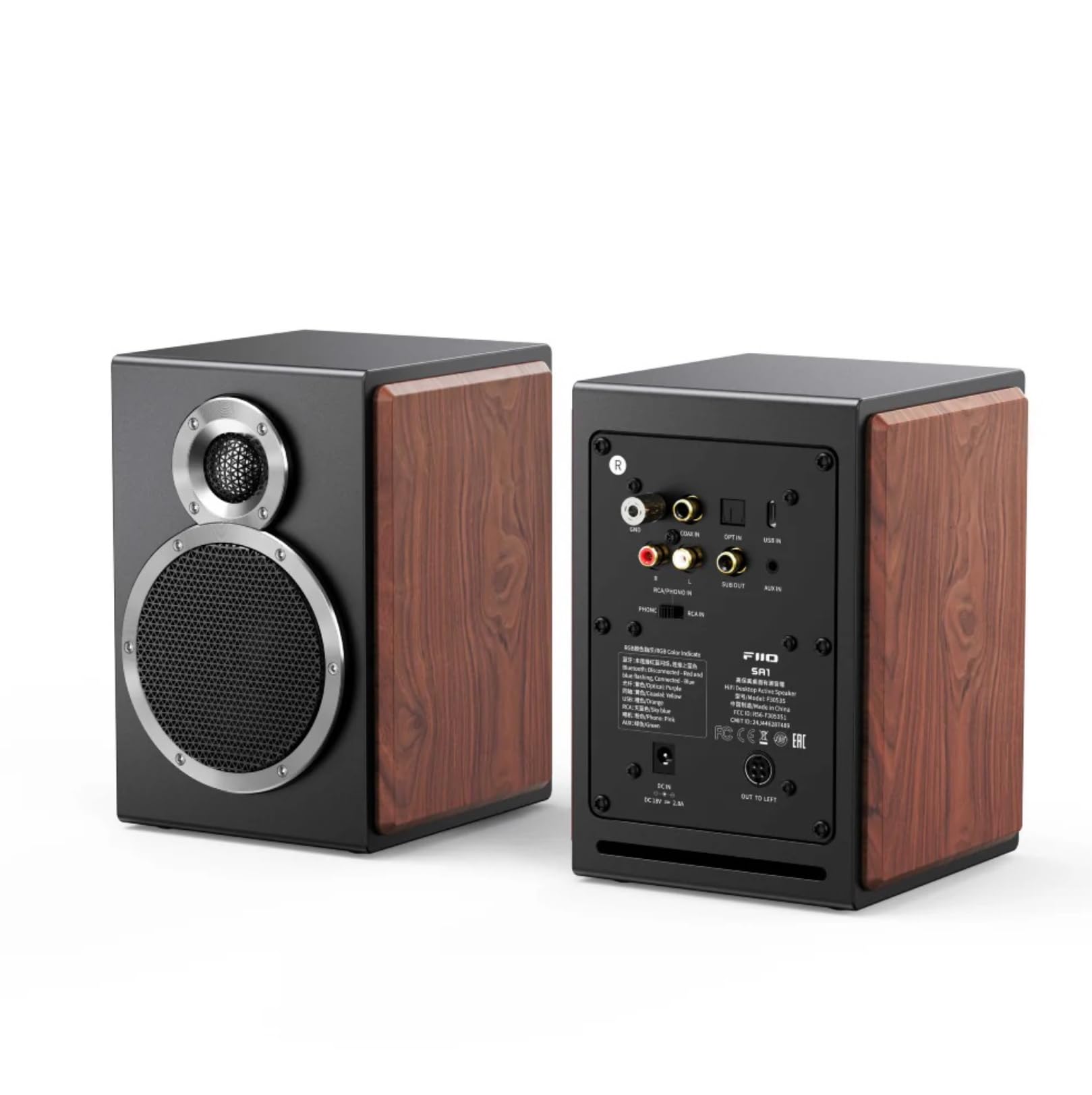
Mufananidzo 1: Kumberi nekumashure view of the FiiO SA1 Desktop Speakers. The image displays the speaker's elegant design with wood side panels and the various input/output ports on the rear.

Mufananidzo 2: Close-up of the physical control knobs on the FiiO SA1 speaker. Two large physical knobs are visible, one with an RGB light indicator, and a large button on the right side of the main speaker for convenient operation.
Zvikamu Zvikuru:
- 3.5-inch Wood Fiber Woofer: Provides lush vocals and warm sound.
- 3/4 inch Aluminum-Magnesium Alloy Dome Tweeter: Delivers crisp, clear sound with rich detail.
- Physical Knobs: For convenient control of volume and other settings.
- Remote Control: Included for full-featured control from a distance.
5. Setup
5.1 Simba Connection
Connect the provided power cable to the DC 12V input port on the rear of the main speaker, then plug it into a wall outlet.
5.2 Kuiswa kweMutauriri
Place the speakers on a stable, flat surface, such as a desktop or bookshelf. For optimal stereo imaging, position them equidistant from your listening position and angled slightly inward.

Mufananidzo 3: FiiO SA1 speakers integrated into a desktop gaming setup, demonstrating ideal placement beside a monitor.
5.3 Audio Connections
The FiiO SA1 offers a variety of input and output options:

Mufananidzo 4: Rear panel of the FiiO SA1, highlighting the diverse range of input and output ports available for connectivity.
- RCA and 3.5mm Analog Inputs: Connect traditional audio sources.
- USB, Coaxial, and Optical Digital Inputs: For high-resolution digital audio.
- Makaralı 5.4: For wireless high-bit-rate audio (LDAC supported).
- Yakavakwa-mukati Phono Preamp: Connect a turntable directly (switch to PHONO setting if your turntable lacks a built-in preamp).
- Kubuda kweSubwoofer (RCA): Connect an active subwoofer to create a 2.1 system.
6. Kushanda
6.1 Simba On/Kudzima
Use the power button on the speaker or the remote control to turn the device on or off.
6.2 Sarudzo yekupinda
Cycle through the available inputs (RCA, 3.5mm, USB, Coaxial, Optical, Bluetooth, Phono) using the input selector button on the speaker or remote control.
6.3 Kudzora Inzwi
Adjust the volume using the main knob on the speaker or the volume buttons on the remote control.
6.4 31-Band Lossless PEQ (Parametric Equalizer)
The SA1 supports a 31-band high-precision lossless PEQ for all input modes. This allows for fine-tuning and calibration of the frequency response curve to optimize sound for your listening environment. PEQ adjustment is currently supported only via the FiiO Control app.

Mufananidzo 5: A smartphone screen showing the FiiO Control app's 31-band PEQ interface, allowing users to customize the sound profile of the SA1 speakers.
6.5 Kubatana kweBluetooth
The SA1 supports LDAC high-definition Bluetooth decoding and Bluetooth version 5.4, enabling wireless high-bit-rate audio up to 990kbps. This ensures high-quality wireless sound, certified for Hi-Res Audio and Hi-Res Audio Wireless.

Mufananidzo 6: An illustration of the Bluetooth 5.4 chip, emphasizing the SA1's advanced wireless audio capabilities.
6.6 App Control and Sound Presets
The FiiO Control app allows fine-tune settings and offers eight built-in sound presets (e.g., pop, jazz, classical, R&B, dance). You can also save up to three custom PEQ setups. A specially-tuned monitoring-style curve compensates for frequency response, transforming the SA1 into active desktop studio monitor speakers.

Mufananidzo 7: A hand holding a smartphone showing the FiiO Control app with various sound presets and customization options for the SA1 speakers.
6.7 Automatic Standby and Wake-up
If the SA1 does not detect any input for 20 minutes, it will enter standby mode. The RGB light indicator will turn red and turn off after 20 minutes. When a signal input is detected, the device will automatically wake up, and the RGB light indicator will return to its original color.

Mufananidzo 8: An illustration depicting the FiiO SA1 speaker's automatic standby and wake-up functionality, indicated by changing light colors.
7. Zvinotsanangurwa
| Feature | Detail |
|---|---|
| Model Name | SA1 |
| Mutauri Rudzi | Portable Nomukurukuri |
| Material | Wood, Aluminum-Magnesium Alloy |
| Color | Nhema |
| Product Dimensions | 6.3"D x 5.51"W x 7.48"H |
| Item Weight | 9.68 pounds (4.4 Makirogiramu) |
| Mutauri Mukuru Wekubuda Simba | 20 Watts (Woofer: 20W*2, Tweeter: 5W*2) |
| Kubatana Technology | Bluetooth, Coaxial, Optical, RCA, USB |
| Audio Output Mode | Stereo |
| Mounting Type | Tabletop Mount |
| Special Feature | Hi-Res Audio, 31-Band Lossless PEQ, Phono Preamp |
| Kudzora Nzira | Remote |
8. Kuchengeta
- Kuchenesa: Use a soft, dry cloth to clean the exterior of the speakers. Avoid using abrasive cleaners, waxes, or solvents.
- Guruva: Regularly dust the speaker grilles and surfaces to prevent accumulation that could affect sound quality or ventilation.
- Environment: Keep the speakers in a cool, dry place away from direct sunlight, extreme temperatures, and high humidity.
9. Kugadzirisa matambudziko
- Hapana Inzwi: Check power connection, input selection, volume levels on both the speaker and source device, and ensure cables are securely connected.
- Inzwi Rakakanganiswa: Reduce volume, check audio source quality, ensure cables are not damaged, and verify speaker placement.
- Bluetooth Pairing Nyaya: Ensure the speaker is in Bluetooth pairing mode, disable and re-enable Bluetooth on your source device, and clear previous pairings if necessary.
- Remote Control Haisi Kushanda: Check battery in the remote control and ensure there are no obstructions between the remote and the speaker.
10. Warranty & Tsigiro
The FiiO SA1 Desktop Speaker comes with a Yakakwana Warranty. Please refer to the warranty card included in your package for specific terms and conditions. For technical support, troubleshooting assistance, or service inquiries, please contact FiiO customer support through their official websaiti kana mutengesi kwawakatenga chigadzirwa.
Zvekushandisa Pamhepo: For the latest firmware updates, FAQs, and additional support, please visit the official FiiO website.


