Nhanganyaya
Welcome to the user manual for your CARabc DB601 Motorcycle Smart Display. This device is designed to enhance your riding experience by integrating advanced connectivity and navigation features directly onto your BMW motorcycle. Please read this manual thoroughly to ensure proper installation, operation, and maintenance of your device.
Product Features
- 6-inch High-Resolution Touchscreen: Provides a clear and vibrant display, even in direct sunlight, with 1000-nit anti-glare technology and 60FPS mode for smooth visuals.
- CarPlay isina waya uye Android Auto: Seamlessly integrate your smartphone for navigation, music, calls, and app access.
- IP68 Isingapindi Mvura Chiyero: Designed to withstand various weather conditions, offering robust protection against dust and water.
- Integrated GPS: For accurate location tracking and navigation.
- 5G Wi-Fi & Dual Bluetooth 5.0 Connectivity: Ensures stable and fast connections for your devices and Bluetooth helmets/headphones.
- BMW Motorcycle Specific Design: Plug-and-play installation with a 3-pin interface, perfectly matching BMW subframes.
- Motorcycle Data Readout: Directly monitors engine performance and other key parameters.
- Voice Control Support: Compatible with Siri and Google Assistant for hands-free operation.
Package Zviri mukati
Pakuvhura pasuru, ndapota simbisa kuti zvese zviriko uye hazvina kukuvara:
- CARabc DB601 Smart Display Unit
- Installation Bracket (pre-attached or separate, depending on model)
- Power Cable with 3-pin BMW connector
- Mushandisi Chinyorwa (gwaro iri)
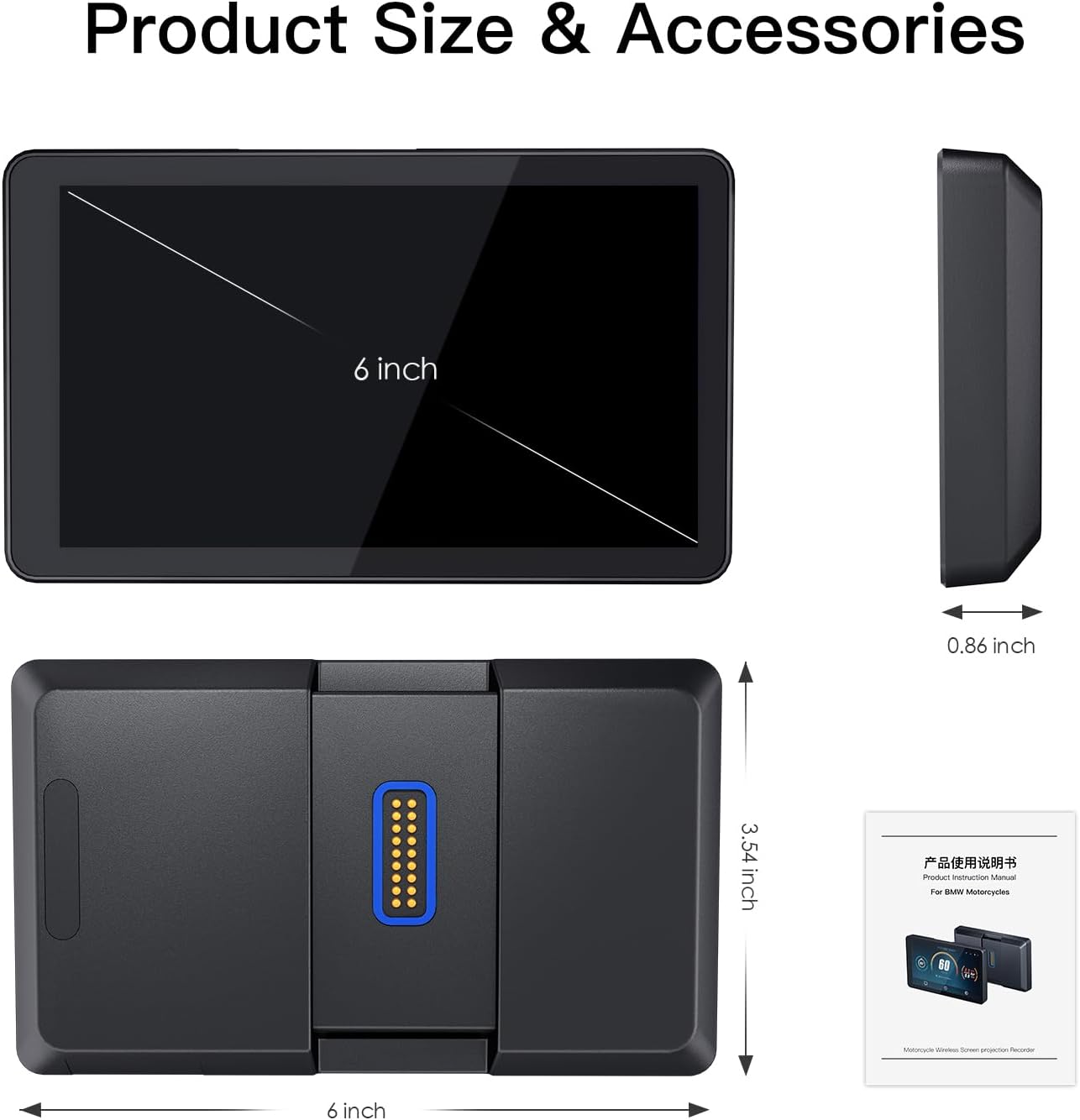
Image: The CARabc DB601 unit, showing its 6-inch screen, side profile, shure view with the 3-pin connector, and a representation of the included user manual.
Setup uye Installation
The CARabc DB601 is designed for plug-and-play installation on BMW motorcycles with a 3-pin interface. Ensure your motorcycle has the compatible subframe before proceeding.
Kuisa Matanho:
- Locate the BMW Subframe: Identify the 3-pin interface on your BMW motorcycle's subframe, typically near the handlebars or instrument cluster.
- Batanidza Chishandiso: Align the connectors on the underside of the DB601 unit with the pins on the BMW subframe. Gently push the unit onto the subframe until it clicks securely into place.

Mufananidzo: Pedyo-up view of the CARabc DB601 unit being attached to the BMW motorcycle's GPS mount, highlighting the quick and non-destructive installation process.
- Chengetedza Kubatana: Ensure the unit is firmly seated and the electrical connection is secure.
- Power On: Turn on your motorcycle's ignition. The DB601 should power on automatically.
Note on Theft Prevention: The DB601 can be easily detached from its mount when parked, allowing you to take it with you to prevent theft.

Image: Two-step illustration showing the BMW exclusive mount and the process of detaching the DB601 unit from the motorcycle dashboard for security.
Operating Instruction
Kutanga Kubatidza uye Kugadzirisa:
- Once powered on, the device will boot up. Follow the on-screen prompts for initial language and region settings.
- Connecting to your Smartphone (CarPlay/Android Auto):
- Ita shuwa kuti Bluetooth neWi-Fi zvinogoneswa pane yako smartphone.
- On the DB601, navigate to the "Phone" or "Connectivity" settings.
- Select "Pair New Device" and choose your smartphone from the list.
- Simbisa kodhi yekuwiriranisa pamidziyo yese miviri.
- Once paired, the device will automatically connect to Wireless CarPlay or Android Auto.
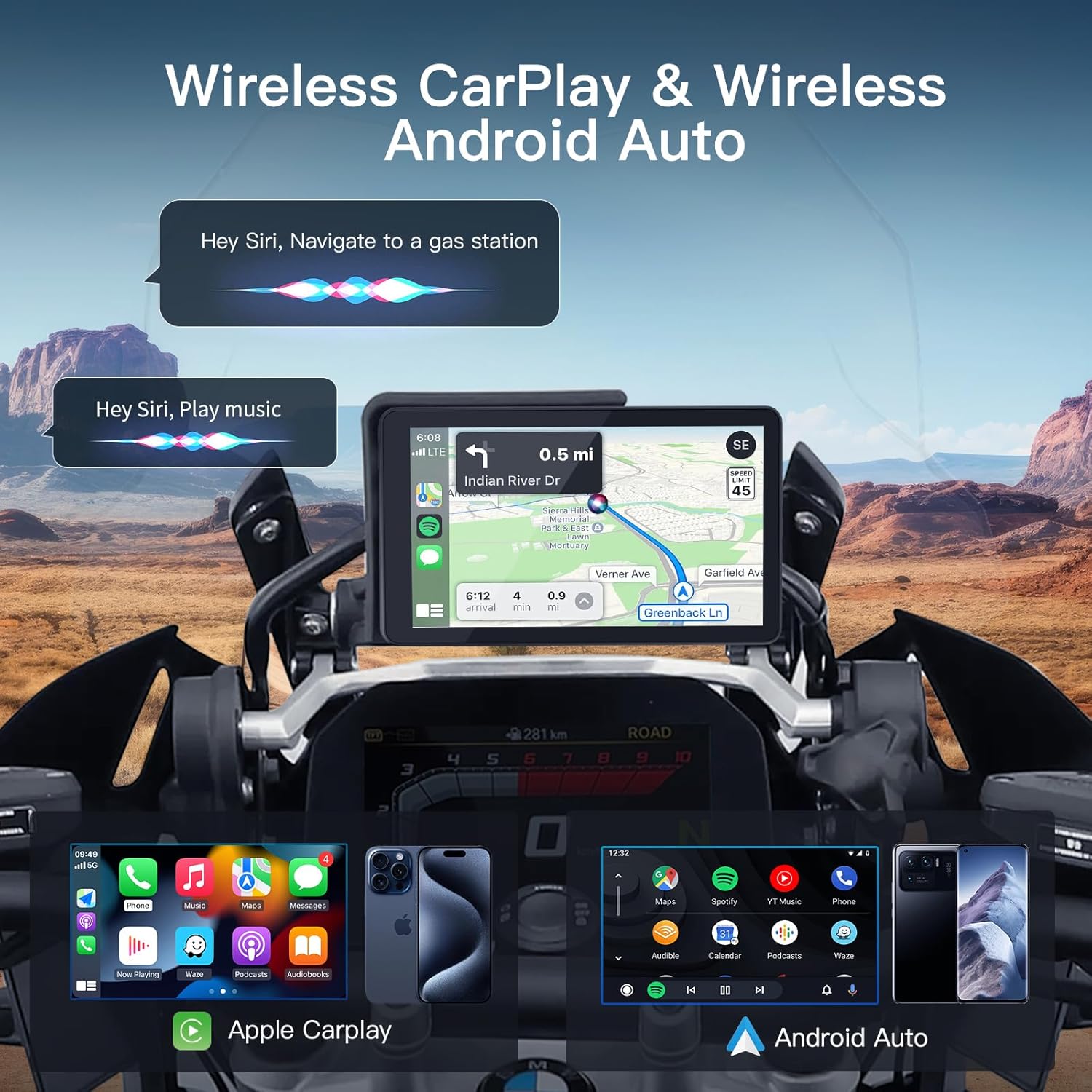
Image: The CARabc DB601 display showing the Wireless CarPlay and Android Auto interfaces, with examples of navigation and voice commands (Siri).
- Connecting Bluetooth Helmet/Headphones:
- Put your Bluetooth helmet or headphones into pairing mode.
- On the DB601, go to Bluetooth settings and select "Pair New Device".
- Choose your helmet/headphones from the discovered devices.

Image: The CARabc DB601 display on a motorcycle, showing connectivity to both a smartphone (for CarPlay/Android Auto) and a Bluetooth helmet, illustrating dual Bluetooth 5.0 functionality.
Mabasa Akakosha:
- Navigation Utilize integrated GPS or map applications via CarPlay/Android Auto for turn-by-turn directions.
- Kuridza Mumhanzi: Stream music from your smartphone or supported apps.
- Nharembozha: Make and receive calls hands-free through your connected helmet/headphones.
- Voice Control: Activate Siri or Google Assistant by pressing the voice command button (if available on your motorcycle's controls) or by saying the wake word.

Image: The CARabc DB601 display on a motorcycle, showing voice command bubbles for Siri ("Hey Siri, Navigate to a gas station" and "Hey Siri, Play music"), illustrating support for Siri/Google Maps voice control.
- Motorcycle Data Display: The DB601 can display real-time motorcycle data such as speed, RPM, and other parameters. This feature is automatically enabled upon connection to the BMW subframe.

Image: The CARabc DB601 display showing a dashboard-like interface with speed (60 Km/h), compass, trip information, and other motorcycle data, alongside a rear view yechikwata.
Screen Features:
- Anti-glare HD Display: The 1000-nit anti-glare screen ensures visibility in various lighting conditions.

Image: The CARabc DB601 display on a motorcycle, illustrating its anti-glare properties with arrows showing light deflection, ensuring a clear display without visual distortion.
- 60FPS Mode: Provides smooth and fluid visuals for navigation and app usage.
Maintenance
- Kuchenesa: Shandisa nyoro, damp cloth to clean the screen and body of the device. Avoid abrasive cleaners or solvents.
- Kuramba Mvura: The device is IP68 waterproof. However, avoid using high-pressure washers directly on the screen as this may cause damage.
- Kuchengeta: Kana usingashandiswe kwenguva yakareba, chengeta mudziyo uyu munzvimbo inotonhorera, yakaoma, kure nezuva rakananga uye tembiricha yakanyanya.
- Zvigadziriso zveSoftware: Periodically check the CARabc official website for firmware updates to ensure optimal performance and access to new features. Updates can resolve bugs and improve functionality.

Image: The CARabc DB601 display with water droplets on its screen, set against a rugged outdoor background with a motorcycle, illustrating its IP68 waterproof, dustproof, and heat-resistant capabilities.
Kugadzirisa matambudziko
| Dambudziko | Zvinogona Kukonzera | Solution |
|---|---|---|
| Mudziyo haubatike. | Loose connection; Motorcycle ignition off; Device fault. | Ensure the device is securely attached to the BMW subframe. Turn on motorcycle ignition. If problem persists, contact support. |
| CarPlay/Android Auto haisi kubatana. | Bluetooth/Wi-Fi off on phone; Phone not paired; Software glitch. | Check phone's Bluetooth/Wi-Fi settings. Re-pair the device. Restart both the DB601 and your smartphone. Ensure firmware is updated. |
| Sikirini haina kujeka kana kuti haiverengeki kana chiedza chezuva chatsvuka. | Brightness setting too low; Extreme glare. | Adjust screen brightness in settings. The 1000-nit anti-glare display is designed for high visibility, but extreme direct sunlight can still affect it. |
| No audio from helmet/headphones. | Helmet/headphones not paired; Volume too low; Incorrect audio output selected. | Ensure helmet/headphones are paired and connected. Check volume levels on both devices. Verify audio output settings on the DB601. |
| Device changes time to 4:46. | Firmware bug; Compatibility issue with specific motorcycle models. | Update to the latest firmware (e.g., version 1.40 or newer). If the issue persists, contact CARabc technical support, as this may be a known bug requiring specific troubleshooting or a newer update. |
Zvinotsanangurwa
| Feature | Detail |
|---|---|
| Model Number | DB601 |
| Screen Size | 6 inches (152 x 90 mm host size) |
| Resolution | 1280x720P |
| Kupenya | 1000 nit (anti-glare HD display) |
| Frame Rate | 60 FPS HFR |
| Kushanda Voltage | 12-18VDC |
| Current | 0.6A |
| Operating Temperature | -20°C kusvika 65°C (-4°F kusvika 149°F) |
| Waterproof Rating | IP68 |
| Kubatana | 5G Wi-Fi, Dual Bluetooth 5.0 |
| CPU | Dual-core A53 |
| Running System | CGOS (Linux) |
| Yakavakwa-mukati Storage | 64GB (approx. 60GB usable) |
| GPS Refresh Rate | 5Hz |
| Kudzora Nzira | Touchscreen, Voice |
| Inowirirana Devices | Smartphone (iOS, Android) |

Image: The product packaging displaying detailed specifications such as host size, operating voltage, temperature, waterproof rating, CPU, running system, storage, display size, resolution, frame rate, Wi-Fi, Bluetooth, and GPS positioning.

Image: A visual summary of key display specifications including 6-inch screen size, 5Hz GPS refresh rate, 1280x720P resolution, anti-glare, 1000-nit brightness, and DC Dimming.
Warranty uye Support
Every CARabc DB601 CarPlay touchscreen comes with a 24-mwedzi waranti uye hupenyu hwehupenyu hutsigiro hwehunyanzvi.
If you encounter any issues during installation or use, please contact CARabc customer support directly. They provide one-to-one engineer support to assist with troubleshooting and guidance.
Please do not initiate a return before seeking assistance from CARabc support, as many issues can be resolved with professional guidance.
For support, please refer to the contact information provided in your product packaging or on the official CARabc website.