1. Nhanganyaya
This manual provides instructions for the proper use and maintenance of your ttec SoundFlow OWS Wireless Bluetooth Earphones, model KM156. Please read this manual thoroughly before using the product to ensure optimal performance and longevity.
The ttec SoundFlow OWS earphones feature an open-ear design for situational awareness, dynamic acoustic system for clear sound, and Bluetooth 5.4 for stable wireless connectivity.
2. Package Zviri mukati
Tarisa uone kuti zvinhu zvese zviripo mupasuru yako yechigadzirwa:
- ttec SoundFlow OWS Wireless Bluetooth Earphones (Left and Right)
- Kuchaja Case
- USB-C Kuchaja Cable
- User Manual
3. Chigadzirwa Pamusoroview
Familiarize yourself with the components of your ttec SoundFlow OWS earphones.

Image 3.1: ttec SoundFlow OWS Earphones and Charging Case. The image displays the two black earphones with ear hooks, positioned above their open black charging case.
Zvidimbu zveEarphone:
- Chiredzo Chenzeve: Inopa nzvimbo yakachengeteka uye yakasununguka pamusoro penzeve.
- Mutauriri wechikamu: Inoburitsa audio inobuda.
- Maikorofoni: Zvekufona nemirairo yezwi.
- Touch Sensor Area: For controlling music, calls, and other functions.
- Kuchaja Mazita: Inobatanidza nebhokisi rekuchaja kuti iwane simba.

Image 3.2: Close-up of an earbud highlighting the touch sensor area. The image shows a detailed view of the earbud's outer surface, indicating the touch-sensitive zone for controls.
Charge Case Components:
- Earphone Slots: Securely holds and charges the earphones.
- USB-C yekuchaja Port: Zvekuchaja nyaya.
- Chiratidzo che LED: Inoratidza mamiriro ekuchaja uye chiyero chebhatiri.
4. Setup
4.1 Kuchaja maEarphone uye Case
Usati watanga kushandisa, chaja zvizere maearphone nekesi yekuchaja.
- Isa maearphone muchesi yekuchaja. Ita shuwa kuti macontacts ekuchaja anoenderana.
- Connect the USB-C charging cable to the charging port on the case and the other end to a power source (e.g., USB wall adapter, computer USB port).
- The LED indicator on the case will show the charging status. Once fully charged, the indicator will change or turn off.
A full charge provides up to 6 hours of earphone use, and the charging case provides up to 30 hours of additional battery life. The Charge&Go feature allows 2.5 hours of use from a 15-minute charge.
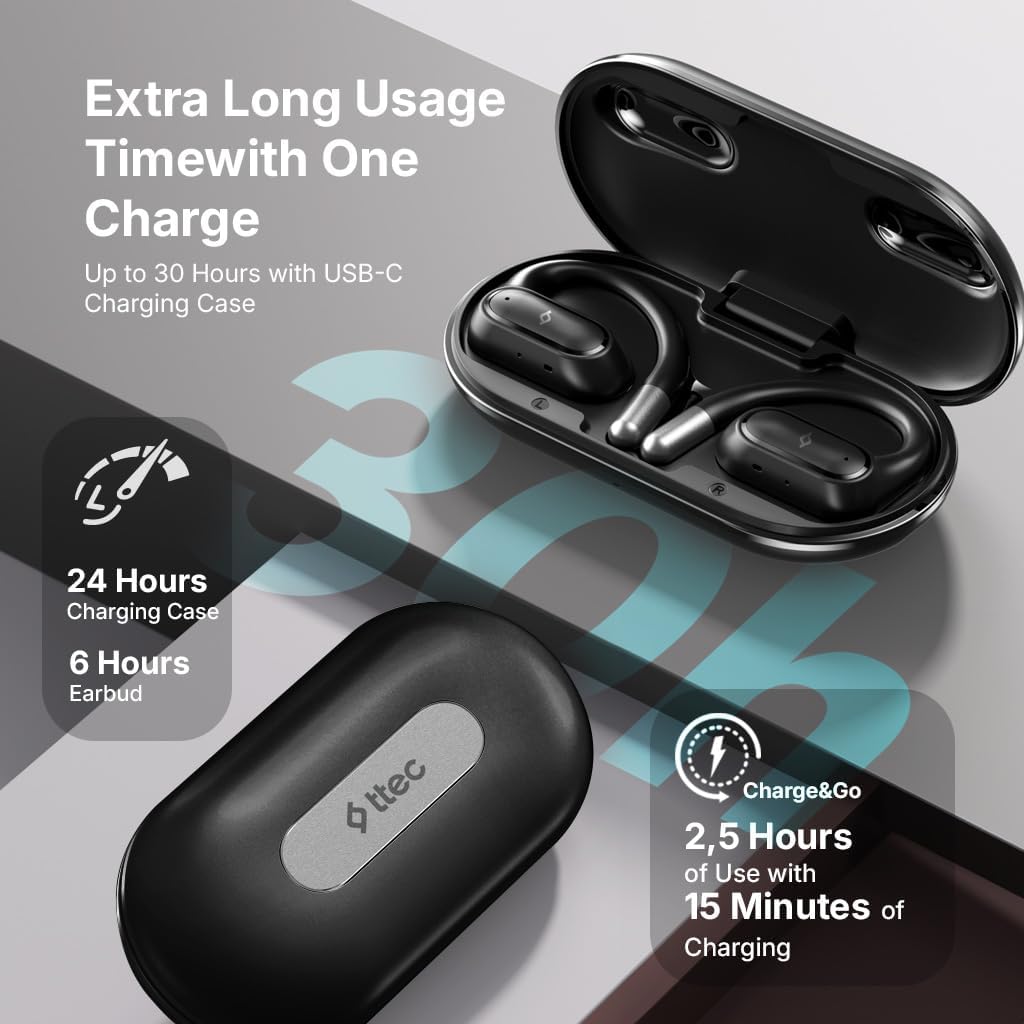
Image 4.1: Charging case displaying battery life. The image illustrates the charging case with text indicating 24 hours from the charging case, 6 hours from earbuds, and 2.5 hours of use from 15 minutes of charging.
4.2 Kubatanidza neBluetooth Chishandiso
To connect your earphones to a smartphone or other Bluetooth-enabled device:
- Ita shuwa kuti maearphone akachajwa uye aiswa muchesi yekuchaja.
- Vhura kesi yekuchaja. Nzeve dzinozopinda otomatiki modhi, uye iwo ma LED maratidziro anopenya.
- Pamudziyo wako, shandisa Bluetooth uye tsvaga zvishandiso zviripo.
- Select "ttec SoundFlow" from the list of found devices.
- Once connected, the earphone LED indicators will stop flashing or turn off, and you will hear a confirmation tone.
Mahedhifoni anozobatanidzwazve otomatiki kumudziyo wekupedzisira wakabatana kana abviswa mubhokisi, kana Bluetooth yakabatidzwa pamudziyo.
5. Operating Instructions
5.1 Kupfeka maEarphone
Gently place the ear hook over your ear and position the speaker unit comfortably in front of your ear canal. The open-ear design allows you to remain aware of your surroundings.

Image 5.1: A person cycling while wearing the ttec SoundFlow OWS earphones. The image highlights the open-ear design, allowing the user to stay connected to their surroundings.

Image 5.2: A woman wearing a ttec SoundFlow earbud, demonstrating the comfortable and secure fit. The image also indicates the lightweight design: 8.2g per earbud and 52g for the charging case.
5.2 Kubata Kudzora
The earphones feature touch sensors for easy control of various functions:
| Chiito | Function |
|---|---|
| Single Tap (L/R) | Ridza/Misa Mimhanzi, Pindura Kufona |
| Tap kaviri (L) | Previous Track |
| Tap kaviri (R) | Next Track |
| Tap katatu (L/R) | Activate Voice Assistant |
| Long Press (L/R) | Reject Call, End Call |
5.3 Game Mode
The earphones feature a low-latency game mode for an enhanced gaming and video experience. This mode reduces audio delay to 50ms.
- To activate Game Mode: Refer to the specific instructions in the quick start guide or product packaging for the exact touch gesture to enable/disable game mode. (Typically a specific tap sequence or long press).
- When Game Mode is active, you may notice a slight change in audio profile, optimized for lower latency.

Image 5.3: ttec SoundFlow earphones and charging case, surrounded by gaming console symbols, highlighting the 50ms low latency feature for an optimized gaming and video experience.
6. Kuchengeta
6.1 Kuchenesa
- Pukuta maearphone nekesi yekuchaja nejira rakapfava, rakaoma, risina lint.
- Usashandise abrasive cleaners, doro, kana makemikari zvinonyungudutsa.
- Iva nechokwadi chekuti ma contacts ekuchaja akachena uye akaoma kudzivirira matambudziko ekuchaja.
6.2 Kuramba Mvura uye Kudikitira
The ttec SoundFlow OWS earphones are IPX6 rated, meaning they are resistant to high-pressure water jets from any direction. This makes them suitable for use during workouts and in light rain.
- Usanyudze maearphones mumvura.
- Ensure the earphones are dry before placing them back into the charging case to prevent damage.

Image 6.1: A man running outdoors, illustrating the sweat and water-resistant design of the ttec SoundFlow earphones, which are IPX6 rated.
6.3 Kuchengeta
When not in use, store the earphones in their charging case to protect them and keep them charged. Store in a cool, dry place away from extreme temperatures.
7. Kugadzirisa matambudziko
Kana ukasangana nematambudziko nemaearphone ako, tarisa mhinduro dzinotevera:
| Dambudziko | Solution |
|---|---|
| Maearphone haana kubatanidzwa | Ensure earphones are charged. Turn off and on Bluetooth on your device. Forget the device in your Bluetooth settings and re-pair. |
| Only one earphone working | Place both earphones back in the case, close the lid, then open again. Ensure both are charged. |
| Hapana ruzha | Check device volume. Ensure earphones are connected. Try playing different audio. |
| Nyaya dzekuchaja | Ensure charging cable is securely connected. Clean charging contacts on earphones and case. Try a different USB-C cable or power source. |
Kana dambudziko rikaramba riripo, tapota taura nerutsigiro rwevatengi.
8. Zvinotsanangurwa
| Feature | Detail |
|---|---|
| Model Name | SoundFlow |
| Model Number | KM156 |
| Kubatana Technology | Wireless (Bluetooth 5.4) |
| Fomu Factor | True Wireless, Open-Ear |
| Kurema kwenzeve | 8.2 gramu (imwe neimwe) |
| Kuchaja Case Weight | 52 magiramu |
| Earbud Battery Hupenyu | Kusvikira kumaawa masere (chaji imwe chete) |
| Hupenyu Hwebhatiri Hwakazara (nekesi) | Kusvikira kumaawa makumi maviri nemashanu |
| Fast Charging | 15 min charge for 2.5 hours use (Charge&Go) |
| Kuramba Mvura | IPX6 Yakayerwa (Inodzivirira ziya uye Mvura) |
| Low Latency | 50ms (Game Mode) |
| Mugadziri | ttec |
9. Warranty uye Tsigiro
Your ttec SoundFlow OWS Wireless Bluetooth Earphones are covered by a manufacturer's warranty. For detailed warranty information, please refer to the warranty card included in your product packaging or visit the official ttec website.
For technical support, troubleshooting assistance, or to inquire about replacement parts, please contact ttec customer service through their official channels. Contact information can typically be found on the product packaging or the official ttec website.


