Nhanganyaya
Thank you for choosing the Billboard Soul Advance True Wireless Stereo (TWS) Earbuds. These earbuds are designed to provide a superior audio experience with Active Noise Cancellation (ANC), Environmental Noise Cancellation (ENC), and a comfortable, splash-resistant design. This manual will guide you through the setup, operation, and maintenance of your new earbuds.
Safety Information
- Do not expose the earbuds or charging case to extreme temperatures or direct sunlight for extended periods.
- Dzivisa kudonhedza kana kushandisa simba rakawandisa kune mudziyo.
- Keep the earbuds and charging case away from water and liquids, except for light splashes as per IPX4 rating. Do not submerge.
- Usaedze kupatsanura kana kugadzirisa chigadzirwa. Izvi zvinoita kuti garandi isashande.
- Shandisa chete tambo yekuchaja yakapihwa kana certified yakaenzana.
- Listening at high volumes for prolonged periods can cause hearing damage. Adjust volume to a safe level.
Package Zviri mukati
- Billboard Soul Advance TWS Earbuds (Left and Right)
- Kuchaja Case
- USB Kuchaja Cable
- User Manual
Product Overview
Familiarize yourself with the components of your Billboard Soul Advance TWS Earbuds and charging case.
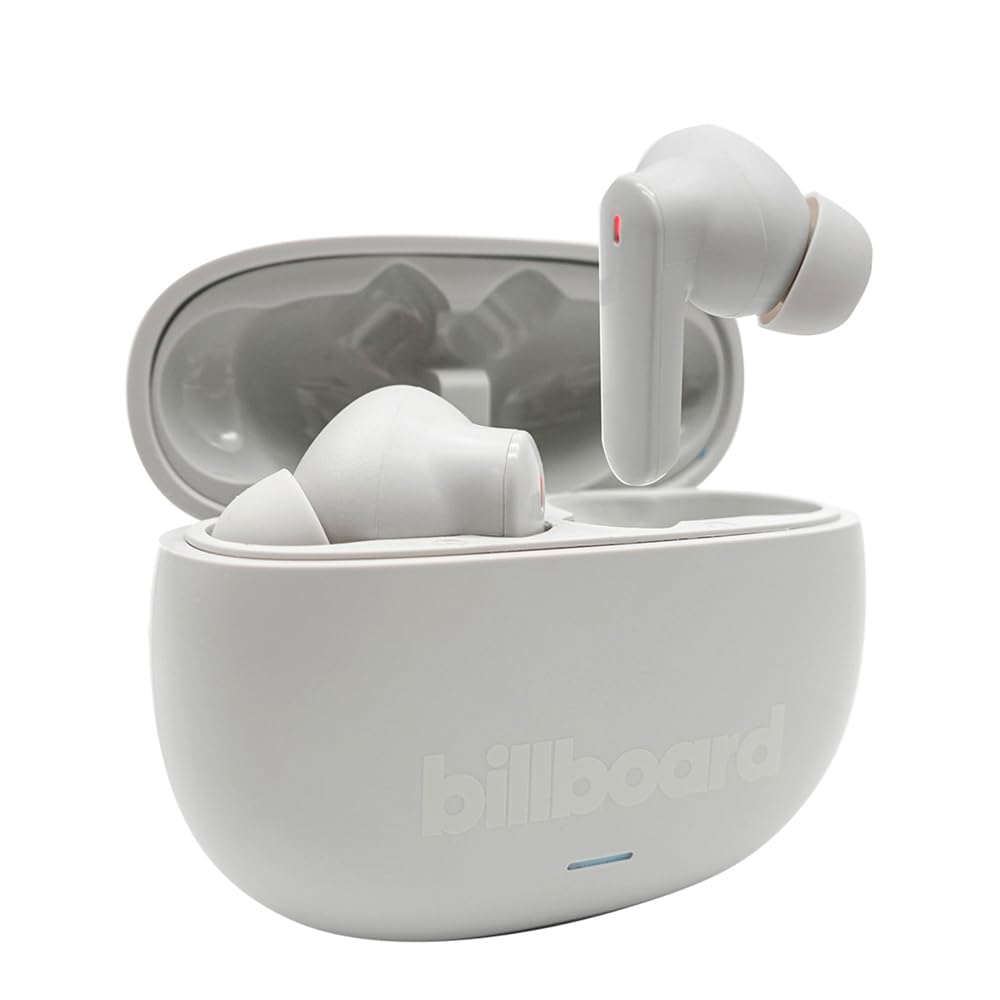
Image: The Billboard Soul Advance TWS Earbuds resting inside their open charging case. The earbuds are grey with red indicator lights visible, and the case is also grey with the 'billboard' logo embossed on the front.

Image: The Billboard Soul Advance TWS Earbuds charging case in a closed position. The case is grey with the 'billboard' logo embossed on the front and a small indicator light at the bottom.
Image: A person holding a single Billboard Soul Advance TWS earbud and the open charging case, demonstrating the compact size and design.
Gadzirira
1. Kuchaja maEarbuds uye Case
Usati watanga kushandisa, chaja zvizere maearbud nekesi yekuchaja.
- Isa maearbuds muchesi yekuchaja. Ita shuwa kuti vakagariswa zvakanaka munzvimbo dzavo dzakasiyana.
- Batanidza tambo yekuchaja yeUSB kune chinochaja chiri pabhokisi uye kune sosi yemagetsi yeUSB (semuenzaniso, komputa, adapta yemadziro).
- The indicator light on the case will show charging status. Once fully charged, the indicator will change or turn off. A full charge takes approximately 5 hours for the case and earbuds.
2. Kubatanidza neChishandiso
Kuti ubatanidze mahedhifoni ako kune smartphone kana imwe mudziyo unogonesa Bluetooth:
- Vhura kesi yekuchaja. Maearbuds anozopinda otomatiki modhi, anoratidzwa nemwenje unopenya pamaearbuds.
- Pamudziyo wako, enda kuBluetooth settings uye iva nechokwadi chekuti Bluetooth yakabatidzwa.
- Tsvaga available devices and select "Billboard Soul Advance" from the list.
- Once connected, the earbud indicator lights will stop flashing.
- Maearbud anozobatana otomatiki kumudziyo wekupedzisira wakabatana kana abviswa mubhokisi, kana Bluetooth yakabatidzwa pamudziyo.
Kushanda
Touch Controls
The earbuds feature touch-sensitive controls on their outer surface. Specific functions may vary slightly by device or app.
| Chiito | Function |
|---|---|
| Single Tap (Kuruboshwe/Kurudyi) | Tamba / Imbomira mimhanzi, Pindura / Pedza kufona |
| Tap kaviri (kurudyi) | Next track |
| Tokonya kaviri (Kuruboshwe) | Previous track |
| Tap katatu (Kuruboshwe/Kurudyi) | Activate Voice Assistant |
| Kudzvanya kwenguva refu (Kuruboshwe/Kurudyi) | Toggle ANC/Transparency Mode |
| Incoming Call Long Press | Ramba kufona |
Kudzima Ruzha Runoshanda (ANC) & Kudzima Ruzha Rwezvakatipoteredza (ENC)
The Soul Advance earbuds feature both ANC and ENC for an optimized listening and calling experience.
- Active Noise Cancellation (ANC): Reduces external ambient noise, allowing for a more immersive audio experience. Activate/deactivate by long-pressing an earbud.
- Environmental Noise Cancellation (ENC): Utilizes 4 built-in microphones to filter out background noise during calls, ensuring clearer conversations for both you and the listener. This feature is active automatically during calls.

Image: A graphic illustrating the concept of Ultra ANC (Active Noise Cancellation), showing sound waves being blocked by headphones, emphasizing a quiet listening experience.
Maintenance
Kuchenesa
- Pukuta zvinyoro nyoro maearbuds nekesi yekuchaja nejira rakapfava, rakaoma, risina lint.
- Usashandise abrasive cleaners, doro, kana makemikari zvinonyungudutsa.
- Iva nechokwadi chekuti ma "charging contacts" ari pama "earbuds" neebhokisi akachena uye akaoma kuti akwanise ku "charging" zvakanaka.
Storage
Kana isiri kushandiswa, chengeta maearbuds mukesi yavo yekuchaja kuti uzvidzivirire uye ugare wakachajwa.
Kugadzirisa matambudziko
| Dambudziko | Solution |
|---|---|
| Maearbuds haasi kubatanidza | Ita shuwa kuti maearbuds akachajwa. Dzima uye paBluetooth yemudziyo wako. Kanganwa mudziyo muzvirongwa zveBluetooth uye gadzirisazve. |
| Imwe chete earbud inoshanda | Place both earbuds back in the case, close it, then open again. Ensure both are charged. |
| Hapana ruzha | Tarisa vhoriyamu yemudziyo. Iva nechokwadi chekuti mahedhifoni akabatana. Edza kuridza odhiyo yakasiyana. |
| Nyaya dzekuchaja | Ensure charging cable is securely connected. Clean charging contacts. Try a different USB port or cable. |
Zvinotsanangurwa
- Zita remuenzanisi: Soul Advance
- Kubatana Technology: Wireless
- Zvinosanganisirwa Zvikamu: Kuchaja Station
- Mashandisirwo Akanyanya: Outdoor activities, Sports
- Nguva yekuchaja: Anenge 5 Maawa
- Zvishandiso Zvinoenderana: Mafoni, Mapiritsi
- Mvura Inodzivisa Level: IPX4 (Splash Resistant)
- Avhareji Hupenyu hwebhatiri: 27 Maawa (necheji yekuchaja)
- Kuiswa Nzeve: Munzeve
- Fomu Factor: Munzeve
- Noise Control: Active Noise Cancellation

Image: A graphic highlighting long battery life, showing headphones with '40H' and earbuds with '42H*' (battery + case), indicating extended usage times.
Official Product Videos
Video: Product demonstration video (0:49 duration).
Video: Product feature overview (0:44 duration).
Video: Additional product details (0:44 duration).
Video: Short product highlight (0:24 duration).
Video: Product feature showcase (0:24 duration).
Video: Detailed product review/demonstration (1:57 duration).
Video: Quick product overview (0:34 duration).
Video: Comprehensive product guide (2:00 duration).
Warranty uye Support
Your Billboard Soul Advance TWS Earbuds come with a standard manufacturer's warranty. For detailed warranty information, please refer to the warranty card included in your package or visit the official Billboard website. For technical support or customer service, please contact the retailer or manufacturer directly.
For returns, a 30-day free return policy is available from the purchase date.


