1. Nhanganyaya
Thank you for choosing the DAHUA DHI-LM32-E230CN-A5-V1 32-inch Curved VA165 Hz Monitor. This manual provides essential information for the safe and efficient use of your new monitor. Please read it thoroughly before installation and operation, and retain it for future reference.
This monitor is designed to deliver a high-quality visual experience with its 1920 x 1080p resolution, 1500R curvature for immersive viewing, and a fast 165 Hz refresh rate. It features a 1ms response time to minimize motion blur and supports a wide color gamut (99% sRGB, 85% NTSC, 85% DCI-P3, 85% Adobe RGB) for accurate color reproduction. Connectivity options include DisplayPort 1.4 and HDMI 2.0, and adaptive sync technology is integrated for tear-free gaming and smooth video playback.
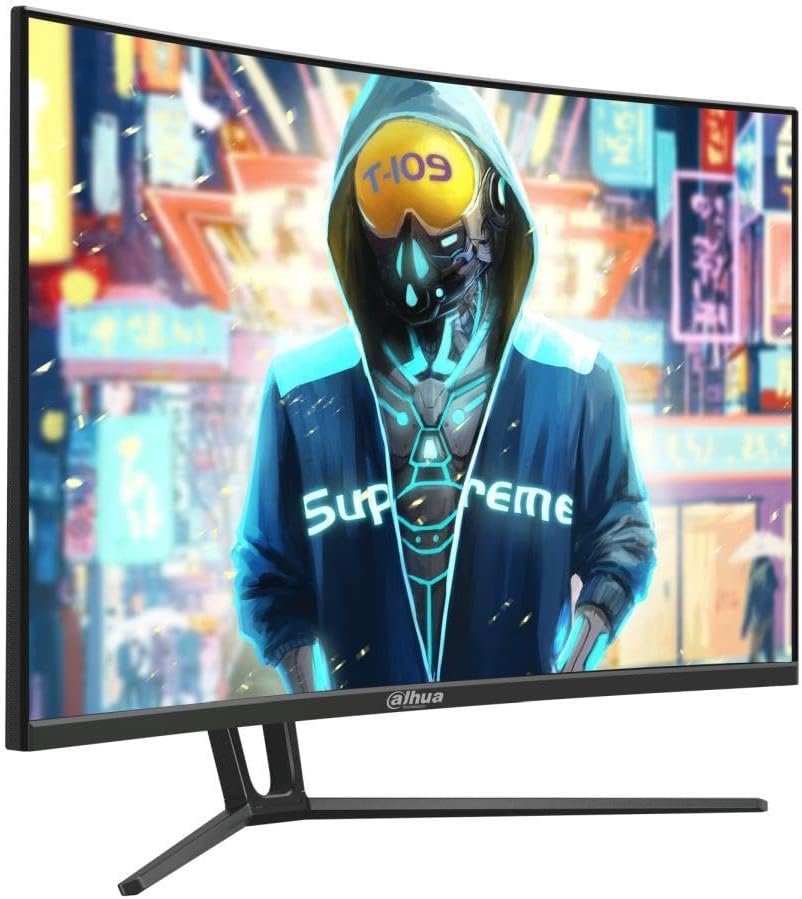
Mufananidzo 1: Mberi view of the DAHUA DHI-LM32-E230CN-A5-V1 monitor.
2. Safety Information
Please observe the following safety precautions to ensure safe operation and prolong the life of your monitor:
- Usafumure chevha kune mvura, unyoro, kana tembiricha yakanyanyisa.
- Iva nechokwadi chekufefetera kwakaringana kwakatenderedza monitor. Usavhare kuvhurika kwemhepo.
- Shandisa chete adapta yemagetsi uye tambo dzakapihwa kana kukurudzirwa nemugadziri.
- Disconnect the power cable from the outlet if the monitor will not be used for an extended period.
- Usaedze kusevha iyo monitor iwe pachako. Tumira masevhisi ese kuvashandi vanokwanisa.
- Dzivisa kuisa zvinhu zvinorema patambo yemagetsi kana pamonita.
- Clean the monitor screen with a soft, lint-free cloth. Do not use liquid cleaners directly on the screen.
3. Package Zviri mukati
Ndapota tarisa zviri mupakeji kana muchibvisa zvinhu. Kana paine zvinhu zvisipo kana kuti zvakakuvara, taurai nemutengesi wenyu.
- DAHUA DHI-LM32-E230CN-A5-V1 Monitor
- Monitor Stand (Base and Neck)
- Power Cable
- RatidzaPort Cable
- Mushandisi Chinyorwa (gwaro iri)
4. Setup
4.1 Kuunganidza Chigadziko
- Bvisa monitor nokungwarira kubva mupakeji yayo, uchiichengetedza panzvimbo yakapfava.
- Attach the stand neck to the monitor panel. Ensure it clicks securely into place or is fastened with screws if applicable (refer to specific diagrams in the physical manual).
- Batanidza stand base kugoro yekumira, uchiichengetedza nescrew yakapihwa.
- Isa iyo yakaungana monitor pane yakagadzikana, yakadzika pasi.
4.2 Kubatanidza Cables
Ita shuwa kuti cheki uye komputa yako yadzimwa usati wagadzira chero chinongedzo.
- Power Connection: Connect the power cable to the monitor's power input, then plug the other end into a grounded electrical outlet.
- Vhidhiyo yekubatanidza: Connect one end of the DisplayPort cable to the DisplayPort output on your computer's graphics card and the other end to the DisplayPort input on the monitor. Alternatively, use an HDMI cable to connect to the HDMI 2.0 input.
- Audio (Sarudzo): If your monitor has an audio output, you can connect external speakers or headphones.

Mufananidzo 2: Kumashure view yemonitor ine ma input ports.
4.3 Kubatidza
After connecting all necessary cables, power on your computer, then press the power button on the monitor. The monitor should automatically detect the input signal.
5. Operating Instructions
5.1 Pa-Screen Display (OSD) Menyu
The OSD menu allows you to adjust various monitor settings. Typically, buttons are located on the back or bottom edge of the monitor.
- Press the Menu bhatani rekuvhura OSD.
- Use the navigation buttons (usually directional arrows) to move through menu options.
- Press the Enter or OK button to select an option or confirm a setting.
- Press the Exit button to close the OSD or go back to the previous menu.
5.2 Display Settings
- Resolution: The native resolution is 1920 x 1080p. For optimal image quality, set your computer's display resolution to this setting.
- Refresh Rate: This monitor supports up to 165 Hz. Ensure your graphics card and operating system are configured to use the highest refresh rate for the smoothest experience.
- Adaptive Sync: This feature synchronizes the monitor's refresh rate with your graphics card's frame rate to eliminate screen tearing and stuttering. Enable this feature in the OSD menu and your graphics card control panel.
- Color Gamut: The monitor supports 99% sRGB, 85% NTSC, 85% DCI-P3, and 85% Adobe RGB. Adjust color settings in the OSD or through your graphics card software to match your preferences or professional requirements.
- Nguva Yemhinduro: The monitor features a fast 1ms response time. This setting is usually optimized by default but can sometimes be adjusted in the OSD for specific use cases.

Mufananidzo 3: Rutivi view chemonitor.
6. Kuchengeta
6.1 Kuchenesa Monitor
Kuti uchenese monitor yako, tevera matanho aya:
- Dzima chekutarisa uye bvisa tambo yemagetsi.
- Use a soft, lint-free cloth (e.g., microfiber cloth) to gently wipe the screen and exterior surfaces.
- Pazvibodzwa zvakasindimara, zvishoma dampsn jira rine mvura kana nyoro, isina-abrasive screen cleaner. Usafire mvura yakananga pachiratidziri.
- Allow the monitor to dry completely before plugging it back in and powering it on.
Yambiro: Do not use alcohol, ammonia-based cleaners, or abrasive materials, as these can damage the screen surface.
7. Kugadzirisa matambudziko
Kana ukasangana nematambudziko ne monitor yako, tarisa gwara rinotevera rekugadzirisa matambudziko:
| Dambudziko | Zvinogona Kukonzera | Solution |
|---|---|---|
| Hapana simba | Tambo yemagetsi isina kubatana; Power outlet yakanganisa; Monitor bhatani remagetsi rakadzimwa. | Check power cable connections; Test outlet with another device; Press monitor power button. |
| Hapana chiratidzo | Video cable not connected; Incorrect input source selected; Computer not powered on. | Tarisa kubatana kwetambo dzevhidhiyo; Sarudza kwakakodzera kwekupinda kuburikidza neOSD; Iva nechokwadi chekuti komputa yakabatidzwa. |
| Mufananidzo unopenya kana kukanganiswa | Incorrect resolution/refresh rate; Faulty video cable; Graphics driver issue. | Set to native resolution (1920x1080p) and 165Hz; Try a different video cable; Update graphics drivers. |
| Mavara anoita seasina kururama | Color settings misconfigured; Faulty video cable. | Adjust color settings in OSD; Try a different video cable. |
8. Zvinotsanangurwa
| Feature | Tsanangudzo |
|---|---|
| Brand | Dahua |
| Model Number | DHI-LM32-E230CN-A5-V1 |
| Screen Size | 31.5 inches |
| Resolution | 1920 x 1080p |
| Panel Type | VA |
| Refresh Rate | 165 Hz |
| Curvature | 1500R |
| Nguva Yekupindura | 1 ms |
| Color Gamut | 99% sRGB, 85% NTSC, 85% DCI-P3, 85% Adobe RGB |
| Viewing Angle | 178° (H) / 178° (V) |
| Vhidhiyo Inputs | 1 x DisplayPort 1.4, 1 x HDMI 2.0 |
| Adaptive Sync | Inotsigirwa |
| Mugadziri | DAHUA |
9. Warranty uye Tsigiro
For warranty information, please refer to the warranty card included with your product or visit the official DAHUA website. If you require technical support or have questions not covered in this manual, please contact DAHUA customer service or your authorized retailer.
Please have your monitor model number (DHI-LM32-E230CN-A5-V1) and serial number ready when contacting support.


