1. Nhanganyaya
Thank you for choosing the AQQA Aquarium LED Light. This high-quality lighting system is designed to provide optimal illumination for your aquatic environment, supporting the healthy growth of fish and plants. It features advanced LED technology, a convenient timer, and multiple lighting modes to create a vibrant and thriving aquarium.
2. Mirayiridzo Yekuchengetedza
- Always unplug the light from the power outlet before performing any maintenance, cleaning, or installation.
- Do not immerse the power adapter or controller in water. The light unit itself is IP67 waterproof, but the power components are not.
- Ensure the light is securely mounted on the aquarium to prevent accidental falls.
- Usashandise mwenje kana tambo yemagetsi kana chivhariso chakakuvara.
- Chengetedza pasingasvikirwi nevana.
- Ichi chigadzirwa ndechekushandiswa kwemukati chete.
3. Package Zviri mukati
Ndokumbira utarise kuti zvinhu zvese zviripo uye mune zvakanaka:
- AQQA Aquarium LED Light Unit
- Extendable Mounting Brackets (2 pcs)
- Inline Controller with Power Cord
- Japanese Instruction Manual
4. Zvigadzirwa zveChigadzirwa
- High-Quality LED Chips: Features 5 rows of high-brightness LED chips, providing approximately 10% more chips than comparable lights for brighter, more uniform illumination. Full-spectrum design (white + RGB) supports healthy fish and aquatic plant growth.
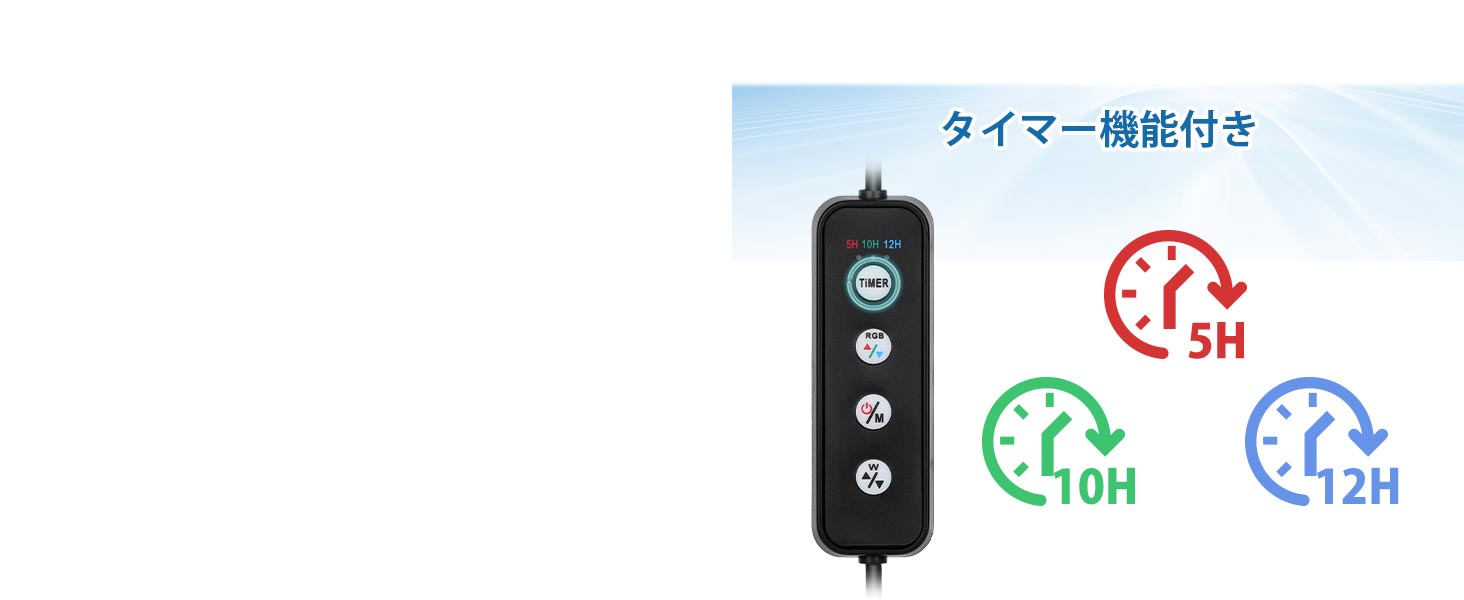
- Timer Function & Memory: Built-in timer with 5, 10, or 12-hour settings for automatic daily on/off cycles. A memory function restores previous settings after a power outage.
- 3 Lighting Modes & 10-Level Brightness: Offers Full Spectrum, White Light, and Color Light modes. Each mode has 10 adjustable brightness levels (3% to 100%) for precise environmental control.
- Extendable Stand & IP67 Waterproof: Adjustable stand design fits various aquarium widths. IP67 waterproof rating protects against water vapor and allows for temporary submersion (retrieve and dry within 30 minutes if submerged).
- Lightweight & Eye-Friendly: Lightweight design minimizes stress on aquarium edges. Flicker-free illumination is gentle on the eyes during observation.
5. Setup Instructions
- Batanidza Mabhureki Anokwidza: Slide the extendable mounting brackets into the slots on both ends of the LED light unit. Adjust the brackets to match the width of your aquarium.
- Isa Chiedza: Carefully place the light unit with attached brackets onto the edges of your aquarium. Ensure it is stable and centered over the tank.
- Batanidza Simba: Plug the inline controller's power cord into a suitable power outlet.

6. Operating Instructions
The AQQA Aquarium LED Light is controlled via an inline remote. Familiarize yourself with the buttons:
- TIMER: Sets the operating duration (5H, 10H, 12H).
- RGB +/-: Adjusts the brightness of the RGB (color) LEDs.
- ON/OFF / M: Powers the light on/off and cycles through lighting modes.
- W +/-: Adjusts the brightness of the white LEDs.

6.1 Simba On / Off uye Mode Sarudzo
- Press the ON/OFF / M button once to turn the light on.
- Press the ON/OFF / M button repeatedly to cycle through the three lighting modes: Full Spectrum, Color Light, and White Light.
- Dzvanya uye ubate iyo ON/OFF / M button for 3 seconds to turn the light off.
6.2 Kugadzirisa Kujeka
Each lighting mode offers 10 levels of brightness adjustment:
- To adjust the brightness of the white LEDs, use the W + (kuwedzera) uye W - (decrease) buttons.
- To adjust the brightness of the RGB (color) LEDs, use the RGB + (kuwedzera) uye RGB - (decrease) buttons.

6.3 Timer Basa
The timer function allows for automatic daily operation:
- Press the TIMER button to select the desired operating duration: 5 hours, 10 hours, or 12 hours.
- Once a timer is set, the light will automatically turn off after the selected duration and will turn on again at the same time the next day, repeating the cycle.
- The light retains its last brightness and color settings even after a power outage, thanks to its memory function.
6.4 Gwaro reVhidhiyo Rinoshanda
Watch this video for a visual guide on setting up and operating your AQQA Aquarium LED Light:
7. Kuchengeta
- Cleaning the Light: Pukuta mwenje nguva nenguva ne soft, damp jira rekubvisa guruva nemavanga emvura. Iva nechokwadi chekuti chiedza hachina kuvharwa usati wachenesa. Usashandise zvinochenesa zvinogumbura.
- Kutarisa MaConnections: Periodically inspect the power cord and connections for any signs of damage or wear.
- Kunyudzwa mumvura: If the light unit accidentally falls into the water, retrieve it immediately and dry it thoroughly before reconnecting power. The IP67 rating provides temporary protection, but prolonged submersion should be avoided.
8. Kugadzirisa matambudziko
| Dambudziko | Zvinogona Kukonzera | Solution |
|---|---|---|
| Chiedza hachibatidze. | Hapana magetsi. | Check if the power adapter is securely plugged into the outlet and the light. |
| Chiedza hachina kujeka kana kupenya. | Kurongeka kwekupenya kusina kunaka. | Adjust brightness using the W +/- or RGB +/- buttons. |
| Basa renguva harisi kushanda. | Timer haina kuiswa zvakanaka. | Ensure the TIMER button has been pressed to select a duration (5H, 10H, or 12H). |
| Light falls into water. | Kuisa zvisina kunaka. | Immediately unplug, retrieve, and dry the unit. Re-mount securely. |
9. Zvinotsanangurwa
| Feature | Detail |
|---|---|
| Model | AQ109-14W |
| Simba | 14W |
| Rudzi Tembiricha | 6500K |
| Lumen | 534 |
| Nhamba ye LEDs | 39 |
| Chiedza Chinyorwa Type | RGB+LED |
| Material | Acrylonitrile Butadiene Styrene (ABS) |
| Voltage | 100 Volts |
| Waterproof Rating | IP67 |
| Hupenyu hurefu | Approx. 50,000 maawa |
| Chikamu Dimensions (L x W x H) | 25 x 10.2 x 1.6 cm |
| Inoenderana Aquarium Saizi | 30-45 cm |

10. Warranty uye Tsigiro
This AQQA Aquarium LED Light comes with a 1-gore kunaka waranti from the date of purchase. If you encounter any quality-related issues during this period, please do not hesitate to contact our customer support team. We are committed to responding within 24 hours and providing prompt assistance.
For support, please refer to the contact information provided with your purchase or visit the official AQQA store on Amazon.


