1. Nhanganyaya
This manual provides detailed instructions for the setup, operation, and maintenance of your Thundeal TD93 Pro Mini Projector. Please read this manual thoroughly before using the product to ensure proper functionality and to extend its lifespan.

Image 1.1: Thundeal TD93 Pro Mini Projector overview.
2. Chii chiri muBhokisi
Tarisa kuti zvinhu zvese zvakanyorwa pazasi zvinosanganisirwa mupakeji yako:
- Thundeal TD93 Pro Projector
- Remote Control
- Power Cord
- Mushandisi Chinyorwa (gwaro iri)
- AV Cable
- HDMI Cable
- Projector Lens Cover

Image 2.1: Package contents of the TD93 Pro Projector.
3. Product Specifications and Features
3.1. Zvinyorwa zveUnyanzvi
| Model Number | TD93 Pro (Item Model Number: TD97) |
| Native Resolution | 1920 x 1080 (Full HD) |
| Max Resolution Tsigiro | 2K 4K UHD (from HD Signal) |
| Kupenya | 12000 Lumens |
| Kusiyanisa Ratio | 15000:1 |
| Aspect ratio | 4:3 / 16:9 / Auto |
| Operating System | Android 9.0 OS |
| Wireless Kubatana | 2.4G / 5G WiFi, Bluetooth-compatible |
| Memory | RAM 1G DDR3 + ROM 8G |
| Kururamisa dombo rinokosha | 6D Keystone (4-point corner +/- 60°, Vertical +/- 60°) |
| Zoom Rinoshanda | 50-100% Proportional Reduction |
| Projection Size | 49 to 300 inches (recommended 93-150 inches) |
| Projection Distance | 1.6 to 6.5 meters (recommended 3-5 meters) |
| Lamp Hupenyu hwose | 50,000 maawa |
| Vadivelu Comedy Audio | Built-in 5W stereo speakers with SRS sound system |
| Special Features | 3D-Ready (Red-Blue 3D), Auto Horizontal Keystone, Built-In Wi-Fi, Portable, Dust Removal Net |
3.2. Key Features
- High Definition Visuals: Native 1080P resolution with support for 2K/4K UHD signals, delivering clear and vibrant images.
- Smart Android OS: Integrated Android 9.0 operating system allows direct app downloads and streaming.
- Dual-Band WiFi: 2.4G and 5G WiFi connectivity for stable and fast wireless streaming and screen mirroring.
- Kubatana kweBluetooth: Batanidza ekunze maBluetooth speaker kana mahedhifoni ekuwedzera odhiyo.
- Advanced Image Correction: 6D Keystone correction (4-point and vertical) for flexible placement and precise image alignment.
- Flexible Projection: Adjustable zoom from 50% to 100% and support for screen sizes up to 300 inches.
- Inogara kwenguva refu Lamp: Akatungamirira lamp designed for up to 50,000 hours of operation.
- Multi-Media Compatibility: Supports various input sources including HDMI, USB, AV, and direct office file kutamba kuburikidza ne USB.

Image 3.1: Visual comparison of projector brightness and resolution.
4. Setup Guide
4.1. Kuiswa kwePurojekita
The projector can be placed in various positions to suit your viewing environment:
- Padhesiki: Isa purojekita panzvimbo yakatsiga, yakati sandara.
- Pane Tripod: Utilize the 6mm screw hole on the bottom for tripod mounting.
- Ceiling Hoisting: Mount the projector to the ceiling using a compatible hanger.
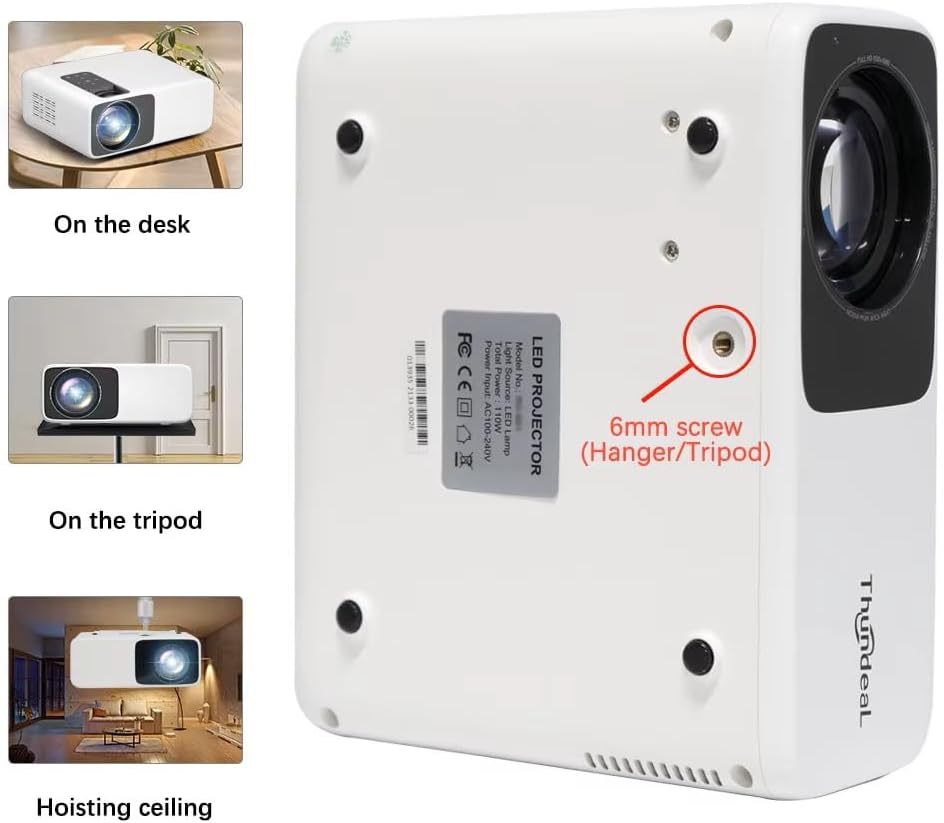
Image 4.1: Projector placement options and mounting point.
For optimal viewing, ensure the projector is positioned perpendicular to the screen or wall. Adjust the projection distance (1.6 to 6.5 meters) to achieve your desired screen size (49 to 300 inches). A distance of 3-5 meters for a 93-150 inch screen is recommended for eye comfort.
4.2. Simba Connection
- Batanidza tambo yemagetsi kuchiteshi chemagetsi chepurojekita.
- Batanidza rimwe divi retambo yemagetsi muchinoburitsa magetsi chakajairika.
- Dzvanya bhatani remagetsi papurojekita kana remote control kuti ubatidze.
5. Operating Instructions
5.1. Multi-Media Connections
The TD93 Pro projector offers various ports for connecting external devices:
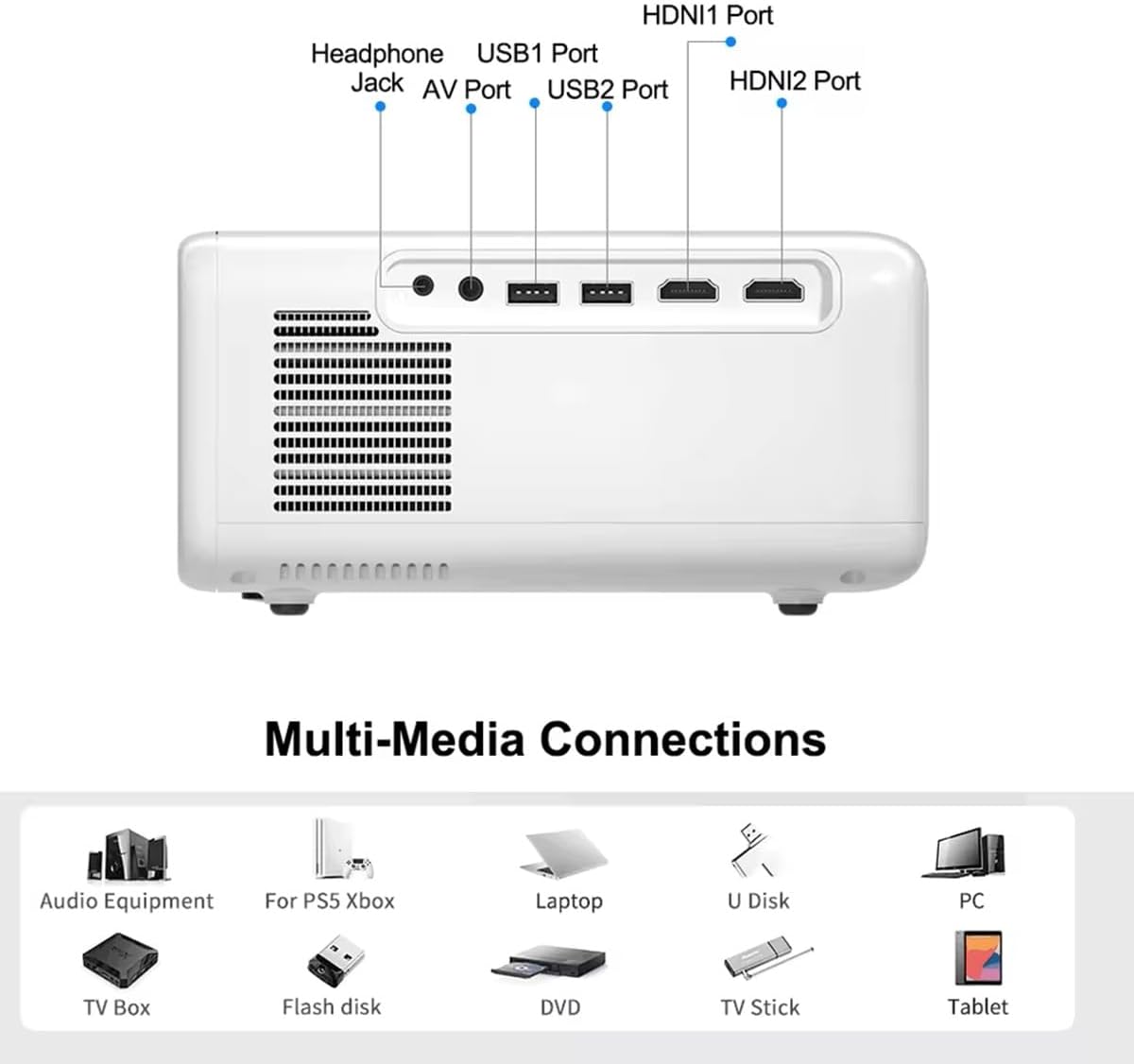
Image 5.1: Available multimedia connection ports.
- HDMI Ports (HDMI1, HDMI2): Connect devices such as TV boxes, gaming consoles (PS5, Xbox), laptops, or Blu-ray players.
- USB Ports (USB1, USB2): Connect USB flash drives for direct media playback (photos, videos, office documents).
- Chiteshi cheAV: Connect older devices using the provided AV cable.
- Headphone Jack (3.5mm): Batanidza mahedhifoni ekunze kana vatauri.
To switch input sources, use the "Source" button on the remote control or the projector's control panel and select the desired input (HDMI1, HDMI2, AV, USB).
5.2. Wireless Connectivity
5.2.1. WiFi Connection (2.4G/5G)
The projector supports dual-band WiFi for internet access and network features:
- Navigate to the "Settings" menu on the projector's Android interface.
- Select "Network & Internet" and then "Wi-Fi".
- Batidza Wi-Fi uye sarudza yako yaunoda network kubva pane iyo rondedzero.
- Isa password kana ukakurudzirwa uye ubatanidze.
5.2.2. Kubatana kweBluetooth
Connect Bluetooth-compatible audio devices like speakers or headphones:
- Go to "Settings" > "Connected devices" > "Bluetooth".
- Batidza Bluetooth.
- Isa yako kifaa cheBluetooth mune pairing mode.
- Sarudza mudziyo wako kubva pane rondedzero yemidziyo iripo yekubatanidza.
5.3. Screen Mirroring (Airplay/WiFi-Display)
Wirelessly display content from your Android or iOS phone:

Image 5.2: Screen mirroring from iOS and Android devices.
- Ensure both your projector and mobile device are connected to the same Wi-Fi network.
- On the projector's main interface, select the "Screen Mirroring" or "Airplay/WiFi-Display" application.
- For iOS devices: Open Control Center, tap "Screen Mirroring" or "AirPlay Mirroring", and select the projector from the list.
- For Android devices: Open the notification panel, find "Cast", "Smart View", "Wireless Display", or similar function, and select the projector.
5.4. Kugadziriswa Kwemifananidzo
5.4.1. Keystone Correction (6D)
The projector features 6D keystone correction to adjust image shape:
- Dombo reKiyi Rakamira: Adjust +/- 60 degrees vertically using the remote control.
- 4-Point Corner Keystone: Adjust each of the four corners independently by +/- 60 degrees for side projection or irregular surfaces. This allows for precise rectangular image alignment.
Access keystone settings via the projector's menu or dedicated buttons on the remote.
5.4.2. Basa reZoom
Adjust the display size from 50% to 100% proportionally without moving the projector. This feature is useful for fine-tuning the image size to fit your screen or wall.
Access the zoom function through the projector's menu settings.
5.5. Android OS and App Usage
The integrated Android 9.0 OS allows you to download and install applications directly from the Play Store. Ensure the projector is connected to Wi-Fi to access online services and apps.
- Play Store: Access the Google Play Store to download streaming apps, games, and utilities.
- Media Playback: Use pre-installed media players or download alternatives (e.g., VLC player for AC3 audio support).
6. Kuchengeta
6.1. Kubvisa Guruva
The projector is equipped with a built-in dust net for easy cleaning. Regularly clean the dust net to maintain optimal performance and prevent overheating. Press to pop out the dust net for cleaning.
6.2. Kutonhora System
The advanced cooling system is designed to dissipate heat efficiently and extend the lamp's lifespan. Ensure proper ventilation around the projector and avoid blocking air vents during operation.
6.3. Lamp Hupenyu hwose
Iyo LED lamp has an estimated lifespan of 50,000 hours. No lamp replacement is typically required during the product's operational life under normal usage conditions.
7. Kugadzirisa matambudziko
7.1. No Image Displayed
- Tarisa uone kana purojekita yakabatidzwa.
- Verify the input source is correctly selected (e.g., HDMI1, USB).
- Ita shuwa kuti tambo dzese dzakabatana zvakachengeteka.
- Adjust focus and keystone correction.
7.2. Hapana Inzwi
- Check the volume level on the projector and the connected source device.
- Ensure external speakers or headphones are properly connected and powered on if used.
- If using an external source, verify its audio output settings.
- For AC3 audio, ensure you are using a compatible player like VLC.
7.3. Connectivity Issues (WiFi/Bluetooth)
- Ensure WiFi is enabled and you are connected to the correct network.
- Tangazve purojekita uye yako router/Bluetooth mudziyo.
- For screen mirroring, confirm both devices are on the same Wi-Fi network.
7.4. Image is Blurry or Distorted
- Rongedza mhete yekutarisa pane lenzi yeprojekita.
- Use the keystone correction features to correct any trapezoidal distortion.
- Iva nechokwadi chekuti nzvimbo inoonekwa yakatsetseka uye yakatsetseka.
8. Warranty uye Tsigiro
Kuti uwane ruzivo rwewarandi uye rutsigiro rwehunyanzvi, ndapota tarisa magwaro akapihwa panguva yekutenga kana kuti bata mutengesi wako. Chengeta risiti yako yekutenga sehumbowo hwekutenga.


