Nhanganyaya
This manual provides comprehensive instructions for the OMAIC EN2Q36H replacement remote control, designed for Hisense Smart TVs. It covers essential information regarding setup, operation, and maintenance to ensure optimal performance and user experience. This remote offers a direct replacement solution without the need for complex programming.
Gadzirira
The OMAIC EN2Q36H remote control is designed for immediate use with compatible Hisense Smart TVs. No programming or pairing is required.
Kuiswa kweBattery
- Tsvaga bhatiri kuseri kweremote control.
- Svetesa chifukidziro chebhatiri pasi kana munzira yakaratidzwa nemuseve kuti uvhure.
- Insert two AAA alkaline batteries (not included), ensuring the positive (+) and negative (-) terminals align correctly with the markings inside the compartment.
- Dzorera chifukidziro chebhatiri nekuchidzosera panzvimbo yacho kusvika chadzvanya zvakanaka.
Once batteries are installed, the remote is ready to operate your Hisense Smart TV.

Operating Instruction
This remote control utilizes infrared (IR) technology for communication with your Hisense Smart TV. Ensure a clear line of sight between the remote and the TV's IR receiver for optimal performance.
Key Features
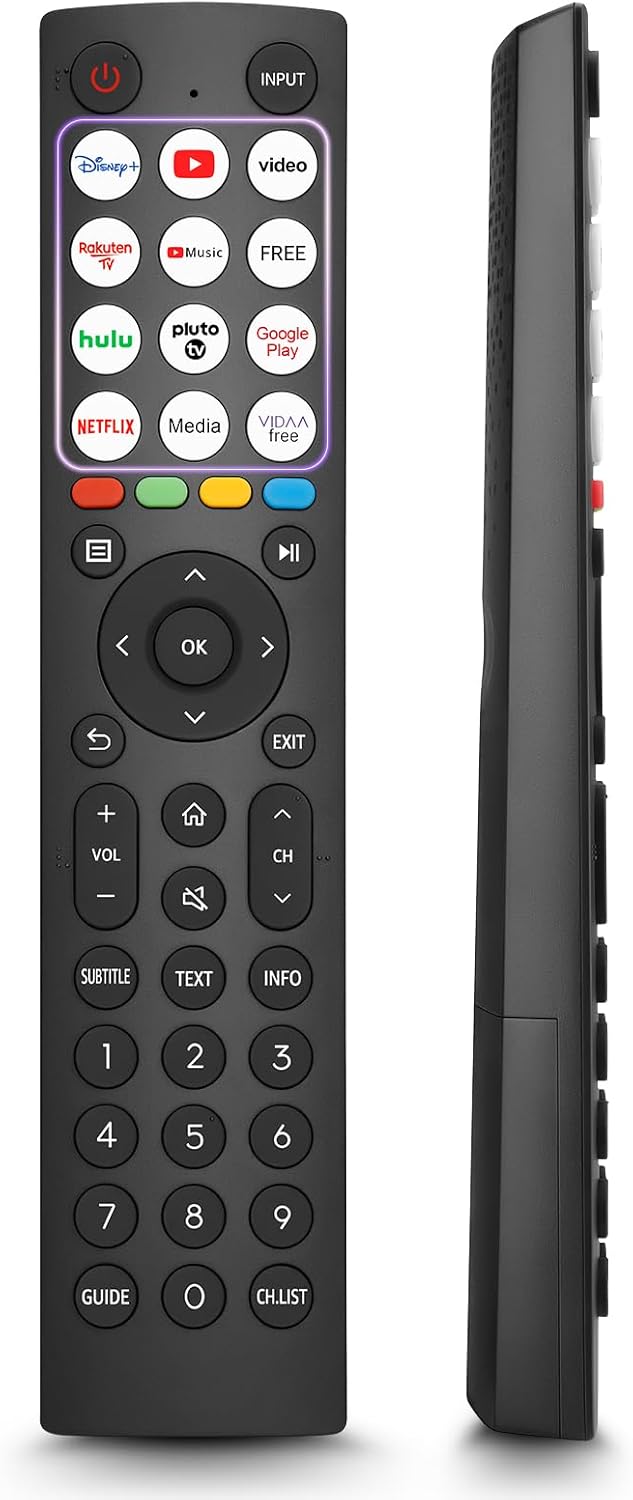
- 12 Shortcut Buttons: Quickly access popular streaming services and applications with dedicated buttons.
- Strong IR Signal: Provides a longer transmission distance and quick response without noticeable delay.
- Durable Construction: Made from high-quality ABS and silicone materials for extended lifespan.

Bhatani Mabasa
Familiarize yourself with the functions of each button on your OMAIC EN2Q36H remote control:
| Bhatani | Function |
|---|---|
| SIMBA | Switches the TV on or into standby mode. |
| INPUT | Inosarudza zvinyorwa zvekupinza (HDMI, AV, nezvimwewo). |
| APP Buttons | Quick access buttons for specific applications (e.g., Disney+, Netflix, YouTube). |
| MENU | Displays the Quick Setup menu. |
| MEDIA Kudzora | Buttons for Play, Pause, Stop, Fast Forward, Rewind. |
| Navigation (Up/Down/Left/Right) | Navigates on-screen menus and adjusts system settings. |
| OK | Confirms selection in on-screen menus. |
| BACK | Inodzokera kumenyu yapfuura. |
| Buda | Inobuda mumenyu iripo. |
| VOL +/- | Inogadzirisa chiyero chevhoriyamu. |
| MUSHA | Enters the Home screen. |
| MUTE | Inonyaradza kana kudzoreredza ruzha rweTV. |
| CH ^/v | Switches channels. |
| SUBTITLE | Activates or deactivates subtitle mode. |
| TEXT | Turns teletext function on and off. |
| INFO | Inoratidza ruzivo rwechirongwa chiripo. |
| NUMBER Buttons (0-9) | Direct channel selection or number input. |
| GUIDE | Displays the Electronic Programme Guide (DTV input). |
| CH.LIST | Displays the Channel List on the screen. |

Compatible Hisense TV Models
The OMAIC EN2Q36H replacement remote control is compatible with the following Hisense VIDAA 4K HDTV Smart TV series:
- 32A4K, 40A4K, 43A4K
- 32A5KQ, 40A5KQ
- 43A6K, 50A6K, 55A6K, 58A6K, 65A6K, 70A6K, 75A6K, 85A6K
- 55U6KQ, 65U6KQ
- 43A7KQ, 50A7KQ, 55A7KQ, 65A7KQ, 75A7KQ
- 43E7KQ, 50E7KQ, 55E7KQ, 65E7KQ, 75E7KQ
Maintenance
Kuti uve nechokwadi chekuti remote control yako inogara kwenguva refu uye ichishanda zvakanaka, tevera nhungamiro idzi dzekugadzirisa:
- Kuchenesa: Use a soft, dry cloth to clean the remote. Avoid using liquid cleaners or abrasive materials, as they may damage the surface or internal components.
- Kutsiva Bhatiri: Replace batteries when the remote's response becomes sluggish or stops working. Always replace both batteries at the same time with new ones of the same type (AAA alkaline).
- Kuchengeta: Chengetedza remote munzvimbo inotonhorera, yakaoma kure nechiedza chezuva, tembiricha yakanyanyisa, uye mwando wepamusoro.
- Dzivisa Madonhwe: Dzivirira kure kure kubva pakukuvadzwa kwemuviri, sezvo madonhwe anogona kukanganisa circuitry yemukati.
Kugadzirisa matambudziko
If you encounter issues with your remote control, refer to the following troubleshooting steps:
| Dambudziko | Zvinogona Kukonzera | Solution |
|---|---|---|
| Kure kwete kupindura | Mabhatiri akafa kana kuiswa zvisizvo. | Replace batteries with new AAA alkaline batteries, ensuring correct polarity. |
| Kure kwete kupindura | Kuvharika pakati peremote neTV. | Ensure a clear line of sight to the TV's IR receiver. Remove any objects blocking the path. |
| Kure kwete kupindura | Remote iri kure zvakanyanya neTV. | Move closer to the TV. The remote has an extended range, but extreme distances may affect performance. |
| Mabhatani anonamira kana kuti haapindure | Tsvina kana marara pasi pemabhatani. | Gently clean around the buttons with a soft, dry cloth. Avoid liquids. |
| Specific functions not working | TV model incompatibility (rare). | Verify your Hisense TV model is listed in the 'Compatible Hisense TV Models' section. |
Zvinotsanangurwa
| Feature | Detail |
|---|---|
| Model Name | EN2Q36H |
| Brand | OMAIC |
| Inowirirana Devices | Hisense Smart TVs |
| Kubatana Technology | Infrared (IR) |
| Nhamba yeMabhatani | 48 |
| Control Type | Bhatani Kudzora |
| Special Features | Universal, Comfortable |
| Color | Nhema |
| Tsanangudzo Yebhatiri | AAA (Alkaline) |
| Supported Devices (Max) | 1 |
| Zviyero zveChigadzirwa (Approx.) | 34.7 x 24.7 x 2.2 cm |
| Kurema Kwechigadzirwa (Approx.) | 80 magiramu |

Warranty uye Support
OMAIC is committed to the quality and compatibility of its replacement remote controls. We provide professional after-sales support to ensure customer satisfaction.
If you have any questions or concerns regarding your OMAIC EN2Q36H remote control or your order, please contact us directly. Our support team aims to respond to inquiries within 12 working hours.