1. Nhanganyaya
Welcome to the user manual for your new Nubia Flip 5G smartphone. This guide provides essential information to help you set up, operate, and maintain your device. The Nubia Flip 5G combines a compact, foldable design with advanced features, including a dual AMOLED display, a versatile external screen, and AI-powered functionalities.
Key features of your Nubia Flip 5G include:
- Dual AMOLED Displays: Enjoy a fluid 120 Hz refresh rate on both the 6.9-inch internal display and the 3-inch external display.
- Fully Functional External Display: Access 100% of your applications directly from the external screen without unfolding the phone.
- Sisitimu Yekamera Yepamusoro: Capture high-quality photos with the 50 MP main camera, supported by AI features and 4K stabilized video recording. Utilize the external screen for high-resolution selfies.
- AI-Powered Enhancements: Benefit from features like AI Magic Photos for editing and live translation for voice calls.
- Bhatiri Inogara kwenguva refu: Equipped with a 4325 mAh battery and 33W fast charging, allowing 50% charge in under 20 minutes.
2. Setup
2.1. Unboxing uye Kutanga Kuongorora
Nyatsobvisa zvinhu zvese kubva pakurongedzerwa. Ita shuwa kuti zvinotevera zvikamu zviripo:
- Nubia Flip 5G Smartphone
- USB Cable
- Phone Case
- Dziviriro Firimu
Inspect the device for any visible damage. If any components are missing or damaged, contact customer support.
2.2. Kuisa SIM Card
- Dzima mudziyo.
- Tsvaga SIM card tray padivi pefoni.
- Use the SIM ejector tool (not included, typically found with your SIM card) to open the tray.
- Place your Nano-SIM card(s) into the tray with the gold contacts facing down. This device supports Dual SIM.
- Nyatsopinza tireyi mufoni.
2.3. Powering On uye Initial Configuration
- Press and hold the Power button until the Nubia logo appears.
- Tevedzera mirairo iri pachikirini kuti usarudze mutauro wako, ubatanidze kune network yeWi-Fi, uye ugadzire account yako yeGoogle.
- You will be guided through setting up security features such as fingerprint unlock and facial recognition.
3. Kushandisa Chishandiso
3.1. Understanding the Dual Display

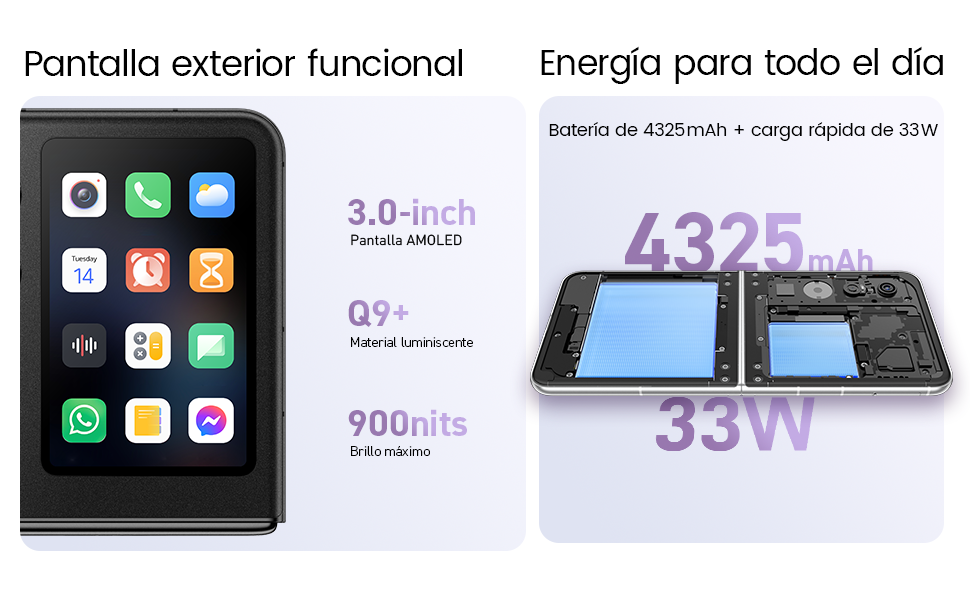
Your Nubia Flip 5G features two displays: a large 6.9-inch internal foldable AMOLED screen and a compact 3-inch external AMOLED screen. Both screens offer a smooth 120 Hz refresh rate for an enhanced visual experience.
- Internal Display: Ideal for immersive content consumption, gaming, and detailed tasks.
- Kuratidzwa Kwekunze: Provides quick access to notifications, widgets, music controls, and even full applications without needing to unfold the phone. Swipe left or right to navigate through different functions.
3.2. Kamera Kushanda

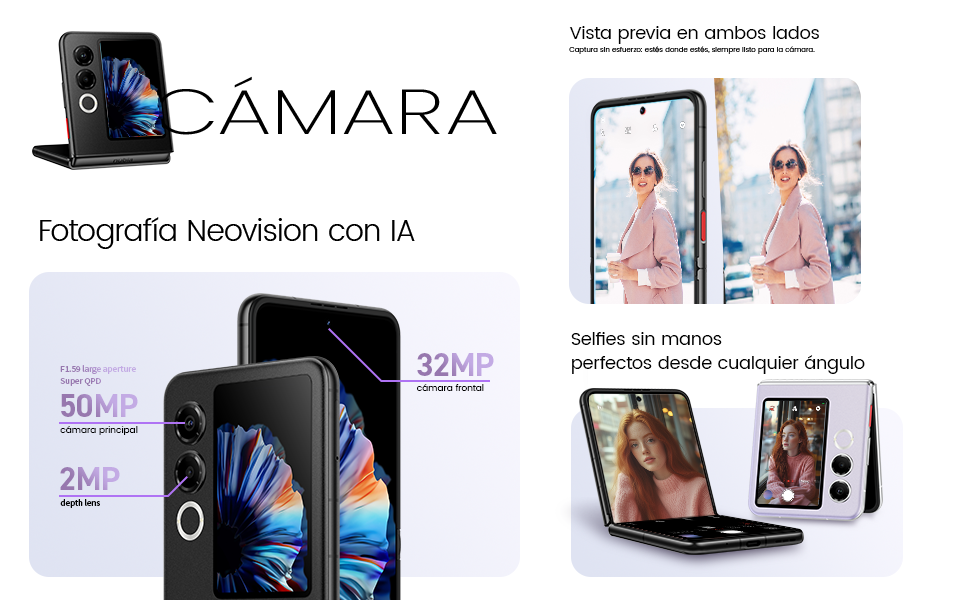
The Nubia Flip 5G is equipped with a powerful 50 MP main camera and a secondary portrait camera, enhanced with AI for superior image quality. The 32 MP front camera ensures clear video calls and selfies.
- High-Resolution Selfies: Use the external screen as a viewfinder to take selfies with the high-quality rear cameras.
- Hands-Free Photography: Partially fold the phone and place it on a flat surface to capture photos and videos without needing a tripod.
- 4K Stabilized Video: Record smooth, high-definition videos with advanced stabilization.
3.3. AI Features
The device integrates several AI functions to enhance user experience:
- AI Magic Photos: Utilize AI for intelligent photo editing and enhancement.
- Live Call Translation: Experience real-time translation during voice calls, breaking down language barriers.
3.4. Vhidhiyo Yaperaview
Official chigadzirwa vhidhiyo showcasing the Nubia Flip 5G's design, versatile external display, hands-free selfie capabilities, and long-lasting battery.
4. Bhatiri uye Kuchaja

The Nubia Flip 5G is equipped with a 4325 mAh battery, designed to provide extended usage. It supports 33W fast charging, allowing you to quickly replenish the battery. A 50% charge can be achieved in less than 20 minutes.
- Use the provided USB cable and a compatible 33W charger for optimal fast charging.
- Dzivisa kushandisa machaja kana tambo dzisina chitupa kudzivirira kukuvara kwemudziyo.
5. Kuchengeta
Proper care ensures the longevity and optimal performance of your Nubia Flip 5G.
- Screen Care: The foldable screen is delicate. Avoid pressing hard on the screen, especially near the crease. Keep sharp objects away from the display.
- Kuchenesa: Shandisa jira rakapfava, risina lint kuchenesa skrini uye muviri. Dzivisa makemikari ane hasha kana abrasive zvinhu.
- Kuramba Mvura: While the device may have some level of splash resistance, it is not fully waterproof. Avoid submerging the phone in water or exposing it to excessive moisture.
- Tembiricha: Operate the device within recommended temperature ranges. Extreme heat or cold can affect battery life and performance.
- Zvigadziriso zveSoftware: Regularly update your device's software to ensure you have the latest features, security patches, and performance improvements.
6. Kugadzirisa matambudziko
If you encounter issues with your Nubia Flip 5G, try the following common troubleshooting steps:
- Mudziyo Haubatike: Ita shuwa kuti bhatiri rachajwa. Batanidza charger womira maminetsi mashoma usati waedza kubatidza zvakare.
- Sikirini haina kupindura: Restart the device by pressing and holding the Power button. If unresponsive, perform a forced restart (refer to device-specific instructions if standard restart fails).
- Mapurogiramu Anoparara: Bvisa cache yeapp inonetsa kana kuimisazve. Ita shuwa kuti software yemudziyo wako ndeyemazuva ano.
- Hupenyu Husina Hwebhatiri: Adjust screen brightness, disable unnecessary background apps, and turn off features like GPS or Bluetooth when not in use.
- Matambudziko Ekubatana (Wi-Fi/Bluetooth): Toggle Wi-Fi or Bluetooth off and on. Restart your router or the connected device.
- Kupisa zvakanyanya: Close demanding applications, reduce screen brightness, and avoid direct sunlight. If overheating persists, contact support.
For more complex issues, refer to the official Nubia support websaiti kana kubata basa ravo revatengi.
7. Zvinotsanangurwa
Below are the detailed technical specifications for the Nubia Flip 5G (Model: 123447101014):
| Feature | Tsanangudzo |
|---|---|
| Operating System | Android 14 |
| Item Weight | 193 g |
| Package Dimensions | 21.1 x 9 x 3.2 masendimita; 193 gramu |
| Mabhatiri | 1 C mabhatiri anodiwa. (inosanganisirwa) |
| Model Number | 123447101014 |
| Connectivity Technologies | Bluetooth, NFC, USB, Wi-Fi |
| GPS | Chokwadi |
| Special Features | Stereo speakers, Mobile Hotspot capability, Dual SIM, Built-in GPS |
| Zvimwe Zviratidziro | Wireless |
| Human Interface Input | Touchscreen |
| Scanner Resolution | 2790 x 1188 |
| Zvimwe Zvimiro zveKamera | Mberi, Kumashure |
| Sravana Sameeralu Serial 4th Audio Jack | Unknown |
| Fomu Factor | Foldable Screen |
| Color | Nhema |
| Battery Power Rating | 4325 mAh |
| Nguva Yekutaura Parunhare | 24 Maawa |
| RAM Saizi | 8 GB |
| CPU Model | Mediatek Dimensity 9000 |
| CPU Speed | 2 GHz |
| Memory Capacity | 8 GB |
| Screen Size | 6.9 inches |
| Refresh Rate | 120 Hz |
| Model Name | ZTE Nubia Flip |
8. Warranty uye Tsigiro
Your Nubia Flip 5G smartphone comes with a standard manufacturer's warranty. Please refer to the warranty card included in your product packaging for specific terms and conditions, including coverage duration and claim procedures.
For technical support, service, or additional information, please visit the official Nubia website or contact their authorized customer service channels. Keep your purchase receipt and device serial number handy when seeking support.


