1. Safety Information
Please read and understand all safety instructions before installing or using the MONTECH HS02 PRO PC Case. Failure to follow these instructions may result in damage to the product, personal injury, or voiding of the warranty.
- Kuchengetedzwa Kwemagetsi: Ensure all power components are properly grounded and connected. Disconnect power before performing any installation or maintenance.
- Kubata: The case contains tempered glass panels. Handle with care to prevent breakage. Avoid dropping or subjecting the case to strong impacts.
- Kufefetedza Ensure adequate airflow around the case to prevent overheating. Do not block ventilation openings.
- Environment: Operate the case in a dry, stable environment. Avoid extreme temperatures, humidity, and direct sunlight.
- Vana uye Zvipfuwo: Keep the product and its components out of reach of children and pets. Small parts can be a choking hazard.
2. Package Zviri mukati
Verify that all items listed below are present in your package. If any items are missing or damaged, please contact Montech customer support.
- MONTECH HS02 PRO ATX Mid-Tower PC Case
- Accessory Box (screws, zip ties, standoffs, etc.)
- Mushandisi Chinyorwa (gwaro iri)
- Pre-installed GF120 V2 ARGB Fans (5x)
3. Chigadzirwa Pamusoroview
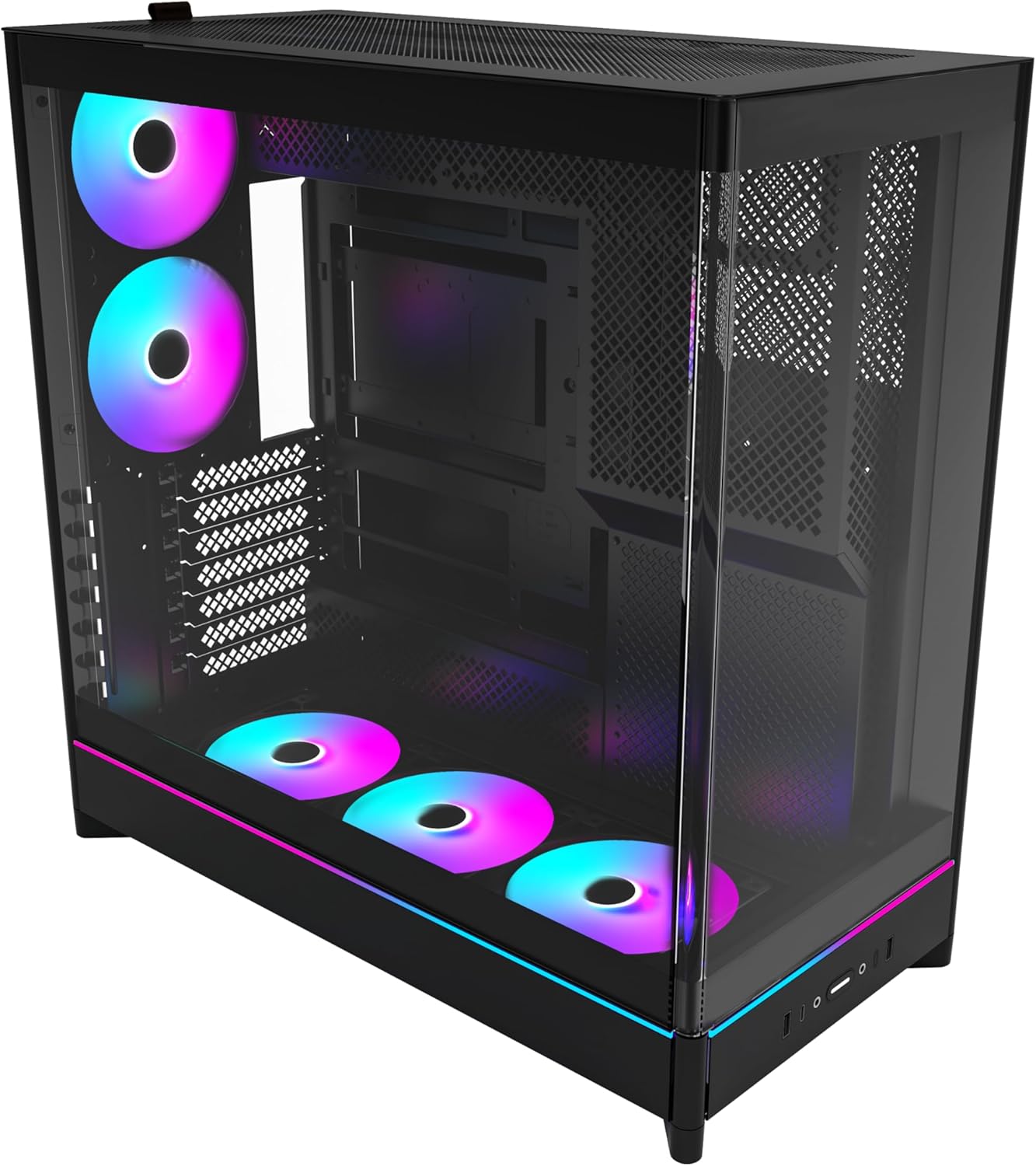
The MONTECH HS02 PRO is a high-airflow ATX mid-tower PC case designed for optimal thermal performance and aesthetic appeal. It features a unique reversible layout and a sturdy curved tempered glass front panel.
Zvinokosha:
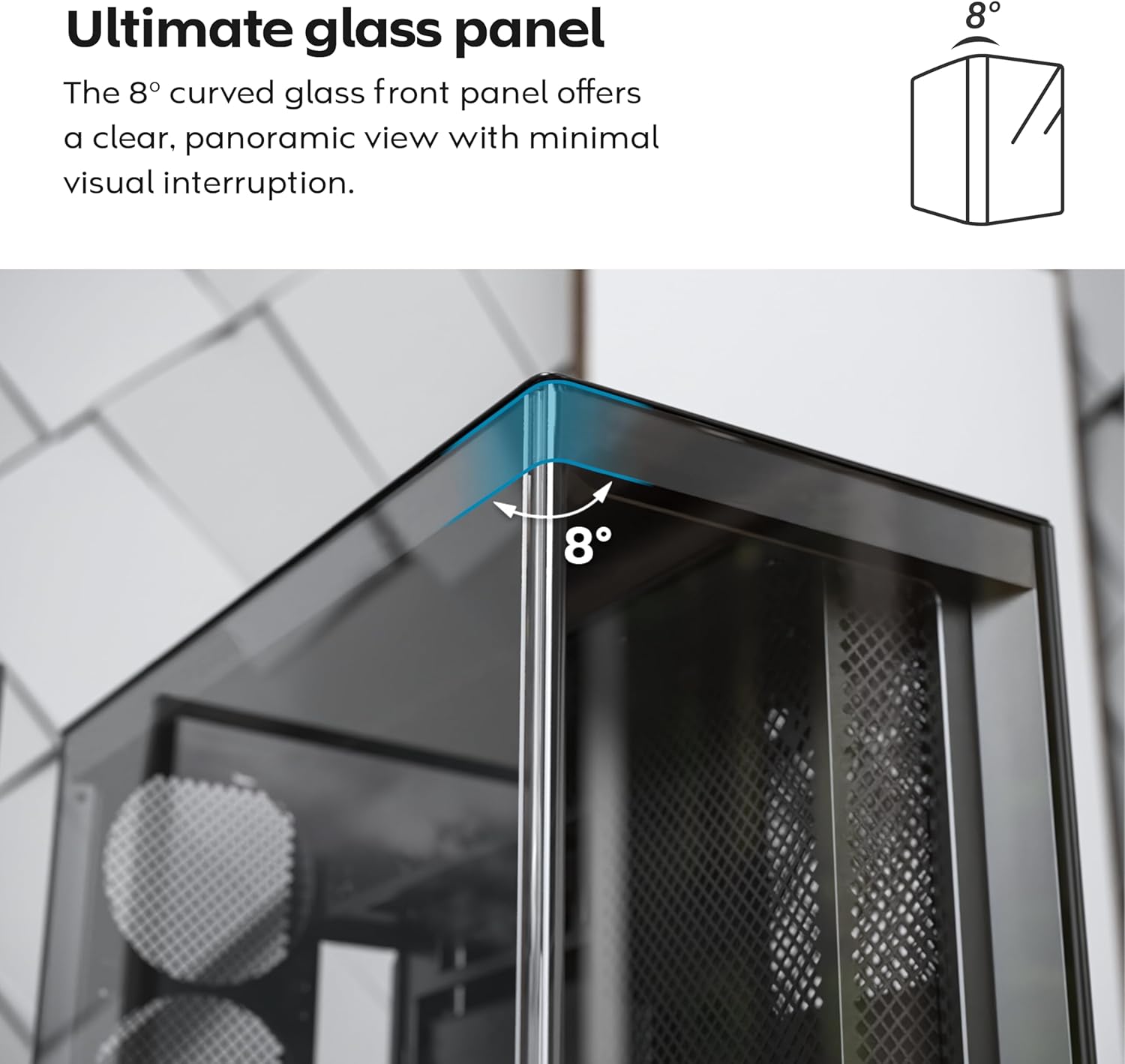
- 8-Degree Curved Glass Panel: The front tempered glass panel features a subtle 8-degree curved edge, offering a distinctive and refined view of the interior with minimal visual distortion.
- Reversible Design: A top-down reversible layout allows the entire setup to be positioned on either the left or right side, showcasing your build from your preferred angle.
- Vertical Ventilation: Bottom air intake and top exhaust create a natural chimney effect for efficient heat dissipation.
- Vertical GPU Ready: Rotatable PCIe slots enable an instant vertical GPU setup without requiring an extra holder or stand.
- Sink-In Design: A recessed bottom fan and motherboard layout maintain a clean, unobstructed side view.
- Pre-installed ARGB PWM Fans: Comes with 5 pre-installed GF120 V2 ARGB fans, fully syncable with motherboard lighting control.
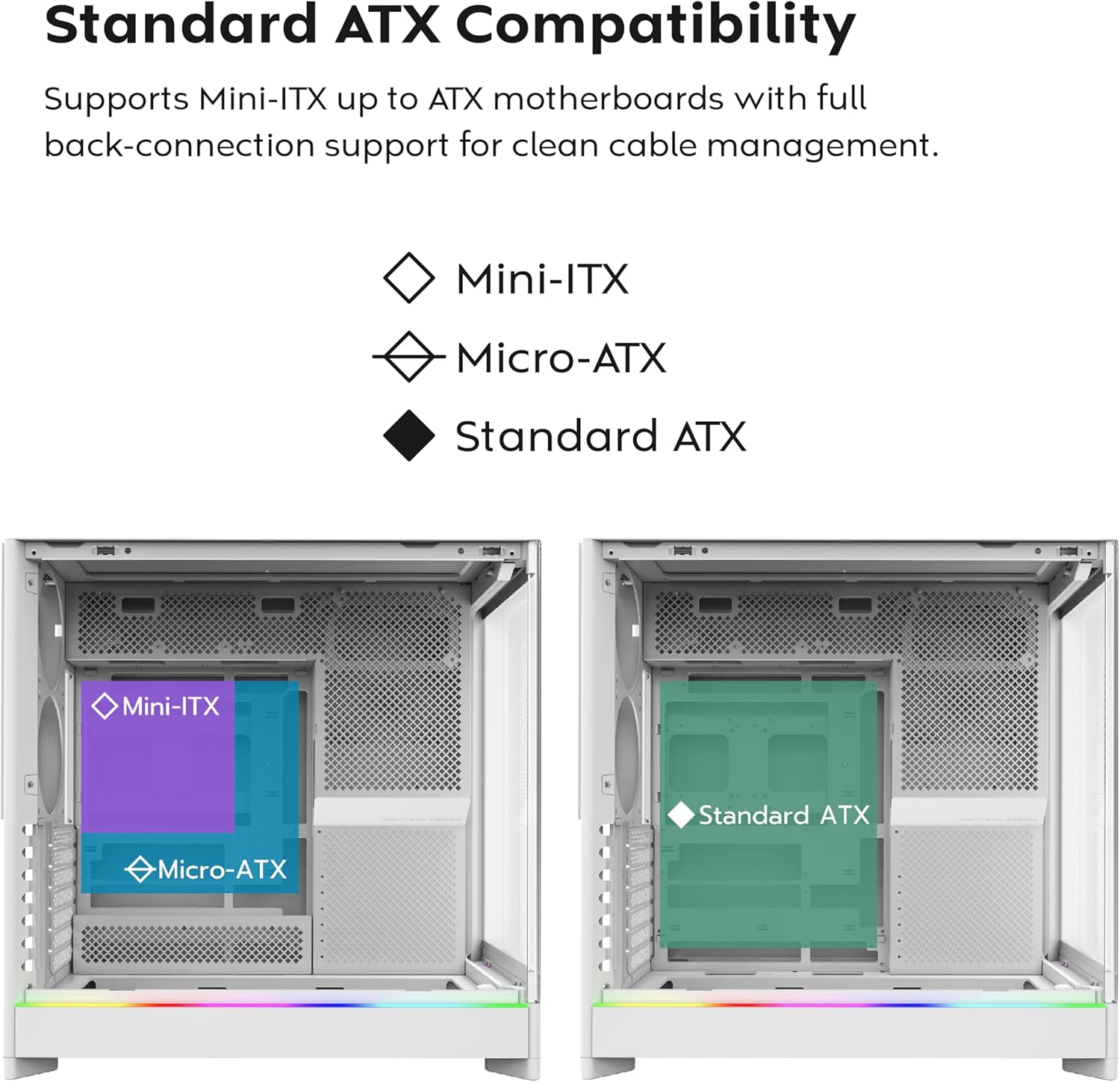
- Back-Connect Motherboard Ready: Supports standard and back-connect motherboards, including MSI Project Zero, ASUS BTF, and more.
- AmpLe Storage Capacity: Supports multiple storage drives (HDD/SSD) for flexible and expandable storage options.
Component Identification:





4. Setup uye Kuiswa
This section provides general guidelines for setting up your MONTECH HS02 PRO PC case. For detailed component-specific instructions, refer to your motherboard, GPU, and PSU manuals.
4.1 Kugadzirira Nyaya
- Kuburitsa: Carefully remove the case from its packaging. Inspect for any shipping damage.
- Panel Removal: Gently remove the tempered glass side panel and the rear metal side panel. The tempered glass panel is secured with toolless latches.
- Bhokisi rekushandisa: Tsvaga bhokisi rezvishongedzo mukati mebhokisi, rine zvese zvinodiwa screws uye hardware yekuisira.
4.2 Kuisirwa mamaboardboard
- Standoffs: Ensure the correct standoffs are installed for your motherboard form factor (Mini-ITX, Micro-ATX, or ATX). Adjust if necessary.
- Nhare yeI/O: Install your motherboard's I/O shield into the rear opening of the case.
- Kukwidza: Carefully align your motherboard with the standoffs and gently lower it into place. Secure it with the provided screws.
- Back-Connect Motherboards: If using a back-connect motherboard, ensure proper alignment with the designated cutouts for cable routing.
4.3 Kuisa Simba Chikamu (PSU) Kuisirwa
- Kukwidza: The PSU mounts at the bottom of the case. Slide the PSU into its designated bay from the rear.
- Kuchengetedza: Chengetedza PSU ne screws kubva kumashure kwebhokisi.
- Cabling: Route necessary power cables through the cable management cutouts to the motherboard and other components.
4.4 Kuisa Dhiraivha Yekuchengetera (HDD/SSD)
- Dhiraivha Bays: Utilize the designated drive bays for 3.5" HDDs and 2.5" SSDs.
- Kukwidza: Secure drives using the provided screws or toolless mechanisms where applicable.
4.5 Graphics Card (GPU) Kuiswa
- PCIe Slots: Remove the necessary PCIe slot covers.
- Horizontal Kuisirwa: Insert the GPU into the primary PCIe slot on your motherboard and secure it with screws.
- Vertical Installation (Optional): The rotatable PCIe slots allow for vertical GPU mounting. Rotate the bracket and install your GPU vertically. A PCIe riser cable (not included) is required for vertical mounting.
4.6 Cooling System Installation (Fans/Radiators)
- Pre-installed Fans: The case comes with 5 pre-installed ARGB PWM fans. Connect their power and ARGB cables to your motherboard or a fan controller.
- Additional Fans/Radiators: The case supports additional fans and radiators at the top, rear, and bottom. Refer to the specifications for supported sizes.
- AIO Cooler: Install your All-in-One (AIO) liquid cooler radiator and fans according to the cooler's instructions, utilizing the available mounting points.
4.7 Cable Management
Shandisa iyo ample space behind the motherboard tray and the cable management cutouts to route and secure cables. This improves airflow and aesthetics.
5. Operating Instructions
Once all components are installed and secured, you can power on your system.
5.1 Kubatidza
- Batanidza Peripherals: Connect your monitor, keyboard, mouse, and other peripherals to your system.
- Simba Cable: Connect the PSU power cable to a wall outlet and flip the PSU's power switch to the 'ON' position.
- Bhatani reSimba: Press the power button on the front I/O panel of the case.
5.2 Front I/O Panel Functions
- USB 3.0 Ports: For connecting USB 3.0 compatible devices.
- USB Type-C Port: For connecting USB Type-C compatible devices.
- Audio Jack: Zvemahedhifoni kana maspeaker.
- Maikorofoni Jack: Yekubatanidza maikorofoni.
- Bhatani reSimba: Kuvhura kana kudzima system.
- Bhatani re LED: To cycle through the 29 ARGB lighting modes for the pre-installed fans and integrated light strip.
6. Kuchengeta
Kugaro gadzirisa kunobatsira kuve nechokwadi chekuita kwakaringana uye hupenyu hurefu hwezvinhu zvePC yako.
- Kuchenesa Hupfu: Periodically clean dust filters (top, bottom, front) to maintain optimal airflow. Use compressed air to remove dust from internal components.
- Glass Panel Cleaning: Use a soft, lint-free cloth and a non-abrasive glass cleaner to clean the tempered glass panels. Avoid harsh chemicals.
- Cable Management: Periodically check cable routing to ensure no cables are obstructing airflow or fan blades.
- Kuongorora kweFan: Ensure all fans are spinning freely and quietly. Clean fan blades if dust buildup is significant.
7. Kugadzirisa matambudziko
This section addresses common issues you might encounter. For more complex problems, consult Montech customer support or a qualified technician.
Matambudziko Anowanikwa uye Mhinduro:
| Dambudziko | Zvinogona Kukonzera | Solution |
|---|---|---|
| Sisitimu haibatike. | PSU switch off, power cables loose, faulty PSU/motherboard. | Ensure PSU switch is ON. Check all power connections (24-pin, CPU, GPU). Test PSU if possible. |
| Fans are not spinning or RGB is not working. | Fan cables disconnected, ARGB cables disconnected, faulty fan/controller. | Verify fan power and ARGB headers are securely connected to motherboard/controller. Use the LED button to cycle modes. |
| Poor airflow or high temperatures. | Dust buildup, obstructed vents, incorrect fan orientation. | Clean dust filters and internal components. Ensure fans are oriented correctly for intake/exhaust. Check for cable obstructions. |
| Front I/O ports not functioning. | Front panel connectors loose or incorrectly connected to motherboard. | Refer to your motherboard manual to ensure all front panel headers (USB, audio) are correctly connected. |
8. Zvinotsanangurwa
Detailed technical specifications for the MONTECH HS02 PRO ATX Mid-Tower PC Case.
| Feature | Tsanangudzo |
|---|---|
| Model Name | HS02 PRO Glass Black with Fans |
| Model Number | HS02PB |
| Nyaya Type | Mid tower |
| Motherboard Kuenderana | ATX, Micro-ATX, Mini-ITX (with back-connect support) |
| Dimensions (LxWxH) | 32 x 52.4 x 58.8 inches (approx. 81.3 x 133.1 x 149.4 cm) |
| Item Weight | 24.2 pounds (approx. 10.98 kg) |
| Front Panel | Curved Tempered Glass (8-degree) |
| Pre-yakaiswa Fans | 5x GF120 V2 ARGB PWM Fans |
| Kutonhodza Nzira | Air (Vertical Ventilation / Chimney Effect) |
| Power Supply Mounting Type | Gomo rezasi |
| Kumberi I / O Zviteshi | 2x USB 3.0, 1x USB Type-C, Audio, Mic, Power Button, LED Button |
| GPU Clearance | Up to 420mm (supports vertical GPU with rotatable PCIe slots) |
| Nzvimbo dzekuchengetera | Multiple HDD/SSD support |
| Color | Nhema |
9. Warranty uye Tsigiro
For warranty information and technical support, please refer to the official Montech websaiti kana kubata basa ravo revatengi zvakananga. Chengetedza humbowo hwako hwekutenga kune warranty claim.
- Montech Official Websaiti: www.montechpc.com
- Mabatiro evatengi: Tarisa kune website for contact details, including email and phone support.