1. Nhanganyaya
Ndatenda nekutengaasing the Supersonic Professional Stereo Amplifier AV-972SA. This amplifier is designed to provide high-fidelity audio for your home entertainment or karaoke system. With its versatile features, including USB/SD card playback, FM radio, and microphone inputs, it offers a powerful and clear sound experience. Please read this manual carefully before operating the unit to ensure proper use and to maximize its performance.
2. Yakakosha Mirayiridzo Yekuchengetedza
- Magetsi: Ita shuwa kuti magetsi emagetsi awandatage matches the requirements specified on the unit (220V~250V/50Hz).
- Kufefetedza Usavhare chero mazaru emhepo. Isa maererano nemirairo yemugadziri.
- Mvura uye Unyoro: Usafumure mudziyo uyu kunaya kana kunyorova. Usaise zvinhu zvakazadzwa nezvinwiwa, zvakaita semavhasi, pamidziyo.
- Kupisa: Usaise padhuze nechero zvitubu zvekupisa zvakaita semaradiator, marejita ekupisa, zvitofu, kana zvimwe midziyo (kusanganisira amplifiers) zvinoburitsa kupisa.
- Kuchenesa: Chenesa chete nemucheka wakaoma.
- Sevhisi: Usaedze kushandira chigadzirwa ichi iwe pachako. Tumira masevhisi ese kuvashandi vanokwanisa.
- Kubatanidza Mutauri Ensure correct polarity when connecting speakers to prevent damage to the amplifier nevatauri.
3. Key Features
- Luxury Color Pointer Screen Display
- High-Fidelity Stereo Dynamic Amplifier Dhizaini
- Bass-enhancement Technology
- Yakasimba 3000W Kubuda
- Professional Karaoke FM Radio Tuner
- USB/SD Card Playback for MP3 files
- Low Leak Magnetic Ring type Voltage
- Optimized for use with 12", 15", and 18" loudspeakers
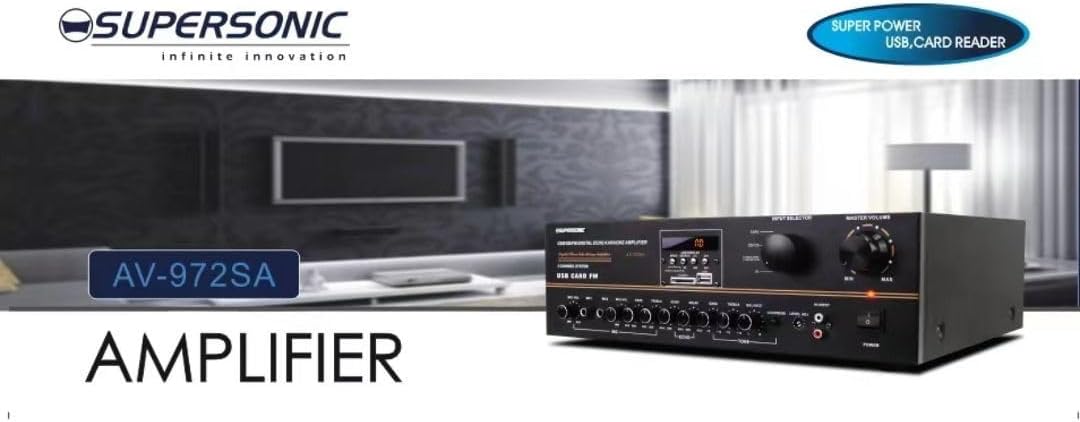
Mufananidzo 3.1: A visual representation of the key features of the Supersonic AV-972SA amplifier, including its display, power output, and connectivity options.
4. Chigadzirwa Pamusoroview
The Supersonic AV-972SA amplifier features a user-friendly front panel for easy control and a rear panel for all necessary connections.
4.1 Pamberi Panel

Mufananidzo 4.1: Mberi view of the Supersonic AV-972SA amplifier, showcasing its controls, display, and input ports in a home setting.
Pamberi pepaneru inosanganisira:
- Bhatani reSimba: Inotendeuka ampanosimudza kana kuvhara.
- Master Vhoriyamu Kudzora: Inogadzirisa huwandu hwese hwezvinobuda.
- Kudzora Bass/Treble: Adjusts low and high frequency response.
- Input Selector: Switches between different audio sources (e.g., USB, SD, FM, AUX).
- Nzvimbo ye USB/SD Card: Yekuridza odhiyo files directly from USB drives or SD cards.
- FM Tuner Controls: For radio station selection and tuning.
- Maikorofoni Inopinza: For connecting microphones for karaoke or public address.
- Ratidza Sikirini: Inoratidza maitiro aripo, ruzivo rwe track, kana FM frequency.
4.2 Rear Panel
The rear panel provides all necessary connections for speakers, power, and external audio sources.
- Mutauri Zviteshi: Connect your loudspeakers here. Ensure correct polarity (+ to + and - to -).
- Kupinda Munzwi (RCA): For connecting external audio devices like CD players, DVD players, or other audio sources.
- Tambo yeSimba Inopinda: Batanidza tambo yemagetsi yakapihwa pano.
- FM Antenna Input: Connect the FM antenna for improved radio reception.
5. Setup Guide
Follow these steps to set up your Supersonic AV-972SA amplifier:
- Kuiswa: Place the amplifier on a stable, flat surface with adequate ventilation around it. Avoid direct sunlight, heat sources, or areas with high humidity.
- Kubatanidza Mutauri Connect your loudspeakers to the speaker terminals on the rear panel. Match the positive (+) terminal on the amplifier to the positive (+) terminal on your speaker, and the negative (-) to the negative (-). Ensure all connections are secure. This amplifier is designed to work best with 12", 15", or 18" loudspeakers.
- Audio Source Connection:
- Midziyo Yekunze: Connect your CD player, DVD player, or other audio sources to the RCA audio input jacks on the rear panel.
- USB/SD Card: Insert a USB flash drive or SD card into the respective slot on the front panel.
- FM Kanyanga: Connect the FM antenna to the designated input on the rear panel for optimal radio reception.
- Power Connection: Iva nechokwadi chekuti ampSwitch yemagetsi yeLifier iri panzvimbo yeOFF. Batanidza tambo yemagetsi ku amplifier's power input and then plug it into a suitable 220V~250V/50Hz AC power outlet.
6. Operating Instructions
6.1 Kubatidza/Kudzima
Press the Bhatani reSimba on the front panel to turn the amplifier ON. The display will illuminate. Press it again to turn the amplifier OFF.
6.2 Selecting Audio Source
Shandisa iyo Input Selector button or knob on the front panel to cycle through available audio sources: USB, SD, FM, or AUX (RCA input).
6.3 Kudzora Vhoriyamu uye Toni
- Master Vhoriyamu: Rotate the Master Volume knob to adjust the overall sound level. Start with a low volume and gradually increase it.
- Bass/Treble: Shandisa iyo Bass uye Treble knobs to fine-tune the low and high frequencies of the audio output to your preference.
6.4 Kutamba Kadhi reUSB/SD
Once a USB drive or SD card containing MP3 audio files is inserted, the amplifier will automatically switch to USB/SD mode and begin playback. Use the control buttons (Play/Pause, Next, Previous) on the front panel to manage playback.
6.5 FM Radio Kushanda
Select the FM input using the Input Selector. Use the FM tuner controls to scan for and select radio stations. The display will show the current frequency.
6.6 Kushandiswa kweMaikorofoni (Karaoke)
Connect your microphones to the microphone input jacks on the front panel. Adjust the microphone volume and echo effects (if available) using the dedicated controls. Ensure the main volume is set appropriately to avoid feedback.
7. Kuchengeta
- Kuchenesa: Bvisa magetsi usati wageza. Shandisa jira rakapfava, rakaoma kupukuta kunze kwe amplifier. Do not use liquid cleaners or aerosol sprays.
- Kufefetedza Gara uchitarisa kuti nzvimbo dzinopinda mhepo hadzina guruva nemarara kudzivirira kupisa zvakanyanya.
- Kuchengeta: Kana kuchengeta iyo amplifier for an extended period, ensure it is in a cool, dry place, away from direct sunlight and extreme temperatures.
8. Kugadzirisa matambudziko
| Dambudziko | Zvinogona Kukonzera | Solution |
|---|---|---|
| Hapana simba | Tambo yemagetsi haina kubatana; Nzvimbo yekubuditsa magetsi haina kumira zvakanaka; Amplifier power switch off | Check power cord connection; Try a different outlet; Ensure power switch is ON |
| Hapana inzwi rinobuda | Volume too low; Incorrect input selected; Speaker wires loose or incorrectly connected; Faulty audio source | Increase master volume; Select correct input; Check speaker connections and polarity; Test with a different audio source |
| Kugamuchira FM kwakashata | Antenna not connected or poorly positioned; Weak signal | Connect FM antenna securely; Adjust antenna position; Try manual tuning |
| USB/SD haisi kutamba | Hazvina kururama file format; USB/SD card faulty or not inserted correctly; Amplifier isiri mu USB/SD mode | Iva nechokwadi files are MP3 format; Reinsert USB/SD card; Select USB/SD input mode |
9. Zvinotsanangurwa
| Feature | Tsanangudzo |
|---|---|
| Brand | Supersonic |
| Model Number | AMP-AV972SA |
| Output Wattage | 3000W |
| Kubatana Technology | USB |
| Special Feature | Compact Design |
| Color | Nhema |
| Product Dimensions | 25D x 45W x 26H masendimita |
| Item Weight | 1 kilogram |
| Kudzora Nzira | Bata |
| Magetsi | 220V ~ 250V/50Hz |
10. Warranty uye Tsigiro
This Supersonic AV-972SA amplifier inouya ne 6 Months Manufacturer's Warranty from the date of purchase. This warranty covers manufacturing defects under normal use. It does not cover damage caused by misuse, accidents, unauthorized modifications, or improper installation.
For warranty claims or technical support, please contact your retailer or the Supersonic customer service department. Please have your proof of purchase and product model number (AMP-AV972SA) ready when contacting support.