1. Nhanganyaya
Thank you for choosing the UGREEN 100W 5-Port GaN Charger. This manual provides essential information for the safe and efficient use of your new charging device. Please read these instructions carefully before use and retain them for future reference.
2. Chigadzirwa Pamusoroview
The UGREEN 100W 5-Port GaN Charger is a versatile and powerful charging solution designed to power multiple devices simultaneously. Featuring advanced GaN technology, a smart digital display with touch control, and comprehensive safety protections, it offers efficient and reliable charging for laptops, smartphones, tablets, and smartwatches.
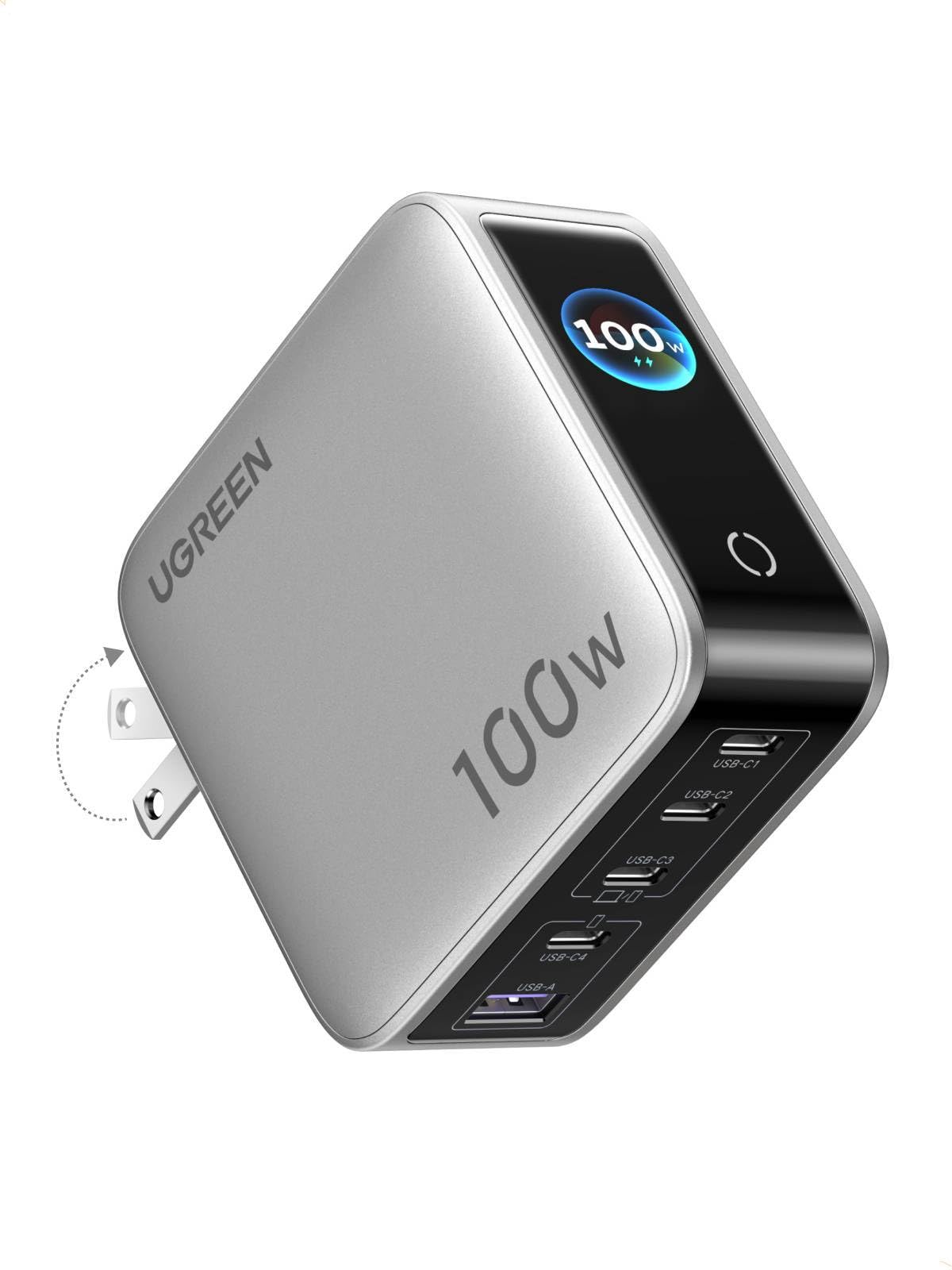
Image: UGREEN 100W 5-Port GaN Charger, showcasing dhizaini yayo diki uye kuratidzwa kwayo kwedhijitari.
Zvinokosha:
- Smart Digital Display with Touch Control: Monitor real-time charging data including total output power, individual port power, charging protocol (PD/QC), device battery level, and charger core temperature.
- 100W PD High-Speed Fast Charging: Delivers up to 100W max Power Delivery for rapid charging of laptops, smartphones, and tablets.
- 5-in-1 Multi-Port Charging: Equipped with 4 USB-C ports and 1 USB-A port for simultaneous charging of up to 5 devices.
- Kugovera Simba Rakangwara: Automatically optimizes power delivery to connected devices, preventing power competition.
- Multi-Layer Safety Certified: Dziviriro yakavakirwa-mukati kubva kune-over-voltage, over-current, over-heat, short-circuit, and over-charge.
- Portable & Fire-Resistant Design: Features a foldable plug for easy travel and a 94-V0 fire-resistant PC material shell for durability.
3. Setup
3.1 Unboxing uye Yekutanga Kuongorora
Upon opening the package, ensure all components are present and undamaged. The package typically includes the UGREEN 100W 5-Port GaN Charger and a user manual.
3.2 Kubatanidza Chaja
- Vhura ma AC prongs kubva pachaja body.
- Plug the charger firmly into a standard wall outlet.
- The digital display will illuminate, indicating the charger is ready for use.

Image: The UGREEN charger with its foldable plug extended, ready to be plugged into an outlet.
4. Operating Instructions
4.1 Kuchaja Zvishandiso Zvako
- Connect your devices to the available USB-C or USB-A ports using appropriate charging cables.
- The charger will automatically detect the connected devices and begin charging.
- The intelligent power distribution system will optimize charging speeds across all connected devices.

Image: The UGREEN charger simultaneously charging a laptop, smartphone, and smartwatch, demonstrating its 5-in-1 capability.
4.2 Using the Smart Digital Display
The integrated digital display provides real-time charging information. Use the touch control button to cycle through different display modes:
- Total Output Power: Inoratidza mvura yakabatanatagiri kuendeswa kumidziyo yese yakabatana.
- Individual Port Power: Inoratidza wattage being delivered by each specific port (USB-C1, USB-C2, USB-C3, USB-A).
- Kuchaja Protocol: Indicates the active charging protocol (e.g., PD, QC) for each port.
- Real-time Device Battery Level: Inoratidza huwandu hwebhatiri razvinotage of connected devices (if supported).
- Charger Core Temperature: Monitors the internal temperature of the charger for safety.
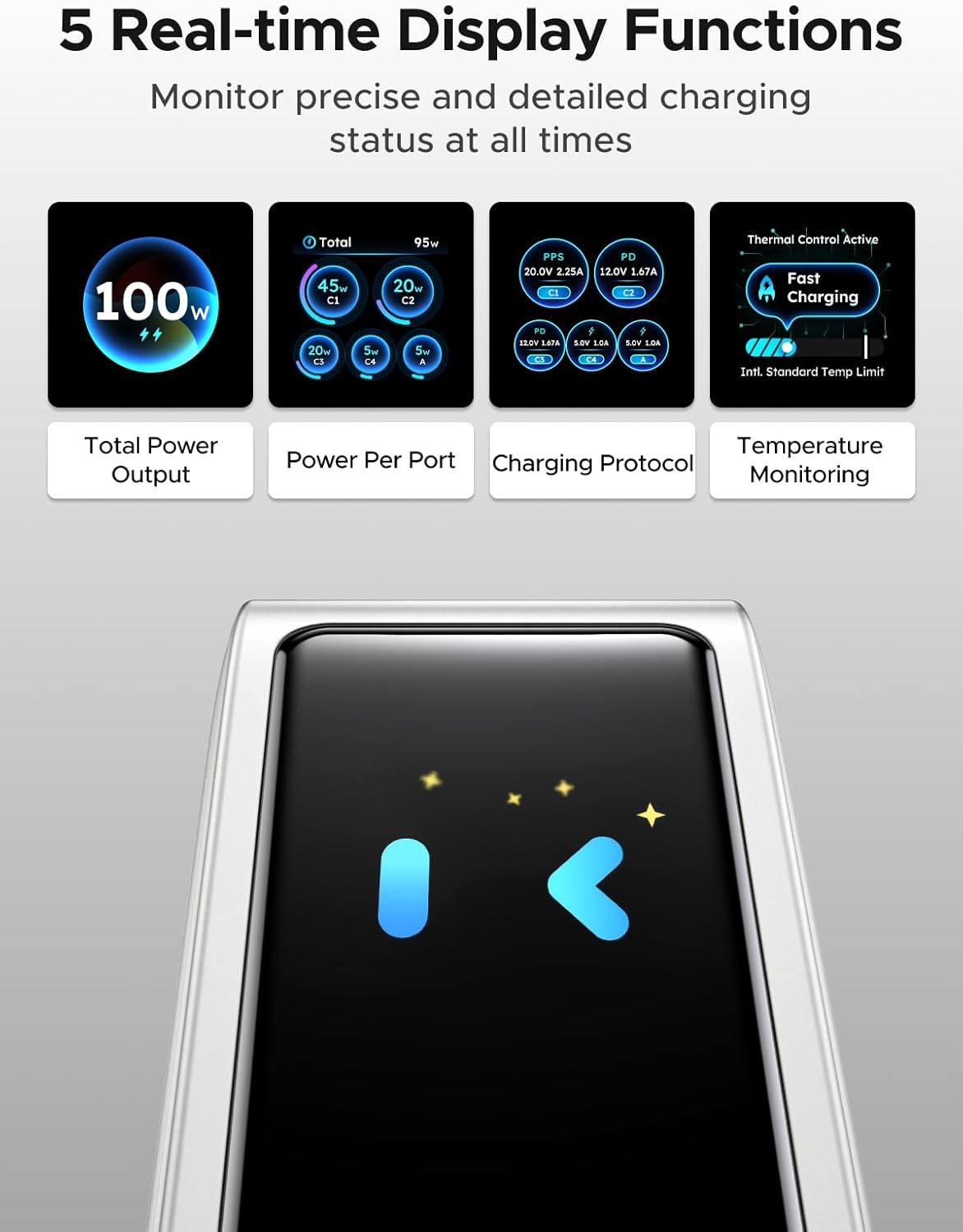
Image: The charger's digital display showing different real-time data points such as total power output, power per port, charging protocol, and temperature monitoring.
Note: The charger features an energy-saving function. The screen will automatically turn off after 2 minutes of inactivity.
5. Safety Information
The UGREEN 100W 5-Port GaN Charger is designed with multiple safety features to protect your devices and ensure safe operation:
- Kupfuura-voltage Dziviriro: Inodzivirira kukuvara kubva kune yakawandisa voltage kuisa.
- Over-current Protection: Dziviriro kubva kune yakawandisa ikozvino kuyerera.
- Over-heat Protection: Intelligent temperature control system automatically adjusts power to prevent overheating.
- Short-circuit Protection: Protects against short-circuit damage.
- Over-charge Protection: Prevents devices from being overcharged.
- Fire-Resistant Design: Constructed with 94-V0 fire-resistant PC material for enhanced safety.

Image: A visual representation of the charger's internal components and various safety features, including over-temperature, over-voltage, pamusoro pazvino, uye pfupi-redunhu kudzivirira.
Always use the charger in a well-ventilated area and avoid covering it during operation.
6. Kuchengeta
6.1 Kuchenesa
To clean the charger, unplug it from the power outlet and disconnect all devices. Use a soft, dry cloth to wipe the surface. Do not use liquid cleaners or abrasive materials.
6.2 Kuchengeta
When not in use, store the charger in a cool, dry place away from direct sunlight and extreme temperatures. Ensure the foldable plug is retracted to prevent damage.
7. Kugadzirisa matambudziko
7.1 Chaja Isina Kubatidzwa
- Ensure the charger is securely plugged into a functional wall outlet.
- Check if the wall outlet is receiving power by testing it with another device.
7.2 Devices Not Charging or Charging Slowly
- Verify that the charging cables are properly connected to both the charger and your devices.
- Ensure your charging cables are in good condition and support fast charging if desired.
- Some devices may have specific charging requirements; refer to your device's manual.
- If multiple devices are connected, the charger intelligently distributes power. Charging speed may vary depending on the number and power requirements of connected devices.
7.3 Digital Display Not Working
- The display has an energy-saving function and turns off after 2 minutes of inactivity. Tap the touch control button to reactivate it.
- Iva nechokwadi chekuti charger iri kugamuchira simba.
8. Zvinotsanangurwa
| Feature | Detail |
|---|---|
| Brand | UGREEN |
| Model | X773 |
| Chikamu Nhamba | 65619 |
| Wattage | 100 watts |
| Nhamba yePorts | 5 (4 USB-C, 1 USB-A) |
| Special Features | Fast Charging, Multi Device Charging, Smart Digital Display, Touch Control, Travel |
| Inowirirana Devices | Cellular Phones, Laptops, Smartwatches, Tablets |
| Inoenderana Phone Models | Galaxy S25 Ultra, S24 Ultra, S24, S23 Ultra, S23+, S22, S22 Ultra, S22+, S21 Ultra, S21, S21 Plus, S20 Ultra, S10, S10 Plus, S10e, S9, S9 Plus, S8, S8 Plus; Galaxy Note 20, Note10, Note 9, Note 8; Pixel 10, 9, 8, 7, 6, 6 Pro, 5, 4A, 3a, 3XL, 3, 2 XL; MacBook Pro 16''/ 15'' / 13"; MacBook Air 13''(M2) / 13''; MacBook 12''; Dell XPS 15/ 13; Steam Deck; iPhone 17, 17 Pro, 17 Pro Max, 16, 16 Plus, 16 Pro, 16 Pro Max, 15, 15 Plus, 15 Pro, 15 Pro Max, 14, 14 Plus, 14 Pro, 14 Pro Max, 13 Pro, 13 Pro Max, 13 mini, 13, 12 Pro, 12 Pro Max, 12 mini, 12, 11 Pro, 11 Pro Max, 11, SE, XS, XS Max, XR, X, 8, 8 Plus |
| Parcel Dimensions | 11.6 x 11.5 x 4.6cm; 440g |
| Mugadziri | Ugreen Group Limited |
| Zuva Rokutanga Kuwanikwa | Kukadzi 5 2026 |
9. Warranty uye Tsigiro
9.1 Ruzivo rweWaranti
UGREEN products typically come with a standard manufacturer's warranty. Please refer to the product packaging or the official UGREEN websaiti kune yakatarwa waranti mazwi uye mamiriro.
9.2 Mutengi Tsigiro
Kuti uwane rutsigiro rwehunyanzvi, rubatsiro rwekugadzirisa matambudziko, kana zvichemo zvewaranti, ndapota taura neUGREEN sevhisi yevatengi kuburikidza nemukuru wavo. websaiti kana ruzivo rwekusangana rwunopihwa pane chako chigadzirwa kurongedza.


