1. Nhanganyaya
Thank you for choosing the VAVA 5.5" 720P HD Video Baby Monitor. This manual provides essential information for the safe and effective use of your device. Please read it thoroughly before operation and retain it for future reference.
This monitor offers a secure and clear way to observe your baby with its 5.5-inch 720p display, two-way audio, night vision, and pan/tilt/zoom capabilities. It operates on a dedicated wireless connection, ensuring privacy and reliability.
Chii chiri muBhokisi
- Baby Monitor (Parent Unit)
- Camera (Baby Unit)
- AC Power Adapter x2
- Mount Kit
- Kamera Mount
- Simba Cable x2
- User Guide

Image 1.1: VAVA 5.5" 720P HD Video Baby Monitor components, including the parent unit (monitor) and baby unit (camera).
2. Safety Information
Please observe the following safety precautions to prevent electric shock, injury, or damage to the product:
- Keep the monitor and camera out of reach of children.
- Do not place the camera or power cords within 3 feet (1 meter) of the crib.
- Use only the provided AC power adapters.
- Usafumura chigadzirwa kumvura kana unyoro.
- Dzivisa kuisa chigadzirwa pedyo nezvinopisa kana zuva rakananga.
- Ensure proper ventilation; do not cover the product with blankets or other materials.
- Do not attempt to repair or modify the product yourself. Contact customer support for assistance.
3. Chigadzirwa Pamusoroview
Chikamu chevabereki (Monitor)
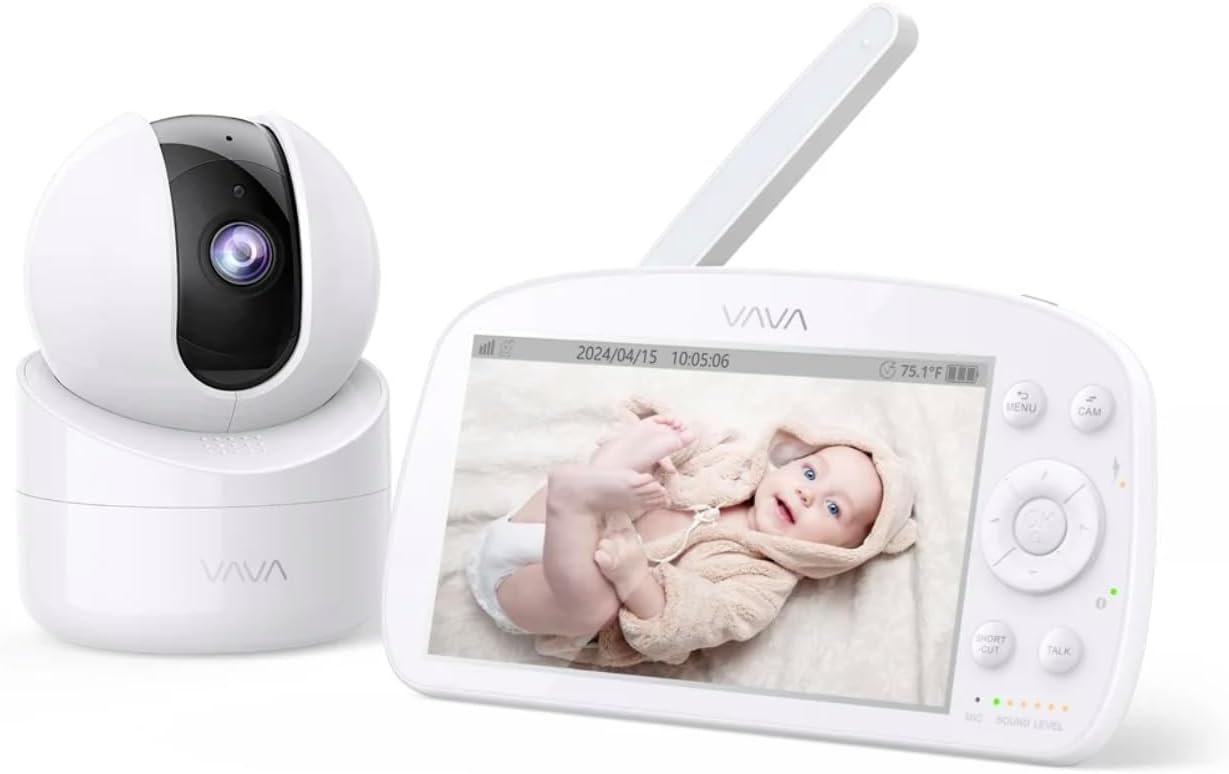
Image 3.1: The VAVA parent unit (monitor) and baby unit (camera) shown together.
The parent unit features a 5.5-inch HD display, control buttons, a microphone, speaker, and an antenna for signal reception.
Chikamu cheVacheche (Kamera)

Image 3.2: The VAVA baby unit (camera) with its pan/tilt base, featuring the lens and microphone.
The baby unit includes a 720p camera with infrared LEDs for night vision, a microphone, speaker, and a temperature sensor. It supports pan, tilt, and digital zoom functions.
4. Setup
4.1 Kuiswa kweKamera
Place the baby unit (camera) in a location that provides a clear view of your baby in the crib. Ensure it is at least 3 feet (1 meter) away from the crib to prevent entanglement with cords. The camera can be placed on a flat surface or mounted to a wall using the included mount kit.

Mufananidzo 4.1: Eksample of camera placement, mounted above a crib for optimal viewing.
4.2 Kubatidza
- Connect one AC power adapter to the baby unit and plug it into a power outlet.
- Connect the second AC power adapter to the parent unit and plug it into a power outlet. The parent unit has a built-in rechargeable battery for portable use.
- Press and hold the power button on the parent unit to turn it on. The display will activate.
4.3 Pairing (If Necessary)
The baby unit and parent unit are pre-paired at the factory. If the connection is lost or you are adding an additional camera (up to 4 cameras supported), follow these steps:
- Pachikamu chemubereki, tinya MENU bhatani.
- Navigate to the camera icon (Pairing) and select it.
- Choose an available camera channel (e.g., CAM 2, CAM 3, CAM 4).
- Press the pairing button on the back of the baby unit within 10 seconds.
- Once paired, the image from the camera will appear on the parent unit display.
5. Operating Instructions
5.1 Kudzora Chikamu Chevabereki

Image 5.1: The parent unit in use, displaying the live feed from the baby unit.
- Menu Bhatani: Access settings, pairing, lullabies, and other functions.
- Mabhatani Ekufambisa (Kumusoro/Kudzika/Kuruboshwe/Kurudyi): Move through menus and control camera pan/tilt.
- Bhatani RAKANAKA: Simbisa sarudzo.
- TALK Button: Press and hold to speak to your baby through the camera's speaker (Two-Way Audio).
- ZOOM Bhatani: Magnify the image (2X-4X digital zoom).
- VOX Modhi: Voice Operated eXchange. The screen will turn on automatically when sound is detected from the baby unit. Adjust sensitivity in the menu.
- Lullabies: Select and play lullabies from the menu to soothe your baby.
- Night Vision: Automatically activates in low light conditions, providing a clear black and white image.
- Auto-Pilot Mode: Cycles through connected cameras automatically.
5.2 Camera Control (Pan & Tilt)
From the parent unit, use the navigation buttons to remotely adjust the camera's viewkona yekona:
- Press Kumusoro/Kudzika to tilt the camera vertically.
- Press Kuruboshwe/Kurudyi to pan the camera horizontally.
6. Kuchengeta
6.1 Kuchenesa
- Disconnect both units from power before cleaning.
- Use a soft, dry cloth to wipe the surfaces of the monitor and camera.
- For the camera lens, use a lens cleaning cloth to avoid scratches.
- Usashandise abrasive cleaners kana solvents.
6.2 Kutarisira Mabhatiri (Chikamu Chevabereki)
- Kurebesa bhatiri, dzivisa kuburitsa bhatiri zvakazara nguva zhinji.
- Charge the parent unit regularly.
- If storing the unit for an extended period, charge the battery to approximately 50% and store in a cool, dry place.
7. Kugadzirisa matambudziko
| Dambudziko | Zvinogona Kukonzera | Solution |
|---|---|---|
| Hapana mufananidzo pachikamu chikuru | Parent unit is off; Camera is off; Out of range; Not paired. | Ensure both units are powered on. Move units closer. Re-pair the camera (see Section 4.3). |
| Yakashata yemhando yemhando | Weak signal; Obstructions; Dirty lens. | Move units closer. Remove obstructions. Clean camera lens. |
| Hapana ruzha kana kurira kwakashata | Volume too low; Out of range; Interference. | Increase parent unit volume. Move units closer. Avoid placing near other electronic devices. |
| Bhatiri reparenti rinopera nekukurumidza | High screen brightness; VOX mode off; Old battery. | Reduce screen brightness. Enable VOX mode. Contact support for battery replacement if necessary. |
| Camera not responding to pan/tilt | Connection issue; Camera malfunction. | Check connection. Power cycle both units. If issue persists, contact support. |
8. Zvinotsanangurwa
| Feature | Detail |
|---|---|
| Model Name | VAVA 5.5" 720P Video Baby Monitor |
| Model Number | 83-24011-022 |
| Kukura Kwekuratidza | 5.5 inches |
| Vhidhiyo Resolution | 720p HD |
| Transmission Range | Kusvika ku900 ft (mutsara wekuona) |
| Kubatana Technology | Wireless (Dedicated 2.4GHz FHSS) |
| Simba Source | Corded Electric, Rechargeable (Parent Unit) |
| Special Features | 2-Way Audio, Night Vision, Pan & Tilt, Zoom (2X-4X), VOX Mode, Lullabies, Temperature Sensor |
| Indoor / Outdoor Kushandiswa | Indoor |
| Mounting Type | Tabletop Mount |
| Product Dimensions | 8.46 x 8 x 5 inches |
| Item Weight | 2.2 makirogiramu |
| UPC | 191280045666 |
9. Warranty uye Tsigiro
9.1 Ruzivo rweWaranti
VAVA products are designed and manufactured to the highest quality standards. This product is covered by a manufacturer's warranty from the date of purchase. Please refer to the warranty card included in your package or visit the official VAVA websaiti kune yakadzama waranti mazwi uye mamiriro.
9.2 Mutengi Tsigiro
If you encounter any issues or have questions regarding your VAVA 5.5" 720P HD Video Baby Monitor, please contact VAVA Customer Support. Our team is available to assist you with troubleshooting, technical support, and warranty claims.
Kuti uwane rumwe ruzivo rwekufambidzana, ndapota shanya: www.vava.com/support


