1. Chigadzirwa Pamusoroview
The WALI Dual Ultrawide Monitor Mount is designed to securely hold two ultrawide, heavy-duty, or curved monitors, enhancing your workspace ergonomics and freeing up desk space. This robust monitor arm supports screens from 17 to 49 inches, with a weight capacity of up to 44 lbs per arm. It features an advanced gas spring mechanism for flexible adjustments, including tilt, swivel, and rotation, allowing for various screen configurations such as vertical stacking.
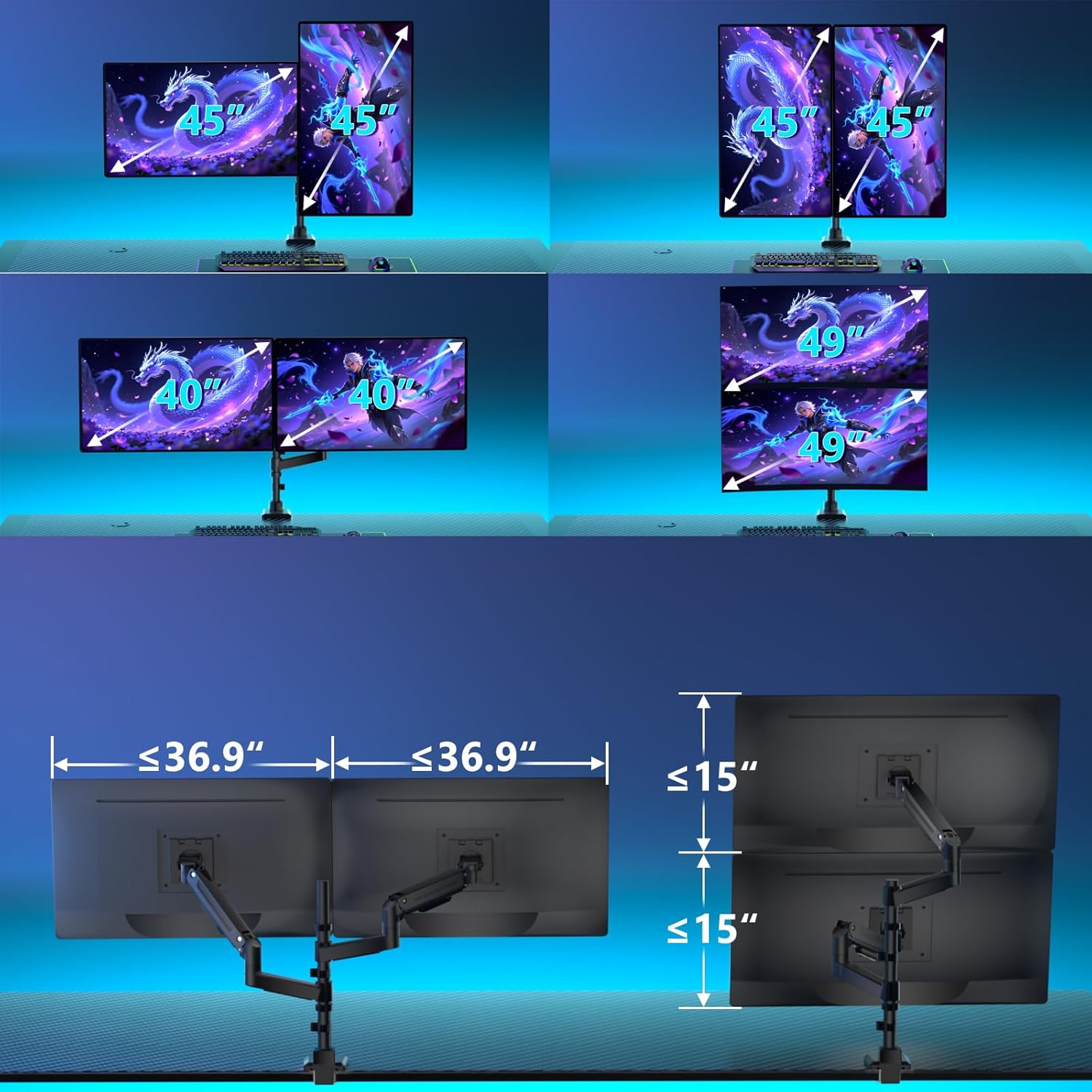
Image: The WALI Dual Ultrawide Monitor Mount supporting two monitors in a stacked vertical configuration.

Image: Visual representation of the WALI Dual Ultrawide Monitor Mount supporting different monitor sizes, including 45-inch, 40-inch, and 49-inch screens in various orientations.
2. Safety Information
Please read this entire instruction manual before installation and assembly. If you have any questions regarding any of the instructions or warnings, please contact your local distributor for assistance. Keep these instructions in a safe place for future reference.
- Do not exceed the maximum weight capacity of 44 lbs (20 kg) per arm. Serious injury or property damage may occur.
- Ensure the mounting surface (desk) can safely support the combined weight of the equipment and all attached hardware.
- Use safety gear and proper tools for installation.
- Ichi chigadzirwa chine zvinhu zvidiki zvinogona kuve njodzi yekudzipwa kana ikamedzwa. Gara kure nevana.
- Always check that the mount is securely fastened before attaching monitors.
3. Package Zviri mukati
Simbisa kuti zvese zvakanyorwa pazasi zvinosanganisirwa mupakeji yako:
- 1 x WALI Ultrawide Monitor Arm (Dual Arms)
- Kiti yeHardware yekuisa (zvikururu zvakasiyana-siyana, mawasher, maspacers)
- User Manual
- Required Tools (e.g., Allen wrenches)
4. Setup uye Kuiswa
The WALI Dual Ultrawide Monitor Mount offers two installation options: C-clamp and grommet mount. Both methods are suitable for desk thicknesses between 0.47 inches and 1.77 inches.
4.1 Choose Your Mounting Method
Determine whether to use the C-clamp for desks without a pre-drilled hole or the grommet mount for desks with an existing hole.

Mufananidzo: Zvakadzama view yeC-clamp and grommet mounting options, showing compatibility with desk thicknesses from 0.47" to 1.77".
4.2 Attaching the Mount to Your Desk
Follow the specific instructions provided in the included hardware kit for your chosen mounting method. Ensure the mount is stable and securely tightened to prevent movement.
4.3 Attaching Monitors to the Arms
This mount is compatible with VESA patterns of 75x75mm and 100x100mm. Before mounting, ensure your monitors meet these VESA standards and do not exceed the 44 lbs weight limit per arm.
- Attach the VESA plate to the back of each monitor using the appropriate screws from the hardware kit.
- Slide the monitor with the attached VESA plate onto the arm's mounting head.
- Secure the monitor by tightening any locking screws or mechanisms on the VESA head.

Image: The WALI monitor arm securely holding two monitors, emphasizing its capacity of up to 44 lbs per arm.
5. Mashandiro uye Kugadzirisa
The WALI Dual Ultrawide Monitor Mount provides extensive flexibility for optimal viewing angles uye ergonomic positioning.
5.1 Kuisa Monitor
Each arm allows for:
- Tilt: +50°/-20° for reducing glare and finding the perfect vertical angle.
- Swivel: +/-90° to share your screen or adjust for different tasks.
- Kutenderera: 360° for switching between landscape and portrait orientations.
- Kugadzirisa Hurefu: Up to 18.9 inches of smooth vertical movement thanks to the gas spring lift.
- Kuwedzera: Max extension of 21.7 inches from the pole.
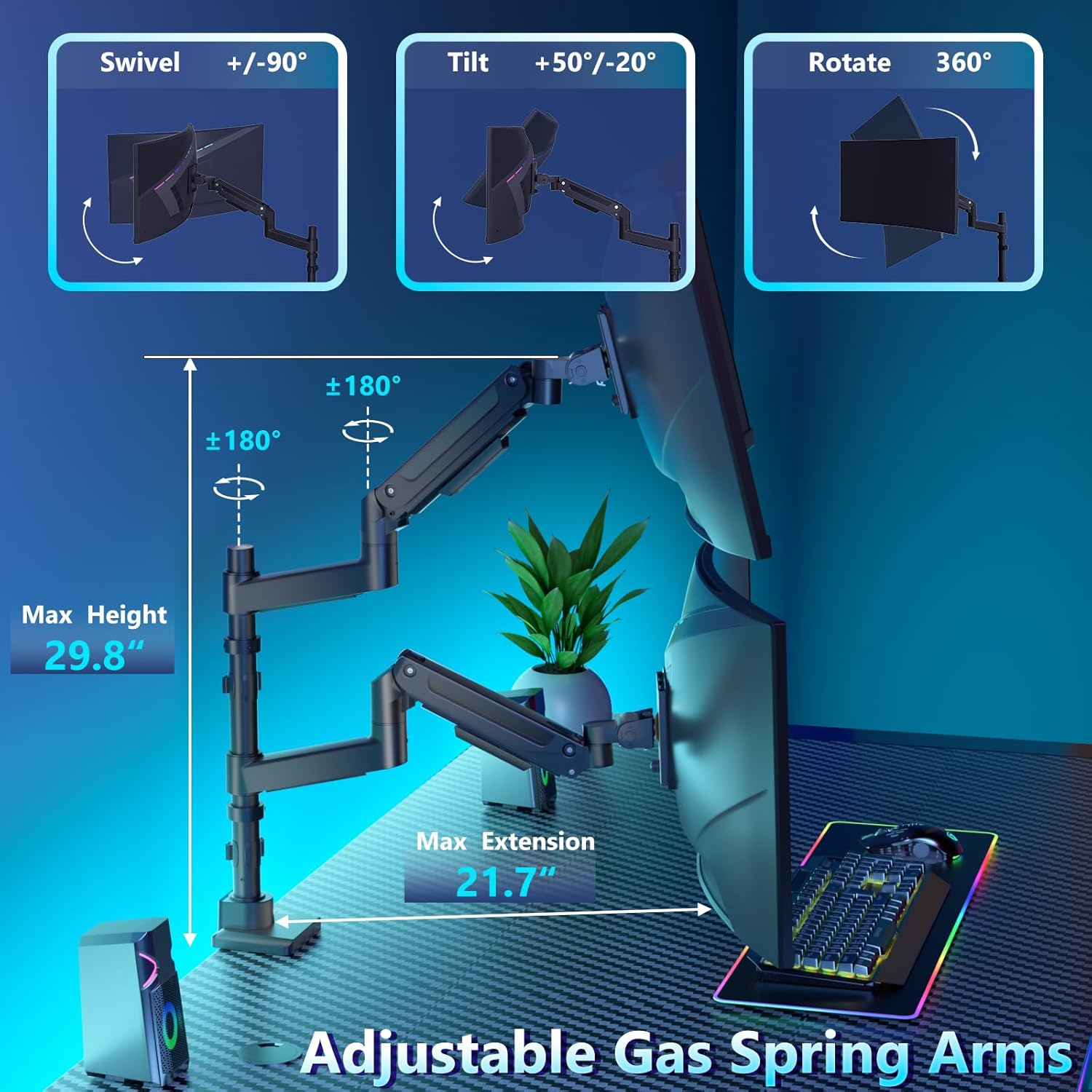
Image: Diagram illustrating the adjustable features of the WALI monitor arm, including swivel (+/-90°), tilt (+50°/-20°), 360° rotation, maximum height of 29.8", and maximum extension of 21.7".
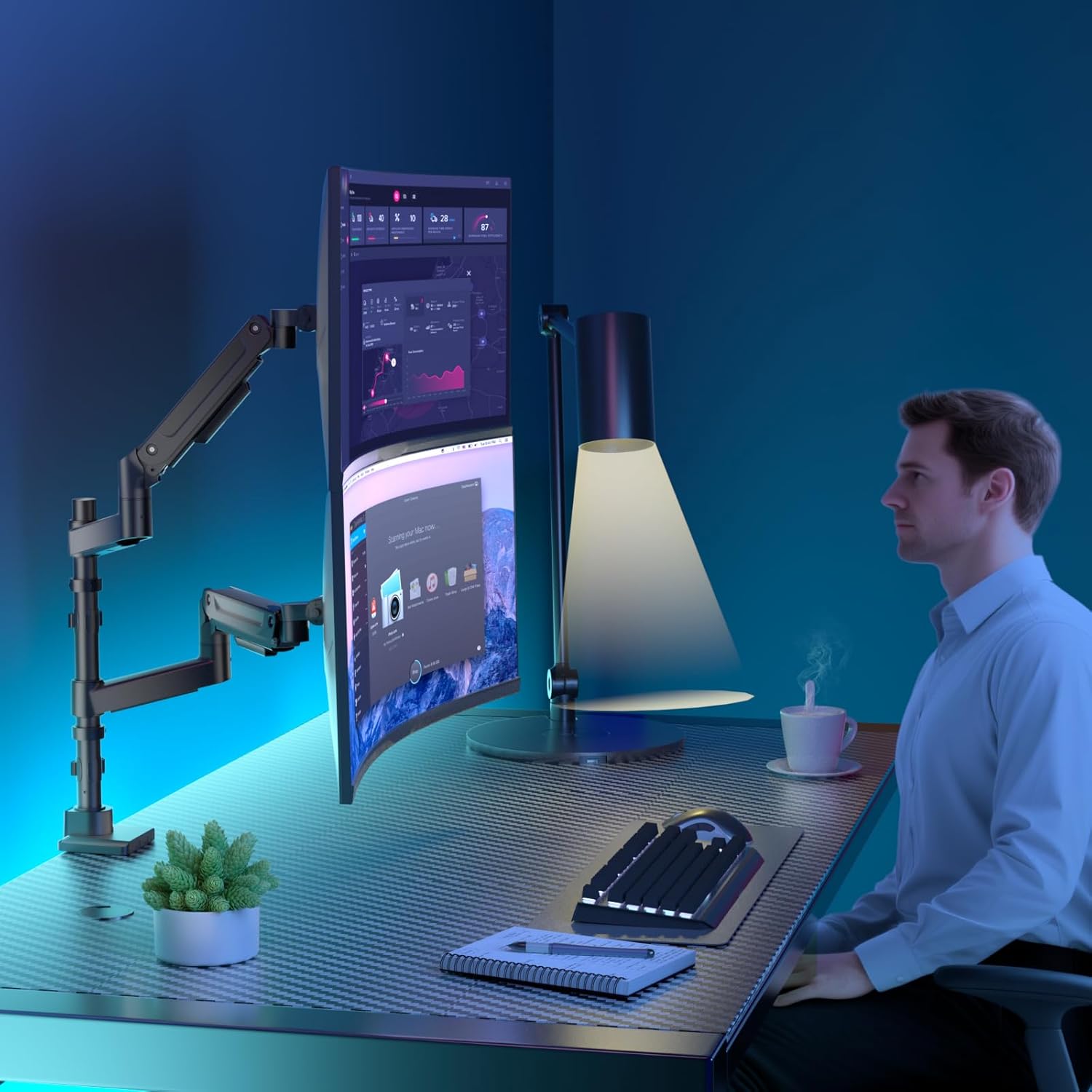
Image: A user demonstrating an ergonomic setup with two vertically stacked monitors, showcasing the flexibility of the WALI monitor arm for different work scenarios.
5.2 Kugadziriswa Kwekuneta Kwechitubu Chegesi
The gas springs allow for effortless adjustments. If an arm drops or rises unexpectedly, adjust the tension using the provided Allen key.
- Misa uye bata ruoko rwakachinjika.
- Locate the tension adjustment screw on the arm.
- Tendeuka clockwise if the arm rises too easily or does not stay down.
- Tendeuka zvinopesana nemaawa if the arm drops or is difficult to raise.
- Adjust until the arm stays in the desired position when released.

Image: Visual guide for adjusting the gas spring tension. Turn counter-clockwise if the arm drops, and clockwise if the arm rises.
5.3 Tilting Ultrawide Monitors
For ultrawide monitors, specific steps may be needed to achieve smooth tilting:
- Before mounting the monitor, adjust the gas spring tension (A & B) to the maximum.
- If the monitor does not tilt smoothly after mounting, loosen the screw as shown in the diagram until smooth tilting is achieved.

Image: Step-by-step instructions for tilting ultrawide monitors, including pre-adjustment of gas spring tension and loosening a specific screw for smooth movement.
5.4 Cable Management
Integrated cable management clips are provided to route and conceal cables along the arms and pole, maintaining a clean and organized workspace.
6. Kuchengeta
Regular maintenance ensures the longevity and optimal performance of your WALI monitor mount.
- Kuchenesa: Pukuta gomo nenyoro, damp jira. Dzivisa abrasive cleaners.
- Kutarisa Kusimba: Periodically check all screws and connections to ensure they remain tight and secure. Re-tighten as necessary.
- Kuongorora Chitubu cheGasi: If the arms become difficult to adjust or do not hold position, refer to the "Gas Spring Tension Adjustment" section.

Image: An illustration of the WALI monitor arm undergoing a "20000 Press Test," signifying its robust and stable construction for long-term use.
7. Kugadzirisa matambudziko
| Dambudziko | Zvinogona Kukonzera | Solution |
|---|---|---|
| Monitor arm drops or does not hold position. | Kusimba kwechitubu chegasi kwakaderera zvakanyanya kupfuura huremu hwemonitor. | Increase gas spring tension by turning the adjustment screw clockwise. Tarisa kuChikamu 5.2. |
| Monitor arm is difficult to move or rises too quickly. | Kusimba kwechitubu chegasi kwakanyanya. | Decrease gas spring tension by turning the adjustment screw zvinopesana nemaawa. Tarisa kuChikamu 5.2. |
| Monitor does not tilt smoothly (especially ultrawide). | Tilt mechanism is too tight. | Loosen the specific tilt adjustment screw as shown in Section 5.3. |
| Chigadziko chinonzwa chisina kugadzikana kana kuzununguka. | Kuisa clamp/grommet is not sufficiently tightened. | Simbisa zvakare C-clamp or grommet bolt to the desk. Ensure desk thickness is within limits. |
8. Zvigadzirwa zveChigadzirwa
| Feature | Detail |
|---|---|
| Model Number | B0FBGG2SX3 |
| Brand | WALI |
| Screen Saizi Kuenderana | 17" - 49" (per arm) |
| Weight Capacity | Kusvika 44 lbs (20 kg) paruoko rumwe |
| VESA kuenderana | 75x75mm, 100x100mm |
| Ukobvu hwedhesiki (C-cl)amp/Grommet) | 0.47" - 1.77" |
| Tilt Range | +50° / -20° |
| Swivel Range | +/-90° |
| Kutenderera | 360° |
| Kugadziriswa Kwehurefu Hwakanyanya | 18.9" (gas spring lift) |
| Material | Metal |
| Color | Nhema |

Image: Compatibility chart for the WALI monitor mount, detailing supported screen sizes (17"-49"), weight capacity (44 lbs), VESA sizes (75x75mm/100x100mm), and desktop thickness for clamp-on and grommet mounts (0.47"-1.77").
9. Warranty uye Customer Support
WALI products are designed for durability and performance. For any questions, concerns, or assistance with your product, please contact WALI customer support. Our experienced and friendly US-based customer support team is available to assist you 7 days a week.
Please refer to your product packaging or the official WALI webwebhusaiti yeruzivo rwewarandi rwechizvino-zvino uye ruzivo rwekuonana.


