Nhanganyaya
This manual provides comprehensive instructions for the Noise Buds Evoke Truly Wireless Bluetooth Earbuds. Please read this guide thoroughly before using your device to ensure proper operation and to maximize your listening experience. Keep this manual for future reference.
Chii chiri muBhokisi
- 1N Bluetooth Headphone (Pair of Earbuds)
- 1N Kuchaja Nyaya
- 1N Type-C yekuchaja Cable
- 1N User Manual (This document)
- 1N Warranty Registration Card
Product Overview
Familiarize yourself with the components of your Noise Buds Evoke earbuds and charging case.

Image: A pair of Noise Buds Evoke earbuds, showcasing their design and in-ear form factor.
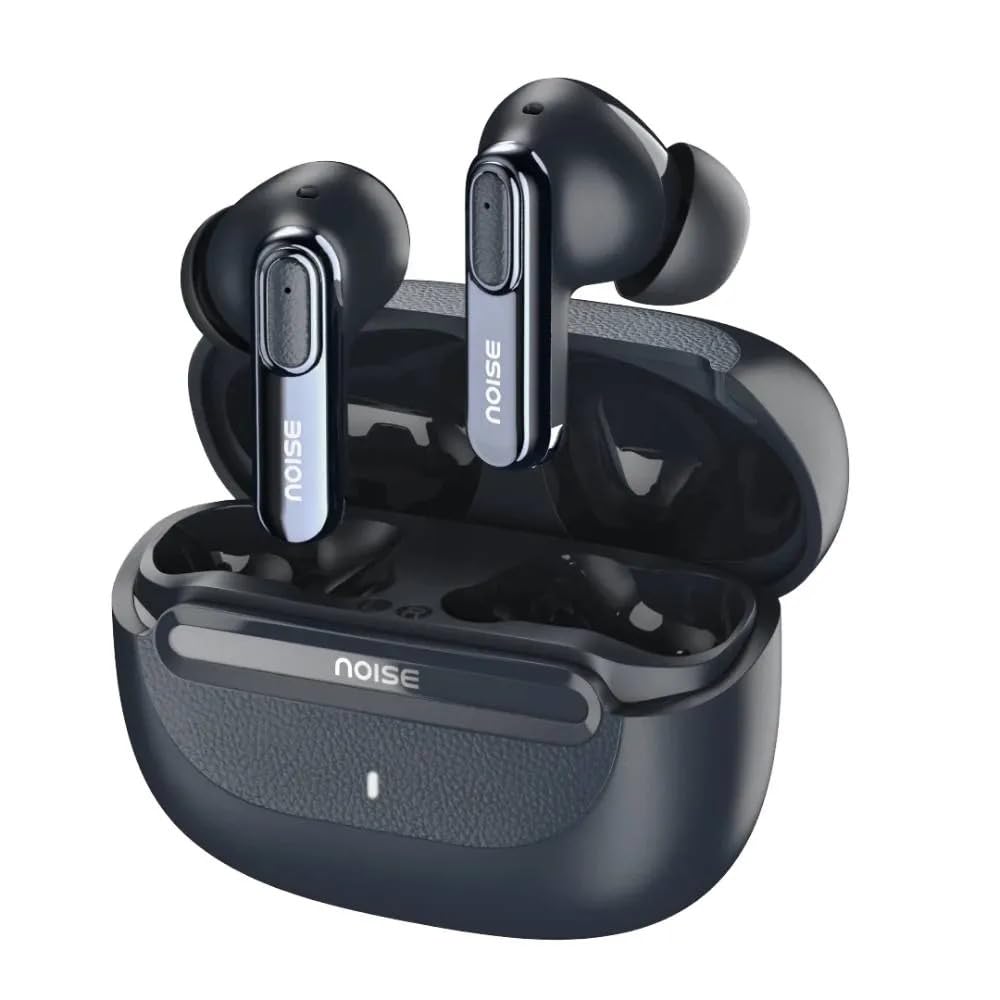
Image: Noise Buds Evoke earbuds placed inside their open charging case, illustrating how they fit for charging and storage.
The earbuds feature touch-sensitive areas for control and are designed for a comfortable in-ear fit. The charging case protects the earbuds and provides additional battery life.
Gadzirira
1. Kuchaja maEarbuds uye Case
Usati watanga kushandisa, chaja zvizere maearbud nekesi yekuchaja.
- Isa ese maarbuds mune yekuchaja kesi.
- Connect the Type-C charging cable to the charging port on the case and the other end to a USB power adapter (not included).
- The indicator light on the charging case will show the charging status. A full charge is indicated when the light changes or turns off (refer to specific LED behavior in the product's quick start guide if available).

Image: Noise Buds Evoke charging case with earbuds inside, illustrating the compact design for charging and portability.
2. Kubatanidza neChishandiso
To connect your Noise Buds Evoke to a new device:
- Ita shuwa kuti maearbuds akachajwa.
- Open the charging case. The earbuds will automatically enter pairing mode, and an indicator light on the earbuds or case will flash (refer to specific LED behavior).
- Pamudziyo wako (smartphone, piritsi, laptop), enda kuBluetooth marongero.
- Batidza Bluetooth.
- Tsvaga available devices and select "Noise Buds Evoke" from the list.
- Kana yangobatanidzwa, izwi rekuchimbidza rinosimbisa kubatanidza kwakabudirira.
The earbuds will automatically reconnect to the last paired device when taken out of the case, provided Bluetooth is enabled on the device and it is within range (10 meters).
Operating Instruction
Simba On/Kudzima
- Power On: Vhura kesi yekuchaja, uye maearbuds anozobatidza otomatiki.
- Power Off: Isa maearbuds kumashure muchesi yekuchaja wovhara chivharo. Vanodzima votanga kuchaja.
Touch Controls
The Noise Buds Evoke feature touch controls on each earbud. The specific functions may vary slightly, but common controls include:
- Tamba/Kumbomira: Top kamwechete pane imwe earbud.
- Next Track: Tokonya kaviri pane earbud yekurudyi.
- Previous Track: Tokonya kaviri kuruboshwe rwenzeve.
- Pindura/Pedzisa Kufona: Tokonya kamwe chete pane imwe earbud panguva yekufona.
- Ramba Kufona: Dzvanya uye ubate chero earbud kwemasekonzi maviri panguva yekufona.
- Shandisa Voice Assistant (Google Assistant/Siri): Tokonya katatu pane imwe earbud.
- Environmental Noise Cancellation (ENC): The earbuds feature Environmental Noise Cancellation for calls. This is typically active automatically during calls to reduce background noise for the person you are speaking with.
Note: For detailed and precise touch control mapping, refer to the quick start guide included with your product or the NoiseFit app if applicable.
Maintenance
Kuchenesa
- Shandisa jira rakapfava, rakaoma, risina lint kuchenesa maearbud nekesi yekuchaja.
- Usashandise abrasive cleaners, doro, kana makemikari zvinonyungudutsa.
- Bvisa zvinyoro nyoro chero chero wakisi kana marara kubva munzeve matipi uye mutauri mesh uchishandisa diki, rakachena bhurasho kana donje swab.
Storage
- Kana isiri kushandiswa, gara uchichengeta maearbuds mukesi yavo yekuchaja kuti uzvidzivirire uye ugare wakachajwa.
- Chengetedza mudziyo munzvimbo inotonhorera, yakaoma, kure nekupisa kwakanyanya uye zuva rakananga.
Kuramba Mvura
The Noise Buds Evoke are water resistant. This means they are protected against splashes and sweat, making them suitable for workouts. However, they are not waterproof and should not be submerged in water or exposed to heavy rain. Ensure the earbuds are dry before placing them back in the charging case to prevent damage.
Kugadzirisa matambudziko
If you encounter issues with your Noise Buds Evoke, try the following solutions:
Maearbuds Kwete Kubatana
- Ita shuwa kuti ese maearbud akachajwa.
- Place earbuds back in the case, close the lid, wait a few seconds, then open the lid again to re-enter pairing mode.
- Dzima uye vhura Bluetooth pane chako kifaa.
- Forget "Noise Buds Evoke" from your device's Bluetooth list and attempt to pair again.
- Ensure no other Bluetooth devices are interfering or already connected to the earbuds.
Hapana Ruzha kana Low Volume
- Tarisa huremu hwevhoriyamu pane chako chakabatana mudziyo uye maearbuds.
- Ita shuwa kuti maearbuds akagara zvakanaka munzeve dzako.
- Chenesa chero tsvina kubva munzeve dzemutauri mesh.
- Batanidzazve maearbuds kumudziyo wako.
Nyaya dzekuchaja
- Tarisa kuti tambo yekuchaja yakabatana zvakachengeteka kune ese ari maviri kesi uye sosi yemagetsi.
- Try a different Type-C charging cable and power adapter.
- Ita shuwa kuti macontacts ekuchaja ari pamaearbuds uye mukati mekesi akachena uye haana tsvina.
Voice Assistant Not Responding
- Ensure the earbuds are connected to your device.
- Confirm that your device's voice assistant (Google Assistant, Siri) is enabled and configured correctly.
- Perform the triple-tap gesture accurately on either earbud.
Zvinotsanangurwa
| Model Name | Buds Evoke |
| Model Number | AUD-HDPHN-BUDSEVOKE-BLU |
| Kubatana Technology | Wireless (Bluetooth) |
| Bluetooth Range | 10 Mamita |
| Noise Control | Environmental Ruzha Kanzura (ENC) |
| Maheadphone Jack | Jacki Yekuchaja Yerudzi rweC Inokurumidza |
| Kudzora Nzira | Inzwi, Kubata |
| Controller Type | Google Mubatsiri, Siri |
| Mvura Resistance Level | Mvura Inodzivirira |
| Item Weight | 50 magiramu |
| Zviyero zveChigadzirwa (LxWxH) | 6.5 x 4.9 x 2.9 cm |
| Material | Polycarbonate (PC) |
| Impedance | 16 Ohms |
Warranty uye Support
Warranty Information
The Noise Buds Evoke come with a 1-year assured warranty from Noise. Please refer to the included Warranty Registration Card for details on how to register your product and the terms and conditions of the warranty.
This warranty covers manufacturing defects. Damage caused by misuse, accidents, unauthorized modifications, or normal wear and tear is typically not covered.
Mutengi Support
For any queries, technical assistance, or warranty claims, please contact Noise customer support:
- Mugadziri: Nexxbase Marketing Pvt. Ltd
- Contact Number: 8882-132-132
- Kero: Khasra No-146/25/2/1, Jail Road Badshahpur, Gurugram Haryana-122101
- Visit the Noise Store on Amazon kuti uwane rumwe ruzivo uye zvigadzirwa zvinogadziridzwa.


