1. Nhanganyaya
Ndatenda nekutengaasing the SENCOR SPT 3907 Bluetooth Radio Player. This compact and versatile device offers multiple audio playback options, including CD, Bluetooth, USB, and FM radio. This manual provides essential information for safe and efficient use of your new player. Please read it thoroughly before operation and retain it for future reference.
2. Mirayiridzo Yekuchengetedza
- Kunobva Simba: Ita shuwa kuti magetsi emagetsi awandatage matches the rating indicated on the unit. Use only the provided power cable.
- Mvura uye Unyoro: Usaise mudziyo uyu mumvura, muhunyoro, kana mumvura inodonha/inopfachukira. Usaise zvinhu zvakazara nemvura, zvakaita semavhasi, pamudziyo wacho.
- Kufefetedza Usavhare nzvimbo dzinopinda mhepo. Iva nechokwadi chekuti pane nzvimbo yakakwana yakakomberedza mudziyo kuti mweya ufambe zvakanaka.
- Kupisa: Chengeta mudziyo uyu kure nezvinhu zvinopisa zvakaita sema radiator, ma heat registers, mastove, kana zvimwe zvinhu (kusanganisira amplifiers) zvinoburitsa kupisa.
- Kuchenesa: Bvisa mudziyo wacho kubva paburi remadziro usati wauchenesa. Shandisa jira rakapfava, rakaoma. Usashandise michina yekuchenesa mvura kana michina yekuchenesa ine aerosol.
- Sevhisi: Usaedze kushandira chigadzirwa ichi iwe pachako. Tumira masevhisi ese kuvashandi vanokwanisa.
- Mabhatiri: When using batteries, ensure correct polarity. Do not mix old and new batteries, or different types of batteries. Remove batteries if the unit is not used for extended periods.
3. Package Zviri mukati
Tarisa uone kuti zvinhu zvese zviripo mupakeji:
- SENCOR SPT 3907 Radio Player
- Remote Control
- AC Simba Cable
- Zvinyorwa (bhuku rino)
4. Zvigadzirwa zveChigadzirwa
The SENCOR SPT 3907 is designed for versatile audio entertainment:
- Output Power: 4W RMS for clear sound.
- CD Player: Supports CD-R/RW discs with programmable playback for up to 20 songs.
- Kubatana kweBluetooth: Bluetooth V2.1 + EDR for wireless audio streaming from compatible devices.
- USB Kutamba: USB connection for MP3 file playback with programmable playback for up to 99 songs.
- FM Radio: Stereo FM radio receiver with digital tuning and 30 station presets.
- AUX-IN: 3.5mm auxiliary input for connecting external audio sources.
- Ratidza: Backlight LCD display for easy navigation.
- Remote Control: Full-function remote control for convenient operation.
- Simba Sarudzo: Operates on AC 100-240V or D/LR20 batteries for portability.
- Mamwe Mabasa: Repeat and random playback modes.
5. Kudzora uye Mabasa
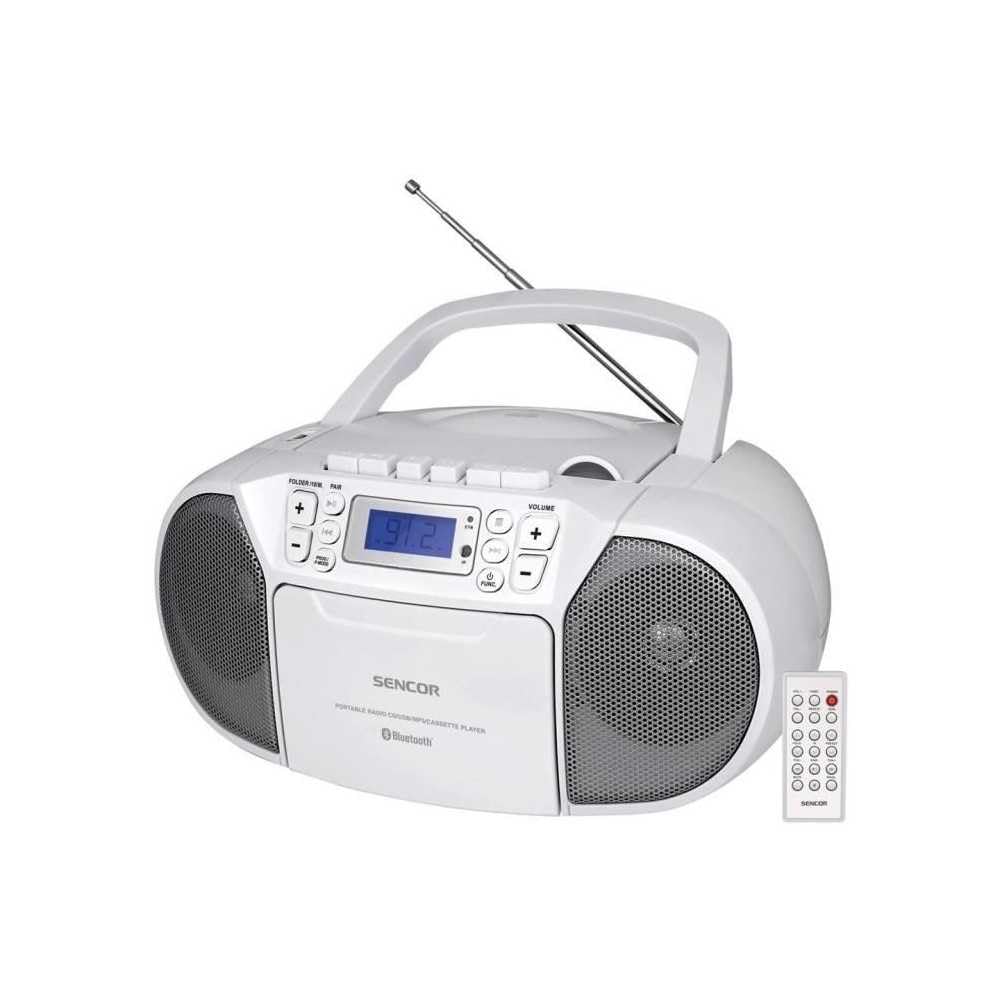
Mberi view of the SENCOR SPT 3907 unit, highlighting the control buttons, LCD screen, CD tray, and speakers. The remote control is also visible.
Front Panel Controls:
- SIMBA Bhatani: Inobatidza kana kudzima unit.
- Bhotani reMODE: Switches between CD, Bluetooth, USB, FM Radio, and AUX-IN modes.
- Mabhatani eVHORUMU +/-: Inogadzirisa mwero wekubuda kweodhiyo.
- PLAY/PAUSE (►/▮▮) Button: Starts or pauses playback in CD, Bluetooth, or USB mode.
- SKIP (◀◀ / ►►) Buttons: Anosvetukira kunzira/chiteshi chekare kana chinotevera.
- STOP (■) Button: Inomira kutamba.
- FOLDER / PAIR Button: Navigates folders in USB mode; initiates Bluetooth pairing.
- Bhatani reFUNC: Accesses additional functions (e.g., program, repeat, random).
- Chiratidziro cheLCD: Shows current mode, track number, frequency, and other information.
- CD Compartment: Yekuisa maCD ekuteerera.
- USB Port: Yekubatanidza USB midziyo yekuchengetedza.
- AUX-IN Jack: Yekubatanidza ekunze ekuteerera midziyo.
- Musoro Wekubuda: Zvekuterera wega.
Rear Panel Controls:
- AC Simba Inzwa Zvinotaurwa: Connects the AC power cable.
- FM Kanyanga: Extendable telescopic antenna for FM reception.
Remote Control:
The remote control duplicates most of the front panel functions for convenient operation from a distance. Refer to the remote control diagram in the included documentation for specific button layouts.
6. Setup
6.1 Simba Connection
The SENCOR SPT 3907 can be powered by AC mains or batteries.
AC Simba:
- Ita shuwa kuti unit yakadzimwa.
- Connect the supplied AC power cable to the AC input jack on the rear of the unit.
- Plug the other end of the AC power cable into a standard wall outlet (AC 100-240V, 50/60Hz).
Battery Power:
- Vhura bhatiri repamhepo chivharo chiri pasi peiyo unit.
- Insert 6 x D/LR20 size batteries (not included), ensuring correct polarity (+/-) as indicated inside the compartment.
- Vhara chivharo chebhatiri zvakachengeteka.
Note: When the AC power cable is connected, battery power is automatically disconnected. Remove batteries if the unit will not be used for an extended period to prevent leakage.
6.2 Antenna Setup
For optimal FM radio reception, fully extend the telescopic FM antenna located on the rear of the unit. Adjust its position for the best signal.
7. Operating Instructions
7.1 Simba On / Off uye Mode Sarudzo
- Press the SIMBA button to turn the unit on. The LCD display will light up.
- Press the MODE button repeatedly to cycle through available modes: CD, Bluetooth, USB, FM Radio, AUX-IN. The selected mode will be shown on the LCD display.
- Press the SIMBA bhatani zvakare kudzima unit.
7.2 Kutamba kweCD
- Press the MODE bhatani kusarudza CD modhi.
- Vhura iyo CD compartment cover.
- Place a CD (CD-R/RW compatible) with the label side facing up onto the spindle.
- Close the CD compartment cover. The unit will read the disc, and the total number of tracks will appear on the display.
- Press the TAMBA/KUMIRA bhatani kutanga kutamba.
- Shandisa iyo SKIP (◀◀ / ►►) mabhatani ekusvetuka makwara.
- Press the MIRA (■) bhatani kumisa kutamba.
- Kutamba Kwechirongwa: While in STOP mode, press the FUNC bhatani rekupinda mumodhi yepurogiramu. Shandisa SKIP buttons to select tracks and FUNC again to confirm. Up to 20 CD songs can be programmed.
7.3 Kushanda kweBluetooth
- Press the MODE button to select Bluetooth mode. The display will show 'BT' and flash, indicating it's in pairing mode.
- Pamudziyo wako une Bluetooth (semuenzaniso, smartphone, tablet), vhura Bluetooth wobva watsvaga michina iripo.
- Select 'SPT 3907' from the list of devices. Once paired, the 'BT' indicator on the display will stop flashing and remain solid.
- Start playing audio on your connected device. The sound will be streamed through the SENCOR SPT 3907.
- Shandisa iyo TAMBA/KUMIRA uye SKIP mabhatani ari payuniti kana kure kudzora kuti utarise kutamba.
7.4 USB Playback
- Insert a USB flash drive (containing MP3 files) muchiteshi che USB.
- Press the MODE button to select USB mode. The unit will automatically read the files.
- Press the TAMBA/KUMIRA bhatani kutanga kutamba.
- Shandisa iyo SKIP (◀◀ / ►►) mabhatani ekusvetuka makwara.
- Press the forodha button to navigate between folders on the USB drive.
- Kutamba Kwechirongwa: While in STOP mode, press the FUNC bhatani rekupinda mumodhi yepurogiramu. Shandisa SKIP buttons to select tracks and FUNC again to confirm. Up to 99 MP3 songs can be programmed.
7.5 FM Radio Kushanda
- Press the MODE button to select FM Radio mode. The current frequency will appear on the display.
- Wedzera antenna yeteresikopu kuti ugone kugamuchira zviri nani.
- Automatic Tuning: Dzvanya uye ubate iyo SKIP (◀◀ / ►►) mabhatani kwemasekonzi mashoma kuti utarise otomatiki chiteshi chinotevera chiripo.
- Chinyorwa Kugadziridza: Muchidimbu dzvanya iyo SKIP (◀◀ / ►►) buttons to fine-tune the frequency step-by-step.
- Preset Stations: To save a station, tune to the desired frequency, then press the FUNC bhatani. Shandisa SKIP mabhatani ekusarudza nhamba yakatarwa (P01-P30), wobva wadzvanya FUNC zvakare kusimbisa.
- Kuti udzorere chiteshi chakatarwa, tinya bhatani rekuti FUNC bhatani kakawanda kuti utenderere munzvimbo dzakachengetedzwa.
7.6 Kubatanidza AUX-IN
- Connect one end of a 3.5mm audio cable (not included) to the AUX-IN jack on the SENCOR SPT 3907.
- Connect the other end of the cable to the headphone jack or audio output of your external audio device (e.g., MP3 player, smartphone).
- Press the MODE bhatani rekusarudza AUX-IN modhi.
- Start playback on your external device. The audio will be played through the SENCOR SPT 3907.
- Chinja vhoriyamu uchishandisa iyo VOLUME +/- buttons on the unit or remote control, and also on your external device.
8. Kuchengeta
8.1 Kuchenesa Chikamu
Wipe the exterior of the unit with a soft, dry cloth. Do not use abrasive cleaners, waxes, or solvents as they may damage the finish. Ensure the unit is unplugged from the power source before cleaning.
8.2 Kutarisirwa kweLenzi dzeCD
If the CD player experiences reading errors, the lens may need cleaning. Use a commercially available CD lens cleaner disc. Do not touch the lens directly.
8.3 Kutsiviwa kwebhatiri
When the unit operates on batteries and the sound becomes distorted or the unit stops functioning, replace all batteries with new D/LR20 batteries, ensuring correct polarity.
9. Kugadzirisa matambudziko
| Dambudziko | Zvinogona Kukonzera | Solution |
|---|---|---|
| Hapana simba | Waya yemagetsi haina kubatana; Mabhatiri apera kana kuti akaiswa zvisiri izvo. | Check AC power connection; Replace batteries, ensuring correct polarity. |
| Hapana ruzha | Vhoriyamu yakadzikira zvakanyanya; Modhi isiriyo yakasarudzwa; Mahedhifoni akabatana. | Increase volume; Select correct mode (CD, BT, USB, FM, AUX); Disconnect headphones. |
| CD haisi kutamba / Kusvetuka | CD dirty or scratched; CD inserted incorrectly; CD lens dirty. | Clean or replace CD; Insert CD with label side up; Use a CD lens cleaner. |
| Bluetooth haina kubatana | Unit not in pairing mode; Device too far; Bluetooth not enabled on external device. | Ensure unit is in BT pairing mode; Move device closer; Enable Bluetooth on your device. |
| Kugamuchira FM kwakashata | Antena haina kutambanudza kana kuiswa zvakanaka; Chiratidzo chisina kusimba. | Tambanudza uye gadzirisa antenna ye telescopic zvizere; Edza kufambisa antenna kuenda kune imwe nzvimbo. |
10. Zvinotsanangurwa
| Feature | Tsanangudzo |
|---|---|
| Model | SPT 3907 |
| Output Power | 4W RMS |
| Inotsigirwa Media | CD-R, CD-RW, Bluetooth, MP3, USB |
| Bluetooth Version | V2.1 + EDR |
| FM Radio Presets | 30 zviteshi |
| Kubatana | Auxiliary (3.5mm), USB |
| Simba Source | AC 100-240V, 50/60Hz; 6 x D/LR20 batteries |
| Item Weight | 1 kg 960g |
| Dimensions | (Not specified in provided data) |
11. Warranty uye Tsigiro
SENCOR products are manufactured to high-quality standards and are warranted against manufacturing defects. For specific warranty terms and conditions, please refer to the warranty card included with your purchase or visit the official SENCOR website. For technical support, service, or inquiries, please contact your local SENCOR distributor or authorized service center.


