1. Chigadzirwa Pamusoroview
The WAVLINK AX5400 WiFi 6E USB Adapter is designed to add or upgrade WiFi capabilities to your desktop or laptop computer. It supports the latest WiFi 6E standard, offering tri-band connectivity across 2.4GHz, 5GHz, and 6GHz frequencies for enhanced speed and performance. This adapter is compatible with Windows 10 and Windows 11 operating systems.
Chiziviso Chakakosha: This device is a WiFi adapter for your computer and is not a WiFi booster, extender, or repeater. It cannot strengthen existing signals from your router.

Image: The WAVLINK AX5400 WiFi 6E USB Adapter, showcasing its design and included USB 3.0 cable.
2. Setup Instructions
2.1 System Zvinodiwa
- Operating System: Windows 10 (Version 1909 or later) or Windows 11 (Version 21H2 or later).
- USB Port: USB 3.0 port recommended for optimal performance.
- To utilize WiFi 6E capabilities, your system requires Windows 11 (Version 21H2 or later) and a WiFi 6E compatible router.
2.2 Kuiswa kwemutyairi
The WAVLINK AX5400 WiFi 6E USB Adapter features a built-in driver for Windows 10 and Windows 11, simplifying the installation process.
- Batanidza Adapter: Insert the adapter's USB 3.0 cable into an available USB port on your desktop or laptop computer.
- Automatic Driver Activation: In most cases, the built-in driver will activate automatically upon connection. A pop-up window may appear in the lower right corner of the taskbar indicating driver installation.
- Manual Driver Installation (if needed): If the pop-up window does not appear, open "This PC" (or "My Computer"), locate the "CD Drive" labeled "WAVLINK_693X2F". Double-click this drive and follow the on-screen instructions to install the driver. If your computer already has the driver installed, the "CD Drive" will not be displayed.

Image: Visual guide for connecting the adapter and installing the driver from the virtual CD drive.

Image: Simplified three-step setup process for the WAVLINK AX5400 adapter.
3. Maitiro Okushandisa
The adapter supports two primary operating modes:
3.1 Wi-Fi Mode (Receive Signal)
In Wi-Fi Mode, the adapter connects your computer to an existing wireless network. It can receive signals from your router on the 2.4GHz, 5GHz, or 6GHz bands, providing high-speed internet access.
- After driver installation, click the network icon in your system tray.
- Sarudza yako yaunoda Wi-Fi network kubva pane iyo rondedzero.
- Enter the network password if prompted and click "Connect".
3.2 Soft AP Mode (Transmit Signal)
In Soft AP Mode, the adapter can transform your computer's wired internet connection into a Wi-Fi hotspot. This allows other wireless devices (smartphones, tablets, laptops) to connect to the internet through your computer.
- Ensure your computer has a wired internet connection.
- Access the adapter's utility software or Windows network settings to enable Soft AP mode.
- Configure the hotspot name (SSID) and password.
- Other devices can then connect to this new Wi-Fi hotspot.

Image: The two operating modes: Receive Mode for connecting to WiFi and Launch Mode (Soft AP) for creating a hotspot.

Image: Detailed diagrams of Station Mode (receiving signal) and Soft AP Mode (transmitting signal).
4. Kuchengeta
Proper maintenance ensures the longevity and optimal performance of your WAVLINK AX5400 WiFi 6E USB Adapter.
- Kuiswa: Position the adapter in an open area, away from obstructions and other electronic devices that may cause interference. The included 1-meter USB 3.0 cable and magnetic base allow for flexible and stable placement on metal surfaces.
- Kuchenesa: Shandisa jira rakapfava, rakaoma kuchenesa adapta. Dzivisa kushandisa mvura yekuchenesa kana zvinonyungudutsa.
- Tembiricha: Operate the device within its specified temperature range. Avoid extreme heat or cold.
- Firmware Dzokorora: Periodically check the WAVLINK official website for any available firmware updates to ensure the best performance and security.
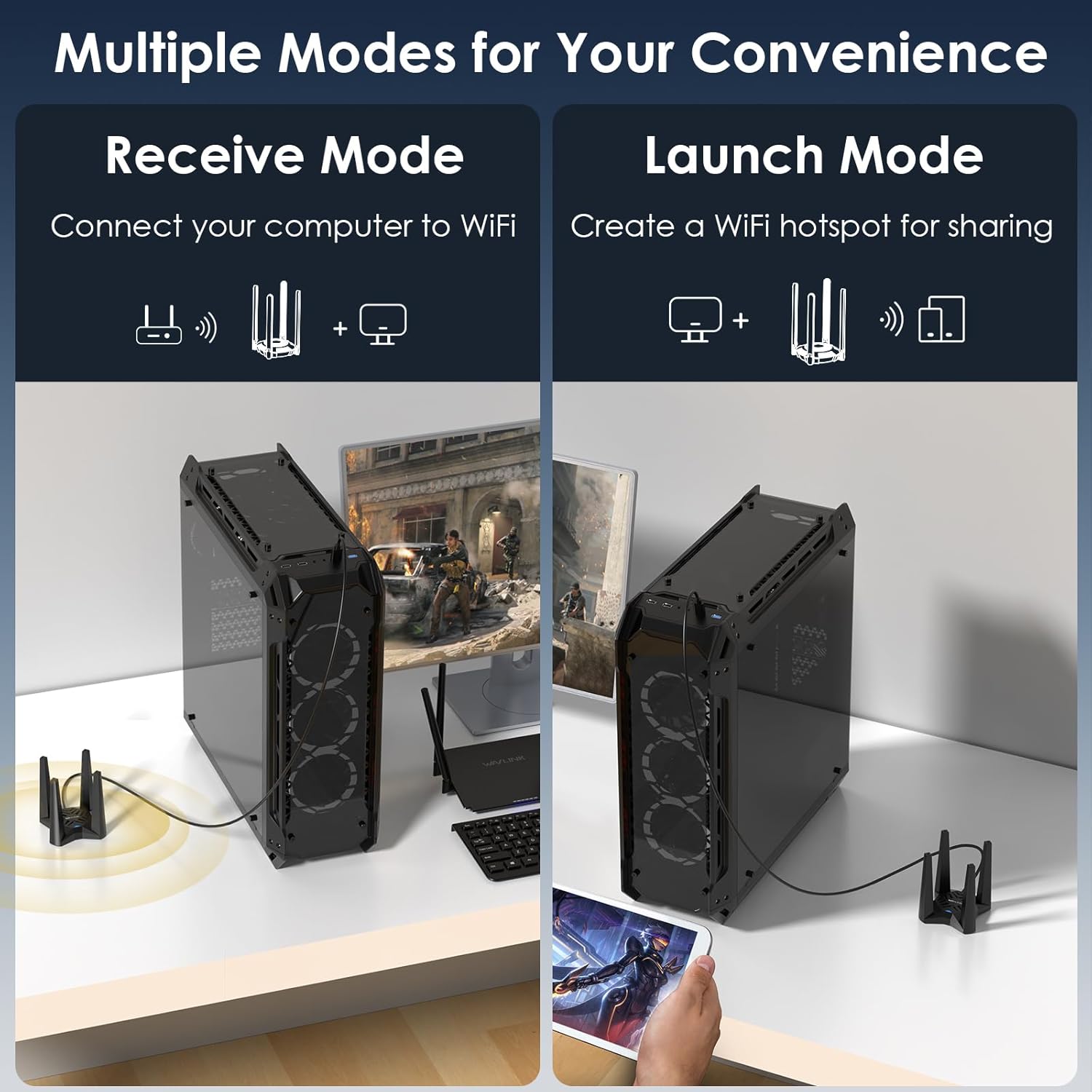
Image: Illustration of optimal placement for the adapter to maximize signal reception with its high-performance antennas.

Image: Representation of the adapter's ability to provide wide, deadzone-free WiFi coverage within a home environment.
5. Kugadzirisa matambudziko
If you encounter issues with your WAVLINK AX5400 WiFi 6E USB Adapter, refer to the following common solutions:
- Driver Not Installing/Recognized:
- Iva nechokwadi chekuti adapta yakabatanidzwa zvakanaka muchiteshi cheUSB.
- Check "This PC" for the "CD Drive" and manually run the installer.
- If issues persist, download the latest driver from the official WAVLINK websaiti (www.wavlink.com) under the Support-Driver section, searching for model WL-WN693X2F.
- Frequent Disconnections or Unstable Connection:
- Verify the USB cable is not faulty. Try using a different USB 3.0 cable if available.
- Relocate the adapter to an area with better signal reception, away from obstacles or interference sources.
- Ita shuwa kuti madhiraivha e USB ekombuta yako ari kuenderana.
- Slow Speeds or Limited Performance:
- Confirm the adapter is connected to a USB 3.0 port on your computer.
- For optimal WiFi 6E speeds, ensure you are connected to a WiFi 6E compatible router on the 6GHz band. Performance gains will be limited with standard WiFi 5/6 routers.
- Tarisa kana paine kukanganiswa kubva kune zvimwe zvishandiso zvinoshanda pamafrequencies akafanana.
- Soft AP Mode Not Working:
- Ensure your computer has an active wired internet connection.
- Verify that Soft AP mode is correctly configured in your system's network settings or the adapter's utility.
6. Zvinotsanangurwa
Detailed technical specifications for the WAVLINK AX5400 WiFi 6E USB Adapter.
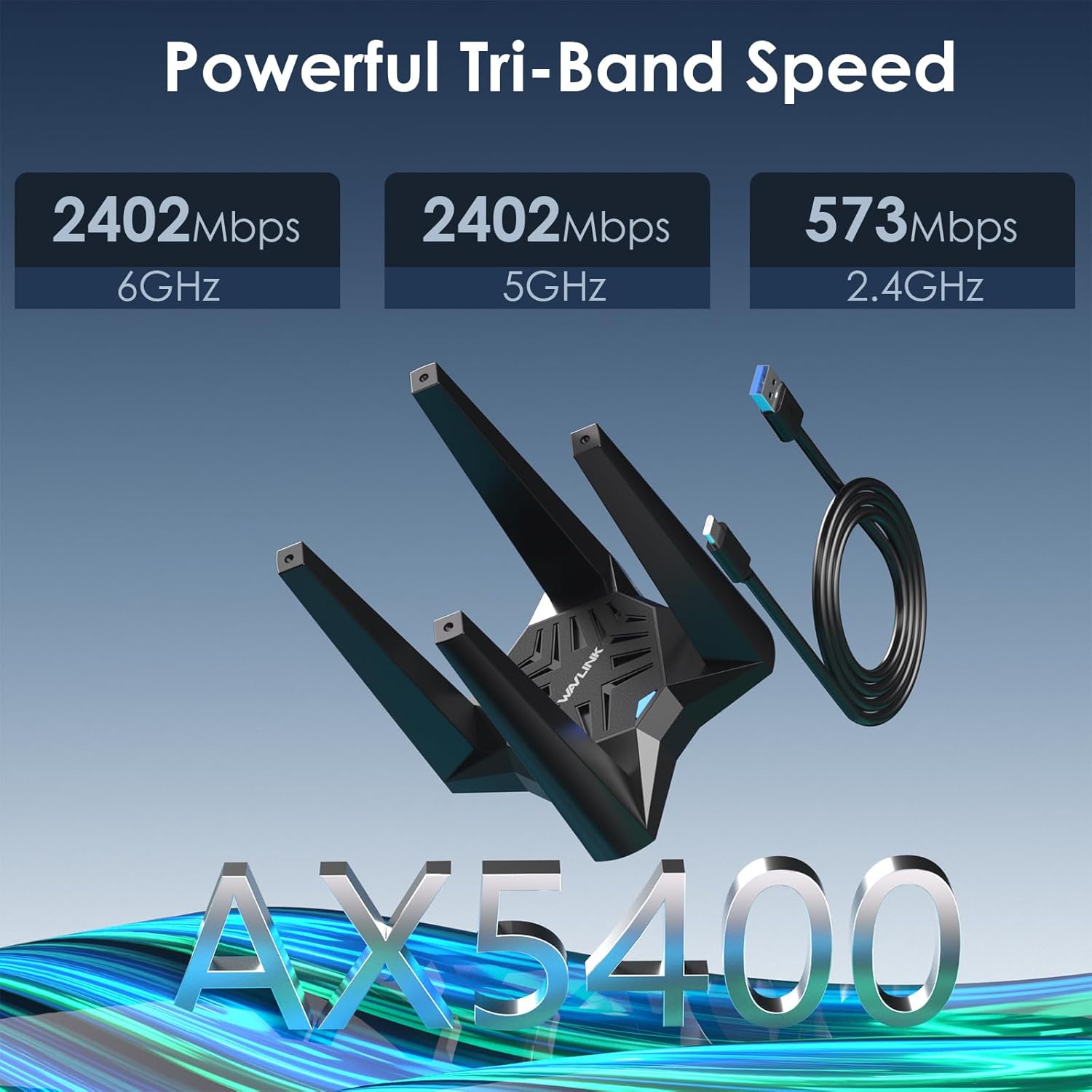
Mufananidzo: Pamusoroview of the adapter's tri-band speed capabilities across 2.4GHz, 5GHz, and 6GHz frequencies.
| Feature | Tsanangudzo |
|---|---|
| Model Number | 693X2F |
| Wireless Standard | WiFi 6E (802.11ax) |
| Frequency Bands | 2.4GHz, 5GHz, 6GHz (Tri-Band) |
| Max Data Rate (2.4GHz) | Kusvikira ku573Mbps |
| Max Data Rate (5GHz) | Kusvikira ku2402Mbps |
| Max Data Rate (6GHz) | Kusvikira ku2402Mbps |
| Total Aggregate Speed | AX5400 |
| Interface | USB 3.0 |
| Antennas | Quad High Gain Antennas |
| Wireless Security | WPA3, WPA2, WPA |
| Features | MU-MIMO, OFDMA, Beamforming, Soft AP Mode |
| Inoenderana OS | Windows 10, Windows 11 (32/64-bit) |
| Product Dimensions | 4.72 x 4.72 x 3.54 inches (approx. 12 x 12 x 9 cm) |
| Item Weight | 10.6 ounces (inenge 0.3 kg) |
7. Warranty uye Tsigiro
WAVLINK provides customer support for its products. For any questions or assistance, please use the contact information below.
7.1 Ruzivo rweKutaurirana
- Rutsigiro rwerunhare: +1 8889730883 (UTC-5) Monday - Friday, 7 AM - 4 PM
- Email Support: contact@wavlink.com
- Official Websaiti: For the latest drivers and support resources, visit www.wavlink.com. Tsvaga model WL-WN693X2F in the Support-Driver section.
- You may also contact us via Amazon messaging.
We aim to provide solutions within 24 hours.

Image: WAVLINK customer support information for assistance.
7.2 Ruzivo rweWaranti
Please refer to the product packaging or the official WAVLINK website for specific warranty terms and conditions applicable to your region. Typically, products come with a manufacturer's warranty covering defects in materials and workmanship.


