1. Nhanganyaya
This manual provides detailed instructions for the installation, operation, and maintenance of your TRYX Panorama SE 240 ARGB 240mm All-In-One (AIO) Liquid Cooler. Please read this manual thoroughly before installation and use to ensure proper functionality and longevity of your product. Keep this manual for future reference.

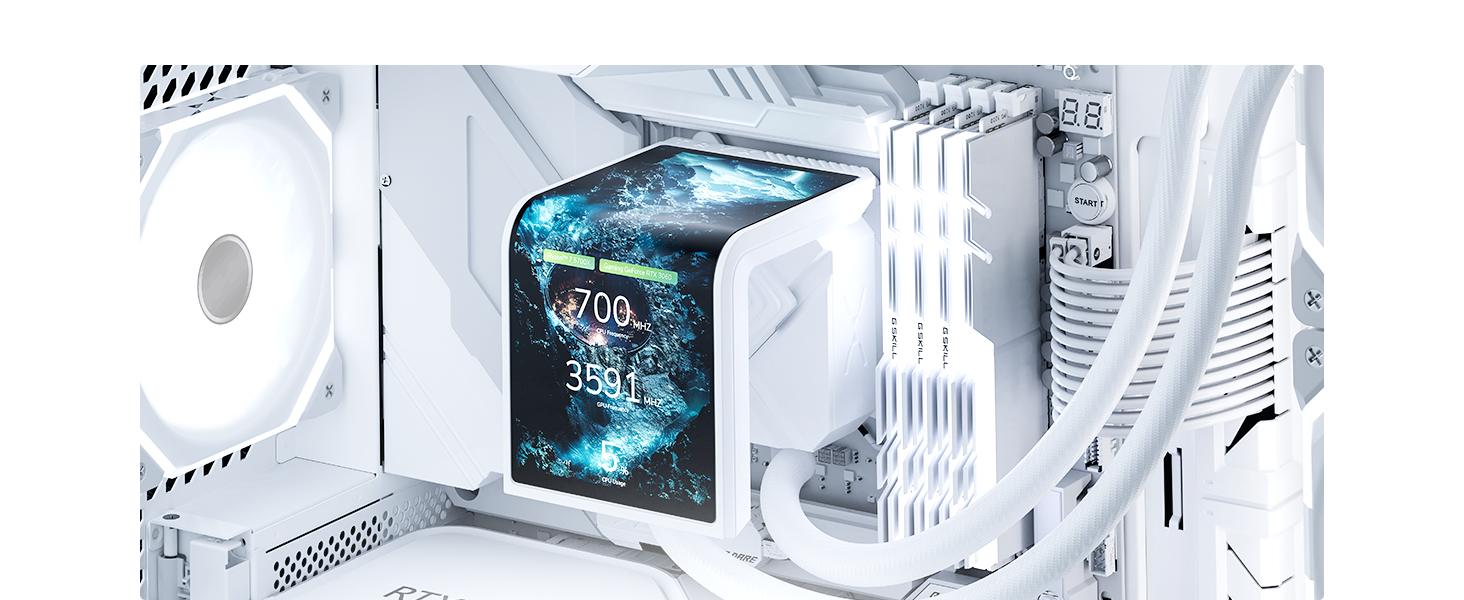
Image 1.1: The TRYX Panorama SE 240 ARGB 240mm AIO Liquid Cooler, featuring the radiator, fans, and the rotatable AMOLED screen pump block.
2. Chigadzirwa Pamusoroview
2.1 Mamiriro Akakosha
- Rotatable 6.67-inch AMOLED Curved Screen: Features a 60Hz refresh rate, 2K display, 400-nit brightness, 372 PPI pixel density, and 1,000,000:1 contrast ratio for enhanced visual performance. The screen design allows for multi-adjustable positions.
- 3D Anamorphic Effect: The curved AMOLED screen enhances content depth, providing 3D visual effects with custom-formatted 3D videos. Preloaded content, including a 'Waterfall' 3D animation, is available via KANALI software.
- Reliable Screen Technology: Designed with G2 Curvature for improved viewing angles and immersion. A tempered glass cover provides scratch and drop resistance. Full adhesion technology eliminates air gaps for clearer visuals and reduced reflection.
- Asetek Cooling Solution: Incorporates Asetek's Adela pump, designed for CPU-intensive tasks. Combined with a 27mm high-density fin radiator and ARGB cooling fans, it offers a 260W TDP cooling capacity.
- Stability and Quiet Operation: Equipped with two 120mm pre-installed ROTA ARGB fans featuring FDB bearings and ARGB GEN2 LEDs. Fans include damping pads to minimize vibration noise, maintaining operation under 27.86dB(A) at full load.

Mufananidzo 2.1: Yakaputika view illustrating the Asetek Adela liquid cooling solution, emphasizing its stable, quiet, and powerful design with up to 260W TDP.

Image 2.2: Diagram showing the rotatable display module, highlighting its detachable screen, flexible and versatile positioning, dynamic display settings, and the new 'Waterfall Mode'.
3. Setup & Installation
3.1 Kuenderana
The TRYX Panorama SE 240 ARGB AIO Liquid Cooler is compatible with a wide range of CPU sockets. The included all-metal mounting hardware ensures reliable installation and proper contact pressure.
- Masokisi eIntel: LGA 1851, LGA 1700, LGA 1200, LGA 1151, LGA 1150, LGA 1155
- Masokisi eAMD: AM4, AM5
3.2 Kuisa Nzira
The cooler supports both standard and hidden AIO tube setups. Refer to the diagrams below for visual guidance.

Image 3.1: Illustration of supported AIO installation methods, including standard and hidden tube configurations. Note: Hidden AIO tube setup requires a compatible motherboard.

Mufananidzo 3.2: Pamusoroview of the all-metal mounting hardware for Intel (LGA 1851/1700/1200/1151/1150/1155) and AMD (AM4/AM5) chipsets, ensuring high stability and durability.
3.3 Inosanganisirwa Zvikamu
The product package includes the AIO cooler, mounting brackets for both AMD and Intel platforms, thermal paste, and this instruction manual. Ensure all components are present before beginning installation.
4. Operating Instructions
4.1 KANALI Software
Utilize the TRYX KANALI software for comprehensive customization and control of your Panorama SE 240 ARGB AIO cooler. Ensure the software is updated to the latest version for full functionality.
- Screen Content Switching: Instantly change displayed content.
- Split-Screen Display: Display multiple pieces of information simultaneously.
- System Information Display: Monitor CPU/GPU temperature, load, and other system metrics.
- Custom Media Upload: Upload PNG, JPG, GIF, MP4, and AVI files (up to 1080P, 500MB maximum) to personalize your display.
- Brightness Balance: Gadzirisa kupenya kwescreen.
- New Waterfall Mode: Access optimized animations for vertical screen orientations.

Image 4.1: Screenshot of the KANALI software interface, showing options for content customization, system information display, and media upload.

Image 4.2: The screen splitting feature within KANALI software, allowing users to divide the display for multiple content types or system metrics.

Image 4.3: The custom content library in KANALI, demonstrating the ability to upload and manage various media formats for display on the AIO screen.
Mufananidzo 4.4: Eksamples of customizable filters and hardware tag display options within the KANALI software, allowing for personalized visual effects and system monitoring.
4.2 Screen Functionality
The 6.67-inch AMOLED screen offers advanced visual capabilities:
- Ultra-Wide Viewing Angle: Ensures consistent color and clarity from various perspectives.
- 400 Nits Kupenya: Provides vibrant visibility.
- 60Hz Refresh Rate: Delivers fluid and natural dynamic scenes.

Image 4.5: Details of the advanced AMOLED screen, highlighting its 6.67-inch curved display, ultra-wide viewing angle, 400 nits brightness, and 60Hz refresh rate.
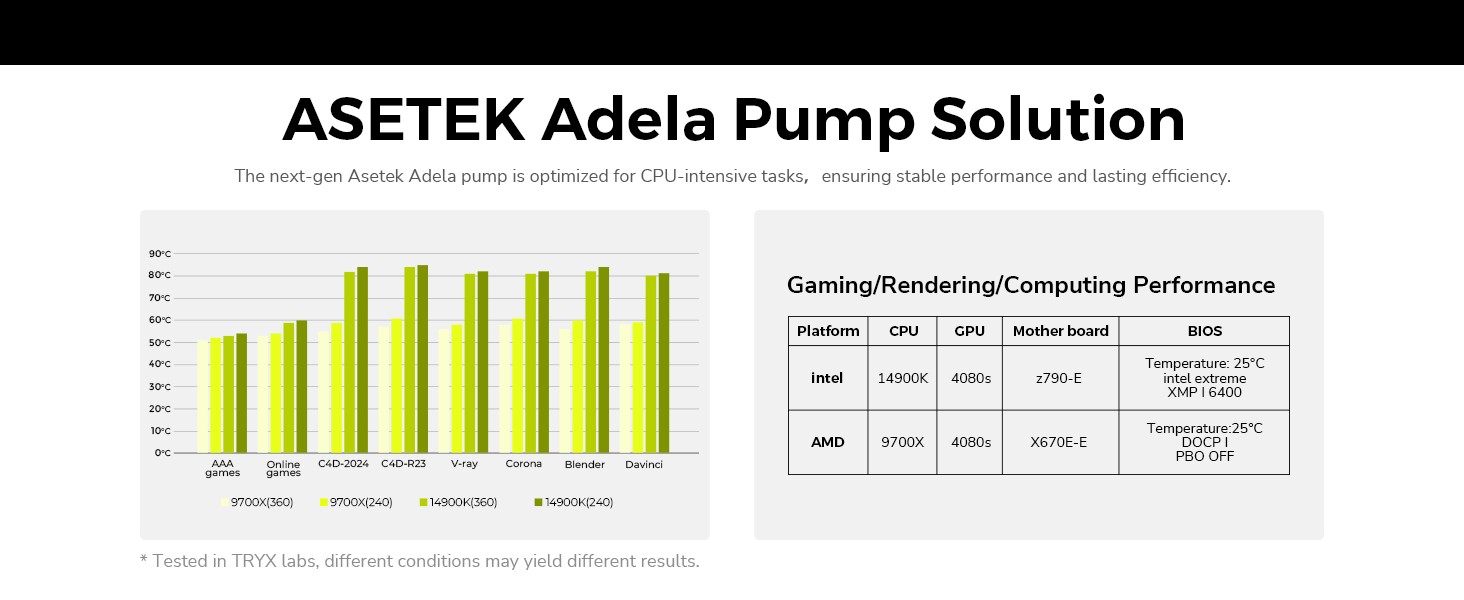
Image 4.6: Explanation of the triple-layer screen technology, including a tempered glass cover, anti-glare coating, and full-adhesion technology for enhanced durability and visual clarity.

Image 4.7: Visual representation of the G2 Curvature design, contributing to modern aesthetics, smooth transitions, and exquisite craftsmanship.

Image 4.8: Comparison demonstrating the ultra-high contrast ratio of 1,000,000:1, providing superior image depth and clarity.
4.3 Waterfall Mode
The 'Waterfall Mode' is a preselection 3D animation specifically designed for the Panorama SE series, optimized for vertical screen display. This mode can be accessed and managed through the KANALI software.

Image 4.9: The 'Waterfall Mode' displayed on the AIO screen, optimized for vertical orientation to enhance visual effects.
4.4 Resource Usage
The integrated display operates independently, minimizing resource usage on your PC while delivering high performance.

Image 4.10: Diagram illustrating the independent operation of the display, indicating near-zero resource usage on the host PC.
5. Kuchengeta
5.1 General Kuchenesa
- Radiator and Fans: Nguva nenguva chenesa guruva kubva pamapete eredhiyeta nemashizha efeni uchishandisa mweya wakamanikidzwa. Iva nechokwadi chekuti mafeni haasi kutenderera panguva yekuchenesa.
- Sikirini Gently wipe the AMOLED screen with a soft, lint-free cloth. For stubborn smudges, use a screen-safe cleaning solution applied to the cloth, not directly to the screen.
- Pombi Yekuputira: Wipe the pump block and tubing with a dry or slightly damp jira rokubvisa huruva.
5.2 Zvigadziriso zveSoftware
Regularly check for and install updates for the KANALI software to ensure optimal performance, access new features, and maintain compatibility.
6. Kugadzirisa matambudziko
If you encounter issues with your TRYX Panorama SE 240 ARGB AIO Liquid Cooler, refer to the following common troubleshooting steps:
- Screen Freezing or Malfunction: Ensure all cables, especially the display connection, are securely seated. Restart the KANALI software or your system. If the issue persists, check for software updates.
- Kushanda Kwakashata Kwekutonhodza: Verify that the pump is running and the fans are spinning. Check that the pump block is making proper contact with the CPU. Ensure there is adequate airflow through the radiator. Reapply thermal paste if necessary.
- Noise Yakanyanyisa: Confirm that fan screws are tightened and no cables are obstructing fan blades. Check for dust buildup on fans and radiator. If pump noise is unusual, contact support.
- Software Not Detecting Cooler: Ensure all USB and power connections are correctly made. Reinstall the KANALI software.
For further assistance, utilize the built-in support window within the KANALI software or visit the official TRYX support website.

Image 6.1: The built-in support window within KANALI software, providing direct access to customer support for troubleshooting and inquiries.
7. Zvinotsanangurwa
| Feature | Tsanangudzo |
|---|---|
| Model Number | L-P240L-AM2M-G0K (P240A SE) |
| Product Dimensions | 16.93"L x 8.74"W x 5.71"H (43 x 22.2 x 14.5 cm) |
| Kurema | 6.5 Mapaundi (2.95 kg) |
| Kutonhodza Nzira | Mvura Kutonhora |
| TDP (Simba rekugadzira Thermal) | Kusvika ku260W |
| Noise Level | Under 27.86 dB(A) |
| Maximum Rotational Speed | 3600 RPM (Pump) |
| Rudzi rweMagetsi Rudzi | 7-Pini |
| Voltage | 12 Volts (DC) |
| Wattage | 3.9 watts |
| Inowirirana Devices | CPU |
| Material | Aluminum, Copper, Polybutylene Terephthalate |
| Screen Type | 6.67-inch AMOLED Curved Screen |
| Screen Refresh Rate | 60Hz |
| Screen Kupenya | 400 nits |
| Screen Contrast Ratio | 1,000,000:1 |
| CPU Socket Kuenderana | Intel LGA 1851/1700/1200/1151/1150/1155, AMD AM4/AM5 |

Image 7.1: Performance chart for the Asetek Adela pump solution, showing cooling efficiency under various CPU loads and configurations.
8. Warranty & Tsigiro
The TRYX Panorama SE 240 ARGB AIO Liquid Cooler is manufactured by Shanghai TRYX Technology Co.Ltd. For warranty information, please refer to the documentation provided with your purchase or visit the official TRYX website.
For technical support, product inquiries, or assistance with the KANALI software, please use the built-in support feature within the KANALI application or contact TRYX customer service directly.


