1. Kupfuuraview
The Razer BlackShark V3 Wireless Gaming Headset for Xbox is designed for high-performance gaming across multiple platforms. It features advanced wireless technology, high-fidelity audio drivers, and a clear microphone for effective communication.
- Razer HyperSpeed Wireless Gen-2: Provides ultra-low latency wireless audio, with speeds as low as 10 ms.
- Razer TriForce Titanium 50mm Drivers Gen-2: Engineered for precise and powerful sound reproduction, enhancing positional awareness.
- Detachable Razer HyperClear Super Wideband 9.9mm Mic: Captures voice with high-definition clarity across a wide frequency range.
- 3 Modes of Connectivity: Supports simultaneous 2.4 GHz and Bluetooth connections, plus USB-C for versatile use.
- Inotevera-Gen Yakatenderedza Ruzha: Compatible with Windows Sonic on Xbox and THX Spatial Audio on PC for immersive audio.
- Pro-Tuned FPS Profiles and Customizable EQ: Offers game-specific EQ profiles and custom equalization settings via Razer Synapse 4.

Image: Razer BlackShark V3 Wireless Gaming Headset on a stand.
2. Chii chiri muBhokisi
Iyo chigadzirwa package inosanganisira zvinotevera zvinhu:
- Razer BlackShark V3 Wireless Gaming Headset
- Detachable Razer HyperClear Super Wideband 9.9mm Mic
- Razer HyperSpeed Wireless Gen-2 Dongle
- USB Type A to Type C Cable
- Mushandisi Chinyorwa (gwaro iri)
Vhidhiyo: Mumwe mukuru pamusoroview of the Razer BlackShark V3 headset line, highlighting key features and design.
3. Setup
3.1 Kutanga Kuchaja
Before first use, fully charge the headset using the provided USB Type A to Type C cable. Connect the USB-C end to the headset and the USB-A end to a powered USB port (e.g., computer, wall adapter).
3.2 Kubatanidza Maikorofoni
Insert the detachable HyperClear Super Wideband Mic into the microphone port located on the left earcup until it clicks into place.

Image: The detachable HyperClear Super Wideband Microphone.
4. Operating Instructions
4.1 Simba On/Kudzima
- Kubatidza: Dzvanya uye bata bhatani remagetsi kusvika chiratidzo che LED chavheneka.
- Kudzima: Dzvanya uye bata bhatani remagetsi kusvika chiratidzo che LED chadzima.
4.2 Kudzora Inzwi
Adjust the volume using the volume wheel located on the earcup.
4.3 Kudzikisa Maikorofoni
Toggle the microphone mute switch to enable or disable the microphone.
5. Kubatana
The Razer BlackShark V3 offers three primary modes of connectivity:
- 2.4 GHz Wireless (Razer HyperSpeed Wireless Gen-2): For ultra-low latency connection to PC, Mac, PlayStation, Nintendo Switch, and Xbox. Use the included USB-C dongle.
- Bluetooth: For wireless connection to smartphones and other Bluetooth-enabled devices.
- Waya ye USB-C: For a direct wired connection and charging.
The headset supports simultaneous 2.4 GHz and Bluetooth audio, allowing you to mix audio from two devices concurrently.

Image: The Razer HyperSpeed Wireless Gen-2 USB-C dongle.

Image: Visual representation of the three connectivity modes.
6. Audio Features
6.1 Razer TriForce Titanium 50mm Drivers Gen-2
These drivers provide clear highs, rich mids, and powerful bass, optimized for competitive gaming to deliver precise audio cues.
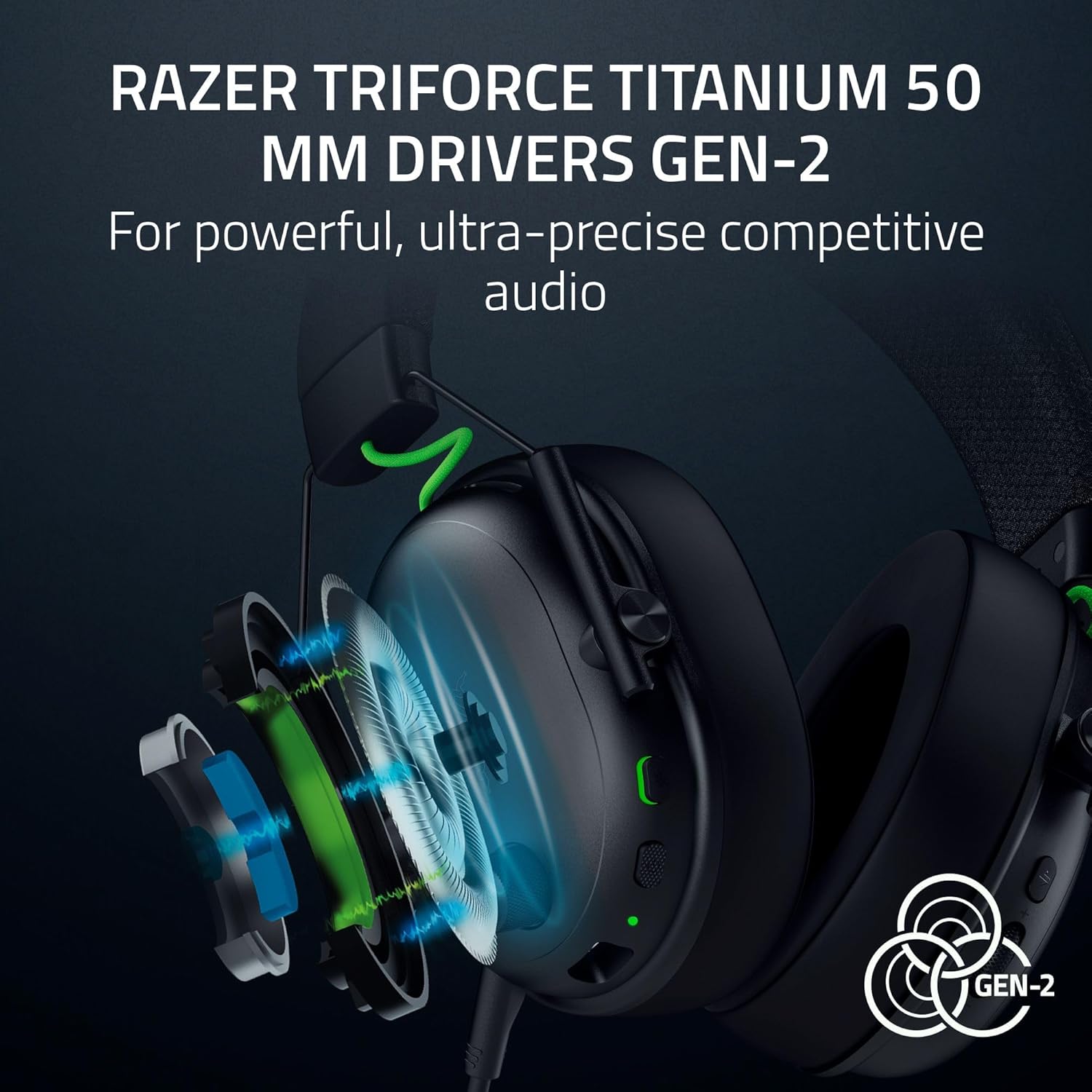
Mufananidzo: Yakaputika view of the TriForce Titanium 50mm Drivers.
6.2 Yakatenderedza Ruzha
Experience enhanced positional audio with Windows Sonic on Xbox and THX Spatial Audio on PC. This feature provides an expanded soundstage for improved in-game awareness.

Image: Visual representation of surround sound technology.
6.3 Customizable EQ Profiles
Utilize Razer Synapse 4 (on PC) to access pro-tuned FPS profiles and create custom equalization settings to optimize your audio experience for different games or media. These settings can be saved directly to the headset.

Image: Razer Synapse 4 interface for customizing EQ settings.
7. Maikorofoni
The detachable Razer HyperClear Super Wideband 9.9mm Mic is designed for high-definition voice capture. Its wide frequency response ensures clear and natural communication. The microphone can be removed when not in use.
8. Zvinotsanangurwa
| Feature | Tsanangudzo |
|---|---|
| Model Name | BlackShark V3 |
| Kubatana Technology | Bluetooth, USB, Wireless (2.4 GHz) |
| Wireless Communication Technology | 2.4 GHz, Bluetooth |
| Maheadphone Jack | USB-C |
| Audio Driver Type | Dynamic Driver |
| Audio Driver Size | 50 mamirimita |
| Frequency Response | 28 KHz |
| Sensitivity | 106 dB |
| Noise Control | Sound Isolation (Passive Noise Control) |
| Inowirirana Devices | Mac, Nintendo Switch, PC, PlayStation, Xbox, Smartphones |
| Material | Metal |
| Item Weight | 1.7 makirogiramu |
| Mabhatiri | 1 Lithium Ion bhatiri inodiwa (inosanganisirwa) |
9. Kuchengeta
9.1 Kuchenesa
Wipe the headset with a soft, dry cloth. Avoid using harsh chemicals or abrasive materials. For earcups, gently wipe with a damp jira uye bvumira kuti mweya uome zvachose usati washandisa.
9.2 Kuchengeta Battery
To prolong battery life, avoid fully discharging the headset frequently. Charge the headset regularly, even if not in constant use. Store in a cool, dry place.
10. Kugadzirisa matambudziko
10.1 Hapana Odhiyo / Inopindirana Audio
- Ita shuwa kuti headset yakabatidzwa uye yakachajiwa zvizere.
- Verify the correct audio output device is selected in your system settings (PC/Mac/Console).
- For 2.4 GHz wireless, ensure the USB-C dongle is securely connected to your device and within range.
- For Bluetooth, ensure the headset is paired and connected to your device. Try re-pairing if issues persist.
- Tarisa huwandu hwevhoriyamu pane ese mahedhifoni uye mudziyo wako wakabatana.
10.2 Maikorofoni Haisi Kushanda
- Ensure the microphone is securely plugged into the headset.
- Check that the microphone mute switch on the headset is not engaged.
- Verify the correct microphone input device is selected in your system's audio settings.
- Adjust microphone volume/gain settings in your system or communication software.
10.3 Nyaya dzeBatanidzo
- If experiencing 2.4 GHz interference, try moving closer to the dongle or ensuring no other devices are causing interference.
- For Bluetooth, ensure the headset is not simultaneously connected to another device that might be interfering.
- Tangazve zvese headset nemudziyo wakabatana.
11. Warranty uye Tsigiro
This Razer product is covered by a limited manufacturer's warranty. For detailed warranty information, please refer to the official Razer webwebhusaiti kana kadhi rewarandi riri mupakeji yechigadzirwa chako.
For technical support, driver downloads, and further assistance, visit the official Razer support page:
Zvirongwa zvekudzivirira zvingave zviripo zvekutengwa zvakasiyana:
- 2-Yegore Dziviriro Chirongwa
- 3-Yegore Dziviriro Chirongwa
- Zadzisa Dziviriro (chirongwa chemwedzi wega wega)


