1. Nhanganyaya
Thank you for choosing the Olvy A10 Cordless Stick Vacuum Cleaner with Mop Function. This appliance is designed for efficient cleaning of various floor types, offering both vacuuming and mopping capabilities. Please read this manual thoroughly before use to ensure proper operation, maintenance, and safety.
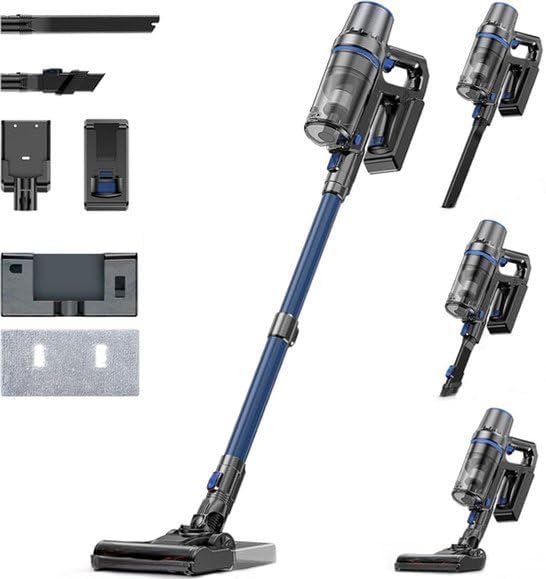
Image: The Olvy A10 Cordless Stick Vacuum Cleaner in its full assembly, alongside various attachments and the wall mount.
2. Mirayiridzo Yekuchengetedza
To reduce the risk of fire, electric shock, or injury, always follow basic safety precautions when using an electrical appliance.
- Verenga mirairo yese usati washandisa mudziyo.
- Usashandise kunze kana panzvimbo dzakanyorova.
- Usabvumira kushandiswa setoyi. Kunyatsotarisa kunodiwa kana ichishandiswa nevana kana pedyo.
- Shandisa chete sezvinotsanangurwa mubhuku rino. Shandisa zvinokurudzirwa nemugadziri chete.
- Usashandise netambo yakakanganiswa kana plug. Kana mudziyo usiri kushanda sezvawaifanira kuita, wakadonhedzwa, wakuvadzwa, wasiiwa panze, kana kuti wakadonhedzwa mumvura, chidzosere kunzvimbo yebasa.
- Usakweva kana kutakura netambo, shandisa tambo semubato, kuvhara gonhi patambo, kana kudhonza tambo kumativi akapinza kana makona. Usamhanye mudziyo pamusoro petambo. Chengetedza tambo kure nenzvimbo dzinopisa.
- Usasunungura nekudhonza tambo. Kuti usunungure, bata plug, kwete tambo.
- Usabate plug kana mudziyo nemaoko akanyorova.
- Usaisa chero chinhu mumaburi. Usashandise nekuvhura kwakavharwa; chengetedza pasina huruva, lint, bvudzi, uye chero chinhu chinogona kuderedza kuyerera kwemhepo.
- Chengeta bvudzi, zvipfeko zvisina kusimba, zvigunwe, uye nhengo dzese dzemuviri kure nekuvhura uye nhengo dzinofamba.
- Dzima zvese zvinodzorwa usati waburitsa.
- Shandisa kungwarira pakuchenesa pamasitepisi.
- Usashandise kunhonga zvinwiwa zvinopfuta kana kutsva, zvakaita sepeturu, kana kushandisa munzvimbo dzavangave varipo.
- Usanhonge chinhu chiri kutsva kana kuputa, chakadai sefodya, machisi, kana madota anopisa.
- Usashandise pasina guruva kapu uye / kana mafirita munzvimbo.
- Dzivirira kutanga usingafungi. Ita shuwa kuti switch iri panzvimbo yekudzima isati yabatana nebhatiri pack, kusimudza kana kutakura mudziyo.
- Recharge chete nechaja yakataurwa nemugadziri. Chaja inokodzera imwe mhando yebhatiri pack inogona kukonzera njodzi yemoto kana ikashandiswa nerimwe bhatiri pack.
- Mumamiriro ezvinhu akashata, mvura inogona kubudiswa mubhatiri; dzivisa kusangana. Kana kusangana kukaitika netsaona, geza nemvura. Kana mvura ikasangana nemaziso, tsvagawo rubatsiro rwekurapa. Mvura inobuda mubhatiri inogona kukonzera kusvotwa kana kupisa.
3. Package Zviri mukati
Tarisa kuti zvese zvirimo zviripo mupakeji:
- Chiyuniti Chikuru (Chinovharidzira Nemaoko)
- Adjustable Extension Tube
- Floor Brush Head
- Removable Battery
- Tangi reMvura (rekukwesha)
- Mop Pad
- 2-mu-1 Brush Tool
- Crevice Tool
- Wall Mount Bracket
- Power Adapter
- Replacement HEPA Filter (2x)
- User Manual

Image: A visual representation of all components included with the Olvy A10 Cordless Stick Vacuum Cleaner.
4. Chigadzirwa Pamusoroview
The Olvy A10 features a powerful 350W motor providing up to 35,000 Pa suction, an integrated mop function, and a multi-stage HEPA filtration system. It includes an intelligent LED display for monitoring status and an auto-mode for adaptive cleaning.
Zvinokosha:
- Kusveta Kwakasimba: 350W motor with 35,000 Pa for deep cleaning on various surfaces.
- 2-in-1 Mashandiro: Seamlessly switch between vacuuming and mopping.
- Intelligent LED Display: Provides real-time information on battery level, suction mode, and dust concentration.
- Auto Mode: Automatically adjusts suction power based on detected dirt levels.
- HEPA 13 Filtration: Captures 99.99% of fine particles, suitable for allergy sufferers.
- Nguva Yakareba: Up to 60 minutes on a single charge with a 2200 mAh removable battery.
- Lightweight and Versatile: Easy to maneuver and convert into a handheld vacuum for various cleaning tasks.

Image: Close-up of the intelligent LED display showing battery indicator, low power warning, auto mode, dust concentration, and control panel.

Image: The LED display indicating 'Auto-mode' and the current power level during operation.
5. Setup uye Gungano
5.1 Kutanga Kuchaja
Before first use, fully charge the battery. The battery takes approximately 4-5 hours to fully charge.
- Bvisa bhatiri kubva pachinhu chikuru nekudzvanya bhatani rekuburitsa.
- Connect the power adapter to the charging port on the battery.
- Plug the adapter into a power outlet. The battery indicator on the LED display will show charging status.
- Kana chachajwa zvizere, bvisa adapta.

Image: The removable battery unit, highlighting its 2200 mAh capacity, 4-5 hour charging time, and up to 60 minutes run time.
5.2 Kubatanidza Vacuum Cleaner
- Batanidza Bhatiri: Slide the charged battery into the main unit until it clicks into place.
- Batanidza iyo Extension Tube: Connect the adjustable extension tube to the main unit. Ensure it clicks securely.
- Batanidza Floor Brush: Connect the floor brush head to the other end of the extension tube.
- Isa Wall Mount (Sarudzo): Sarudza nzvimbo yakakodzera yekuisira madziro. Isunge kumadziro uchishandisa screws nezvitsigiso zviripo. Izvi zvinoita kuti zvive nyore kuchengetedza nekuchaja.
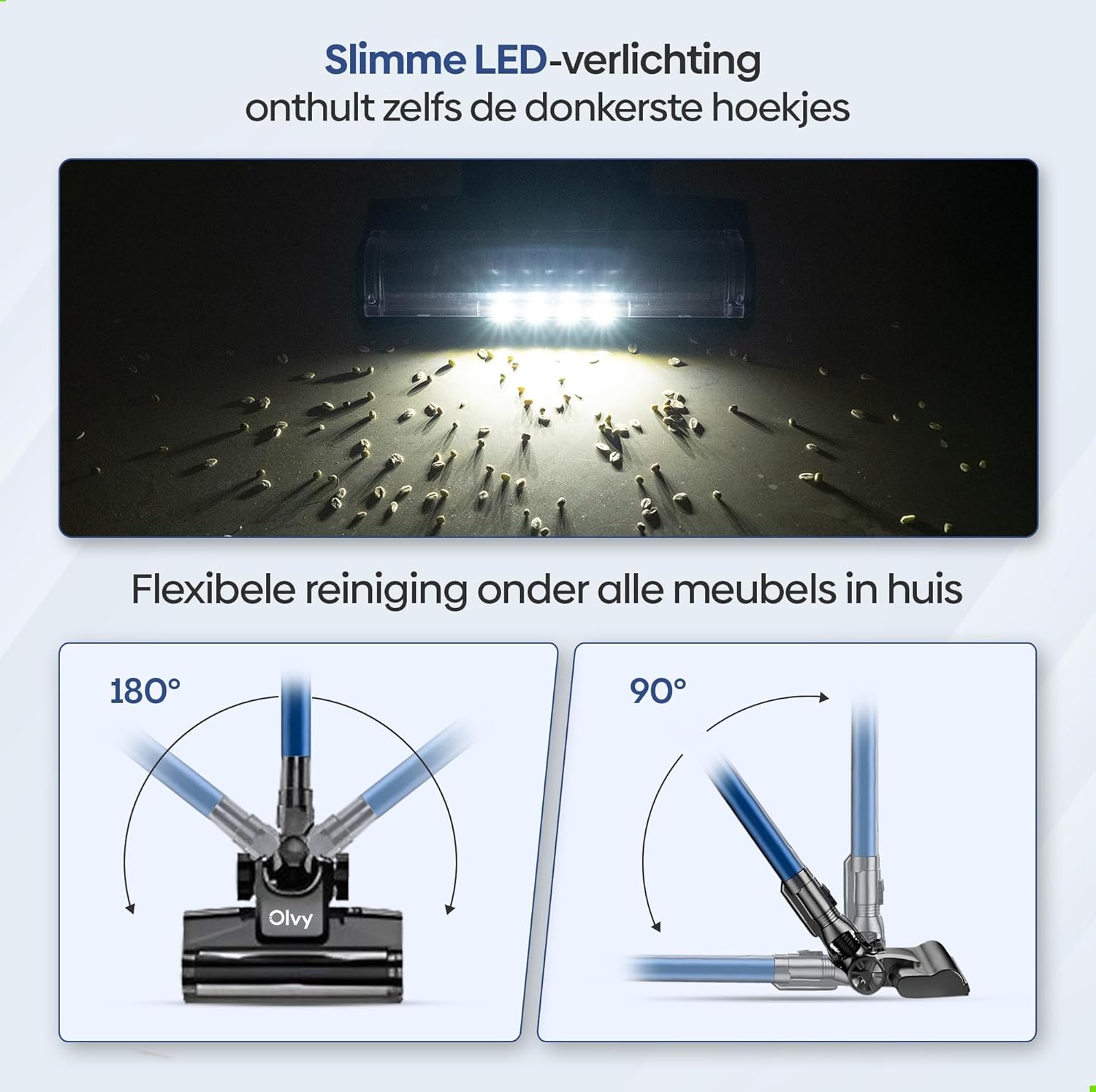
Image: The vacuum cleaner demonstrating both wall-mounted storage and self-standing capability.
6. Operating Instructions
6.1 Basic Operation
- Batidza/Kudzima: Dzvanya bhatani rekudzima kana kudzima mudziyo wekuchenesa.
- Gadzirisa Suction Power: The vacuum offers 5 suction levels. Use the control panel on the LED display to cycle through the power modes (Low, Normal, High, Turbo).
- Auto Mode: Activate the intelligent auto mode for automatic suction adjustment based on dirt detection. The LED display will show 'Auto' when this mode is active.
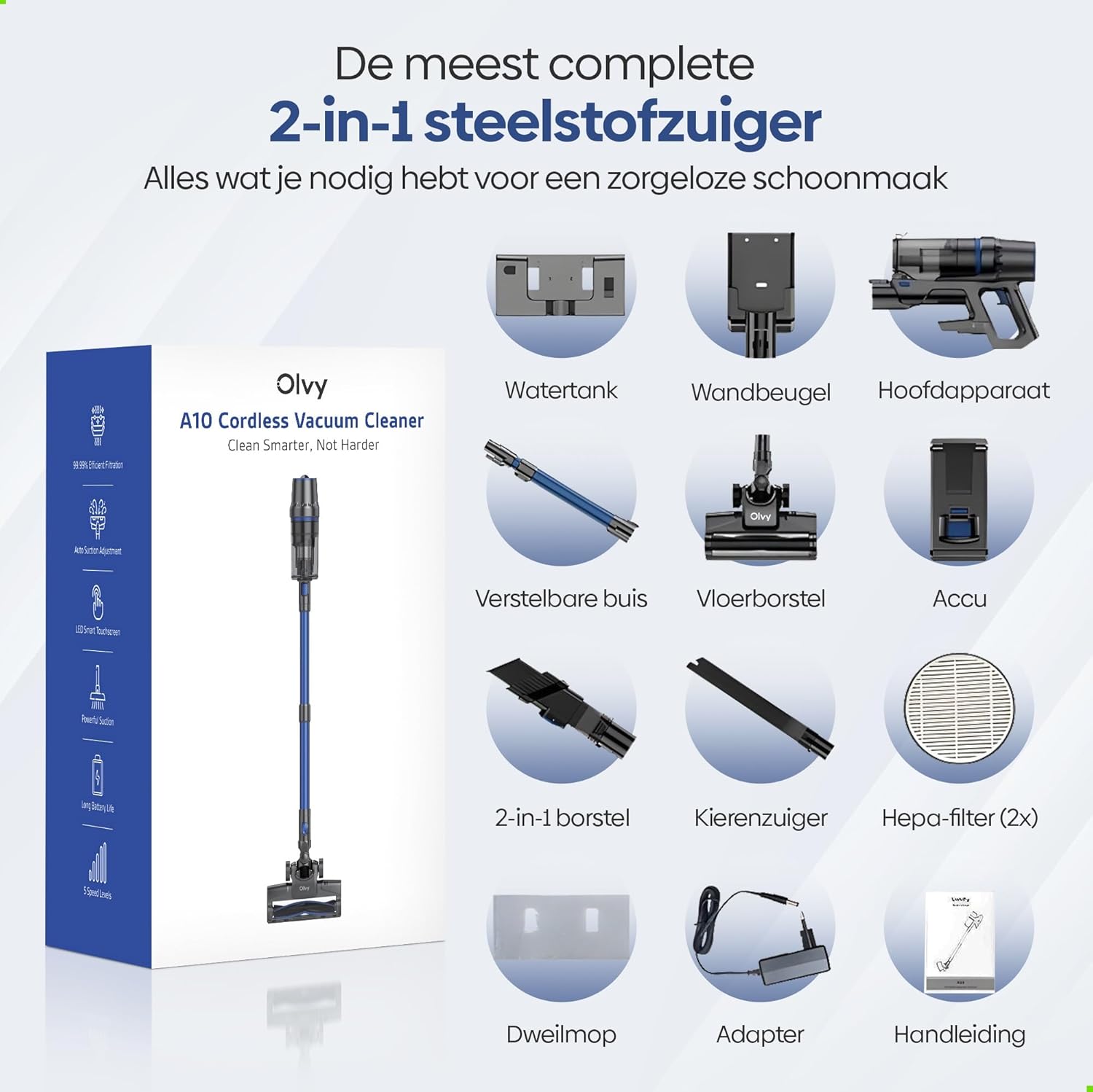
Image: The vacuum cleaner demonstrating its 4 suction levels (Low, Normal, High, Turbo) and intelligent auto mode, which adapts to dirt levels.
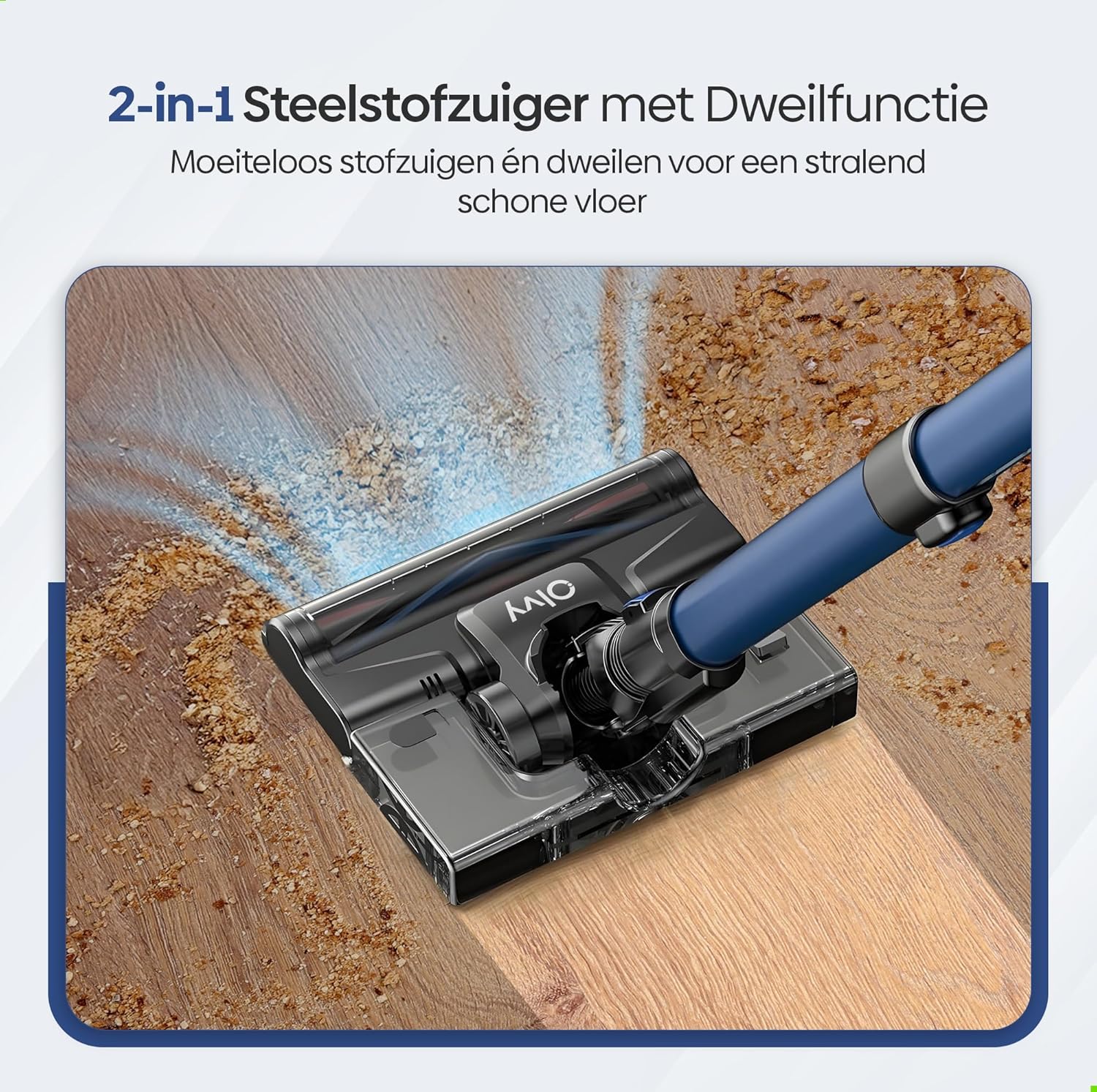
Image: A user operating the Olvy A10, showcasing its powerful 350W motor and 35,000 Pa suction for effective cleaning of various debris like hair, dust, crumbs, and sand.
6.2 Using the Mop Function
The integrated mop function allows for simultaneous vacuuming and wet cleaning of hard floors.
- Zadza Tangi Yemvura: Detach the water tank from the floor brush head. Fill it with clean water. Do not use corrosive liquids or detergents that may damage the tank or floor.
- Attach Mop Pad: Securely attach the mop pad to the bottom of the water tank.
- Torazve Tangi Yemvura: Reinstall the filled water tank onto the floor brush head.
- Begin Mopping: Operate the vacuum cleaner as usual. The mop pad will dampen the floor as you vacuum, providing a streak-free clean.

Mufananidzo: Yakadzama view of the 2-in-1 stick vacuum with mop function, showing water being dispensed for simultaneous vacuuming and mopping on a hard floor.

Image: The mop function of the Olvy A10 actively cleaning a hard floor, demonstrating its effectiveness in removing dirt and leaving a clean surface.
6.3 Kushandisa maAttachments
- 2-in-1 Brush Tool: Ideal for cleaning upholstery, curtains, and delicate surfaces.
- Crevice Tool: Yakakwana yekusvika munzvimbo dzakasimba, makona, uye mipendero.
- To use, detach the extension tube and connect the desired attachment directly to the main unit.

Image: The Olvy A10 being used in different configurations, including as a stick vacuum for floors, a handheld for high areas, and for cleaning under furniture.

Image: The vacuum's LED lighting revealing hidden dust particles on the floor, and diagrams illustrating its 180° and 90° flexible head rotation for cleaning under furniture.
7. Kuchengeta
Regular maintenance ensures optimal performance and extends the lifespan of your Olvy A10 vacuum cleaner.
7.1 Kubvisa Dustbin
Empty the dustbin regularly, especially when the 'Dust Concn' indicator on the LED display shows high concentration.
- Ita shuwa kuti vacuum yakadzimwa.
- Press the dustbin release button to detach it from the main unit.
- Hold the dustbin over a trash can and press the bottom release latch to open the lid and empty the contents.
- Close the lid and reattach the dustbin to the main unit.

Image: The dustbin being emptied with a single click, demonstrating its large 0.8L capacity.

Image: A user washing the dustbin under running water, illustrating the washable components for easy cleaning.
7.2 Kuchenesa Masefa
The Olvy A10 uses a multi-stage filtration system, including an HEPA filter, which should be cleaned regularly.
- Bvisa dustbin.
- Twist and pull out the filter assembly (HEPA filter, dust filter, stainless steel filter).
- Tap off loose dirt from each filter component.
- Rinse the filters under cold running water. Do not use hot water or detergents.
- Allow all filter components to air dry completely for at least 24 hours before reassembling. Do not use the vacuum with wet filters.
- Unganidzazve mafirita woadzosera mubhini remarara, wobva wabatanidzazve bhini remarara kuchinhu chikuru.

Image: A cutaway diagram illustrating the multi-stage HEPA filtration system, including the dustbin filter, stainless steel filter, dust filter, HEPA air filter, and air outlet filter.
7.3 Kuchenesa Bhurashi Roro
Nguva nenguva tarisa mupumburu webhurashi kune bvudzi rakapetwa kana marara.
- Dzima vacuum cleaner.
- Press the release tab on the side of the floor brush head to remove the brush roll cover.
- Simudza bhurasho roll.
- Shandisa chigero kana chishandiso chekuchenesa kuti ucheke nekubvisa bvudzi kana shinda dzakapindana.
- Isazve bhurashi wobva wasunga chifukidziro.
7.4 Kuchenesa Mop Pad
After each use of the mop function, remove and clean the mop pad.
- Detach the mop pad from the water tank.
- Rinse the mop pad under running water or machine wash it with mild detergent.
- Allow the mop pad to air dry completely before storing or reusing.
8. Kugadzirisa matambudziko
If you encounter any issues with your Olvy A10, refer to the following common problems and solutions:
| Dambudziko | Zvinogona Kukonzera | Solution |
|---|---|---|
| Vacuum haibatike | Bhatiri harina kuchajwa kana kuti harina kuiswa zvakanaka. | Charge the battery fully. Ensure the battery is securely clicked into the main unit. |
| Simba rekusveta shoma | Dustbin is full. Filters are clogged. Brush roll is tangled. Obstruction in the nozzle or tube. | Empty the dustbin. Clean all filters thoroughly and ensure they are dry. Remove any hair or debris from the brush roll. Check for and remove any blockages. |
| Brush roll kwete kutenderera | Roro rebhurashi rakamonyana kana kuti rakavharika. | Turn off the vacuum. Remove the brush roll and clear any obstructions. |
| Mop function not working | Water tank is empty or not properly installed. Mop pad is dry. | Fill the water tank. Ensure the water tank is securely attached to the floor brush. Dampen the mop pad slightly before use if needed. |
| Nguva pfupi yekumhanya | Battery not fully charged. Using high suction mode continuously. Battery degradation. | Ensure battery is fully charged. Use lower suction modes for longer run time. If battery life significantly decreases, consider replacing the battery. |
9. Zvinotsanangurwa
| Feature | Tsanangudzo |
|---|---|
| Brand | Olvy |
| Model Number | A10 |
| Color | Nhema |
| Product Dimensions | 32 x 19 x 32 cm |
| Kurema | 5 kg |
| Motor Power | 350W |
| Suction Power | Kusvika ku35,000 Pa |
| Nhamba Yekumhanya | 5 (including Auto Mode) |
| Noise Level | 55 Decibel |
| Run Time | Kusvika awa imwe chete (maminitsi makumi matanhatu) |
| Battery Capacity | 2200 mAh |
| Kuchaja Nguva | 4-5 maawa |
| Rudzi rwesefa | HEPA 13 (Washable) |
| Dustbin Capacity | 0.8L |
| Simba Source | Bhatiri |
| Recommended Surfaces | All floors (carpets, hard floors) |
| Special Features | 2-in-1 Vacuum & Mop, LED Display, Auto Mode, Pet-friendly, Lightweight |
10. Warranty uye Tsigiro
Olvy products are manufactured to high-quality standards. For warranty information, technical support, or service inquiries, please refer to the contact information provided with your purchase documentation or visit the official Olvy website. Ndapota chengetedza humbowo hwako hwekutenga kwezvichemo zvewaranti.


