1. Chigadzirwa Pamusoroview
The Jennov 6MP PoE PTZ Security Camera is designed for outdoor surveillance, offering high-resolution video, extensive pan, tilt, and zoom capabilities, and advanced detection features. This camera utilizes Power over Ethernet (PoE) for simplified installation and includes various night vision modes to ensure clear monitoring in diverse lighting conditions.

Image: Jennov 6MP PoE PTZ Security Camera capturing superior 6MP UHD images during both day and night, showcasing its high-resolution capabilities.
Video: This video provides a brief overview of the Jennov 6MP PoE PTZ Security Camera's features, including its dual-lens system, solar power capability, PTZ controls, high-definition video, weather resistance, smart motion detection, and wireless connectivity.
2. Key Features
- Ultra 6MP HD & 20X Optical Zoom: Captures detailed 6-megapixel Ultra HD images. Features a 4.7~94mm motorized lens for 20X optical zoom and 10X digital zoom, allowing clear viewing of distant objects without image degradation.
- Auto Tracking & Human Detection: Equipped with intelligent auto-tracking and human detection. Detection areas and sensitivity can be adjusted to minimize false alarms. The camera automatically tracks detected individuals and sends real-time video or snapshots to your mobile device. Supports 8 cruising routes, each with up to 16 preset positions for comprehensive area coverage.
- Color Night Vision & Sound-Light Alarm: Integrates 6 infrared lights and 4 white LEDs for smart night vision up to 50 meters. Offers three night vision modes: Infrared, White Light, and Intelligent. When suspicious activity is detected, an audio alarm is triggered, and white LEDs illuminate at night for enhanced deterrence and visibility.
- Power Over Ethernet (PoE) & Two-Way Audio: Simplifies installation by using a single Ethernet cable for both power and data transmission. Features built-in microphone and speakers for real-time two-way communication through the monitoring system.
- Multi-user Sharing & IP66 Waterproof: Allows sharing camera access and controls with up to 5 users simultaneously via the main account. The IP66 rating ensures the camera's durability and normal operation in various adverse weather conditions.
3. Zvigadzirwa zveChigadzirwa
Iyo package inosanganisira zvinotevera zvinhu:

Mufananidzo: Zvakadzama view of the Jennov 6MP PoE PTZ Security Camera's components and the complete packing list, including the camera, mounting bracket, cables, power supply, and user manual.
Packing List:
- Jennov 6MP PoE PTZ Security Camera
- Kuisa Bracket
- 1M Ethernet Cable
- User Manual
- Isapinda Kepu
- 12V 2A Power Supply
- Yambiro kunamirwa
- Screws uye Wall Plugs
4. Setup Guide
4.1 Kutanga Kubatanidza
Follow these steps to connect your Jennov PoE camera using a separate power supply:
- Power on your camera by connecting the 12V 2A power supply to the camera's power input and then to a power outlet.
- Connect your camera to your network router using the provided Ethernet cable. Ensure both ends are securely plugged in.
Video: This video demonstrates the initial setup process for the Jennov PoE camera, showing how to power it on and connect it to a router using an Ethernet cable.
4.2 App Configuration (Videlink App)
To access and control your camera, download and configure the Videlink app:
- Download the "Videlink" app from your smartphone's app store.
- Nyorera account itsva kana kuti pinda kana watova nayo.
- On the app's main screen, click "Add New Device".
- Select "Lan" as the connection type.
- Scan the QR code located on your camera using your phone's camera through the app.
- Follow the on-screen prompts to bind the device. Once successful, your camera feed should appear in the app.
5. Operating Instructions
5.1 Kudzora Pan, Tilt, uye Zoom (PTZ)
The camera offers 360° pan and 90° tilt movement, along with 20X optical zoom. Use the controls within the Videlink app to adjust the camera's viewing angle and zoom level. This allows for flexible monitoring of large areas and detailed inspection of specific points.

Image: The Jennov 6MP PoE PTZ Security Camera illustrating its 360-degree pan and 90-degree tilt capabilities, along with auto-tracking functionality for comprehensive surveillance.

Image: The Jennov 6MP PoE PTZ Security Camera demonstrating its powerful 30X zoom, which includes 20X optical zoom for clear magnification and 10X digital zoom.
5.2 Night Vision Modes
Kamera ine nzira nhatu dzekuona husiku:
- Infrared Modhi: Inopa vhidhiyo nhema nechena mumamiriro ekunze asina chiedza chakawanda ichishandisa ma LED e infrared.
- White Light Mode: Activates white LEDs to provide full-color night vision.
- Nzira Yekuchenjera: Automatically switches between infrared and white light modes based on detected motion or user settings, offering color vision when needed.
5.3 Human Detection and Auto-Tracking
The camera can detect human figures and automatically track their movement within its field of view. Configure detection zones and sensitivity settings in the app to optimize performance and reduce false alerts. The camera supports setting up to 8 cruising routes, each with 16 preset positions, for automated patrol.
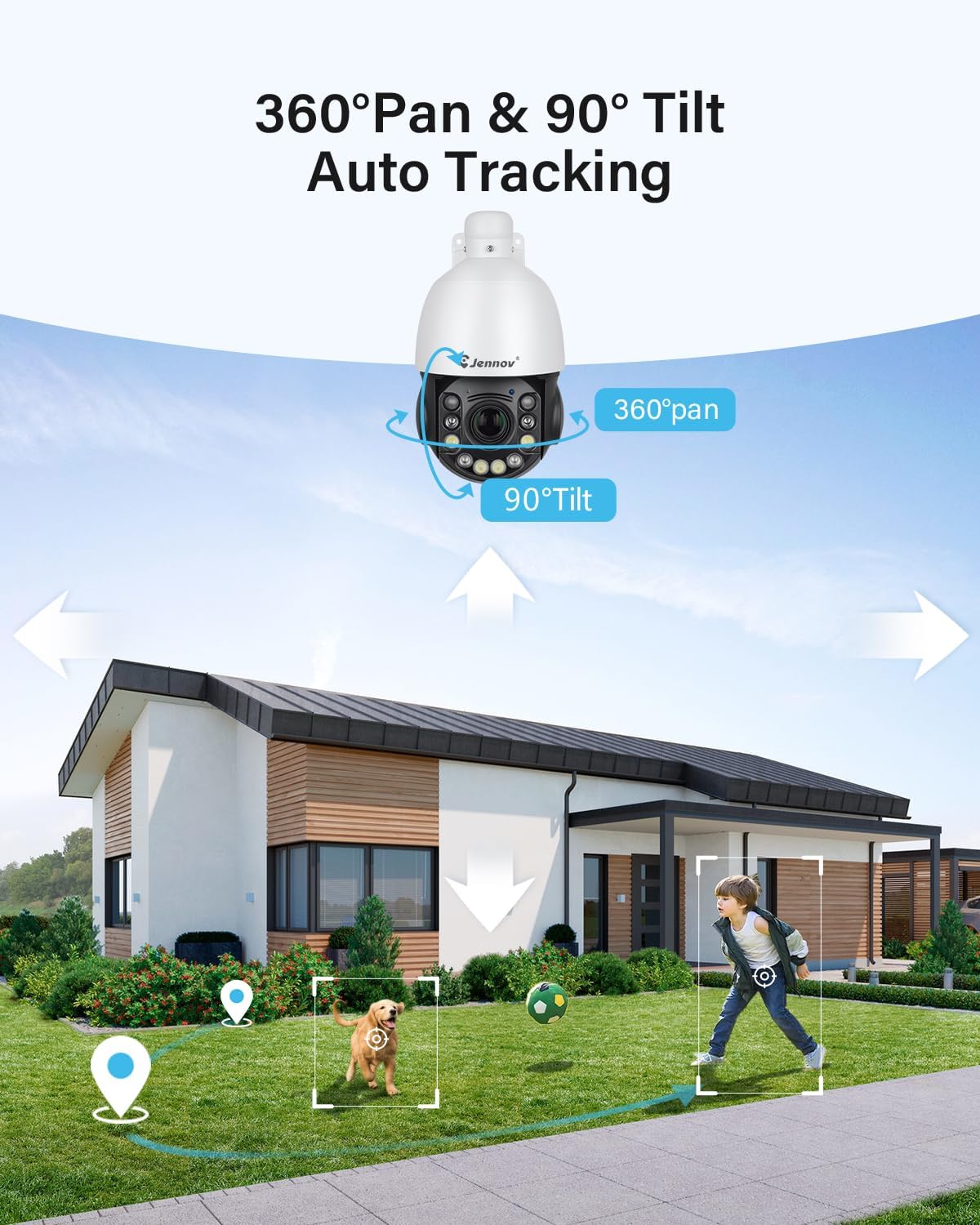
Image: The Jennov 6MP PoE PTZ Security Camera's smart human and vehicle detection feature, showing how it identifies subjects and can trigger email, push notifications, or FTP alerts.
5.4-Nzira mbiri Audio
Utilize the built-in microphone and speaker for two-way audio communication. This feature allows you to listen to the camera's surroundings and speak through the camera from your mobile device, facilitating interaction with visitors or deterring intruders.

Image: The Jennov 6MP PoE PTZ Security Camera showcasing its two-way audio function, allowing a user to communicate with a person at the door via the mobile app.
5.5 Multi-User Access
Share access to your camera's live feed and controls with family or friends. This is managed through the main account in the Videlink app, allowing up to 5 users to view the camera simultaneously.
6. Kuchengeta
- Kuchenesa: Gara uchichenesa lenzi yekamera nekabati kayo uchishandisa soft, damp jira rekubvisa guruva nemarara. Dzivisai zvinochenesa zvinokwesha.
- Firmware Dzokorora: Check the Videlink app periodically for available firmware updates. Keeping the firmware updated ensures optimal performance, security, and access to new features.
- Weather Resistance: The camera is IP66 rated for outdoor use. While designed to withstand rain and dust, ensure all connections are properly sealed to maintain its weather resistance.
7. Kugadzirisa matambudziko
| Nyaya | Zvinogona Kukonzera | Solution |
|---|---|---|
| Kamera haisi kubatika | No power supply, faulty adapter, loose connection. | Ensure power adapter is correctly plugged into camera and outlet. Test outlet with another device. Check power cable for damage. |
| Hapana vhidhiyo muapp | Network connectivity issue, incorrect app setup, camera offline. | Verify Ethernet cable connection to router. Restart camera and router. Re-add device in Videlink app. Ensure your phone has internet access. |
| Kuonekwa kwekufamba hakusi kushanda | Detection settings incorrect, sensitivity too low, object outside detection zone. | Adjust motion detection sensitivity and define detection zones in the Videlink app. Ensure camera lens is clean. |
| Hunhu husina kunaka hwekuona husiku | Obstruction in front of lens, incorrect night vision mode, insufficient ambient light for color mode. | Clean the camera lens. Switch between Infrared, White Light, and Intelligent night vision modes in the app to find the best setting for your environment. |
8. Zvinotsanangurwa
- Zita remuenzanisi: PS6009
- Zvinokurudzirwa Zvishandiso: Kunze Kuchengetedzwa
- Kubatana Technology: Ethernet (PoE)
- Special Feature: Nyore Kuisa
- Resolution: 6 Megapixels Ultra HD
- Optical Zoom: 20X
- Digital Zoom: 10X
- Pan/Tilt: 360° Pan, 90° Tilt
- Night Vision Range: Up to 50m (160ft) with IR and White LEDs
- Weather Resistance: IP66
- Audio: Two-Way Audio (Built-in Microphone and Speaker)
- Kuonekwa: Human Detection, Auto-Tracking
9. Warranty uye Tsigiro
For warranty information, technical support, or further assistance, please refer to the official Jennov websaiti kana kubata basa ravo revatengi zvakananga. Chengeta risiti yako yekutenga yezvichemo zvewaranti.


