Nhanganyaya
Thank you for choosing the Bigben Karaoke Microphone. This all-in-one portable karaoke system combines a stereo microphone with a powerful 15W Bluetooth speaker and dynamic light effects, designed to enhance your singing and music listening experience. This manual provides essential information for safe and optimal use of your device.
Safety Information
- Verenga mirairo yese usati washandisa mudziyo.
- Chengetedza mudziyo kure nemvura uye unyoro.
- Usafumure kune tembiricha yakanyanyisa kana zuva rakananga.
- Usaedze kudimbura kana kugadzirisa mudziyo wega. Tarisa kune vashandi vanokwanisa.
- Shandisa chete zvinhu zvakatarwa zvekuchaja.
- Chengetedza pasingasvikirwi nevana.
Package Zviri mukati
Ndapota tarisai kuti zvinhu zvese zviripo mupakeji:
- Bigben Karaoke Microphone (Model PARTYBTMIC2WH)
- Kuchaja Cable (USB)
- Mushandisi Chinyorwa (gwaro iri)
- Front Glass (as an included component, likely pre-installed or a protective cover)

Mufananidzo 1: The Bigben Karaoke Microphone shown in its retail packaging. The packaging highlights features such as Bluetooth connectivity, 4 vocal effects, and wireless speaker functionality.
Product Overview
The Bigben Karaoke Microphone features an integrated speaker and various controls for an interactive experience.
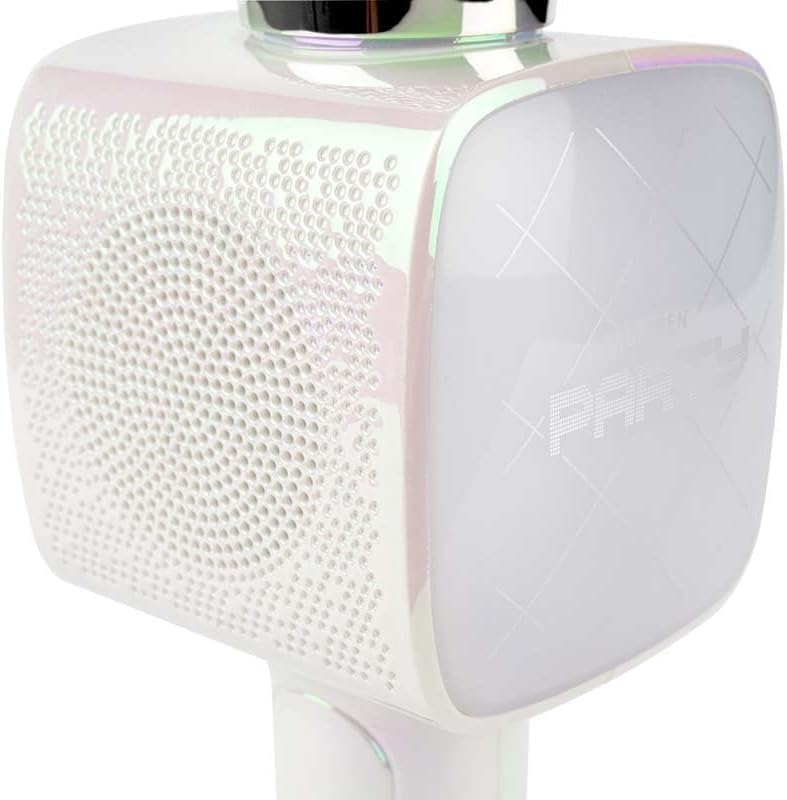
Mufananidzo 2: A pedyo-up view of the Bigben Karaoke Microphone, focusing on the speaker grille and the light-up panel. The panel displays "PARTY" and shows dynamic light effects.
Zvinokosha:
- Makaralı 5.0: For stable wireless connection to your devices.
- Mutauri Akabatanidzwa: 15W output for clear and powerful sound.
- Light Effects: Dynamic lighting to enhance the karaoke experience.
- Sound Effects: 4 different vocal effects and an echo effect.
- Zvakawanda Zvinopinza: USB, Micro SD, and 3.5mm headphone jack.
Gadzirira
1. Kuchaja Maikorofoni
- Batanidza yakapihwa USB yekuchaja tambo kune maikorofoni yekuchaja port.
- Batanidza imwe magumo e USB tambo kune ino enderana USB magetsi adapta (isina kuisirwa) kana komputa USB port.
- Chiedza chechiratidzo chekuchaja chichavhenekera. Kana chazara chaji, mwenje unogona kuchinja ruvara kana kudzima.
2. Powering On / Off
- To power on, press and hold the Power button for a few seconds until the indicator light illuminates and you hear an audible prompt.
- Kuti udzime, dzvanya uye ubate bhatani reSimba zvakare kudzamara mwenje wechiratidzo wadzima.
3. Bluetooth Kubatanidza
- Ensure the microphone is powered on and in Bluetooth pairing mode (usually indicated by a flashing light).
- Pane yako smartphone, piritsi, kana imwe Bluetooth-inogonesa mudziyo, enda kumasetin'i eBluetooth.
- Tsvaga available devices and select "Bigben Karaoke Mic" (or similar name) from the list.
- Kana wangobatanidzwa, uchanzwa ruzha rwekusimbisa, uye rambi rechiratidzo richamira kupenya.
Operating Instruction
1. Kutamba Mumhanzi
- Kuburikidza neBluetooth: After successful pairing, play music from your connected device. The sound will output through the microphone's speaker.
- Via USB/Micro SD: Insert a USB drive or Micro SD card (with music files) into the respective port. The microphone will automatically detect and play music.
- Via 3.5mm Audio Cable: Connect an external audio source using a 3.5mm audio cable (not included) to the headphone input.
2. Kushandisa Maikorofoni
- Speak or sing directly into the microphone grille.
- Adjust the microphone volume using the dedicated controls on the device.
3. Migumisiro Yeruzha
- Migumisiro Yenzwi: The microphone offers 4 different vocal effects. Press the "Effect" button (or similar labeled button) to cycle through these effects.
- Echo Mhedzisiro: Activate or adjust the echo effect using its dedicated control.
4. Chiedza Migumisiro
The microphone features dynamic light effects. These lights typically activate automatically when the device is on and can often be toggled or changed using a dedicated light button, if available.
Maintenance
- Kuchenesa: Wipe the microphone with a soft, dry cloth. Do not use abrasive cleaners or solvents.
- Kuchengeta: Chengetedza mudziyo munzvimbo inotonhorera, yakaoma kure nechiedza chezuva kana isiri kushandiswa.
- Battery Care: For optimal battery life, charge the device regularly, even if not used frequently.
Kugadzirisa matambudziko
| Dambudziko | Zvinogona Kukonzera | Solution |
|---|---|---|
| Hapana simba | Bhatiri rapera. | Chaja maikorofoni zvizere. |
| Hapana ruzha kubva kumutauri | Volume is too low; device not connected; incorrect input mode. | Increase volume; ensure Bluetooth is paired or cable is connected; check USB/Micro SD insertion. |
| Maikorofoni haisi kushanda | Microphone volume is too low; microphone function is off. | Increase microphone volume; ensure microphone is active. |
| Kubatana kweBluetooth hakuna kugadzikana | Device is too far from the microphone; interference. | Move devices closer; avoid obstacles; disconnect and re-pair. |
Zvinotsanangurwa
| Feature | Detail |
|---|---|
| Brand | Bigben |
| Model Number | PARTYBTMIC2WH |
| Kubatana | Bluetooth 5.0, USB, Micro SD, 3.5mm Headphone Jack |
| Mutauriri Kubuda | 15W |
| Sound Effects | 4 Vocal Effects, Echo Effect |
| Zviyero zveChigadzirwa (LxWxH) | 20 x 15 x 10 cm |
| Item Weight | 300 magiramu |
| Color | Chena |
| Nhamba yeChannels | 2 |
| Mabhatiri Anodiwa | Yes (type unknown, likely integrated rechargeable) |
Warranty uye Support
For warranty information and customer support, please refer to the documentation provided with your purchase or visit the official Bigben website. Chengetedza humbowo hwako hwekutenga kune warranty claim.
For technical assistance or further inquiries, please contact Bigben customer service through their official channels.


