Nhanganyaya
This manual provides detailed instructions for the safe and efficient use of your artfone G6 Pro 4G Senior Flip Phone. Please read this manual thoroughly before operating the device and keep it for future reference.

Image: The artfone G6 Pro 4G flip phone, showcasing its dual LCD screens and large keypad.
Chii chiri muBhokisi
Tarisa uone kuti zvinhu zvese zviripo mupakeji:
- 1 x artfone G6 Pro Senior Flip Phone
- 1 x 1300 mAh Bhatiri
- 1 x USB yekuchaja Cable
- 1 x Charging Head (Power Adapter)
- 1 x Kuchaja Doki
- 1 x Bhuku reVashandisi (Chirungu, ChiGerman, ChiFrench, ChiSpanish, ChiItalian)

Image: All components included in the artfone G6 Pro package: the phone, battery, USB cable, power adapter, charging dock, and user manual.
Gadzirira
1. Installing the SIM Card, Micro SD Card, and Battery
- Bvisa chivharo chekumashure chefoni.
- Insert your Nano SIM card(s) into the designated slot(s). Ensure the gold contacts face downwards.
- If desired, insert a Micro SD card (up to 64GB) into the Micro SD slot for expanded storage.
- Insert the 1300mAh battery, aligning the contacts correctly.
- Dzorera chivharo chekumashure kusvika chadzvanya zvakanaka panzvimbo.
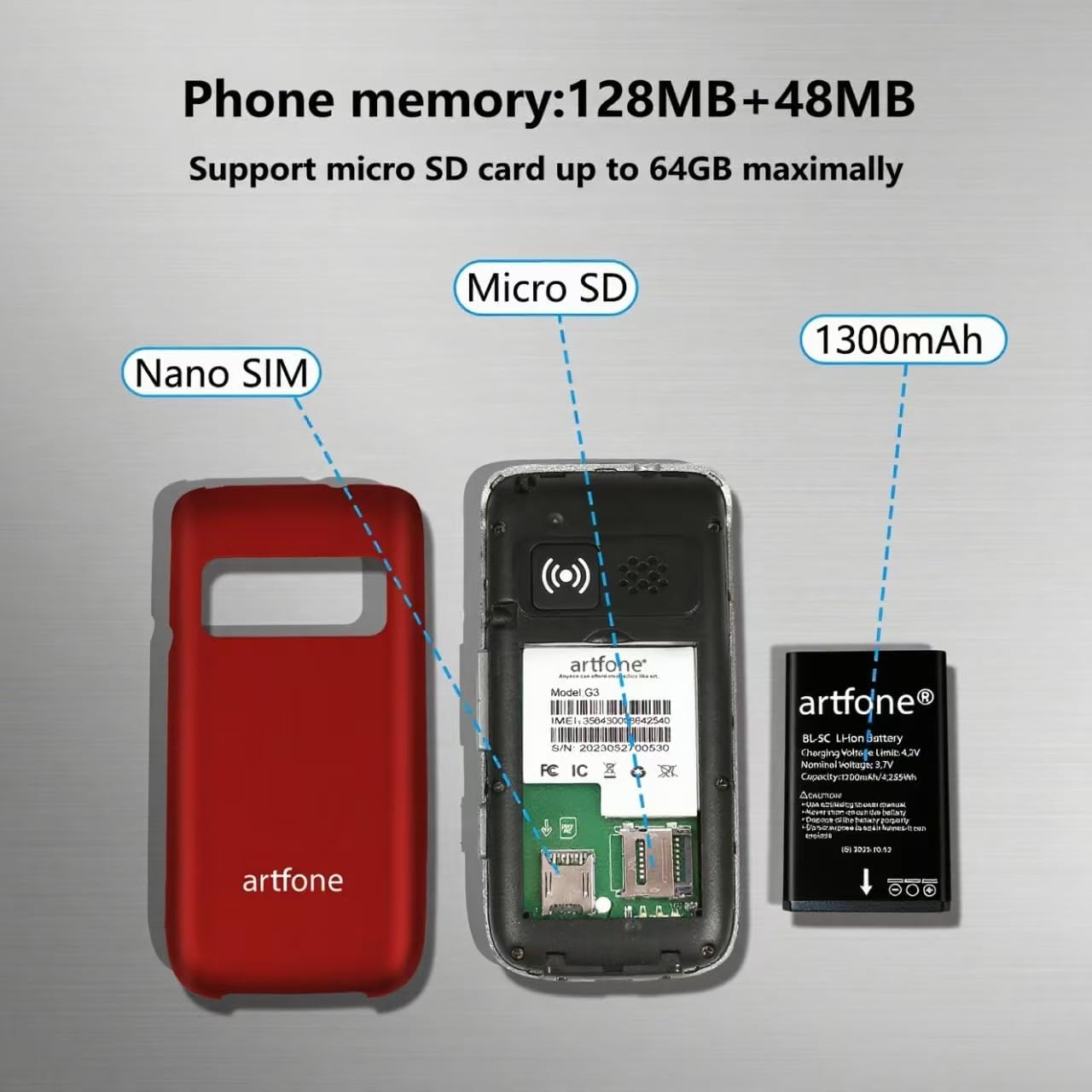
Mufananidzo: Yakaputika view of the artfone G6 Pro, showing the back cover removed, revealing slots for Nano SIM and Micro SD cards, and the 1300mAh battery.
2. Kutanga Kuchaja
Before first use, fully charge the phone. You can charge it using the provided charging dock or directly via the USB-C cable.
- Using the Charging Dock: Connect the USB cable to the charging head, then plug it into a power outlet. Place the phone into the charging dock. The phone will indicate charging status.
- Kuchaja kwakananga: Connect the USB-C cable directly to the phone's charging port and the other end to the charging head, then plug into a power outlet.
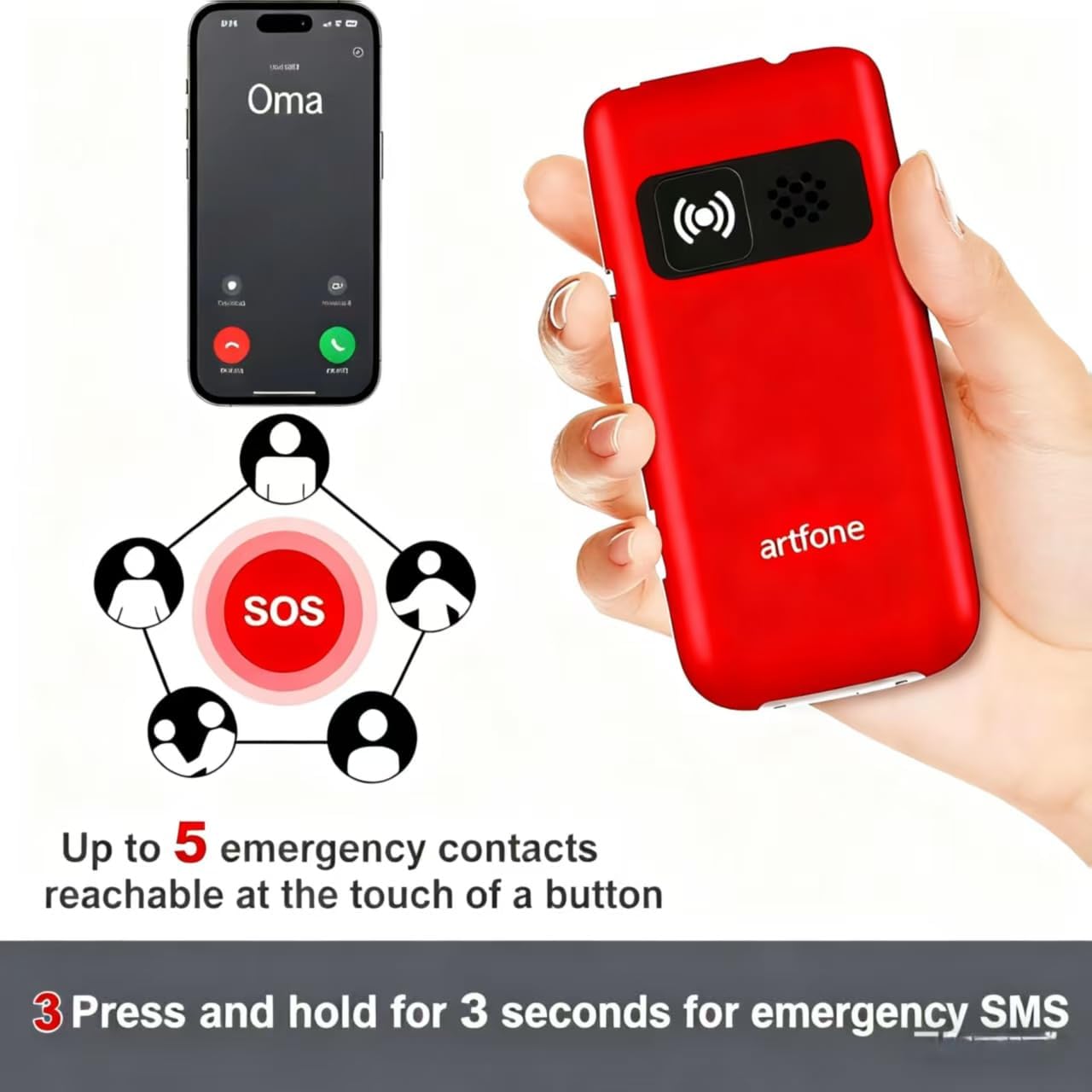
Image: The artfone G6 Pro phone placed in its charging dock, connected to a power source.
Operating Instruction
1. Simba On / Off
- Kubatidza: Press and hold the red End Call/Power button (
 ) until the screen lights up.
 - Kudzima: Press and hold the red End Call/Power button until the power-off options appear, then select 'Power Off'.
2. Kuita uye kugamuchira mafoni
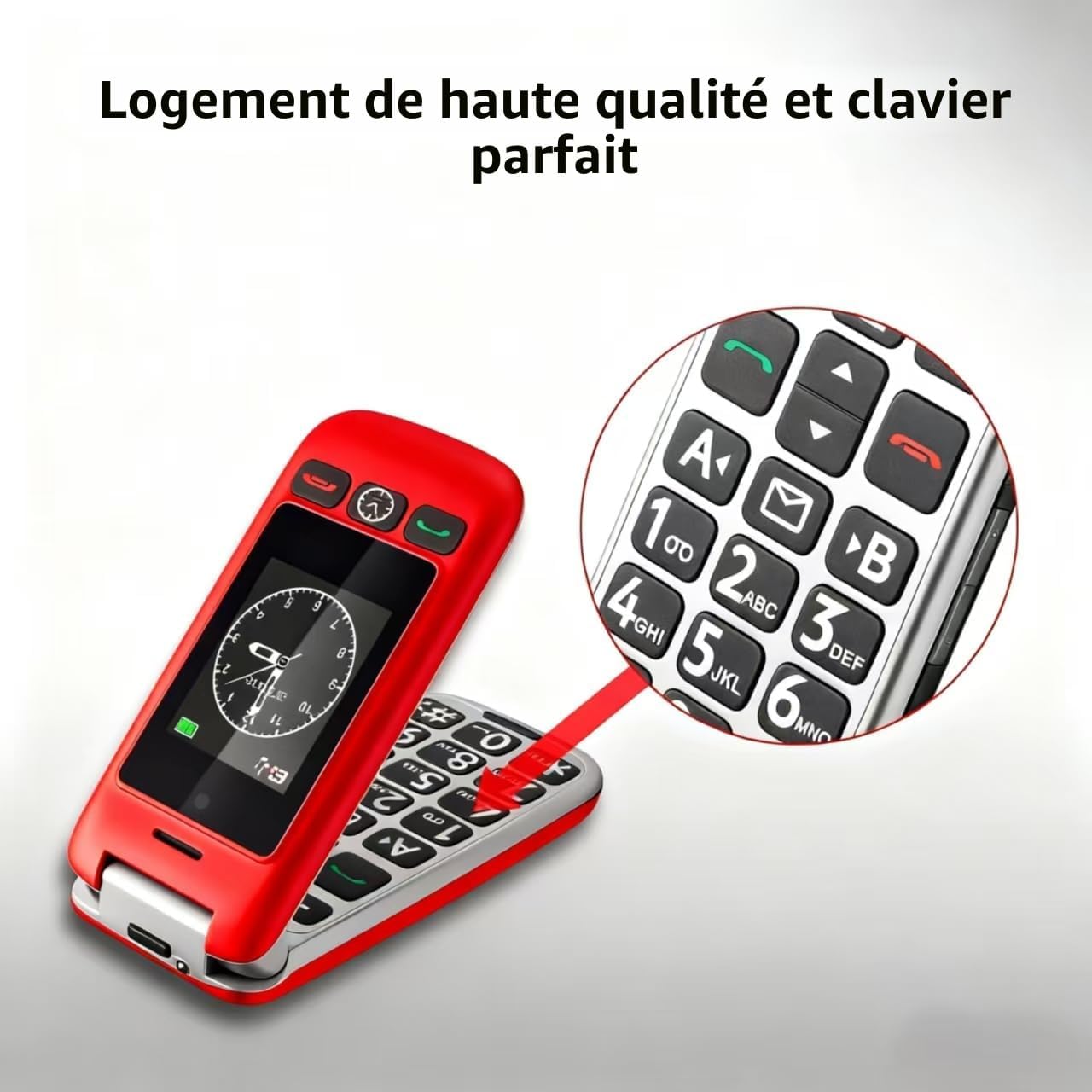
- Kufona: Dial the number using the large keypad and press the green Call button ().
- Kutambira Call: Open the flip to answer, or press the green Call button. Close the flip or press the red End Call button to end a call.
- Kugadzirisa Inzwi: Use the volume buttons on the side of the phone during a call.

Image: A close-up of the artfone G6 Pro's large, backlit keypad, designed for easy dialing.
3. Dual Screen Features
The artfone G6 Pro features a 2.4-inch internal screen and a 1.8-inch external screen.
- The external screen displays time, date, battery status, and caller ID without opening the phone.
- Press and hold the dedicated time announcement button (often located on the side or front) for 2 seconds to hear the current time spoken aloud.

Image: The artfone G6 Pro displaying the time on its external screen, with an illustration of the time announcement feature.
4. Basa reSOS reEmergency
The SOS button provides quick access to emergency contacts.
- Kugadzirisa Nhamba dzeSOS: Navigate to the 'SOS Settings' in the phone's menu to program up to 5 emergency contact numbers.
- Kushanda kweSOS: In an emergency, press and hold the SOS button on the back of the phone for 3 seconds. The phone will automatically call the programmed numbers in sequence until one answers. It will also send an emergency SMS to these contacts.

Image: The artfone G6 Pro with its SOS button highlighted, illustrating how it connects to up to 5 emergency contacts.
5. Speed Dial
Assign frequently called numbers to speed dial keys (A, B, 1-9) for quick access.
- Setting Speed Dial: Go to 'Settings' > 'Speed Dial' to assign contacts to specific keys.
- Kushandisa Speed Dial: Press and hold the assigned key (e.g., 'A' or '1') to call the stored contact.
6. Zvimwe Zvimiro
- Kamera: Access the camera through the main menu to take basic photos.
- FM Radio: Plug in headphones (3.5mm jack) to use the FM radio function.
- Tochi: Activate the flashlight via a dedicated side switch or through the menu.
- User Interface: The phone features a simple, user-friendly interface with clear icons for easy navigation.

Image: A visual representation of the artfone G6 Pro's menu, showing large, clear icons for Contacts, Tools, Message, SOS, Calendar, Settings, Internet, Multimedia, and Call logs.

Image: A composite image illustrating the flashlight, FM radio, and 3.5mm headphone jack features of the artfone G6 Pro.
Maintenance
- Chengeta foni yakaoma. Hunyoro hunogona kukanganisa macircuit emagetsi.
- Do not expose the phone to extreme temperatures. High temperatures can shorten the life of electronic devices and warp or melt certain plastics.
- Do not use harsh chemicals, cleaning solvents, or strong detergents to clean the phone. Wipe it with a soft, damp jira.
- Handle the phone gently. Do not drop, knock, or shake it. Rough handling can break internal circuit boards and fine mechanics.
- Only use original or certified compatible batteries, chargers, and accessories.
Kugadzirisa matambudziko
| Dambudziko | Zvinogona Kukonzera | Solution |
|---|---|---|
| Foni haibatike | Bhatiri rakaderera kana kuti harina kuiswa zvakanaka. | Chaja bhatiri. Iva nechokwadi chekuti bhatiri rakaiswa nemazvo. |
| Hatikwanise kufona kana kugamuchira | No SIM card, SIM card not properly inserted, or no network signal. | Ensure SIM card is inserted correctly. Check network coverage. Contact your service provider. |
| Poor call quality / Low volume | Weak signal, speaker blocked, or volume too low. | Move to an area with better signal. Ensure speaker is not obstructed. Adjust call volume using side buttons. |
| Bhatiri rinopera nekukurumidza | Frequent use, background applications, or old battery. | Deredza kupenya kwechiso. Vhara maapplication asina kushandiswa. Funga nezvekutsiva bhatiri kana rakura. |
| Basa reSOS harisi kushanda | SOS numbers not programmed or incorrect. | Verify and correctly program the emergency contact numbers in SOS settings. |
Kana dambudziko rikaramba riripo mushure mekuyedza mhinduro idzi, ndapota taura nerutsigiro rwevatengi.
Zvinotsanangurwa
- Muenzaniso: artfone G6 Pro
- Network Technology: 4G, 3G, 2G
- Operating System: artfone Mocor RTOS
- Main Screen: 2.4 inches
- Sikirini Yekunze: 1.8 inches
- Memory: 128MB + 48MB
- Kuchengetedzwa Kunogona Kuwedzerwa: Micro SD kadhi inosvika ku64GB
- SIM Card Type: Nano SIM
- Bhatiri: 1300mAh Lithium-ion
- Nguva Yekutaura: Kusvikira maawa 5-6
- Nguva Yakamira Kusvikira kumazuva makumi manomwe
- Kubatana: Bluetooth
- Kuchaja Port: USB Type-C
- Special Features: SOS Button, Large Keys, Dual Screen, Charging Dock, FM Radio, Flashlight, Camera
Warranty uye Support
Warranty Information
The artfone G6 Pro comes with a 2-year mugadziri waranti kubva pazuva rawakatenga. Waranti iyi inovhara zvikanganiso muzvinhu uye kugadzirwa kwezvinhu pasi pekushandiswa kwakajairika. Haivhari kukuvara kunokonzerwa nekushandiswa zvisizvo, tsaona, shanduko dzisina mvumo, kana kusakara kwakajairika.
Mutengi Support
For technical assistance, warranty claims, or further inquiries, please refer to the contact information provided in your product packaging or visit the official artfone websaiti. Ndapota gadzirirai chigadzirwa chenyu neruzivo rwekutenga kana muchibata rutsigiro.


