1. Chigadzirwa Pamusoroview
The XIAOMI Redmi 15 4G LTE is a feature-rich smartphone designed for reliable performance and user comfort. It boasts a quad-curved design, IP64 dust and water resistance, and a powerful 50MP AI dual camera system. The device is equipped with a massive 7000mAh battery and supports 33W turbo charging for extended use.
Zvinokosha:
- Ratidza: 6.9" FHD+ DotDisplay with up to 144Hz refresh rate.
- Kamera: Sisitimu ye50MP AI Dual Camera.
- Bhatiri: 7000mAh (typical) with 33W Turbo Charging.
- processor: Snapdragon 685.
- Operating System: Xiaomi HyperOS based on Android 15.
- Durability: Kudzivirira Guruva neMvura neIP64.
2. Setup
2.1 Unboxing uye Yekutanga Kuchaja
Upon unboxing your XIAOMI Redmi 15, ensure all components are present:
- XIAOMI Redmi 15 Smartphone
- 33W Wall Charger
- USB Type-C Cable
- Phone Case
- Adapter
Before first use, it is recommended to fully charge your device using the provided 33W wall charger and USB Type-C cable. The 33W turbo charging feature allows for rapid charging.
2.2 Kuisa SIM Card neMicro SD Card
The device supports Dual Nano SIM cards and one Micro SD card. Locate the SIM tray on the side of the phone. Use the provided SIM ejector tool to open the tray. Carefully place your Nano SIM cards and Micro SD card into their respective slots, ensuring correct orientation. Close the tray securely.
2.3 Kuenderana kweNetwork
For users in the USA, this device is compatible with T-Mobile, Mint, and Tello networks (requires a previously activated SIM card). Outside the USA, it supports 4G VoLTE worldwide unlocked Dual Nano SIM. Please verify your carrier's compatibility before use. The FCC ID for this device is 2AFZZRN2DL.

Mufananidzo 1: Carrier Compatibility Chart. This image displays a green 'Compatible' section listing T-Mobile, Mint, Tello, Ultra, and 'Outside USA / Fuera de USA'. A red 'Not Compatible' section lists Verizon, AT&T, Xfinity, Boost, Virgin, Visible, Cricket, and 'Other CDMA Carrier'.
3. Kushandisa mudziyo wako
3.1 Kudzima/Kubatidza uye Kuratidza
To power on your device, press and hold the power button located on the side until the XIAOMI logo appears. To power off, press and hold the power button, then select 'Power off' from the options. The 6.9" FHD+ DotDisplay offers a smooth visual experience with a refresh rate of up to 144Hz and a touch sampling rate of up to 288Hz. Brightness levels can reach 700 nits (typical) and 850 nits (HBM) for clear visibility in various lighting conditions. The display is TÜV Rheinland certified for Low Blue Light, Circadian Friendly, and Flicker Free to reduce eye strain.
3.2 Kamera Mabasa
The XIAOMI Redmi 15 features a 50MP AI dual camera system. Open the Camera app to access various modes:
- Mufananidzo: Maitiro akajairwa ekutora mifananidzo isina kusimba.
- Mufananidzo: Utilizes AI for depth effects and enhanced portraits.
- Vhidhiyo Records videos at 1080p or 720p at 30 frames per second.
- HDR Mode: Improves dynamic range in photos.
- FilmCamera: Offers creative filters and effects.
- Nguva-yapera: Captures a series of images over time to create a sped-up video.
The 8MP front camera also supports various modes including HDR, Soft-light ring, Portrait, and Time-lapse, with video recording capabilities up to 1080p at 30 fps.
3.3 Zvimiro Zvekuchengetedza
Chishandiso chako chine nzira dzakasiyana siyana dzekuchengetedza:
- Sensor yemunwe wekumashure: Nyoresa mafingerprints ako kuti uvhure nekukurumidza uye zvakachengeteka.
- Kuvhura Chiso neAI: Shandisa ruzivo rwechiso kuti uvhure mudziyo wako.
- PIN/Pattern/Password: Standard security methods for device access.
3.4 Kubatana uye Navigation
The device supports Wi-Fi (2.4GHz and 5GHz) and Bluetooth 5.1 for wireless connectivity. For navigation, it integrates GPS, AGPS, GLONASS, Beidou, and Galileo systems, ensuring accurate location services.
4. Kuchengeta
4.1 Kudzivirira Guruva Nemvura
The XIAOMI Redmi 15 features an IP64 rating for dust and water resistance. This means it is protected against dust ingress and splashing water from any direction. However, it is not designed for submersion in water. Avoid exposing the device to high-pressure water, extreme temperatures, or corrosive liquids. Damage caused by liquid ingress is not covered under warranty.
4.2 Kuchengeta Battery
Kuti uwedzere hupenyu hwebhatiri rako re7000mAh:
- Use only the original 33W charger and USB Type-C cable.
- Dzivisa kupisa kwakanyanya paunenge uchichaja kana kushandisa mudziyo.
- Usarega bhatiri richipera nguva zhinji.
4.3 Zvigadziriso zveSoftware
Keep your device's software updated to the latest Xiaomi HyperOS based on Android 15 for optimal performance, security, and new features. You can check for updates in the device settings.
5. Kugadzirisa matambudziko
5.1 Netiweki Yekubatanidza Nyaya
If you experience issues with network connectivity:
- Ita shuwa kuti SIM kadhi rako rakaiswa nemazvo uye rakaitwa.
- Verify that your carrier is compatible with the device (T-Mobile, Mint, Tello in USA; Global 4G VoLTE outside USA).
- Tangazve mudziyo wako.
- Check network settings and ensure mobile data is enabled.
5.2 Performance Lags
While the Snapdragon 685 processor and 8GB RAM are designed for smooth performance, occasional lags may occur:
- Vhara zvisingaite zvemashure maapplication.
- Bvisa cache yemapurogiramu anoshandiswa kakawanda.
- Ensure sufficient storage space (256GB internal storage).
- Restart your device periodically.
6. Zvinotsanangurwa
| Feature | Tsanangudzo |
|---|---|
| Model Name | 25062RN2DL |
| Brand | XIAOMI |
| Operating System | Xiaomi HyperOS yakavakirwa paAndroid 15 |
| CPU Model | Snapdragon 685 |
| RAM Memory Yakaiswa Saizi | 8 GB |
| Memory Storage Capacity | 256 GB |
| Screen Size | 6.9 Inches FHD+ DotDisplay |
| Resolution | 2340 x 1080 |
| Refresh Rate | Kusvika ku144 Hz |
| Bata Sampling Rate | Kusvika ku288 Hz |
| Main Camera | Kamera mbiri ye50MP AI |
| Front Camera | 8MP |
| Battery Capacity | 7000 mAh (yakajairika) |
| Kuchaja | Kuchaja Turbo ye33W |
| Connectivity Technologies | 4G LTE, Wi-Fi (2.4GHz/5GHz), Bluetooth 5.1 |
| Sravana Sameeralu Serial 4th Audio Jack | 3.5 mm |
| Sensors | Rear Fingerprint, AI Face Unlock, Proximity, Ambient Light, Accelerometer |
| Navigation | GPS, AGPS, GLONASS, Beidou, Galileo |
| Color | Titan Grey |
| Item Weight | 6 ounces |
| Package Dimensions | 7 x 4 x 2 inches |
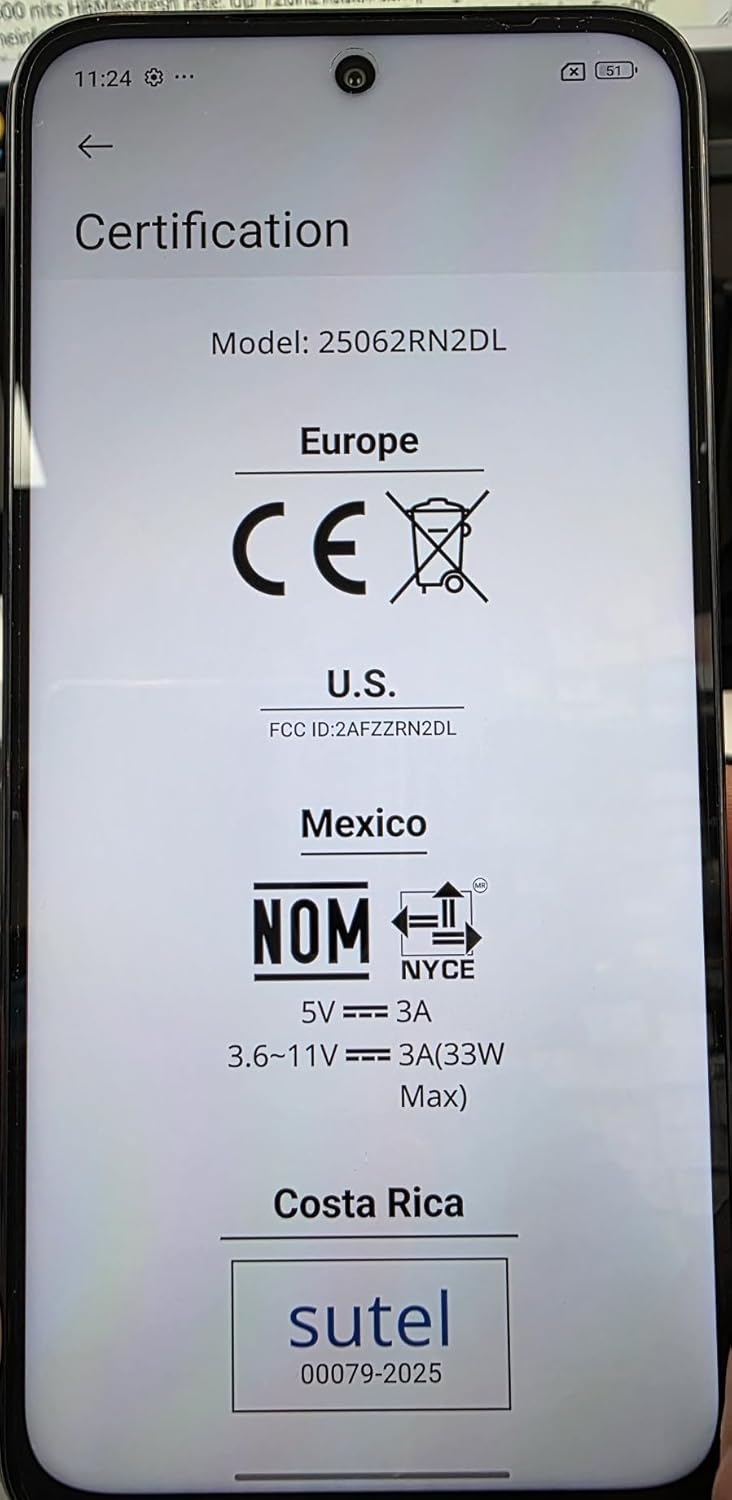
Mufananidzo 2: Certification Labels. This image shows the phone's screen displaying various certification marks including CE (Europe), FCC ID (U.S.), NOM (Mexico), and SUTEL (Costa Rica), along with power specifications.
7. Warranty uye Tsigiro
Specific warranty details for your XIAOMI Redmi 15 are typically provided with your purchase documentation. Please refer to the warranty card or contact your retailer for precise terms and conditions.
For technical support, software updates, or further assistance, please visit the official XIAOMI support webwebhusaiti kana kuti taura nevatengi vavo. Unogona kuwana rumwe ruzivo pa Chitoro cheXIAOMI paAmazon.


