1. Nhanganyaya
The Trevi RDA 70 BR is a compact and versatile portable radio designed to provide a comprehensive listening experience. It combines traditional radio functionality with modern digital features, making it suitable for listening to music or news anywhere. This manual provides instructions for the proper setup, operation, and maintenance of your device.
2. Safety Information
- Verenga mirairo yese zvakanaka usati washandisa mudziyo.
- Usaisa redhiyo pamvura, hunyoro, kana tembiricha yakanyanya.
- Rega kuisa mudziyo pedyo nekupisa kana muzuva rakananga.
- Usabvisa kana kuedza kugadzirisa mudziyo wega. Tumira mabasa ese ekugadzirisa kuvashandi vane hunyanzvi.
- Chengetedza mudziyo kure nemasimba ane magineti.
- Use only the specified charging cable (USB Type-C) for recharging the battery.
3. Package Zviri mukati
Ita shuwa kuti zvinhu zvese zviripo mupakeji:
- Trevi RDA 70 BR Portable Radio
- USB Type-C Yekuchaja Cable
- Mushandisi Chinyorwa (gwaro iri)
4. Chigadzirwa Pamusoroview
Familiarize yourself with the various parts and controls of your Trevi RDA 70 BR radio.

Mufananidzo 1: Angled kumberi view of the Trevi RDA 70 BR Portable Radio, showing the speaker grille, display, and main controls.
Front Panel Controls
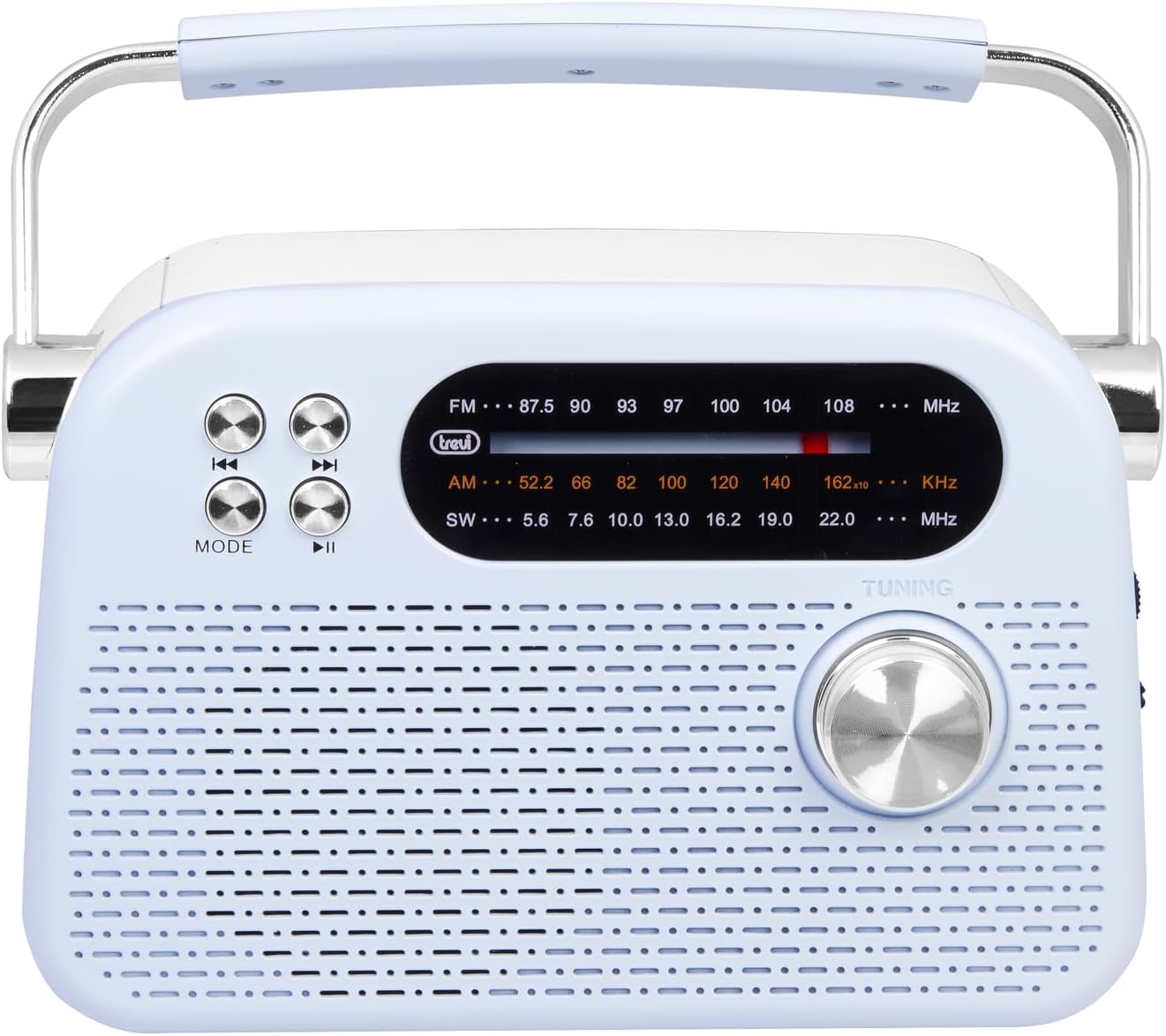
Mufananidzo 2: Yakadzama pamberi view highlighting the display, mode button, playback controls, and tuning knob.
- Ratidza: Shows frequency, mode, and other information.
- Bhotani reMODE: Switches between radio bands (FM/AM/SW) and media playback modes (USB/Micro SD/Wireless).
- Playback Controls (◀◀ / ▶▶ / ▶▶): Used for skipping tracks in media mode or fine-tuning in radio mode.
- Tuning Knob: For manual station tuning.
Side Panel Controls and Ports

Mufananidzo 3: Rutivi view showing the power switch, volume control, USB port, Micro SD slot, and USB Type-C charging port.
- OFF/ON/Volume Knob: Turns the radio on/off and adjusts the volume level.
- DC 5V IN (USB Type-C): Nzvimbo yekuchaja yebhatiri remukati.
- USB Port: Yekubatanidza madhiraivha eUSB flash kuti utambire MP3.
- Micro SD Slot (TF): For inserting Micro SD cards for MP3 playback.
- Chinja Chekusarudza Mabhendi: Selects between FM, AM, and SW radio bands, and MEDIA mode for USB/Micro SD/Wireless.
Rear Panel

Mufananidzo 4: Kumashure view showing the telescopic antenna and battery compartment.
- Telescopic Antenna: Extend for improved radio reception, especially for FM and SW bands.
- Battery Compartment: Houses the rechargeable lithium battery.
5. Setup
5.1 Kuchaja Bhatiri
- Locate the USB Type-C charging port on the side of the radio.
- Connect the provided USB Type-C cable to the radio's charging port.
- Batanidza rimwe divi retambo yeUSB kune adapta yemagetsi yeUSB yakajairika (isina kuiswa) kana chiteshi cheUSB chekombuta.
- The charging indicator light will illuminate (if present) to show charging status.
- Once fully charged, disconnect the cable. A full charge ensures maximum portability and uninterrupted use.
5.2 Antenna Kugadziriswa
For optimal radio reception, extend the telescopic antenna fully. Adjust its direction and angle to achieve the clearest signal, especially for FM and Shortwave (SW) broadcasts.
6. Operating Instructions
6.1 Kudzima/Kubatidza Simba uye Kudzora Vhoriyamu
- To turn the radio ON, rotate the OFF/ON/Volume knob clockwise.
- Continue rotating the knob clockwise to kuwedzera inzwi.
- Rotate the knob counter-clockwise to kuderedza inzwi.
- To turn the radio DZIMA, rotate the knob counter-clockwise until it clicks into the OFF position.
6.2 Mode Sarudzo
Shandisa iyo Band Selector Shandura on the side panel to choose your desired mode:
- FM: For Frequency Modulation radio stations.
- PA: For Amplitude Modulation radio stations.
- SW: For Shortwave radio stations.
- HAFU: For playing audio from USB, Micro SD, or Wireless (Bluetooth) sources.
6.3 Kugadzirisa Redhiyo
- Select the desired radio band (FM, AM, or SW) using the Band Selector Switch.
- Wedzera antenna yeteresikopu kuti ugone kugamuchira zviri nani.
- Zvishoma nezvishoma tenderera Tuning Knob on the front panel to scan for stations.
- The frequency will be displayed on the screen. Stop tuning when you find a clear station.
6.4 USB/Micro SD Playback (MP3)
- Insert a USB flash drive or a Micro SD card (with MP3 files) into the corresponding port/slot on the side panel.
- Switch the Band Selector Switch to MEDIA mode. The radio should automatically detect and begin playing MP3 files.
- Shandisa iyo Playback Controls (◀◀ / ▶▶) to skip to the previous or next track.
- Shandisa iyo Play/Pause (▶▶) bhatani kumbomira kana kutangazve kutamba.
6.5 Kubatanidza Pasina Waya (Bluetooth)
The radio supports wireless audio streaming from compatible devices.
- Switch the Band Selector Switch to MEDIA mode. The radio will enter Bluetooth pairing mode (indicated by an audible prompt or flashing indicator).
- Pafoni yako, tablet, kana chimwe chinhu chinoshandisa Bluetooth, vhura Bluetooth wobva watsvaga zvishandiso zviripo.
- Sarudza "Trevi RDA 70 BR" (or similar name) from the list of devices to pair.
- Once paired, you can stream audio from your device to the radio.
- Use the playback controls on your connected device or the radio's playback controls to manage audio.
7. Kuchengeta
- Kuchenesa: Shandisa jira rakapfava, rakaoma kuchenesa kunze kweredhiyo. Usashandise zvinochenesa zvinogumbura kana zvinonyungudutsa.
- Kuchengeta: Kana usingashandiswe kwenguva yakareba, chengeta redhiyo munzvimbo inotonhorera, yakaoma, kure nezuva rakananga uye tembiricha yakanyanya.
- Battery Care: To prolong battery life, avoid fully discharging the battery frequently. Recharge it regularly, even if not in constant use.
8. Kugadzirisa matambudziko
| Dambudziko | Zvinogona Kukonzera | Solution |
|---|---|---|
| Hapana simba | Battery is discharged; Power knob is OFF. | Charge the battery; Rotate the power knob to ON. |
| Kugamuchirwa kweredhiyo kusina kunaka | Antena haina kuwedzerwa; Chiratidzo chisina simba; Kupindira. | Extend and adjust the telescopic antenna; Move the radio to a different location; Tune carefully. |
| USB/Micro SD not playing | Maitiro asiri iwo; Haatsigirwi file format; Corrupted files. | Ensure Band Selector Switch is on MEDIA; Check if files are MP3 format; Try a different USB/Micro SD card. |
| Cannot connect via Wireless (Bluetooth) | Radio not in pairing mode; Bluetooth off on device; Device already connected to another unit. | Ensure radio is in MEDIA mode; Enable Bluetooth on your device; Disconnect from other devices and try again. |
9. Zvinotsanangurwa
| Feature | Detail |
|---|---|
| Brand | Trevi |
| Model | RDA 70 BR |
| Dimensions (L x W x H) | 18.5 x 7 x 12.5 cm |
| Kurema | 600 magiramu |
| Simba Source | Rechargeable Lithium Battery |
| Kuchaja Port | USB Type-C (DC 5V) |
| Mabhendi eRedhiyo Anotsigirwa | FM, AM, SW |
| Media Playback | USB, Micro SD (MP3 format) |
| Wireless Kubatana | Yes (Bluetooth compatible) |
| Special Features | Portable, Rechargeable |
10. Warranty uye Tsigiro
For warranty information and customer support, please refer to the documentation provided at the time of purchase or visit the official Trevi website. Standard return policies apply for products purchased through retailers. For specific details regarding returns or defective products, consult your purchase platform's help pages.


