Nhanganyaya
Thank you for choosing the Baseus Bowie MH1 Adaptive Active Noise Cancelling Headphones. This manual provides essential information for setting up, operating, and maintaining your headphones to ensure optimal performance and longevity. Please read this manual thoroughly before using the product.
Chii chiri muBhokisi
- Baseus Bowie MH1 Noise Cancelling Headphones ×1
- Kutakura Nyaya ×1
- USB-C Data Cable ×1
Note: An AUX cable is not included to reduce electronic waste. Wired mode works with any standard AUX cable.
Product Overview
The Baseus Bowie MH1 headphones are designed for superior audio quality and comfort, featuring advanced noise cancellation and personalized sound experiences.
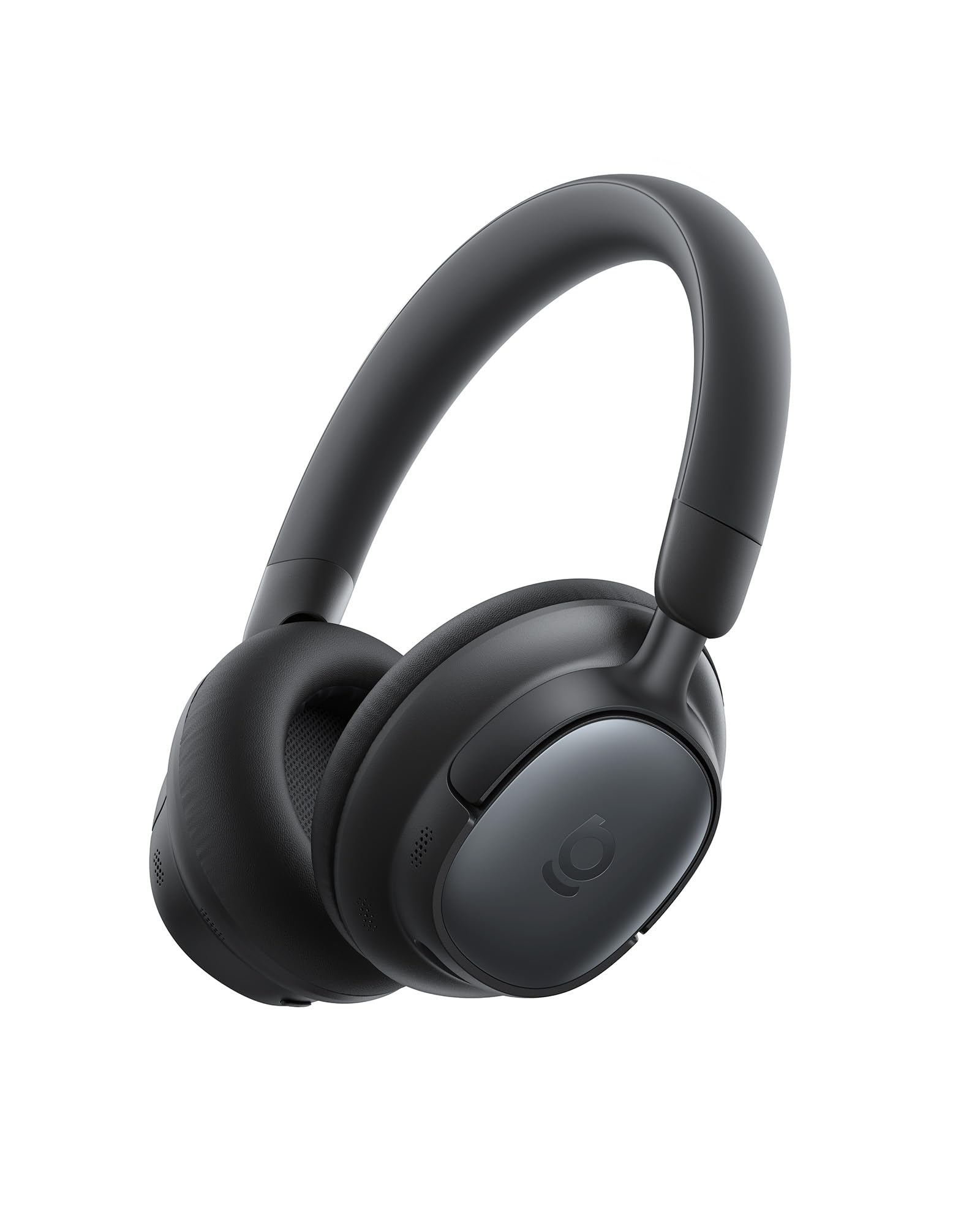
Figure 1: Baseus Bowie MH1 Headphones in Cosmic Black.
Zvinokosha:
- Crystal-Clear Hi-Res Audio: Certified Hi-Res & Hi-Res Wireless with LDAC codec and 36 mm dynamic drivers.
- Adaptive Hybrid ANC: Blocks up to 99.8% of noise with -48 dB deep noise cancellation.
- 5-Mic AI Clear Calls: Enhanced voice capture and wind-noise reduction for clear communication.
- Hupenyu hwebhatiri yemaawa makumi matanhatu: Extended playtime on a single charge.
- Comfortable Fit: Integrated cushioned headband and cloud-soft protein leather earcups.

Mufananidzo 2: Kupfuuraview of Baseus Bowie MH1 features including sound quality, ANC, call clarity, and battery life.
Gadzirira
1. Powering On / Off
- Power On: Press and hold the Power button (located on the left earcup) for 3 seconds until the indicator light flashes blue and you hear an audible 'Power On' prompt.
- Power Off: Press and hold the Power button for 3 seconds until the indicator light turns off and you hear an audible 'Power Off' prompt.
2. Bluetooth Kubatanidza
- Ita shuwa kuti mahedhifoni akadzimwa.
- Dzvanya uye ubatisise bhatani reSimba kwemasekonzi mashanu kusvika chiratidzo chemwenje chichipenya bhuruu uye tsvuku zvachinja, zvichiratidza pairing mode.
- On your device (smartphone, tablet, laptop), enable Bluetooth and search for 'Baseus Bowie MH1' in the list of available devices.
- Select 'Baseus Bowie MH1' to connect. The indicator light will turn solid blue once connected.
3. Dual Device Connection (Multipoint)
The Baseus Bowie MH1 supports simultaneous connection to two Bluetooth devices. To enable this feature, activate 'Dual Device Connection' in the Baseus App.
Operating Instruction
Kudzora Pamusoroview

Mufananidzo 3: Detailed view of the 4-Layer Noise-Cancelling System components.
- ANC Bhatani: Toggle between ANC On, ANC Off, and Transparency modes.
- Mabhatani Evhorumu (+/-): Short press to adjust volume. Long press for previous/next track.
- Multi-function Bhatani: Play/pause music, answer/end calls (single press), reject calls (long press), toggle spatial audio (double press), activate low latency mode (triple press).
Kudzima Ruzha Runoshanda (ANC) & Transparency Mode
The Adaptive Hybrid ANC system blocks up to 99.8% of ambient noise, providing an immersive listening experience. Transparency mode allows you to hear your surroundings without removing the headphones.

Figure 4: Visual representation of -48dB deep noise cancellation.
Press the ANC button to cycle through ANC On, Transparency, and ANC Off modes. You can customize ANC levels and modes via the Baseus App.

Figure 5: Tailored quiet for various venues, including traveling, working, commuting, and exercising.
Kufona
The 5-Mic AI Clear Calls feature utilizes AI-powered voice boost and wind-noise reduction for crystal-clear conversations. Use the Multi-function button to manage calls.

Figure 6: 5-Mic AI Clear Calls ensure crystal-clear voice capture and seamless conversations.
Zvinonzwika Zvinonzwika
Hi-Res Audio & LDAC
Enjoy lossless sound quality with Hi-Res Audio certification and LDAC codec support, delivering up to 3X the audio detail compared to standard Bluetooth. The 36 mm dynamic drivers with LCP diaphragms provide balanced clarity across all frequencies.

Figure 7: Experience lossless Hi-Res Sound with LDAC, delivering rich, low-distortion audio.
SuperBass 2.0 & BISA Spatial Audio
SuperBass 2.0 intelligently adjusts low frequencies in real-time for deep, impactful bass. Baseus Immersive Spatial Acoustics (BISA) technology creates a lifelike soundstage that surrounds you, offering a truly immersive audio experience.

Figure 8: SuperBass 2.0 dynamically enhances low frequencies for powerful sound.

Figure 9: Baseus Immersive Spatial Acoustics (BISA) delivers a soundstage that feels alive.
SoundFit Personalization
SoundFit technology adapts audio to your unique hearing profile, providing a custom-tuned listening experience. This feature can be enabled via the Baseus App after ensuring the app and firmware are updated.

Figure 10: SoundFit personalizes your hearing profile for fine-tuned audio at any volume.
Nyaradzo uye Dhizaini
The Bowie MH1 headphones are designed for extended wear, featuring an integrated cushioned headband and cloud-soft protein leather earcups with resilient memory foam. This design evenly distributes pressure for cloud-like comfort and superior noise isolation.

Figure 11: Designed for ultimate comfort with snag-free headband, smooth protein leather, and resilient memory sponge.
The headphones are also foldable and lightweight, making them compact and travel-ready for commutes, travels, and daily use.

Figure 12: Compact and travel-ready design allows headphones to slip easily into bags or cases.
Bhatiri uye Kuchaja
The Baseus Bowie MH1 offers an impressive battery life of up to 80 hours with ANC off, and 55 hours with ANC on. A quick 10-minute charge provides up to 10 hours of playback.

Figure 13: Week-long playtime with 80 hours (ANC off) and 10-minute quick charge for 10 hours of playback.
- Kuchaja Port: USB-C (located on the left earcup).
- Nguva yekuchaja: Anenge maawa maviri ekuchajisa kwakazara.
- Chiratidzo chebhatiri: Check battery status via the Baseus App or the LED indicator on the headphones.
Kubatana
The headphones feature Bluetooth 6.0 for fast, stable, and ultra-low-latency connections. The Baseus Smart Connect (BSC) technology enables seamless switching between two paired devices.

Figure 14: Instant Multipoint Connection with Bluetooth 6.0 for seamless switching between devices.
Low Latency Mode
Activate Low Latency Mode for improved audio and video synchronization, ideal for gaming or watching videos. This can be toggled via the Multi-function button (triple press) or the Baseus App.
Baseus App Control
Unlock the full potential of your Baseus Bowie MH1 headphones with the dedicated Baseus App. The app provides comprehensive control over various settings and features.
Figure 15: Smart App Control allows full customization of your listening experience, including Noise Reduction Modes, Spatial Audio, Bass Boost, and EQ Modes.
App Features:
- Noise Reduction Modes: Adjust ANC levels and switch between modes.
- Spatial Audio: Enable/disable Baseus Immersive Spatial Acoustics.
- EQ Modes & Bass Boost: Select from various equalizer presets or activate SuperBass 2.0.
- SoundFit: Personalize audio based on your hearing profile.
- Find Your Headphones: Locate misplaced headphones using the app's tracking feature.
Figure 16: Effortlessly find your headphones using the Baseus App's location feature.
Maintenance
- Kuchenesa: Use a soft, dry cloth to clean the headphones. Avoid harsh chemicals or abrasive materials.
- Kuchengeta: Store the headphones in the provided carrying case when not in use to protect them from dust and damage.
- Battery Care: Kurebesa hupenyu hwebhatiri, dzivisa kuburitsa mahedhifoni zvakazara nguva zhinji. Vachajise nguva nenguva, kunyangwe isiri mukushandiswa nguva dzose.
- Dzivisa Zvakanyanya Mamiriro ezvinhu: Usaise mahedhifoni pakupisa kwakanyanya, hunyoro, kana kuti pachiedza chezuva chakananga.
Kugadzirisa matambudziko
| Dambudziko | Solution |
|---|---|
| Mahedhifoni haashande | Ensure the headphones are charged. Press and hold the Power button for 3 seconds. |
| Hatikwanisi kuibatanidza neBluetooth | Ensure headphones are in pairing mode (flashing blue/red). Turn off and on Bluetooth on your device. Forget previous pairings and try again. |
| Hapana ruzha kana yakaderera vhoriyamu | Check headphone and device volume levels. Ensure headphones are properly connected. Try restarting both devices. |
| ANC haisi kushanda nemazvo | Ensure ANC mode is activated. Adjust ANC levels via the Baseus App. Ensure earcups form a good seal around your ears. |
| Hunhu hwekufona husina kunaka | Ensure microphone is not obstructed. Check network signal on your device. Try moving to a quieter environment. |
Zvinotsanangurwa
| Feature | Detail |
|---|---|
| Model Name | Baseus Bowie MH1 |
| Noise Control | Active Noise Cancellation (-48 dB) |
| Kubatana Technology | Wireless (Bluetooth 6.0) |
| Audio Driver Size | 36 mamirimita |
| Hupenyu hwebhatiri | Maawa zana (ANC yabviswa), Maawa makumi manomwe nemaviri (ANC yakavharwa) |
| Kuchaja Nguva | Maminetsi mashanu ekutamba kwemaawa maviri |
| Maheadphone Jack | No Jack (3.5mm AUX compatible) |
| Control Type | Button Control, Smart APP Control |
| Material | Faux Leather, Plastiki |
| Item Weight | 1.08 makirogiramu |
| Product Dimensions | 7.87 x 6.5 x 1.97 inches |
Warranty uye Support
Baseus products are designed and manufactured to the highest quality standards. For warranty information, technical support, or customer service inquiries, please refer to the warranty card included in your product packaging or visit the official Baseus website. Chengetedza humbowo hwako hwekutenga kune warranty claim.
Official Product Video
Vhidhiyo 1: Chigadzirwa chepamutemo chaperaview of the Baseus Bowie MH1 Adaptive Active Noise Cancelling Headphones, highlighting key features and design.


