1. Nhanganyaya
This manual provides essential information for the safe and efficient operation of your Telefunken 50FTV825 50-inch 4K UHD Smart Fire TV. Please read these instructions thoroughly before using the television and retain them for future reference.
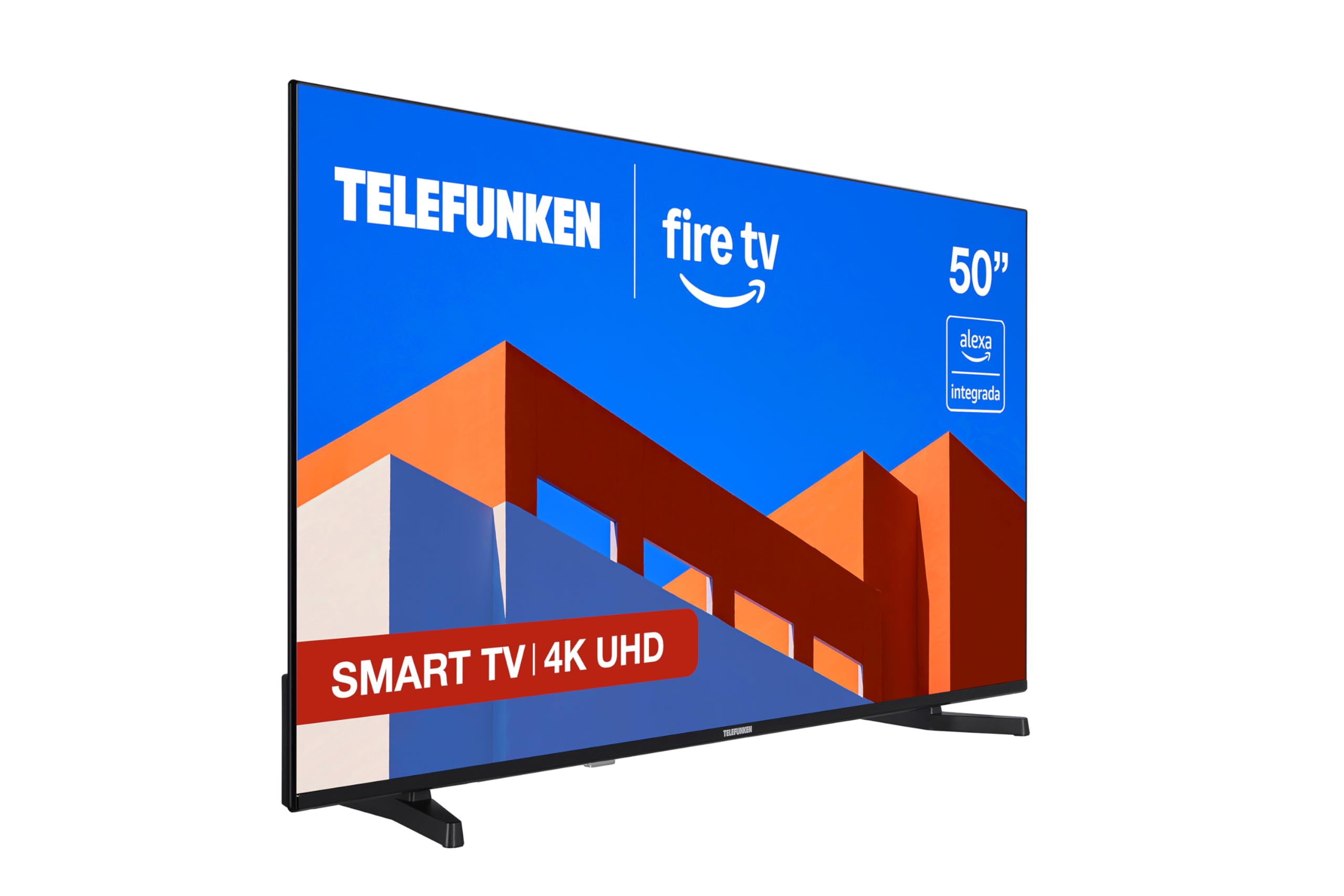
Mufananidzo: Mberi view of the Telefunken 50FTV825 50-inch 4K UHD Smart Fire TV.
2. Safety Information
Gara uchitevera chenjedzo dzekuchengetedza paunenge uchishandisa iyi terevhizheni kuderedza njodzi yemoto, kuvhunduka kwemagetsi, uye kukuvara.
- Usafumure TV kunaya kana kunyorova.
- Iva nechokwadi chekufefetera kwakaringana paTV.
- Do not block ventilation openings with items like newspapers, table-cloths, or curtains.
- Do not place the TV on unstable carts, stands, tripods, brackets, or tables.
- Bvisa TV panguva yemadutu emheni kana kuti isina kushandiswa kwenguva refu.
- Tumira masevhisi ese kuvashandi vanokwanisa.
3. Chii chiri muBhokisi
Tarisa kuti zvese zvirimo zviripo pane unboxing:
- Telefunken 50FTV825 50-inch 4K UHD Smart Fire TV
- Remote Control
- Mabhatiri (remote control)
- Mushandisi Chinyorwa (gwaro iri)
4. Setup
4.1. Kubatanidza Chigadziko kana Chigadziko cheMadziro
Carefully place the TV face down on a soft, flat surface. Attach the stand using the provided screws, ensuring it is securely fastened. If wall-mounting, follow the instructions provided with your VESA-compatible wall mount (sold separately).
4.2. Simba rekubatanidza nemidziyo
- Batanidza tambo yemagetsi kuTV wobva wabatanidza kune chinoburitsa magetsi.
- Connect external devices (e.g., cable box, gaming console, Blu-ray player) to the HDMI ports.
- Kuti uwane internet, batanidza tambo yeEthernet kune LAN port kana gadzirira kugadzirisa Wi-Fi.
4.3. Simba rekutanga On uye Setup Wizard
Press the power button on the remote control. The TV will guide you through the initial setup process, including language selection, network connection, and Fire TV account login.
5. Operating Your Telefunken Fire TV
5.1. Fire TV Interface
Your TV features an integrated Fire OS, providing access to a wide range of streaming services and applications. Navigate the home screen using the remote control to browse content from Netflix, Prime Video, Disney+, and more.

Image: The Fire TV home screen displaying available streaming applications.
5.2. Kudzora Izwi reAlexa
The remote control includes an integrated Alexa button. Press and hold this button to activate voice commands. You can ask Alexa to:
- Change channels or adjust volume.
- Tsvaga movies, TV shows, or music.
- Dzora midziyo yakangwara yepamba inowirirana.
- Check the weather or get information.

Image: Close-up of the remote control highlighting the Alexa voice button.
5.3. Apple AirPlay
Utilize Apple AirPlay to stream content directly from your iPhone, iPad, or Mac to the television. This allows for easy sharing of photos, videos, and screen mirroring without complex configurations.
5.4. Kuvandudza Mifananidzo neRuzha
- 4K UHD + HDR10: Experience stunning visuals with four times the resolution of Full HD, enhanced by HDR10 for vibrant colors and deep contrasts.
- Dolby Audio: Enjoy immersive and clear sound quality, bringing movies, series, and games to life.
- MEMC: Motion Estimation, Motion Compensation technology ensures smoother motion in fast-paced scenes.
6. Kuchengeta
6.1. Kuchenesa Screen
pukuta skrini zvinyoro nyoro nemucheka wakapfava, wakaoma, usina lint. Pazvibodzwa zvakasindimara, zvishoma dampsn jira rine mvura kana chekuchenesa skrini. Dzivisa kushandisa makemikari ane hasha kana abrasive zvinhu.
6.2. Kuchenesa Cabinet
Pukuta kabati reTV nejira rakapfava, rakaoma. Usashandise zvinochenesa mvura kana aerosol zvakananga pakabati.
6.3. Software Updates
Your Fire TV will periodically receive software updates. Ensure your TV is connected to the internet to receive these updates, which improve performance and add new features.
7. Kugadzirisa matambudziko
Kana ukasangana nematambudziko neTV yako, tarisa kune anotevera akajairika mhinduro:
| Dambudziko | Zvinogona Kukonzera | Solution |
|---|---|---|
| Hapana simba | Power cord not connected, power outlet not working. | Tarisa kubatana kwetambo yemagetsi. Edza nzira yekubuditsa nayo tambo yemagetsi uchishandisa chimwe chishandiso. |
| Hapana mufananidzo, asi inzwi riripo | Kwasarudzwa zvisirizvo. | Press the 'Input' button on the remote to select the correct source. |
| Hapana ruzha, asi mufananidzo uripo | Volume is muted or too low. External audio device issues. | Unmute or increase volume. Check connections to external audio systems. |
| Remote control haisi kushanda | Batteries are dead or incorrectly inserted. Obstruction between remote and TV. | Replace batteries. Ensure clear line of sight to the TV's IR sensor. |
| Wi-Fi nyaya dzekubatanidza | Incorrect password, router issues, TV too far from router. | Re-enter Wi-Fi password. Restart router. Move TV closer to router or use Ethernet. |
For further assistance, please contact Telefunken customer support.
8. Zvinotsanangurwa
| Feature | Detail |
|---|---|
| Brand | Telefunken |
| Model Number | 50FTV825 |
| Screen Size | 50 inches |
| Display Technology | LED |
| Resolution | 4K UHD (3840 x 2160) |
| Refresh Rate | 120 Hz |
| Operating System | Moto OS |
| Special Features | Alexa Compatible, Bezel-less Design, VESA Wall Mountable, HDR - HLG, Smart TV |
| Kubatana Technology | Bluetooth, Ethernet, HDMI, USB, Wi-Fi |
| Aspect ratio | 16:9 |
| Chigadzirwa Zviyero (W x D x H) | 112 x 26.1 x 68.6 cm |
| Product Weight | 9.56 kg |
| Nyika Yekwakabva | Teki |
| Kuyera Kushanda Nesimba (SDR) | E |
| Kuyera Kushanda Nesimba (HDR) | G |
For detailed energy information, refer to the product information sheet and energy label:

Image: Product Information Sheet detailing technical specifications and energy consumption.
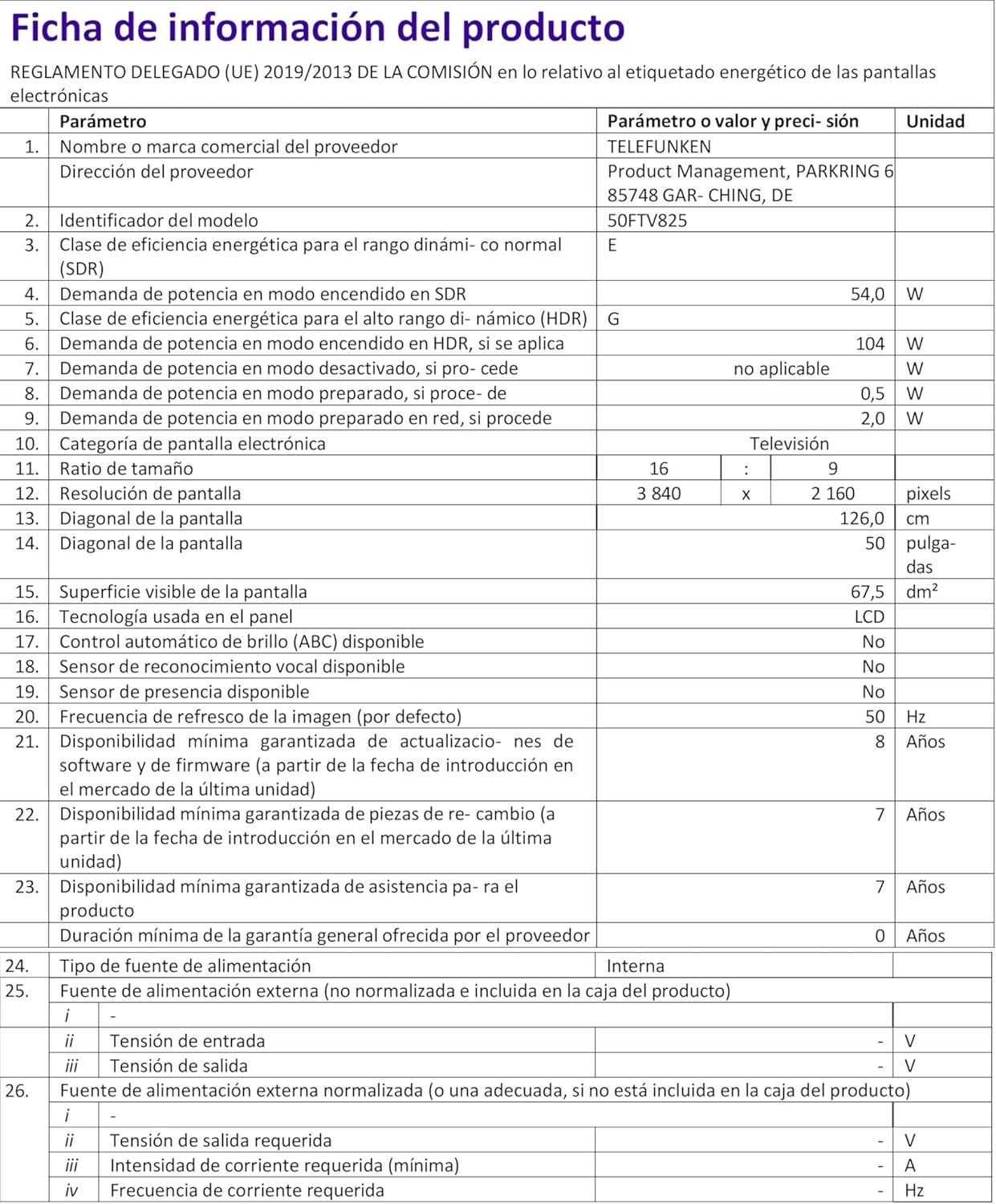
Image: Energy Efficiency Label showing ratings for SDR and HDR modes.
Additional energy information can be found at: https://eprel.ec.europa.eu/qr/2400040
9. Warranty uye Tsigiro
Your Telefunken 50FTV825 television comes with a standard manufacturer's warranty. Please refer to the warranty card included in your packaging for specific terms and conditions, including warranty duration and coverage details.
For technical support, troubleshooting assistance beyond this manual, or warranty claims, please contact Telefunken customer service through their official websaiti kana ruzivo rwekusangana rwunopihwa mune yako waranti zvinyorwa.