Nhanganyaya
This manual provides essential instructions for the safe operation, maintenance, and troubleshooting of your COSTWAY 850W Food Dehydrator. Please read it thoroughly before first use and retain it for future reference.
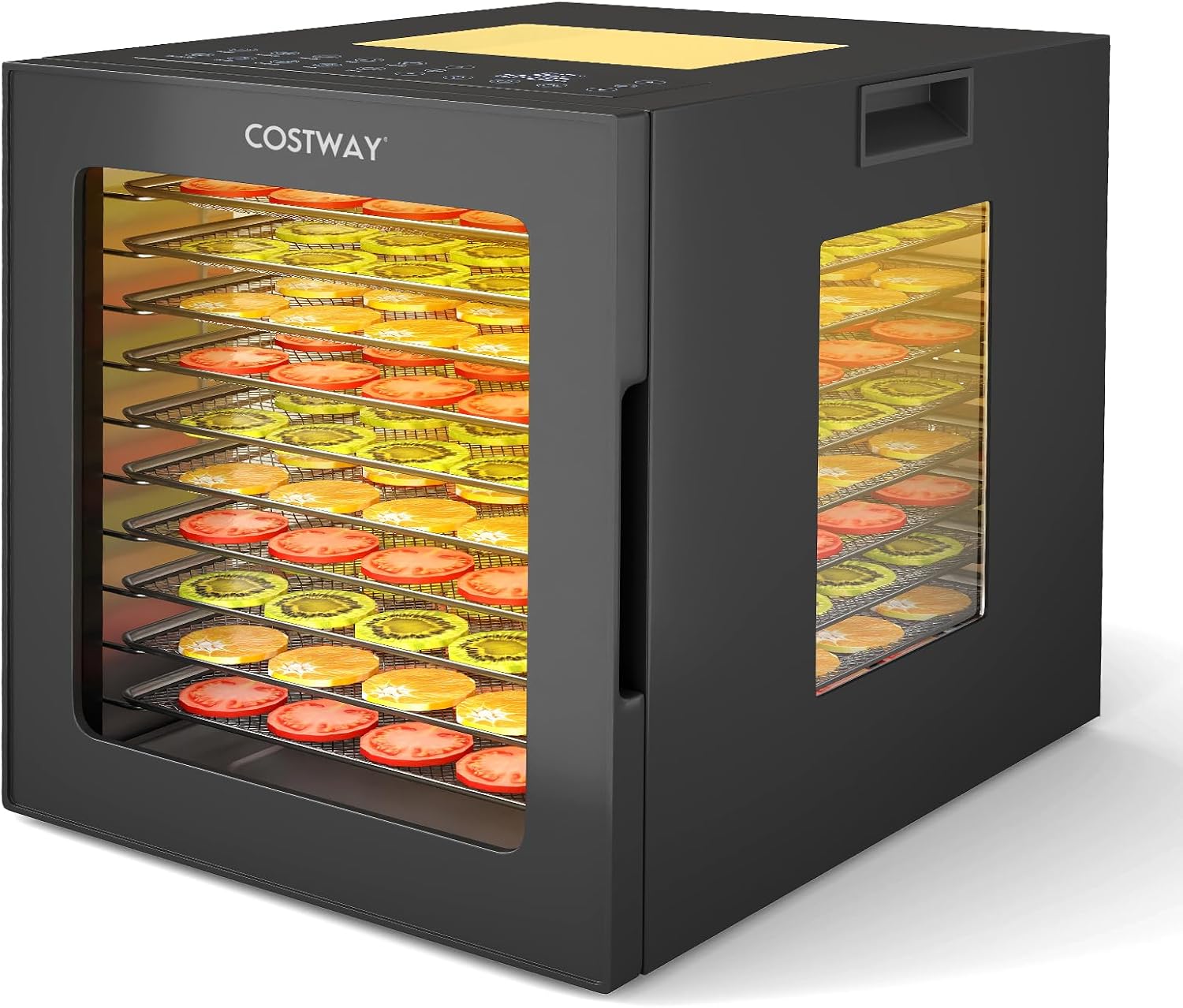
Image: The COSTWAY 850W Food Dehydrator, a black rectangular appliance with a transparent door, showcasing 10 stainless steel trays filled with colorful sliced fruits and vegetables. The brand name "COSTWAY" is visible on the front.
Product Overview uye Features
The COSTWAY 850W Food Dehydrator is designed for efficient and uniform drying of various foods. Key features include:
- 850W Heating Element: Provides powerful and consistent heat for effective dehydration.
- 360° Air Circulation Technology: Ensures even drying across all trays, eliminating the need for tray rotation.
- 10 Stainless Steel Trays: Offers ample capacity for large batches of food.
- Intuitive Control Panel: Features a digital LED display and backlit buttons for easy operation.
- 10 Preset Zvirongwa: Convenient options for common food types.
- Adjustable Temperature & Timer: Temperature range of 35-75°C (95-167°F) and a timer up to 48 hours for customized drying.
- Four-Sided Viewing Windows & LED Lights: Allows clear monitoring of the drying process without opening the door.
- Safety Features: Integrated thermostat and overheating protection.
- Durable Construction: Robust metal hinges and anti-slip feet for stability.

Mufananidzo: Yakadzama view of the dehydrator's intelligent control panel, showing a digital display indicating "75°C" and "48:00h", along with various backlit buttons for temperature, timer, and 10 preset food programs (e.g., Apple, Mushroom, Beef, Fish).

Image: An illustration highlighting the dehydrator's four-sided visual design, indicating that the drying process can be observed from the top, front, left, and right sides through transparent panels.
Mirayiridzo Yekuchengetedza
Please read and follow these safety precautions carefully to prevent injury or damage to the appliance:
- Always place the dehydrator on a stable, heat-resistant surface.
- Ita shuwa kuti pave nemhepo yakakwana yakatenderedza mudziyo panguva yekushanda.
- Usanyudze main unit mumvura kana zvimwe zvinwiwa.
- Chengetedza kure nevana nemhuka dzinovaraidza.
- Bvisa mudziyo wekubvisa mvura kubva pamagetsi kana usiri kushandiswa uye usati wachenesa.
- Usashandise mudziyo netambo yakakuvara kana plug.
- Dzivisa kubata nzvimbo dzinopisa panguva yekuvhiya uye nekukurumidza mushure mekuvhiya. Shandisa ma mitts emuovheni kana zvichidikanwa.
- Usavhare maburi emhepo panguva yekushanda.
- Mudziyo uyu ndewekushandisa pamba chete.
Gadzirira
- Kuburitsa: Carefully remove all packaging materials and inspect the dehydrator for any damage. Retain packaging for future transport if needed.
- Kutanga Kuchenesa: Before first use, wash the stainless steel trays, mesh screen, and drip tray in warm, soapy water. Rinse thoroughly and dry completely. Wipe the interior and exterior of the main unit with a damp jira.
- Kuiswa: Place the dehydrator on a flat, stable, and heat-resistant surface. Ensure there is at least 15 cm (6 inches) of clear space around all sides for proper ventilation. Do not place near heat sources or flammable materials.
- Power Connection: Iva nechokwadi chekuti voltage of your power outlet matches the specifications of the dehydrator (230V, 50Hz). Plug the power cord into a grounded electrical outlet.

Image: The dehydrator's accessories laid out, including ten stainless steel trays (28x29 cm), one mesh screen (26x26 cm) for smaller items, and one drip tray (28x29 cm) which can also be used as a fruit roll sheet.
Operating Instruction
Preparing Food for Dehydration
- Wash and prepare food items (e.g., slice fruits and vegetables evenly, trim fat from meat).
- Arrange food in a single layer on the trays, ensuring air can circulate freely. Do not overlap items.
- For smaller items or herbs, use the mesh screen. For fruit leathers, use the drip tray as a fruit roll sheet.
Kushandisa Control Panel
- Matrei Ekutakura: Place the prepared trays into the dehydrator. Close the door securely.
- Power On: Plug in the dehydrator. The display will illuminate.
- Select Program (Optional): Press the "Program" button to cycle through the 10 preset programs. Each program has a default temperature and time.
- Seta Tembiricha: If not using a preset program, press the "Temp" button and use the "+" and "-" buttons to adjust the temperature between 35°C and 75°C (95°F - 167°F).
- Seta Nguva: Press the "Timer" button and use the "+" and "-" buttons to set the desired drying time, up to 48 hours.
- Kutanga / Kumbomira: Press the "Start/Pause" button to begin the dehydration process. The LED lights inside will turn on. Press again to pause.
- Monitoring: Use the four-sided viewing windows and internal LED lights to monitor the drying progress without opening the door.
- Kupedzisa: The dehydrator will automatically shut off when the timer expires. Unplug the unit and allow food to cool before removing.

Image: An illustration showing the versatility of the dehydrator for various foods, including fruits, vegetables, pet food, herbs, and dried meat (jerky).
Kuchengetedza uye Kuchenesa
Kuchenesa nguva dzose kunoita kuti mudziyo wako ushande zvakanaka uye kunoita kuti mvura irambe ichirarama kwenguva refu.
- Unplug: Bvisa mudziyo wekubvisa mvura kubva pamagetsi wobva warega uchitonhorera zvachose usati wageza.
- Bvisa matireyi: Remove all trays, mesh screen, and drip tray from the unit.
- Wash Accessories: Wash the stainless steel trays, mesh screen, and drip tray in warm, soapy water. A soft brush can be used to remove stubborn food residue. Rinse thoroughly and dry completely. These parts are generally dishwasher safe, but hand washing is recommended for longevity.
- Yakachena Mukati: Wipe the interior of the dehydrator with a damp cloth. For sticky residue, use a mild detergent solution, then wipe with a clean damp cloth to remove any soap residue. Ensure the interior is completely dry before next use.
- Chenesa Kunze: Wipe the exterior of the dehydrator with a soft, damp jira. Usashandise abrasive cleaners kana scouring pads.
- Kuchengeta: Chengetedza dehydrator munzvimbo yakachena, yakaoma kana isiri kushandiswa.

Image: A person cleaning the interior of the dehydrator with a cloth, and a separate inset showing a hand washing one of the mesh trays under running water, illustrating the ease of cleaning.
Kugadzirisa matambudziko
| Dambudziko | Zvinogona Kukonzera | Solution |
|---|---|---|
| Dehydrator haibati. | Haina kubatirwa mukati; power iwetage; faulty outlet; unit malfunction. | Ensure the power cord is securely plugged into a working outlet. Check your circuit breaker. If the problem persists, contact customer support. |
| Food is not drying evenly. | Overloaded trays; unevenly sliced food; blocked air vents. | Ensure food is in a single layer and not overlapping. Slice food to uniform thickness. Check that air vents are not obstructed. |
| Dehydrator stops unexpectedly. | Timer expired; overheating protection activated; power interruption. | Check the timer setting. If the unit is hot, allow it to cool down. Verify power supply. |
| Ruzha rusina kujairika panguva yekushanda. | Kuvharika kwefeni; chikamu chakasununguka. | Unplug the unit and inspect the fan area for any obstructions. If noise persists, contact customer support. |
Zvinotsanangurwa
| Brand | COSTWAY |
| Model | QE32613PQ-NWIT |
| Color | Nhema |
| Zvishandiso | Stainless Steel, Galvanized Metal, PP |
| Zviyero zveChigadzirwa (L x W x H) | 40 masendimita x 33 masendimita x 35.5 masendimita |
| Net Weight | 9.4 kg |
| Voltage | 230V |
| Frequency | 50Hz |
| Current | 3.7A |
| Simba | 850W |
| Temperature Range | 35°C - 75°C (95°F - 167°F) |
| Timer Range | Maawa matanhatu kusvika masere |
| Noise Level | <48dB |
| Nhamba yeTreyi | 10 (Stainless Steel) |
| Included Accessories | 1 Mesh Screen, 1 Drip Tray/Fruit Roll Sheet |

Image: A diagram illustrating the external dimensions of the dehydrator: 33 cm (width), 40 cm (depth), and 35.5 cm (height), with the 10 trays numbered inside.
Warranty uye Support
For warranty information, please refer to the warranty card included with your purchase or visit the official COSTWAY website. For technical support, replacement parts, or any questions regarding your product, please contact COSTWAY customer service.
Contact Information: Please refer to the contact details provided in your product packaging or on the official COSTWAY website.


