1. Nhanganyaya
Welcome to the OnePlus 15 user manual. This guide provides essential information for setting up, operating, maintaining, and troubleshooting your new smartphone. The OnePlus 15 is designed for high performance and extended battery life, featuring a Snapdragon 8 Elite Gen 5 processor, a 7300mAh battery, and a triple 50 MP camera system. Please read this manual thoroughly to ensure optimal use of your device.
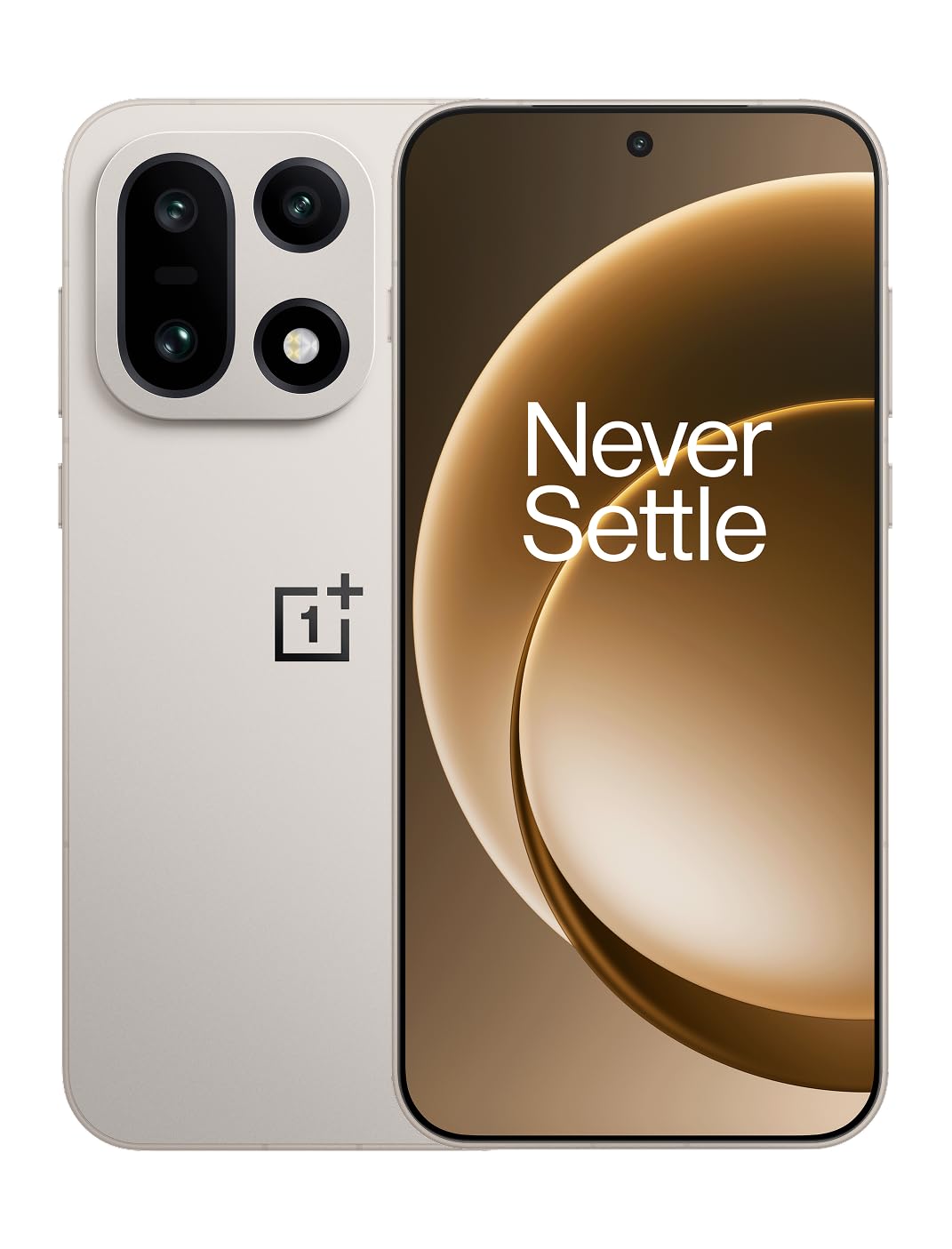
Mufananidzo 1: Mberi view of the OnePlus 15 smartphone.
2. Chii chiri muBhokisi
Tarisa kuti zvinhu zvese zviripo mupakeji yechigadzirwa chako:
- OnePlus 15 Smartphone (x1)
- Chaja (x1)
- USB Data Cable (x1)
- SIM Ejector Tool (x1)
- Gwaro Rinokurumidza (x1)
- Safety Guide (x1)

Figure 2: Included items in the OnePlus 15 package.
3. Setup
3.1. Kuiswa kweSIM Card
The OnePlus 15 supports Dual-SIM functionality. To install your SIM card(s):
- Tsvaga SIM card tray padivi pechigadzirwa.
- Isa iyo SIM ejector chishandiso mugomba diki padivi petireyi uye wodzvanya zvakasimba kusvika tireyi yabuda.
- Place your Nano-SIM card(s) into the tray with the gold contacts facing down. Ensure they are correctly seated.
- Nyatsodzosa tireyi yeSIM kadhi mufoni.

Mufananidzo 3: Rutivi view of the OnePlus 15, highlighting the SIM card tray.
3.2. Yekutanga Power On uye Setup
Kubatidza mudziyo wako kekutanga:
- Dzvanya wobata bhatani rePower (riri kurudyi) kusvika logo yeOnePlus yaonekwa.
- Tevedzera zviri pa-skrini kuti upedze kuseta kwekutanga, kusanganisira kusarudza mutauro, kubatana kweWi-Fi, kupinda muakaundi yeGoogle, uye zvigadziriso zvekuchengetedza.
3.3. Kuchaja Bhatiri
The OnePlus 15 is equipped with a 7300mAh battery. To charge your device:
- Kuchaja Wired: Connect the provided USB Data Cable to the Type-C port on the bottom of the phone and the other end to the charger. Plug the charger into a power outlet.
- Kuchaja Wireless: Place the phone on a compatible wireless charging pad. Ensure the phone is centered on the pad for efficient charging.
A full charge provides approximately 68.7 hours of talk time.

Figure 4: Illustration of the 7300mAh battery capacity.
4. Kushandisa mudziyo wako
4.1. Ratidza
The OnePlus 15 features a 6.78-inch AMOLED display with a 2772x1272 resolution and a 165 Hz refresh rate. This provides smooth visuals and vibrant colors. Adjust display settings such as brightness, color mode, and refresh rate in the device settings menu.
4.2. Kuita
Powered by the Snapdragon 8 Elite Gen 5 processor and 16GB of RAM, the OnePlus 15 delivers fast and efficient performance for multitasking, gaming, and demanding applications. The Tri-Chip System, combining the Snapdragon 8 Elite Gen 5 with a dedicated Wi-Fi chip and CPU scheduler, optimizes for speed, connectivity, and power efficiency.
Vhidhiyo 1: Pamusoroview of the OnePlus 15's performance capabilities and user experience.
4.3. Kamera System
The device is equipped with a Triple 50 MP camera system, offering wide, ultra-wide, and telephoto lenses for versatile photography. The DetailMax Engine enhances photo quality in various lighting conditions, including day, night, and motion shots. Both front and rear cameras are available for capturing images and videos.

Mufananidzo 5: Kumashure view of the OnePlus 15, showcasing sisitimu yekamera nhatu.
Figure 6: DetailMax Engine for stunning photos.
4.4. Kubatana
The OnePlus 15 supports a range of connectivity options:
- Wireless: Wi-Fi, Bluetooth, NFC, Infrared.
- Wired: USB Type-C.
- Navigation Dual-band GPS (L1+L5) and Galileo (E1+E5a).
- SIM: Dual SIM support for managing multiple networks.
4.5. Operating System
The device runs on Android 16 with OxygenOS 16, providing a fast and smooth user experience. Regular software updates will be provided to enhance features and security.
5. Kuchengeta
5.1. Kugara kwenguva refu uye Dziviriro
The OnePlus 15 is built with IP66/IP68/IP69 and IP19K ratings, offering resistance against dust and water. While designed to be durable, avoid exposing the device to extreme conditions or prolonged submersion in water.

Figure 7: OnePlus 15 demonstrating water resistance.
5.2. Kuchenesa Mudziyo Wako
Use a soft, lint-free cloth to clean the screen and body of your phone. Avoid using abrasive materials or harsh chemicals, which can damage the display or finish.
5.3. Software Updates
Periodically check for software updates in the device settings. Keeping your software up-to-date ensures you have the latest features, security patches, and performance improvements.
6. Kugadzirisa matambudziko
This section addresses common issues you might encounter with your OnePlus 15.
6.1. Mudziyo Haubatiki
- Iva nechokwadi chekuti bhatiri rachajwa. Batanidza foni pachaja womirira kwemaminitsi mashoma usati waedza kuibatidza zvakare.
- Dzvanya uye bata bhatani reSimba kweinenge 10-15 masekonzi kumanikidza kutangazve.
6.2. Kubatana Kusina Kunaka kweNetiweki
- Tarisa kana SIM card yako yakaiswa nemazvo.
- Verify that airplane mode is not enabled.
- Tangazve mudziyo.
- If issues persist, contact your network provider.
6.3. Mapurogiramu Anoputsika kana Kutonhora
- Vhara uye vhura zvakare app.
- Clear the app's cache and data in device settings.
- Ita shuwa kuti app yakagadziridzwa kune yazvino vhezheni.
- If the issue is widespread, consider restarting the phone.
6.4. Kukurumidza Kubvisa Mabhatiri
- Deredza kupenya kwechiso uye nguva yekudzima kwechiso.
- Dzima zvinhu zvisina kushandiswa zvakaita seWi-Fi, Bluetooth, kana GPS kana zvisingadiwi.
- Ziva uye vhara mapurogiramu anoshandisa simba rakawanda ari kushanda kumashure.
- Check for recent software updates, as they often include battery optimizations.
7. Zvinotsanangurwa
Detailed technical specifications for the OnePlus 15 (Model: CPH2749).
| Feature | Detail |
|---|---|
| Model Name | OnePlus 15 |
| Item Model Number | CPH2749 |
| Product Dimensions | 6.36 x 3.02 x 0.32 inches |
| Item Weight | 1.28 makirogiramu |
| Operating System | Android 16 |
| CPU Model | Snapdragon 8 Elite Gen 5 |
| CPU Speed | 4.61 GHz |
| RAM Memory Yakaiswa Saizi | 16 GB |
| Memory Storage Capacity | 512 GB |
| Yakamira Sikirini Ratidza Size | 6.78 inches |
| Resolution | 2772*1272 |
| Refresh Rate | 165 Hz |
| Battery Capacity | 7300 mamiriyoniamp Maawa (7300mAh) |
| Nguva Yekutaura Parunhare | 68.7 Maawa |
| Connectivity Technologies | Infrared, NFC, USB, Wi-Fi, Bluetooth |
| GPS | Dual band: GPS(L1+L5) Galileo(E1+E5a) |
| Special Features | Dual SIM, Wireless Charging |
| Sravana Sameeralu Serial 4th Audio Jack | Type-C headphones: supported Type-C digital headphones & Type-C analog headphones |
| Zvimwe Zvimiro zveKamera | Front, Rear (Triple 50 MP Camera System) |
| IP Rating | IP66/IP68/IP69 and IP19K rated |
| Color | Sand Storm |
8. Ruzivo rweWaranti
Your OnePlus 15 device is covered by a limited manufacturer's warranty. Please refer to the included Safety Guide or visit the official OnePlus website for detailed warranty terms and conditions, including coverage duration and service procedures. Keep your proof of purchase for warranty claims.
9. Tsigiro
For further assistance, technical support, or to access additional resources, please visit the official OnePlus support website or contact customer service. You can find contact details and FAQs on the OnePlus website.
Zvekushandisa Pamhepo: www.oneplus.com/support


