Nhanganyaya
Thank you for choosing the VONROC CH516AC 2500W WiFi Electric Convector Heater. This manual provides essential information for the safe and efficient operation, installation, and maintenance of your new heater. Please read these instructions carefully before use and retain them for future reference.
Yakakosha Mirayiridzo Yekuchengetedza
Always observe basic safety precautions when using electrical appliances to reduce the risk of fire, electric shock, and injury to persons. This includes:
- Verenga mirairo yese usati washandisa hita iyi.
- Usashandise hita iyi munzvimbo yepedyo yekugezera, yekugezera kana dziva rekushambira.
- Do not cover the heater. A warning label "DO NOT COVER" is present on the appliance.
- Iva nechokwadi chekuti voltage inotaridzwa pachiratidzo cheratidzo inoenderana neiyo mains voltage mumba mako.
- Chengetedza vana nemhuka dzinovaraidza kure nehita.
- Do not insert any objects into the heater openings.
- Bvisa hita kana isiri kushandiswa.
- Kana tambo yekugovera yakakuvadzwa, inofanirwa kutsiviwa nemugadziri, mumiriri wayo webasa kana vanhu vanokwanisa zvakafanana kuitira kudzivirira njodzi.

Product Features
- 2500W heating power.
- Integrated WiFi for smart control via Tuya App.
- Adjustable thermostat (5-50 °C).
- Timer basa.
- Multiple operating modes: Eco, Comfort, Anti-freeze.
- IP24 splash-proof rating.
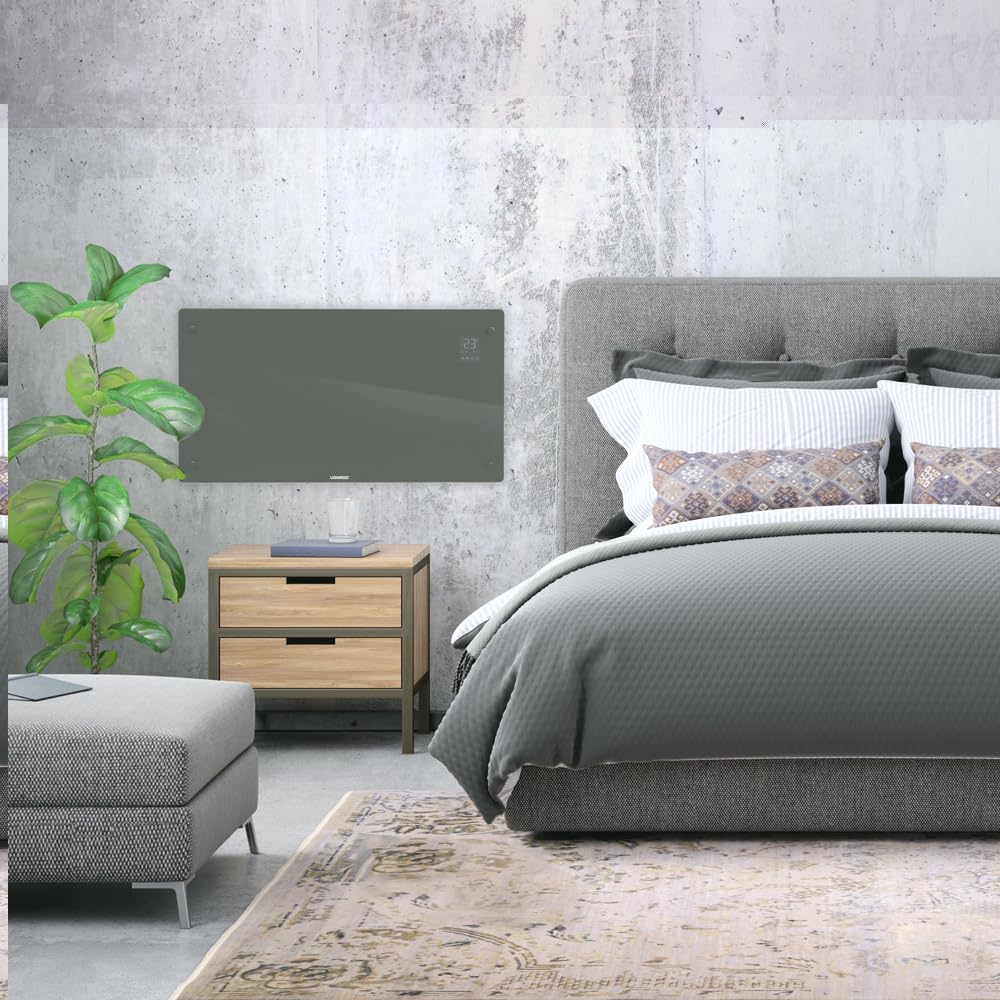
- Suitable for wall mounting or floor standing.
- Heats areas up to 30 m².
Package Zviri mukati
Tarisa uone kuti zvese zviriko uye hazvina kukuvara pakuburitsa:
- VONROC CH516AC Convector Heater
- Feet for floor standing (if applicable)
- Wall mounting kit (screws, anchors)
- User Manual
Setup uye Installation
1. Floor Standing Installation
- Bvisa hita nezvinhu zvose zvinowedzerwa nokungwarira.
- Attach the provided feet to the bottom of the heater using the screws. Ensure they are securely fastened.
- Place the heater on a flat, stable surface, away from flammable materials and at least 1 meter from furniture or curtains.

2. Wall Mounting Installation
- Choose a suitable wall location, ensuring sufficient clearance around the heater (at least 15 cm from the floor and ceiling, and 30 cm from side walls).
- Mark the drilling points on the wall using the provided template or by measuring the mounting brackets on the back of the heater.
- Dhobora maburi uye woisa zvibatiso zvemadziro.
- Chengetedza madziro ekumisikidza mabhureki kumadziro nema screws.
- Nyatsoturika hita pamabhuraketi emadziro, uchiona kuti yakagara zvakanaka.

Operating Instruction
1. Chekutanga Power On
Plug the heater into a suitable electrical outlet. The digital display will illuminate.

2. Manual Control
- Bhatani reSimba: Dzvanya kuti ubatidze hita ON/OFF.
- Kugadzirisa Tembiricha: Use the '+' and '-' buttons on the control panel or app to set the desired temperature between 5°C and 50°C.
- Sarudzo yeModhi: Cycle through Eco, Comfort, and Anti-freeze modes using the mode button.
- Timer: Seta timer yekudzima otomatiki.
3. WiFi and App Control (Tuya App)
- Dhawunirodha app ye "Tuya Smart" kubva kuchitoro chemaapp chefoni yako.
- Nyorera kana kuti pinda muakaundi yako yeTuya.
- Ensure your heater is powered on and the WiFi indicator on the display is blinking (if not, press and hold the WiFi button on the heater for 5 seconds to enter pairing mode).
- In the Tuya app, tap '+' to add a device. Select "Heater" or "Convector Heater" from the list.
- Follow the on-screen instructions to connect the heater to your home WiFi network.
- Once connected, you can control the heater remotely, set schedules, and monitor its status via the app.
Maintenance
Kugara kugadziridza kunovimbisa kuita kwakaringana uye hupenyu hurefu hweheater yako.
- Kuchenesa: Disconnect the heater from the power supply before cleaning. Wipe the exterior with a soft, damp jira. Usashandise abrasive cleaners kana solvents.
- Kuchengeta: If storing the heater for an extended period, unplug it, allow it to cool completely, and store it in a dry, dust-free location.
- Kuongorora: Periodically check the power cord and plug for any signs of damage. If damaged, contact qualified personnel for repair.

Kugadzirisa matambudziko
| Dambudziko | Zvinogona Kukonzera | Solution |
|---|---|---|
| Heater haina kubatika. | Hapana magetsi; Simba bhatani risina kudzvanywa; Kudzivirirwa kwekupisa kwakanyanya. | Check power connection; Press power button; Unplug and allow to cool for 30 minutes. |
| Heater haisi kupisa zvinobudirira. | Temperature setting too low; Room size too large; Obstruction of air vents. | Increase temperature setting; Ensure heater is appropriate for room size; Clear any obstructions. |
| WiFi yekubatanidza nyaya. | Incorrect WiFi password; Heater too far from router; Router issues; Heater not in pairing mode. | Verify WiFi password; Move heater closer to router; Restart router; Put heater in pairing mode (long press WiFi button). |
| Ruzha kana hwema husingawanzoitiki. | Kuunganidzwa kweguruva; Kukanganisika kwemukati. | Unplug and clean the heater; If problem persists, discontinue use and contact customer support. |
Zvinotsanangurwa
| Feature | Detail |
|---|---|
| Brand | VONROC |
| Model Number | CH516AC |
| Kupisa Simba | 2500 Watts |
| Voltage | 230 Volts |
| Chimiro cheTembiricha yeThermostat | 5 - 50 °C |
| Maximum Temperature Setting | 35 °C |
| IP Rating | IP24 (Splash-proof) |
| Kudzora | Digital display, Buttons, Tuya App (WiFi) |
| Mounting Options | Wall-mounted or Floor standing |
| Yakakurudzirwa Saizi Yekamuri | Kusvika ku30 m² |
Warranty uye Support
VONROC products are manufactured to high quality standards. In the unlikely event of a defect, please contact your retailer or VONROC customer service for assistance. Keep your proof of purchase for warranty claims.
For further support, visit the official VONROC websaiti kana kubata dhipatimendi ravo rebasa revatengi.


