Nhanganyaya
This manual provides essential information for the safe and efficient use of your Hisense 100UX RGB-MiniLED 4K UHD HDR Google Smart TV. Please read these instructions thoroughly before operating the television and retain them for future reference.
Safety Information
Always follow basic safety precautions when using this product to reduce the risk of fire, electric shock, and injury. Keep the TV away from moisture and heat sources. Ensure proper ventilation. Do not block ventilation openings. Use only attachments/accessories specified by the manufacturer. Refer all servicing to qualified service personnel.
Package Zviri mukati
Iva nechokwadi chekuti zvinhu zvese zviripo mupakeji:
- Hisense 100UX TV
- Power Cable
- Kudzora Kure (mabhatiri maviri eAAA anosanganisira)
- TV Stand Components
- Quick Start Guide (QSG)
Gadzirira
Muviri Dimensions uye Weight
Usati waiswa, review the physical dimensions and weight of your TV to ensure proper placement and support.

Stand Installation
Kuisa stand yeTV:
- Isa TV zvakanaka-naka panzvimbo yakapfava, yakachena kudzivirira kukuvara kwechiso.
- Namatira zvikamu zvechigadziko panzvimbo dzakatarwa pasi peTV uchishandisa screws dzakapihwa.
- Ita shuwa kuti screws dzese dzakasungwa zvakachengeteka.


Kuiswa Kwemadziro
If you choose to wall mount your TV, use a VESA-compatible wall mount kit (sold separately) that supports the 1000x600 mm (M8) standard. Consult a professional for wall mounting to ensure safety and proper installation.
Kubatanidza Midziyo
Connect your external devices such as Blu-ray players, gaming consoles, and sound systems to the appropriate ports on the back of the TV.
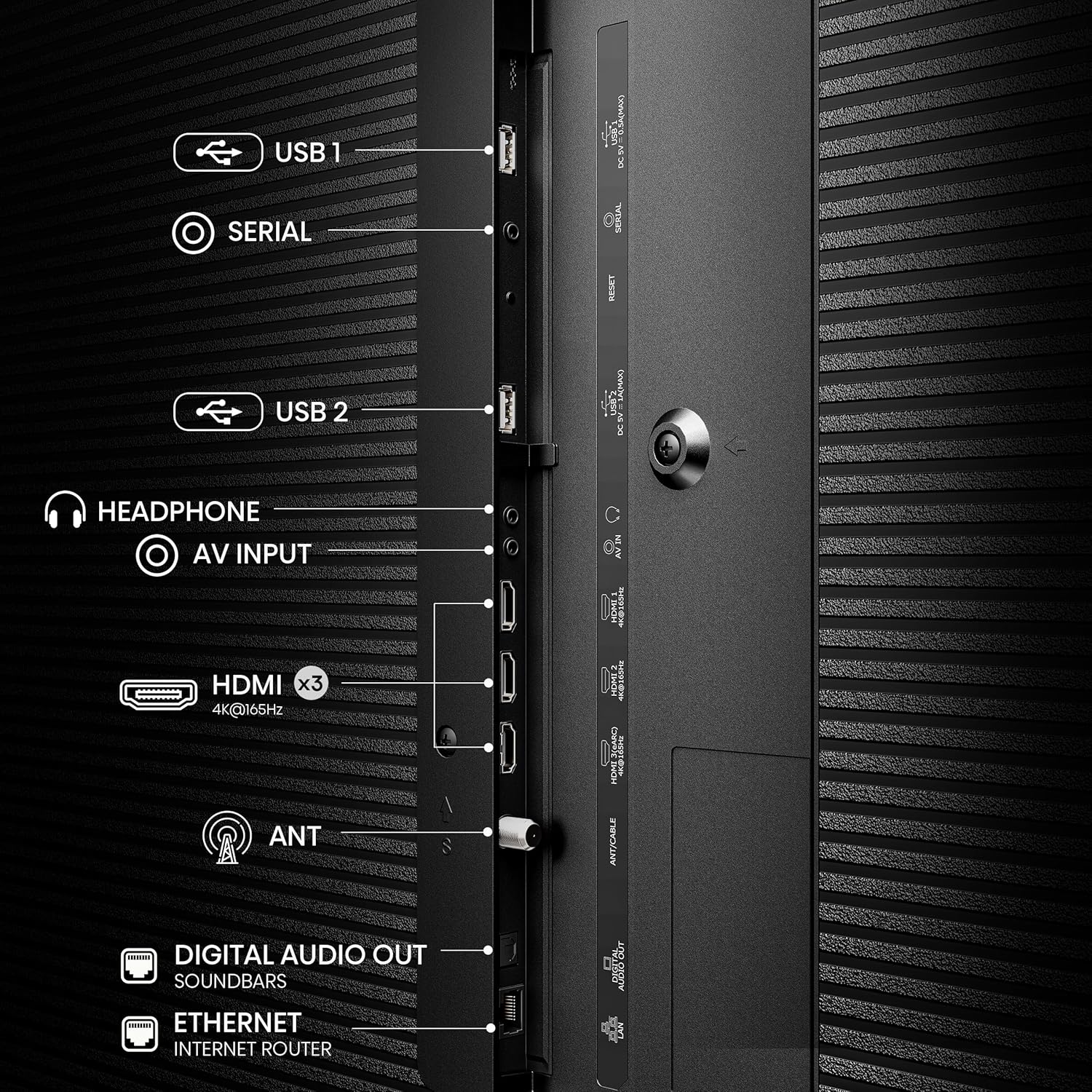
Chekutanga Power On
After connecting all necessary cables, plug the power cable into an electrical outlet. Press the power button on the remote control or on the TV to turn it on. Follow the on-screen instructions for initial setup, including network connection and Google TV account login.
Kushandisa TV yako
Remote Control
The Hisense 100UX comes with a solar-powered remote control. It can be charged by ambient light, reducing the need for battery replacement. The remote also features a 'Find my remote' function, which can be activated via the TV to emit a sound, helping you locate it.

Google TV Interface
Your TV operates on the Google TV platform, providing access to a wide range of streaming services, apps, and personalized content recommendations. Navigate using the remote control to explore movies, shows, and apps.

Mifananidzo Settings
The Hisense 100UX TV incorporates advanced technologies for picture quality:
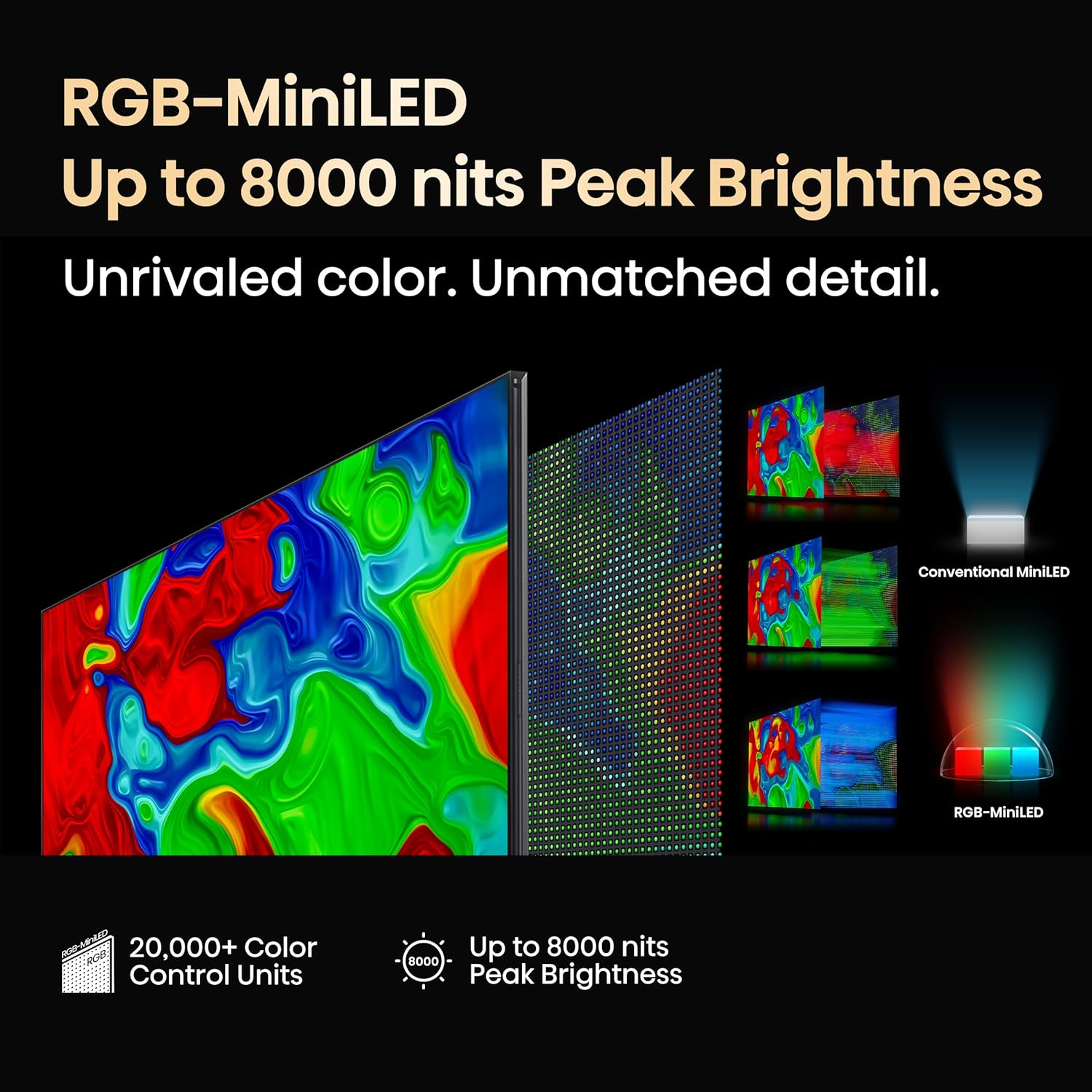
- RGB-MiniLED: This technology uses red, green, and blue MiniLEDs for local dimming, offering precise contrast and color control with peak brightness up to 8,000 nits.
- 3D Color Master Pro: This feature ensures accurate and rich color reproduction, covering 95% of the BT.2020 color gamut. It is Pantone Validated and Pantone SkinTone Validated for color fidelity.
- Mhoro-View AI Engine X: This AI processor analyzes and adapts picture and audio in real-time, enhancing clarity, color, contrast, and motion for various content types.
- AI Chroma Light Sensor: Automatically adjusts brightness and color temperature based on ambient room lighting for optimal viewing.
- Anti-Reflection Pro: A special coating on the screen minimizes glare and reflections, improving visibility in various lighting conditions.


Sound Settings
The TV features a 6.2.2 CineStage X Surround sound system for an immersive audio experience. It includes side speakers, top-firing speakers, and a built-in subwoofer. The TV also supports WiSA SoundSend and eARC for enhanced audio connectivity with compatible sound systems.


Mutambo Zvimiro
For an optimized gaming experience, the TV includes:
- Native 165Hz Panel: A high refresh rate panel with Variable Refresh Rate (VRR) from 48Hz to 165Hz, reducing motion blur and input lag.
- Game Booster 288: Inovandudza kuita kwemitambo.
- AMD FreeSync Premium Pro: Eliminates screen tearing and stuttering.
- Auto Low Latency Mode (ALLM) and Low Latency MEMC: Further reduce input lag.
- Enhanced Game Bar: An on-screen display for quick access and adjustment of game settings.

Smart Features uye Voice Control
The TV integrates with various smart home ecosystems:
- Hey Google / Google Assistant: Use voice commands to control the TV, search for content, and manage smart home devices.
- Google Cast: Cast content from compatible mobile devices to your TV.
- Alexa: Compatible with Amazon Alexa for voice control.
- Apple AirPlay: Tevedzera zvirimo kubva kuApple zvishandiso.
- Wi-Fi 6E: Provides fast and stable wireless connectivity.
Maintenance
Cleaning the Screen and TV Body
Kuti uchenese skrini, pukuta zvinyoro nyoro nemucheka wakapfava, usina lint. Pazvibodzwa zvakasindimara, zvishoma dampen the cloth with water or a screen-cleaning solution. Avoid using harsh chemicals or abrasive materials. For the TV body, use a dry, soft cloth.
Remote Control Care
Ensure the solar panel on the remote control is exposed to ambient light regularly to maintain its charge. If the remote's performance degrades, ensure it is exposed to light or replace the AAA batteries if necessary.
Kugadzirisa matambudziko
Kana ukasangana nematambudziko neTV yako, tarisa kune anotevera akajairika mhinduro:
- Hapana Simba: Check if the power cable is securely plugged into both the TV and the electrical outlet. Ensure the outlet is functional.
- Hapana Mufananidzo: Tarisa kuti kwasarudzwa nzvimbo chaiyo yekuisa. Tarisa zvese zvakabatana netambo kumidziyo yekunze.
- Hapana Inzwi: Ensure the TV volume is not muted or set too low. Check audio cable connections to external sound systems.
- Remote Control Haisi Kupindura: Ensure the remote has sufficient charge (for solar remote) or fresh batteries (if applicable). Point the remote directly at the TV's IR sensor.
- Reflections on Screen: Utilize the Anti-Reflection Pro feature by adjusting room lighting or TV placement to minimize glare.
For more detailed troubleshooting, consult the full user manual available on the Hisense support website.
Zvinotsanangurwa
| Feature | Tsanangudzo |
|---|---|
| Model Number | 100UX |
| Screen Size | 100 inches |
| Display Technology | RGB MiniLED, Hi-View Engine-X, QLED |
| Resolution | 4K UHD |
| Refresh Rate | 165 Hz yemuno |
| Peak Kupenya | Kusvika ku8000 nits |
| Color Control Units | 20000+ |
| Color Gamut | 95% BT.2020 (3D Color Master Pro) |
| Kubatana | Bluetooth, Ethernet, HDMI (x3), USB (x2), Wi-Fi 6E |
| Operating System | Google Smart TV |
| Zviyero zvechigadzirwa (pasina kumira) | 89.5" W x 50.6" H x 1.5" D |
| Item Weight (without stand) | 157.4 makirogiramu |
| VESA Wall Mount Size | 1000x600 mm (M8) |
Warranty uye Support
Warranty Information
Your Hisense 100UX TV is covered by a limited manufacturer's warranty. Please refer to the warranty card included in your package or visit the official Hisense websaiti kune yakadzama mazwi uye mamiriro ane chekuita nekuvhara, nguva, uye masevhisi maitiro.
Mutengi Support
For technical assistance, troubleshooting, or service inquiries, please contact Hisense Customer Support. Contact details can be found on the Hisense official website or in the Quick Start Guide provided with your TV.


