1. Setup Guide
This section provides instructions for the initial setup of your XIAOMI Poco M8 5G smartphone.
1.1 Unboxing uye Package Zviri mukati
Bvisa mudziyo wako nokungwarira woongorora zvese zviri mukati. Pakeji yakajairika inosanganisira:
- XIAOMI Poco M8 5G Smartphone
- USB Cable (Rudzi-C)
- Phone Case
- SIM Tray Ejector
- Mushandisi Chinyorwa (gwaro iri)
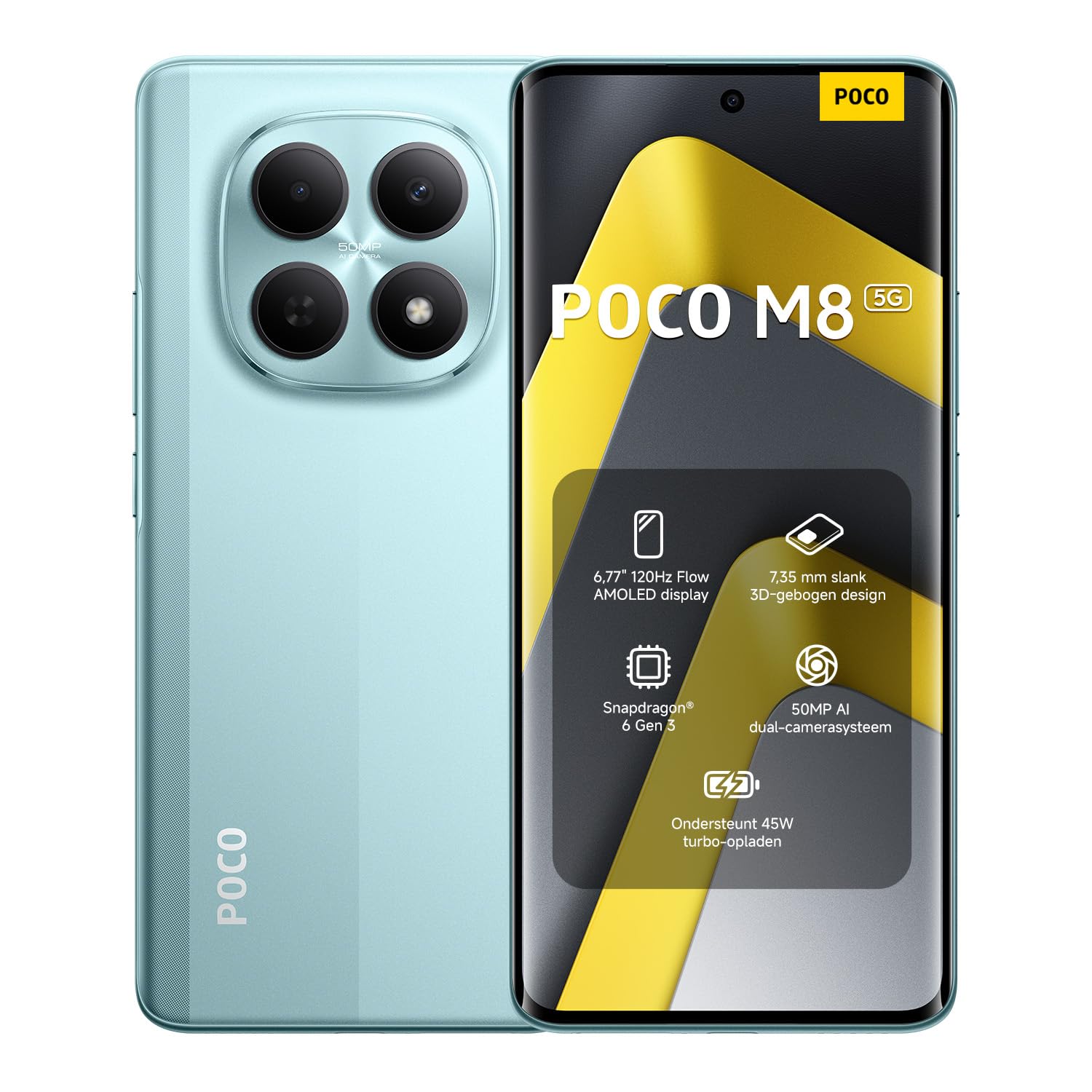
Image: The XIAOMI Poco M8 5G smartphone, USB-C cable, phone case, and SIM tray ejector pin, as typically found in the product box.
1.2 Kuiswa kweSIM Card
Your Poco M8 5G supports a nano SIM 1 and a hybrid slot for either a second nano SIM or a microSD card. eSIM is not supported.
- Tsvaga iyo SIM tray padivi pechishandiso chako.
- Isa SIM tray ejector tool mugomba diki padivi petireyi wodzvanya zvinyoro nyoro kusvika tireyi yabuda.
- Place your nano SIM card(s) and/or microSD card into the tray with the gold contacts facing down, ensuring they are correctly oriented.
- Nyatsopinza SIM tray mumudziyo kusvika yadzvanya panzvimbo.
1.3 Initial Power On and Network Compatibility
Press and hold the power button until the XIAOMI logo appears. Follow the on-screen instructions to complete the initial setup, including language selection, Wi-Fi connection, and account setup.
Network kuenderana:
- USA Market: This device is compatible with T-Mobile, Mint, Tello, or any carrier operating on the T-Mobile network. A pre-activated SIM card is required.
- Kunze kweU.SA: The device works with any GSM carrier worldwide.
- Mabhendi Anotsigirwa:
- 5G: 1/2/3/5/7/8/20/28/38/40/41/48/66/71/77/78
- 4G LTE FDD: B1/2/3/4/5/7/8/18/19/20/26/28/66/71
- 4G LTE TDD: B38/40/41/42/48
- 3G WCDMA: B1/2/4/5/6/8/19
- 2G: Quad Band
2. Operating Instructions
Learn how to use the key features of your XIAOMI Poco M8 5G smartphone.
2.1 Kuratidzwa uye Mushandisi
The Poco M8 5G features a 6.77-inch Flow AMOLED display with a resolution of 2392 x 1080 pixels. Key display features include:
- Refresh Rate: Up to 120Hz (adjustable for supported apps).
- Bata Sampling Rate: 240Hz, with an instant touch sampling rate of 2560Hz activated under Game Turbo Mode.
- Kupenya: Up to 3200 nits peak brightness, 800 nits typical.
- Kudzika Kwemavara: 12-bit (68.7 billion colors) with DCI-P3 wide color gamut.
- Kubuda: 3840 PWM dimming and 16,000 (Hardware Solution) for eye comfort.
- Operating System: The device runs on Hyper OS 2.
2.2 Kamera Mabasa
Tora mifananidzo nemavhidhiyo emhando yepamusoro uchishandisa sisitimu yekamera yakabatanidzwa.
- Rear Camera:
- Main Camera: 50MP with Light Fusion 400 sensor (1/2.88", 1.22µm 4-in-1 Super Pixel, f/1.8 aperture, 5P lens).
- Yakadzama Kamera: 2MP.
- Kurekodha Vhidhiyo: Supports 4K at 30fps, 1080p at 30fps, and 720p at 30fps.
- Front Camera:
- 20MP sensor (1/4", f/2.2 aperture, 4P lens).
- Kurekodha Vhidhiyo: Supports 1080p at 30fps and 720p at 30fps.
2.3 Ruzha uye Kubatana
Experience immersive audio and seamless connectivity.
- Audio: Dual speakers with Dolby Atmos certification and Hi-Res Audio certification. Features a 3.5mm headphone jack.
- Kubatana: Supports 5G, Wi-Fi, Bluetooth, NFC, and GPS (L1 | GLONASS: G1 | BDS: B1I+B1C | Galileo E1).
- Sensors: Virtual proximity sensor, ambient light sensor, accelerometer, electronic compass, IR blaster, gyroscope, in-screen fingerprint sensor, and AI face unlock.
2.4 Wet Touch Technology 2.0
The device features Wet Touch Technology 2.0, which intelligently detects water, oil, foam, sweat, and more, ensuring responsive and accurate screen operation even with wet or oily fingers.
3. Kuchengeta
Proper care and maintenance will extend the lifespan of your XIAOMI Poco M8 5G.
3.1 Kuchengeta Battery
- The device is equipped with a 5520mAh (typical) battery and supports 45W turbo charging.
- To optimize battery longevity, avoid extreme temperatures and fully discharging the battery frequently.
- The silicon-carbon battery technology is designed to retain over 80% capacity after 1,600 charge cycles.
- Shandisa machaja akatenderwa chete netambo.
3.2 Screen and Device Cleaning
- The display features high-durability glass. To clean the screen, gently wipe it with a soft, lint-free cloth.
- Pakuoma musoro, zvishoma dampsn jira rine mvura kana chekuchenesa skrini rakagadzirirwa zvemagetsi.
- Dzivisa kushandisa makemikari ane hasha, abrasive zvinhu, kana kunyanyisa mwando.
- Keep the device free from dust and debris, especially around ports and speaker grilles.
4. Kugadzirisa matambudziko
Ichi chikamu chinogadzirisa zvinowanzoitika zvaungasangana nazvo nemudziyo wako.
4.1 Matambudziko Anowanikwa uye Magadzirirwo
- Mudziyo hausi kubatika: Ensure the battery is charged. Connect the device to its charger for at least 15 minutes before attempting to power it on again.
- Sikirini haina kupindura: If the screen is unresponsive, try a forced restart by holding the power button for approximately 10-15 seconds.
- Network yekubatanidza nyaya:
- Tarisa kana SIM kadhi rako rakaiswa zvakanaka.
- Wona kuti nharembozha yakagoneswa mumaseting ako.
- Iva nechokwadi chekuti uri mukati me network coverage.
- Tangazve mudziyo.
- Bhatiri rinopera nekukurumidza:
- Vhara maapplication asina kushandiswa arikumashure.
- Deredza kupenya kwescreen.
- Dzima zvinhu zvakaita seWi-Fi, Bluetooth, kana GPS kana zvisiri kushandiswa.
- Check for app updates, as outdated apps can sometimes consume more power.
- Zvishandiso zvinoputsika kana kutonhora:
- Clear the cache and data for the problematic app in settings.
- Gadziridza app iyi kuti isvike payazvino.
- Kana nyaya ikaramba iripo, bvisa uye dzosera iyo app.
If you encounter issues not covered here or require further assistance, please refer to the Warranty & Support section.
5. Zvinotsanangurwa
Detailed technical specifications for the XIAOMI Poco M8 5G smartphone.
| Model Name | Poco M8 5G |
| Item Model Number | MZB0NF7EU |
| Kukura Kwekuratidza | 6.77 Inches Flow AMOLED |
| Resolution | 2392 x 1080 |
| Refresh Rate | Kusvika ku120Hz |
| processor | Snapdragon 6 Gen 3 Mobile Platform (4nm, Octa-core up to 2.4GHz) |
| RAM | 8 GB |
| Storage | 256 GB (Expandable up to 1TB via microSD in hybrid slot) |
| Operating System | Hyper OS 2 |
| Rear Camera | 50MP Main + 2MP Depth |
| Front Camera | 20MP |
| Battery Capacity | 5520 mAh (yakajairika) |
| Kuchaja | 45W Turbo Charge |
| Kubatana | 5G, Wi-Fi, Bluetooth, NFC, GPS |
| Sravana Sameeralu Serial 4th Audio Jack | 3.5 mm |
| Dimensions | 7.05 x 3.54 x 1.65 inches (Package) |
| Item Weight | 13 ounces |
| Color | Green (as per current product variant) |
6. Warranty & Tsigiro
For warranty information and customer support, please refer to the official XIAOMI resources.
6.1 Chigadzirwa Chivimbiso
Your XIAOMI Poco M8 5G smartphone is covered by a limited manufacturer's warranty. Details regarding the warranty period and terms can typically be found on the official XIAOMI website or within the warranty card included in your product packaging. Please retain your proof of purchase for warranty claims.
6.2 Mutengi Tsigiro
If you require technical assistance, have questions about your device, or need to report an issue, please contact XIAOMI customer support through their official channels. This may include their website, dedicated support hotlines, or authorized service centers.
For the most up-to-date support information, visit the official XIAOMI websaiti: www.mi.com/global/support


