1. Chigadzirwa Pamusoroview
The LIGE Smart Watch EF24-A is a versatile and durable smartwatch designed for active lifestyles. It features a 1.7-inch HD display, long-lasting 1000mAh battery, Bluetooth calling, comprehensive health tracking, and over 100 sports modes. This manual provides essential information for setting up, operating, and maintaining your device.
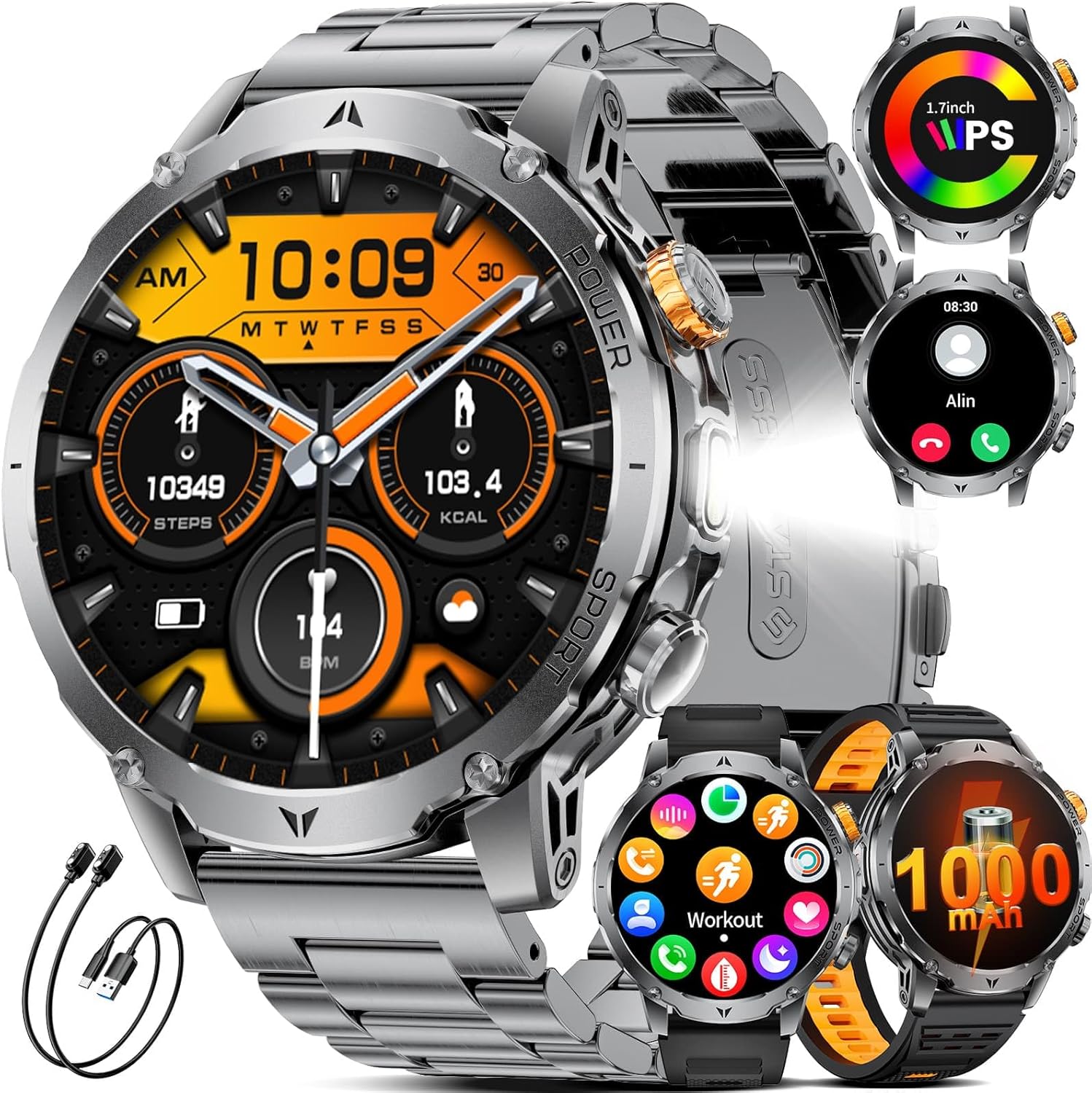
Figure 1: LIGE Smart Watch EF24-A. This image displays the smartwatch with a metal strap, showcasing its round face and robust design.
2. Chii chiri muBhokisi
Upon opening your LIGE Smart Watch EF24-A package, you should find the following items:
- Wachi Yakangwara (yuniti imwe)
- Watch Bands (3 units: 1 stainless steel, 2 silicone)
- Charging Cables (2 units: USB and Type-C magnetic charging cables)
- Bhuku reMushandisi (1 unit)

Figure 2: Package contents including the smartwatch, three watch bands, and two charging cables.
3. Setup Guide
3.1 Kuchaja iyo Smart Watch
Before initial use, fully charge your smartwatch. The device comes with two magnetic charging cables (USB and Type-C) for convenience.
- Connect one of the magnetic charging cables to a compatible USB or Type-C power adapter (not included) or a computer's USB port.
- Align the magnetic end of the cable with the charging contacts on the back of the smartwatch. The watch will snap into place and display a charging indicator.
- Allow approximately 2 hours for a full charge. A full charge provides up to 15 days of typical daily use and over 60 days of standby time.

Figure 3: The smartwatch being charged using both USB and Type-C magnetic cables, highlighting the 1000mAh battery capacity.
3.2 Kuiswa kweApp uye Kubatanidza Chishandiso
To unlock the full potential of your smartwatch, download and install the companion app on your smartphone.
- Scan the QR code in the manual or on the watch packaging, or search for the designated app (e.g., 'FitCloudPro' as commonly used by LIGE) in your smartphone's app store (compatible with iOS 8.0+ and Android 4.4+).
- Install and open the app. Follow the on-screen instructions to create an account or log in.
- Gonesa Bluetooth pane yako smartphone.
- In the app, navigate to the device pairing section and search for your smartwatch (e.g., 'EF24-A').
- Select your device from the list to initiate pairing. Confirm the pairing request on both your phone and the smartwatch.
3.3 Kuiswa kwetambo
The LIGE Smart Watch EF24-A comes with three interchangeable straps: a stainless steel band and two silicone straps. To change a strap:
- Tsvaga mapini anoburitswa nekukurumidza kumashure kwetambo dzewachi.
- Slide the pin inwards to detach the current strap from the watch body.
- Align the new strap with the watch lugs and slide the pin inwards. Release the pin once the strap is in place to secure it. Gently pull on the strap to ensure it is firmly attached.
4. Operating Instructions
4.1 Basic Navigation
The smartwatch features a full touch screen and physical buttons for navigation:
- Swipe Kumusoro/Kudzika: Dzvanya mumamenyu uye zviziviso.
- Swipe Kuruboshwe/Kurudyi: Svika nekukurumidza mabasa kana majeti.
- Top: Sarudza chinhu kana simbisa chiito.
- Dzvanya Mabhatani Eparutivi: The watch typically has a power/home button and a customizable function button. Refer to the watch settings for specific button assignments.

Figure 4: Various menu interfaces and navigation options on the smartwatch display.
4.2 Kufona neBluetooth uye Zviziviso
With its advanced dual-core chip and BLE 5.3 support, the smartwatch offers stable Bluetooth calling and real-time notifications.
- Kufona/Kugamuchira Mafoni: Once paired, you can answer or make calls directly from your watch using the built-in speaker and microphone.
- Zviziviso zveMharidzo: Receive real-time alerts from social apps (e.g., Facebook, Twitter, WhatsApp) and other smartphone notifications directly on your wrist. Ensure notification permissions are enabled in the companion app.

Figure 5: The smartwatch displaying incoming calls and various app notifications.
4.3 Tarisa Zviso
Personalize your smartwatch with a wide selection of watch faces.
- The watch comes with 7 built-in faces.
- The companion app offers over 400 additional UI designs. You can also upload a photo to create a unique personal background.
- To change watch faces, long-press the home screen or select from the watch face settings in the app.

Figure 6: A selection of customizable watch faces available for the smartwatch, including options for DIY backgrounds.
4.4 Basa reTochi
The smartwatch includes a powerful LED flashlight for various situations.
- Svika iyo tochi basa kubva pawachi menyu.
- It offers different modes, including constant light, warning mode, and SOS mode.

Figure 7: The smartwatch's powerful LED flashlight being used in various outdoor and emergency scenarios.
4.5 Zvimwe Zvimiro
The LIGE Smart Watch EF24-A offers a range of practical features:
- AI Voice Assistant: Interact with your watch using voice commands.
- Kudzora Mumhanzi: Dzora kurira kwemimhanzi panharembozha yako zvakananga kubva pawachi.
- Remote Camera: Shandisa wachi yako sevhavha yekure kure kune kamera yefoni yako.
- Mamiriro ekunze: Wana real-time mamiriro ekunze.
- Alarm Clock: Seta maaramu pawachi yako.
- Timer: Utilize the built-in timer function.
- Tsvaga Runhare: Tsvaga yako yakapetwa kaviri smartphone nekuita kuti irire.
- Sedentary Chiyeuchidzo: Wana chenjedzo kuti ufambe mushure menguva yekusaita basa.
- Mvura Chiyeuchidzo: Receive reminders to drink water throughout the day.

Figure 8: A collage showing the smartwatch's music control, weather display, alarm clock, camera control, find phone, sedentary reminder, and water reminder features.
5. Kutevera Hutano
The LIGE Smart Watch EF24-A is equipped with sensors to monitor various health metrics. Note: Measurements are for reference only and are not medical data.
5.1 Kuongorora Kwemoyo
The watch tracks your heart rate 24 hours a day. All data can be synced to the app to record physical changes.
- To view your current heart rate, navigate to the heart rate section on your watch.
- The app provides detailed historical data and analysis.

Figure 9: The smartwatch displaying real-time heart rate and blood oxygen levels, with a user actively monitoring their health.
5.2 Kuongororwa kweOkisijeni muRopa (SpO2)
Tarisa mazinga eokisijeni yeropa rako zvakananga kubva paruoko rwako.
- Access the blood oxygen feature on your watch to take a measurement.
- Ensure the watch is snug on your wrist for accurate readings.
5.3 Kutarisa Hunhu Hwekurara
The smartwatch automatically tracks your sleep patterns, providing insights into awake, light, and deep sleep stages.
- Pfeka wachi kusvika pamubhedha kuti uzive zviri kuitika panguva yekurara.
- View detailed sleep analysis in the companion app to understand your sleep quality.

Figure 10: The smartwatch displaying sleep quality data, including total sleep duration and different sleep stages, with a person sleeping in the background.
5.4 Pressure Detection and Breathing Training
The watch can help you stay on top of stress levels and guide you through breathing exercises.
- Access the pressure detection feature to monitor your stress.
- Use the breathing training function to relax and recover.

Figure 11: The smartwatch displaying pressure detection data, with a graph showing stress levels over time, and a user engaged in focused work.
6. Mitambo Modes
The LIGE Smart Watch EF24-A offers over 100 sports modes to track your physical activities. It monitors key metrics such as steps taken, distance covered, calories expended, and exercise duration.
- To start a workout, navigate to the 'Workout' or 'Sports' section on your watch.
- Select your desired activity (e.g., walking, running, cycling, tennis, mountaineering, basketball, badminton, rope skipping).
- The watch will begin tracking your activity. End the workout when finished to save the data.
- Review detailed workout summaries in the companion app.

Figure 12: The smartwatch displaying various sports modes and tracking metrics like steps, distance, and calories, with images of people engaged in different sports activities.
7. Kuchengeta
7.1 Kugara Kwenguva Refu Uye Kusapinda Mvura
The LIGE Smart Watch EF24-A is built with military-grade protection standards, offering exceptional resistance to scratches, impacts, and harsh environmental conditions. It is IP68 waterproof, protecting it from splashes, rain, and sweat, and suitable for swimming (without hot water or steam).
- Dzivisa kuisa wachi pamvura inopisa, utsi, kana majeti emvura ane simba guru.
- Do not operate the watch buttons underwater.
- After exposure to water, wipe the watch dry with a soft cloth.

Figure 13: The smartwatch highlighting its water-resistant, cold-resistant, shock-resistant, and dust-resistant properties.
7.2 Kuchenesa uye Kuchengeta
- Regularly clean the watch body and straps with a soft, damp jira.
- Dzivisa kushandisa makemikari akaomarara kana zvinhu zvinogumbura, sezvo izvi zvinogona kukuvadza magumo acho.
- Ita shuwa kuti macontacts ekuchaja akachena uye akaoma musati wachaja kudzivirira kukora.
8. Kugadzirisa matambudziko
If you encounter issues with your LIGE Smart Watch EF24-A, try the following troubleshooting steps:
8.1 Nyaya dzeBatanidzo
- Iva nechokwadi chekuti Bluetooth yakabatidzwa pafoni yako uye kuti wachi yako iri pedyo.
- Tangazve zvese zviri zviviri smartphone yako uye smartwatch.
- Unpair and re-pair the device through the companion app.
- Check if the companion app is running in the background and has necessary permissions.
8.2 Battery Hupenyu Hunetsekana
- Ensure the watch is fully charged using the provided magnetic cables.
- Reduce screen brightness and turn off unnecessary features (e.g., continuous heart rate monitoring, always-on display) to conserve battery.
- Check for app updates, as software optimizations can improve battery performance.
8.3 Display Not Responding
- Edza kutangazve wachi nekudzvanya uye kubata bhatani rekudzima.
- Ita shuwa kuti skrini yakachena uye yakaoma.
- If the issue persists, perform a factory reset (note: this will erase all data on the watch).
9. Zvinotsanangurwa
| Feature | Tsanangudzo |
|---|---|
| Model Number | EF24-A |
| Kukura Kwekuratidza | 1.7 inches |
| Display Resolution | 360*360 pixels |
| Battery Capacity | 1000 mAh Lithium Polymer |
| Hupenyu hweBattery Hwakajairika | Kusvikira kumazuva makumi manomwe |
| Standby Time | Above 60 days |
| Kuchaja Nguva | Approx. 2 maawa |
| Kubatana | Bluetooth 5.3 |
| Operating System | Android (4.4 and above), iOS (8.0 and above) |
| Kuramba Mvura | IP68 |
| Product Dimensions | 5.91 x 2.76 x 0.79 inches |
| Item Weight | 8.8 ounces (0.25 Makirogiramu) |

Figure 14: Visual comparison of the 1.7-inch display size of the LIGE Smart Watch EF24-A against other smartwatches.
10. Warranty uye Tsigiro
10.1 Ruzivo rweWaranti
LIGE stands behind the quality of its products. The LIGE Smart Watch EF24-A comes with a 24-month worry-free product warranty. This warranty includes services such as replacement, return, or accessory replacement.
10.2 Mutengi Tsigiro
If you have any questions or concerns about your smartwatch, please do not hesitate to contact our customer support team. Our team is always ready to provide you with the support you need.
- Refer to the contact information provided in your product packaging or on the official LIGE webnzvimbo yekutsigira nzira.
- Please have your model number (EF24-A) and purchase details ready when contacting support.
11. Product Videos
11.1 Military Smart Watch for Men EF24 Overview
Vhidhiyo 1: Vhidhiyo iyi inopa ruzivo rwakakwana pamusoroview of the LIGE Smart Watch EF24, showcasing its design, various watch faces, flashlight function, and charging capabilities. It also highlights health monitoring features like heart rate and blood pressure, along with music control and weather updates.
11.2 Smart Watch for Men EF24 Features and Durability
Video 2: This video demonstrates the durability of the LIGE Smart Watch EF24, showing its resistance to impact and water. It also illustrates key functionalities such as charging, various sports modes, health tracking (heart rate, blood oxygen, pressure), call handling, notifications, and the flashlight feature.


