1. Nhanganyaya
The Lilytech ZL-6210A+ is a high-performance temperature controller designed for precise temperature management. Featuring a robust 30A relay output, it is suitable for a wide range of heating or cooling applications. This manual provides essential information for the safe installation, operation, and maintenance of your ZL-6210A+ controller.

Mufananidzo 1: Mberi view of the ZL-6210A+ Temperature Controller, showing the display and control buttons.
2. Safety Information
Please read all safety instructions carefully before installation and operation. Failure to follow these instructions may result in electric shock, fire, or damage to the device.
- Njodzi Yemagetsi: Mudziyo uyu unoshanda nehigh voltage (185-245Vac). Installation should only be performed by qualified personnel.
- Bvisa Simba: Always disconnect power to the circuit before performing any wiring or maintenance.
- Nzvimbo Yakakodzera: Ensure the device is properly grounded according to local electrical codes.
- Environmental Conditions: Do not expose the controller to excessive moisture, dust, or corrosive environments beyond its specified working conditions.
- Load Capacity: Do not exceed the maximum current rating of the relay (30A for R1, 5A for R2).
3. Zvinotsanangurwa
| Parameter | Value |
|---|---|
| Magetsi | 185 ~ 245Vac, 50/60Hz |
| Sensor Type | NTC (2 meters long) |
| Output Relay R1 | 30A / 250Vac (resistive load) |
| Output Relay R2 | 5A / 250Vac (resistive load) |
| Kuisa Range | -40 ~ 120°C |
| Display Range | -40 ~ 130°C |
| Nzvimbo Yekushanda | -10 ~ 45°C, 5 ~ 90%RH (non-condensing) |
| Zviyero (W x H x D) | 78 x 34.5 x 71 mm |
| Installation Drilling (W x H) | 71 x 29 mm |
| Nyaya Materials | PC + ABS chiratidzo chemoto |
| Dziviriro Level | IP65 (Kurutivi rwemberi chete) |
| Item Weight | 1.76 ounces (inenge 50g) |
NTC Sensor Selection
The ZL-6210A+ uses NTC sensors. Different sensor types are available, varying in seal material, wire length, resistance, and B-value. Ensure the correct sensor type is used for your application.
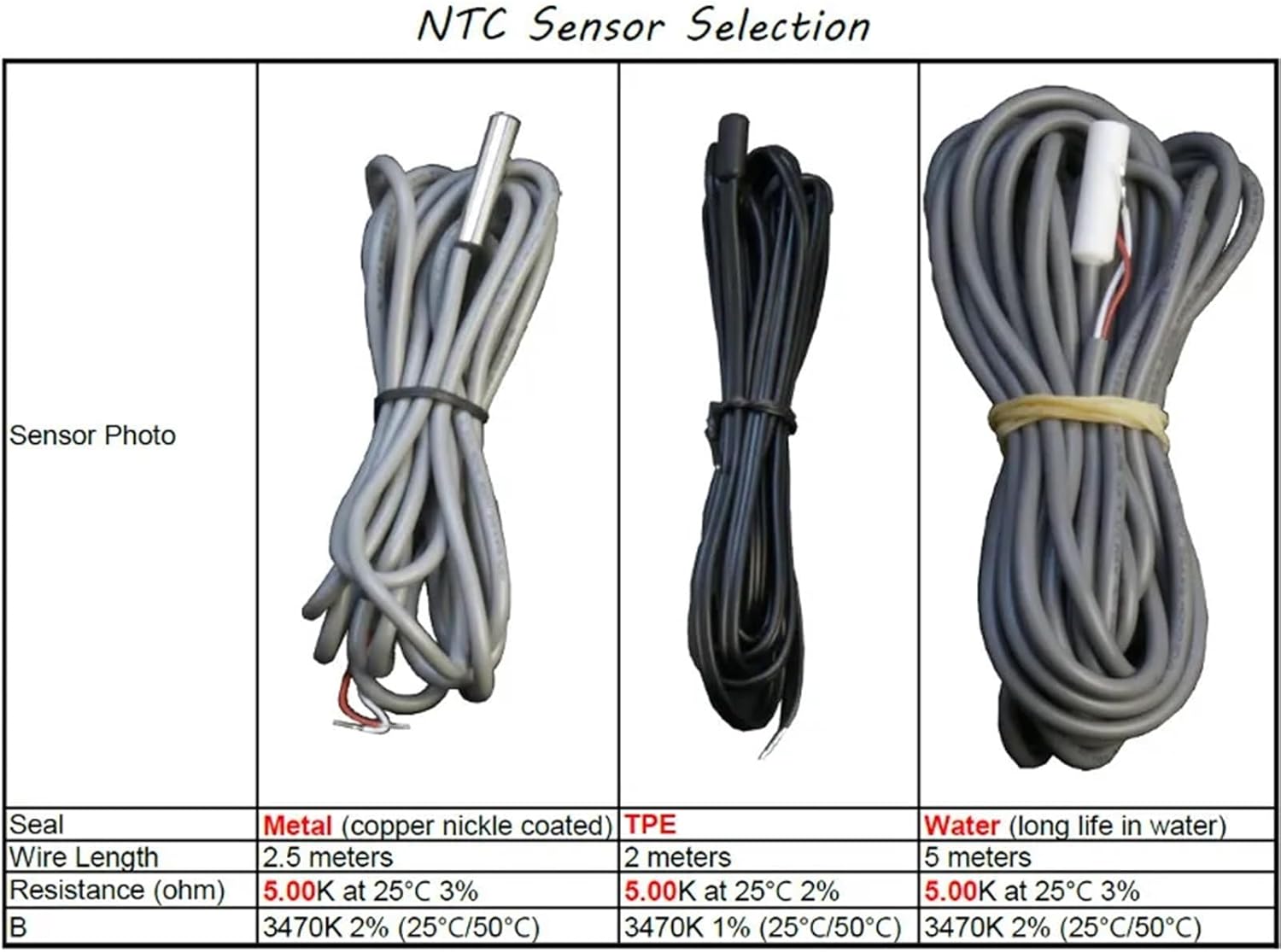
Figure 2: NTC Sensor Selection table, detailing specifications for Metal, TPE, and Water sealed sensors.
4. Kuiswa
4.1 Kuiswa
The ZL-6210A+ is designed for panel mounting. Create an opening in your panel with the dimensions of 71 mm (width) x 29 mm (height). Insert the controller into the opening and secure it using the provided clips.
4.2 Wiring
Refer to the wiring diagrams below for proper connection. Ensure all connections are secure and comply with local electrical codes. The main power input is 185-245Vac. The primary temperature output (R1) is rated for 30A.

Mufananidzo 3: Kumashure view of the ZL-6210A+ showing the terminal block layout. Terminals 1-2 are for R1 Temp. Output, 3-6 for 220V~ power (L, N), and 7-10 for Alarm Input and Temp. Sensor.
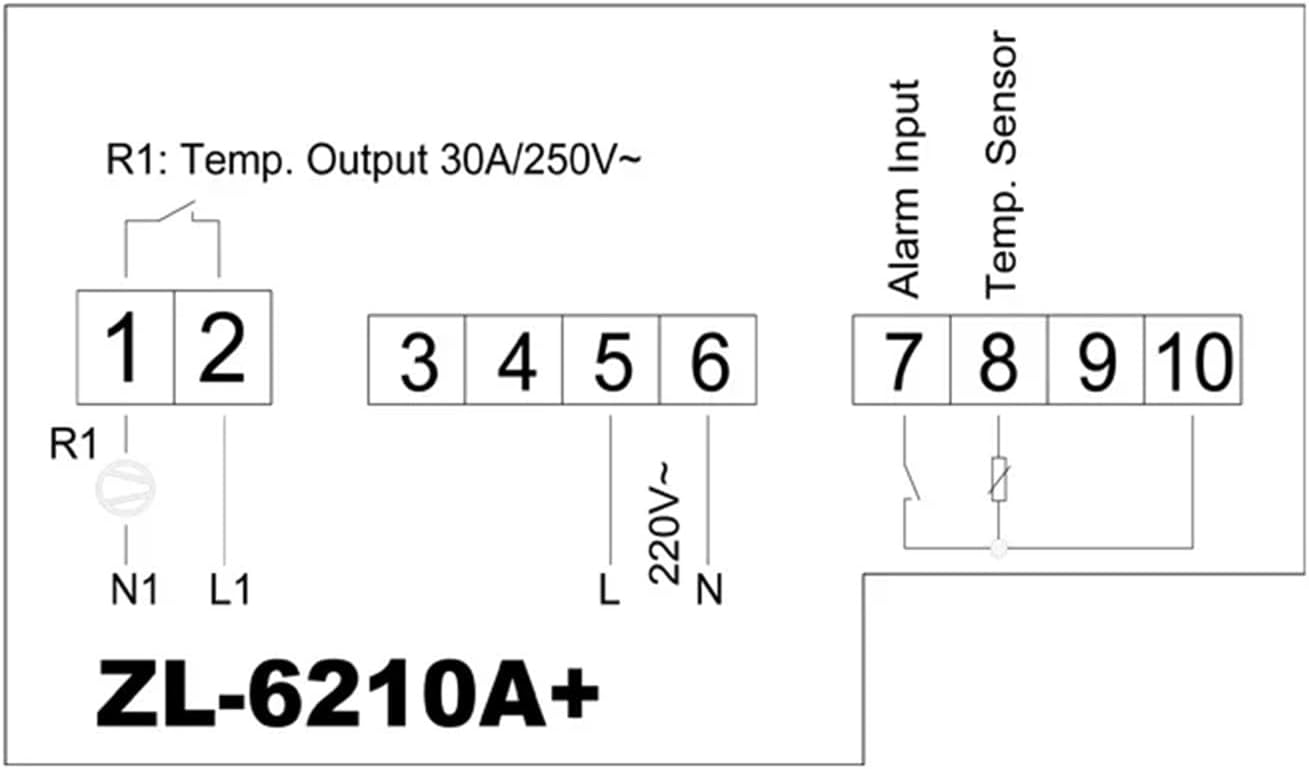
Figure 4: Simplified wiring diagram. Connect power to terminals 5 (L) and 6 (N). Connect the temperature sensor to terminals 9 and 10. The main relay output (R1) is connected to terminals 1 and 2. An alarm input can be connected to terminals 7 and 8.
Terminal Connections:
- Gumiguru 1, 2 R1 Temperature Output (30A / 250V~)
- Gumiguru 3, 4 (Not explicitly labeled in diagram, often for auxiliary functions or R2 if present)
- 5 (L), 6 (N): Power Supply Input (220V~)
- Gumiguru 7, 8 Alarm Inzwa Zvinotaurwa
- Gumiguru 9, 10 Temperature Sensor Input (NTC)
5. Kushanda
The ZL-6210A+ features a digital display and control buttons for setting parameters. Specific operational details, including setting the desired temperature, hysteresis, and alarm functions, are typically accessed via a menu system. Refer to the detailed manual available from the manufacturer for complete programming instructions.

Mufananidzo 5: Yemukati view showing the digital display and buttons (S1, S2, S3, S4) used for parameter setting and navigation.
Basic Mabasa:
- Kuratidza Tembiricha: Inoratidza tembiricha yakayerwa iripo.
- Set Point Adjustment: Allows users to set the desired target temperature.
- Sarudzo yeModhi: Typically allows selection between heating and cooling modes.
- Alarm Settings: Configures high/low temperature alarms.
6. Kuchengeta
Regular maintenance ensures optimal performance and longevity of your temperature controller.
- Kuchenesa: Geza pamberi pepaneru nenyoro, damp jira. Usashandise abrasive cleaners kana solvents. Ita shuwa kuti hapana mvura inopinda mumudziyo.
- Environmental Check: Periodically inspect the installation environment to ensure it remains within the specified temperature and humidity ranges.
- Wiring Inspection: Check all wiring connections periodically for tightness and signs of wear or corrosion.
- Sensor Condition: Ensure the temperature sensor is clean and free from damage.
7. Kugadzirisa matambudziko
If you encounter issues with your ZL-6210A+, refer to the following common problems and solutions:
| Dambudziko | Zvinogona Kukonzera | Solution |
|---|---|---|
| Chinodzora hachibatidzi | Hapana magetsi; Waya dzisina kururama; Fuse yakaputika | Check power connections; Verify wiring against diagram; Check for internal fuse (if accessible, consult professional) |
| Kuverenga kwekushisa kusina kunaka | Faulty sensor; Sensor not connected properly; Sensor placed incorrectly | Check sensor wiring; Replace sensor if damaged; Relocate sensor to a representative area |
| Output relay (R1) not switching | Temperature not within set range; Incorrect parameter settings; Faulty relay | Verify set point and hysteresis; Check operating mode (heating/cooling); Consult professional for relay replacement |
| Chiratidziro chinoratidza kodhi yezvikanganiso | Sensor error; Internal fault | Refer to the full manufacturer's manual for specific error code meanings and solutions. |
8. Warranty uye Tsigiro
For warranty information, please refer to the terms provided by your retailer or the manufacturer at the time of purchase. For detailed technical support, additional documentation, or specific programming instructions, please visit the official Lilytech websaiti kana kubata basa ravo revatengi.
A comprehensive manual can be found at: www.suzhoulily.com/pdf/ZL-62x0A(plus)_en_2.0d.pdf


