1. Kupfuuraview
The AOCHUAN Smart X3 is an advanced 3-axis gimbal stabilizer designed for smartphones, offering enhanced stability and creative shooting capabilities. It features 360° face tracking, an integrated one-tap open tripod, gesture control, a magnetic remote control, and a built-in 20-inch extension rod. This manual provides essential information for setting up, operating, and maintaining your Smart X3 gimbal.
2. Package Zviri mukati
Ita shuwa kuti zvinhu zvese zviripo mupakeji:
- SMART X3 gimbal ×1
- USB-C charging cable ×1
- Bhuku rekushandisa ×1
- Chihomwe Chekuchengetedza ×1
3. Zvimiro zveChigadzirwa & Zvikamu
The Smart X3 gimbal integrates several features for versatile smartphone videography:
- Upgraded 3-Axis Smart Stabilization: Delivers smoother and steadier footage for various activities.
- 360° Unlimited Rotation: Enables smooth pans, continuous rotations, and flexible shooting angles.
- Innovative One-Touch Open Tripod: Integrated tripod deploys instantly for quick setup and stable shots.
- Magnetic Detachable Remote: Controls shooting, mode switching, and photo capture from up to 33 feet away.
- Built-in 20" Extension Rod: Extends for higher, wider, and more creative angles, suitable for selfies and overhead shots.
- Rear Mirror for Better Self-Framing: Assists in accurate framing when using the rear camera for selfies and vlogs.
- Compact Folding Size: Smaller and lighter when folded for easy portability.
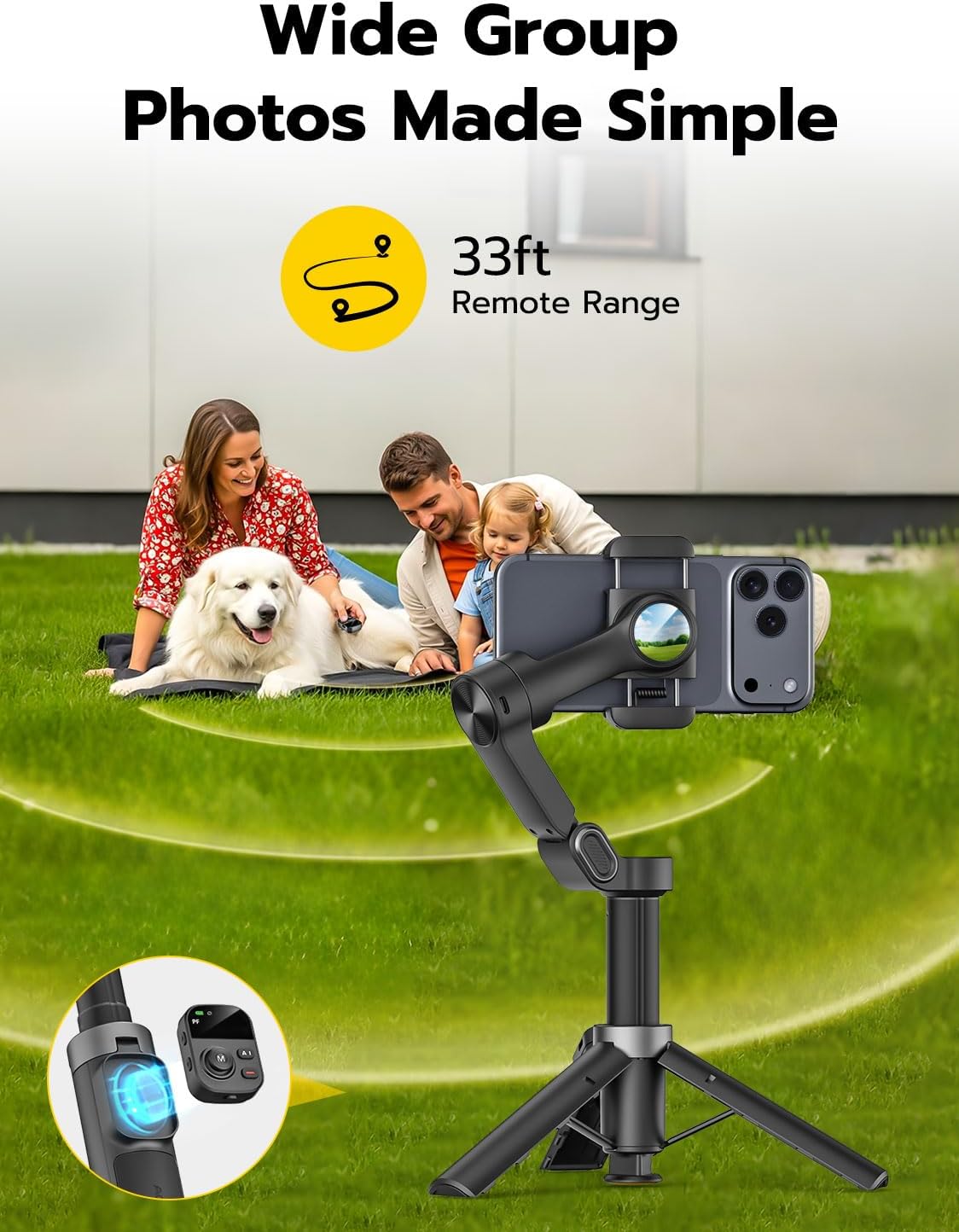
The AOCHUAN Smart X3 Gimbal with a smartphone attached, highlighting its remote control capabilities for wide group photos.

Demonstration of the innovative one-tap release mechanism for the built-in tripod and the extendable rod.

Visual representation of the AOCHUAN 10.0 Smart Stabilization system, showing the gimbal's rotating axes.

The built-in 20-inch extension rod of the Smart X3 phone gimbal, allowing for flexible angles and group shots.

AI Tracking in action, demonstrating the gimbal's ability to follow subjects in various lifestyles, such as playing volleyball.

The gimbal's smooth 360° rotation capability, allowing for unlimited horizontal tracking without blind spots.
4. Setup Guide
4.1 Kuvhura Gimbal
- Hold the gimbal with both hands and gently unfold the folding arms upward until they lock into place.
- Press the yellow button at the base to deploy the integrated tripod legs.
4.2 Kuisa Smartphone Yako
- Iva nechokwadi chekuti clamp latch is pointing upward.
- Pull open the phone clamp and carefully place your smartphone in the center.
- If your phone has a large or heavy camera, adjust its position slightly left or right within the clamp to achieve optimal balance.
4.3 Kubatidza
- After mounting the phone, press and hold the power button located on the side arm for 3 seconds to turn on the gimbal.
- It is recommended to fully charge the gimbal immediately after unboxing for optimal performance.
4.4 Bluetooth Connection
- Open your phone's Bluetooth settings and locate the device named "SMART_X3". Tap to connect.
- Slide the power switch at the bottom of the remote to ON. Press and hold the shooting button on the remote for 3 seconds to wake it up. A steady Bluetooth indicator light means the connection is successful.
Official video tutorial demonstrating how to set up and use the AOCHUAN Smart X3 gimbal.
5. Operating Instructions
5.1 Remote Control Mabasa
- Shooting Button:
- Press and hold for 3 seconds: Wake up or put the remote to sleep.
- Single-click: Take photo or start/stop video recording.
- Double-click: Switch between landscape and portrait orientation.
- Triple-click (requires APP connection): Switch between front and rear cameras.
- Joystick / M Function Button:
- Push joystick: Adjust phone direction (up/down/left/right).
- Single-click M: Switch between PF (Pan Follow), F (Common), L (Lock), POV (Cool), DM (Rotation), and S (Sport) modes. The corresponding mode indicator will light up.
- Double-click M: Instantly recenter the phone.
- Triple-click M: Enable DM Auto Rotation mode.
- Press and hold M: Activate S (Sport) mode.
- AI Bhatani:
- Single-click: Turn Smart Tracking on/off (requires APP/AI tracking module).
- Double-click: Switch between zoom, focus, and fill light brightness adjustment.
- Triple-click: Enter 360° panorama mode.
- Upper/Lower Side Buttons (Zoom/Focus/Fill Light):
- In Zoom mode: Upper button zooms in, Lower button zooms out.
- In Focus mode: Upper button shifts focus farther, Lower button shifts focus closer.
- In Fill Light mode: Upper button increases brightness, Lower button decreases brightness.
5.2 Maitiro eGimbal
The Smart X3 offers six different modes:
- PF (Pan Follow) Mode: Pan axis follows, tilt & roll locked. Suitable for horizontal panning shots.
- F (Common) Mode: Pan & tilt follow, roll locked. Allows phone to follow left-right or up-down handle movements, ideal for horizontal panning, tilt, or overhead shots.
- L (Lock) Mode: All axes locked. Allows for stable push/pull or tracking shots.
- POV (Cool) Mode: All axes unlocked. Allows tilting for unique, angled shots.
- DM (Rotation) Mode: Auto 180° rotation shots.
- S (Sport) Mode: Same as F mode but with stronger motors for fast moves.
5.3 APP's Tracking Feature
After entering the app and connecting the device via Bluetooth, tap the smiley face icon at the bottom to select from four tracking modes:
- Kutsvaga Kuso Select Face Tracking mode. When a face appears on the phone screen, the device will automatically start tracking it.
- Body Tracking: Select Body Tracking mode. When a human body appears on the phone screen, the device will automatically begin tracking. (Note: Body tracking is suitable for long-distance tracking. Do not stand too close to the phone to avoid interference with recognition.)
- Kutsvaga chinhu: Select Object Tracking mode. Use your finger to draw a frame around the object you want to track on the phone screen. The device will then automatically track the selected object.
- Third-Party App Tracking: You can choose to use either the front or rear camera. Tap to select the tracking platform (e.g., YouTube, TikTok, Instagram). After selecting the platform, click "Start Live" and enter the third-party app. Once inside, triple-click the stabilizer's shooting button to enable tracking.
5.4 APP's Gesture Control Feature
The gesture function is enabled by default (icon appears in yellow). Tap the icon to view all available gesture instructions:
- OK gesture: Make an OK gesture towards the camera to enable/disable face tracking.
- Palm gesture: Show an open palm gesture towards the camera to start a 3-second countdown for automatically taking a photo or recording a video. Repeat the gesture to stop shooting.
- Double thumbs up gesture: Show a double thumbs up gesture towards the camera to switch the phone's orientation between horizontal and vertical modes.
- Fist gesture: Make a fist gesture towards the camera to toggle between photo and video modes.
- Double L gesture: Make a double "L" gesture towards the camera to pause/restart gesture recognition. While paused, other gesture controls will not function.
Official vhidhiyo showcasing the creative assistant features of the Smart X3 gimbal.
6. Kuchengeta
- Chengeta gimbal yakachena uye isina guruva kana marara. Shandisa jira rakapfava, rakaoma pakuchenesa.
- Dzivisa kuisa gimbal pakupisa kwakanyanya kana kuti pazuva rakananga kwenguva yakareba.
- Store the gimbal in its provided pouch when not in use to prevent scratches and damage.
- When not using the remote for an extended period, switch its power button to OFF to conserve battery. If the remote is turned on but not connected for 10 minutes, it will automatically enter sleep mode.
7. Kugadzirisa matambudziko
- Gimbal not balancing correctly: Ensure your phone is centered in the clamp. If your phone has a heavy camera, adjust its position slightly to balance the weight.
- Tracking issues: Ensure the AI tracking module is properly attached and powered on. For body tracking, maintain an appropriate distance from the phone to avoid interference.
- Remote control haisi kupindura: Ensure the remote is switched ON and properly paired via Bluetooth. If issues persist, try re-pairing the remote.
- Limited tilt angle with extension rod: This is a known characteristic. Adjust your shooting angle or gimbal position accordingly.
- Joystick not working as expected: Ensure Smart Tracking is disabled when using the joystick for device angle adjustments.
8. Zvinotsanangurwa
- Zviyero zvechigadzirwa: 1.7 x 4.4 x 6.9 inches (yakapetwa)
- Chinhu Weight: 1.28 pounds (580 Grams)
- Nhamba Yemhando Yechinhu: Smart X3
- Mabhatiri: 1 Lithium Ion bhatiri (inosanganisirwa)
- Ruvara: Nhema
- Zvishandiso Zvinoenderana: Nharembozha
- Mugadziri: AOCHUAN
9. Warranty uye Tsigiro
The AOCHUAN Smart X3 typically comes with a standard return policy of 30 days for refunds or replacements. Extended protection plans (2-Year, 3-Year) may be available for purchase separately.
For further assistance, technical support, or warranty claims, please refer to the official AOCHUAN websaiti kana kubata basa ravo revatengi zvakananga. Unogonawo kushanyira AOCHUAN Store on Amazon kuti uwane rumwe ruzivo.


