Nhanganyaya
Thank you for choosing the Fastrack StreetStyle 5.0 Quartz Analog Watch. This manual provides detailed instructions for setting up, operating, and maintaining your watch to ensure optimal performance and longevity. This watch combines a classic analog display with a modern digital interface, offering precise timekeeping and a range of useful functions for your daily activities.
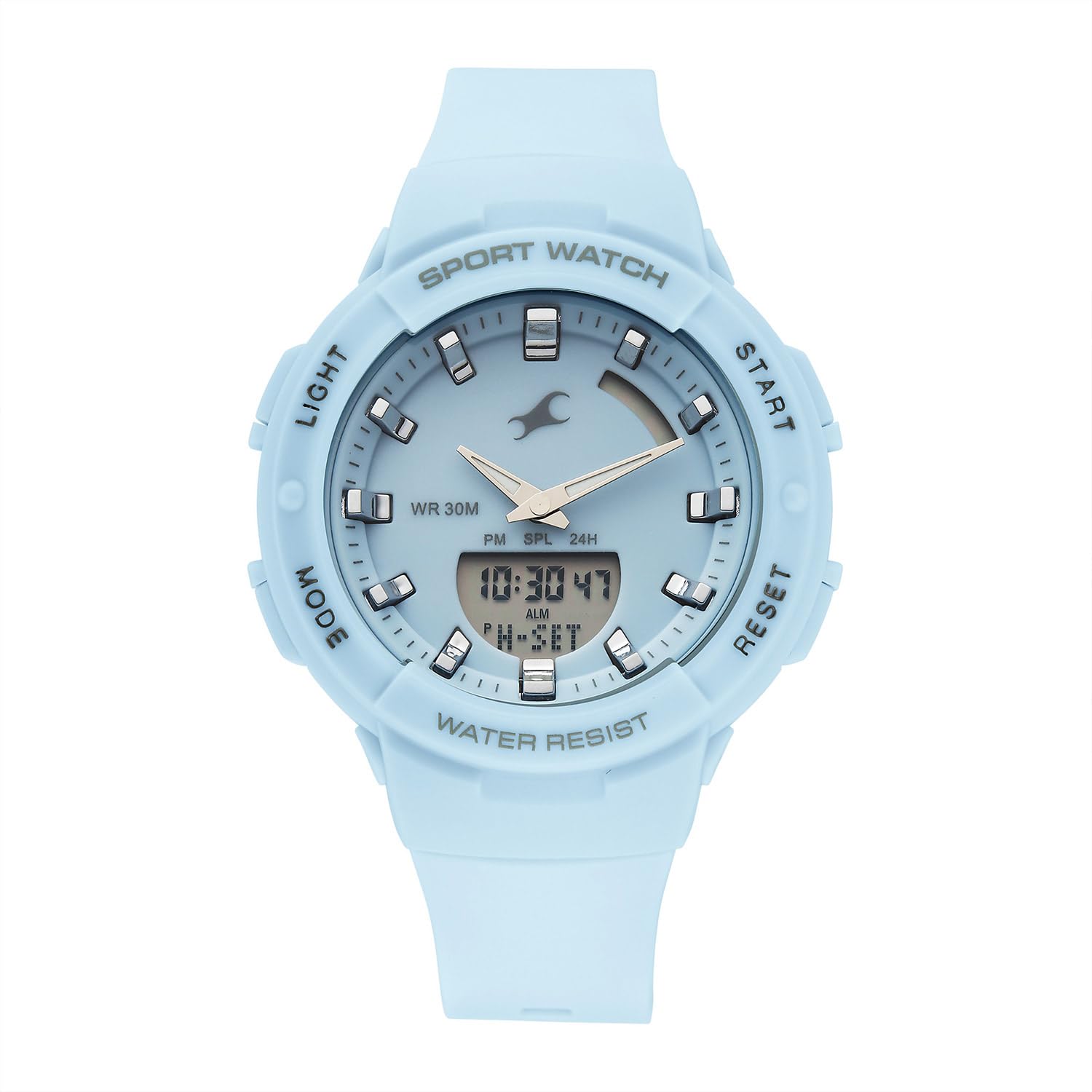
Mberi view of the Fastrack StreetStyle 5.0 watch, showcasing the blue dial, analog hands, and digital display. The four control buttons (LIGHT, MODE, START, RESET) are visible on the sides of the case.
Gadzirira
Your Fastrack StreetStyle 5.0 watch comes with a pre-installed battery. Before first use, ensure any protective films are removed from the watch face and back case.
Nguva Yekutanga Setting
- Ziva Mabhatani: Your watch features four buttons: CHIEDZA (kumusoro kuruboshwe), MODE (pazasi kuruboshwe), START (kumusoro kurudyi), uye RESET (pazasi kurudyi).
- Isa Nguva Yekugadzirisa: Press the MODE button repeatedly until the digital time display starts flashing, indicating you are in setting mode.
- Gadzirisa Nguva: Shandisa iyo START button to increase the flashing value (hours, minutes, seconds). Use the RESET button to cycle through the different values (hours, minutes, 12/24-hour format).
- Gadza Zuva Nezuva: Ramba uchimanikidza iyo RESET button to move to date, month, and day settings. Adjust these values using the START bhatani.
- Buda Setting Mode: Kana zvese zvagadziriswa zvakanaka, tinya bhatani rekuti MODE button to exit the setting mode. The digital display will stop flashing, and the analog hands will automatically synchronize with the set digital time.
Operating Instruction
Kushandisa EL Backlight
To illuminate the digital display in low-light conditions, press the CHIEDZA button (top left). The backlight will remain active for a few seconds.
Alarm Basa
- Access Alarm Mode: Press the MODE button repeatedly until 'ALM' or the alarm time is displayed.
- Gadza Alarm Nguva: While in Alarm Mode, press the RESET button to select the hour or minute digit you wish to adjust. Use the START bhatani rekushandura kukosha.
- Activate / Deactivate Alarm: Press the START button while in Alarm Mode to toggle the alarm ON/OFF. An alarm icon will appear when activated.
- Hourly Chime: Some models allow setting an hourly chime. Refer to the display for an 'SIG' or chime icon and use the START button to toggle it.
- Buda muAlarm Mode: Press the MODE button to return to the regular time display.
Stopwatch Basa
- Access Stopwatch Mode: Press the MODE button repeatedly until 'STW' or '00:00:00' is displayed.
- Kutanga/Mira: Press the START bhatani kuti utange nguva. Dzvanya bhatani START zvakare kumbomira.
- Lap/Split Time: Panguva iyo stopwatch iri kushanda, tinya iyo RESET button to record a lap or split time. The stopwatch will continue running in the background.
- Dzorera zvakare: While the stopwatch is paused, press the RESET bhatani rekubvisa stopwatch kusvika '00:00:00'.
- Buda muStopwatch Mode: Press the MODE button to return to the regular time display.
Basa reNguva Yenyika
Your watch includes a World Time function for tracking time in different global cities.
- Access World Time Mode: Press the MODE button repeatedly until 'WT' or a different city code is displayed.
- Select City: Shandisa iyo START button to cycle through available city codes/time zones.
- Exit World Time Mode: Press the MODE button to return to the regular time display.
Maintenance
Kuchenesa Wachi Yako
Kuti wachi yako irambe ichitaridzika zvakanaka, ipukute nguva nenguva nejira rakapfava, rakaoma. Kana wara rakasimba, pukuta zvishomaamp cloth can be used, followed by a dry cloth. Avoid using chemical cleaners, solvents, or abrasive materials, as these can damage the watch's finish and seals.
Kuramba Mvura
This watch is rated for WR 30M (3 ATM) water resistance. This means it is suitable for everyday use and can withstand splashes or brief immersion in water. It is kwete suitable for swimming, showering, or diving. Avoid operating buttons when the watch is wet to prevent water ingress.

Rear view of the Fastrack StreetStyle 5.0 watch, showing the stainless steel back case with engraved brand logo, model number (68054PP02), and water resistance rating (WR 30M).
Kutsiviwa kwebhatiri
The watch is powered by a button-cell battery. When the display dims or the watch stops functioning, it's time for a battery replacement. It is recommended to have the battery replaced by an authorized service center to ensure proper sealing and maintain water resistance.
Storage
When not in use, store your watch in a cool, dry place away from direct sunlight, extreme temperatures, and strong magnetic fields. Keeping it in its original packaging or a watch box can help protect it from dust and scratches.
Kugadzirisa matambudziko
- Wachi Isiri Kushanda: Check if the battery needs replacement. Ensure no buttons are stuck.
- Kuratidzwa Kwenguva Isina Kururama: Re-enter the time setting mode and adjust the time as per the 'Initial Time Setting' instructions.
- Analog Hands Not Synchronized: If analog hands do not match the digital time after setting, try resetting the watch (if a reset function is available, otherwise consult service).
- Digital Display Dim or Blank: This usually indicates a low battery. Replace the battery.
- Mvura Mukati Yekutarisa: If you notice condensation or water droplets inside the watch, stop using it immediately and take it to an authorized service center.
For issues not covered here, please contact Fastrack customer support.
Zvinotsanangurwa

Diagram illustrating the case size of the Fastrack StreetStyle 5.0 watch, indicating a 41 mm case diameter for reference.
| Feature | Detail |
|---|---|
| Brand | Fastrack |
| Model Name | StreetStyle 5.0 |
| Model Number | 68054PP02W |
| Display Type | Analog-Digital |
| Movement | Quartz |
| Kuramba Mvura | Mamita makumi mashanu (3 ATM) |
| Nyaya Dimensions (LxWxH) | 50 x 41 x 17 Mamirimita |
| Item Weight | 200 g |
| Mabhatiri Akabatanidzwa | Ehe |
| Nyika Yekwakabva | India |
Warranty uye Support
Your Fastrack StreetStyle 5.0 watch is covered by a manufacturer's warranty against manufacturing defects. Please refer to the warranty card included with your purchase for specific terms, conditions, and duration. Keep your purchase receipt as proof of purchase for warranty claims.
For technical assistance, service, or warranty claims, please contact Fastrack customer support or visit an authorized Fastrack service center. You can find contact information and service center locations on the official Fastrack websaiti: www.fasrack.in


