1. Nhanganyaya
Thank you for choosing the iScooter i14 Electric Scooter with Seat. This manual provides essential information for the safe assembly, operation, and maintenance of your new electric scooter. Please read it thoroughly before your first ride and keep it for future reference. Proper use and care will ensure optimal performance and longevity of your scooter.
2. Safety Information
Your safety is paramount. Always wear a helmet and appropriate protective gear (knee pads, elbow pads) when riding. Familiarize yourself with local laws and regulations regarding electric scooter use. Do not ride in adverse weather conditions or on slippery surfaces. Avoid riding under the influence of alcohol or drugs. Regular maintenance checks are crucial for safe operation.
- Nguva dzose pfeka ngowani uye giya rekudzivirira.
- Check brakes, tires, and all fasteners before each ride.
- Tevedzera mitemo yemumugwagwa yemuno.
- Usapfuure huremu hwepamusoro hwe264 lbs.
- Avoid riding in heavy rain, snow, or on icy roads.
3. Package Zviri mukati
Kana wabvisa zvinhu mubhokisi, ndapota iva nechokwadi chekuti zvikamu zvese zviripo:
- i14 Electric Scooter
- Charger
- Mushandisi Chinyorwa (gwaro iri)
- Tool Kit
4. Setup uye Gungano
Follow these steps to assemble your iScooter i14 Electric Scooter. A detailed assembly video is provided below for visual guidance.
4.1 Unboxing uye Yekutanga Kuongorora
Carefully remove all components from the packaging. Inspect for any damage that may have occurred during shipping.

Figure 4.1: The iScooter i14 Electric Scooter with Seat.
4.2 Front Wheel and Fender Installation
Attach the front wheel and fender to the scooter's fork using the provided tools. Ensure all bolts are securely tightened.
4.3 Handlebar Assembly
Insert the handlebar stem into the main frame and secure it. Adjust the handlebar height to your preference and tighten the quick-release clamp. Attach the handlebar to the stem and secure it with the provided screws.

Figure 4.2: Adjusting the height of the handlebar for comfortable riding.
4.4 Kuiswa Kwezvigaro
Insert the seat post into the designated slot on the scooter frame. Adjust the seat height for comfortable riding and secure it with the quick-release lever. Ensure the seat is firmly in place.

Figure 4.3: Adjusting the seat height to suit individual rider preferences.
4.5 Rear Basket Attachment
Secure the rear storage basket to the designated mounting points on the scooter's rear rack using the provided hardware. Ensure it is stable and can safely carry items.

Figure 4.4: The spacious rear basket for carrying personal belongings.
4.6 Gwaro reVhidhiyo reKugadzira
Video 4.1: This video demonstrates the assembly process for the iScooter i14 Electric Scooter with Seat, including unboxing, attaching the front wheel, handlebar, seat, and rear basket.
5. Operating Instructions
Understand the controls and features of your iScooter i14 for a safe and enjoyable ride.
5.1 Power On/Off and Key Ignition
Insert the mechanical key into the ignition slot and turn it to the 'ON' position to power on the scooter. The LCD display will illuminate. Turn the key to 'OFF' to power down.
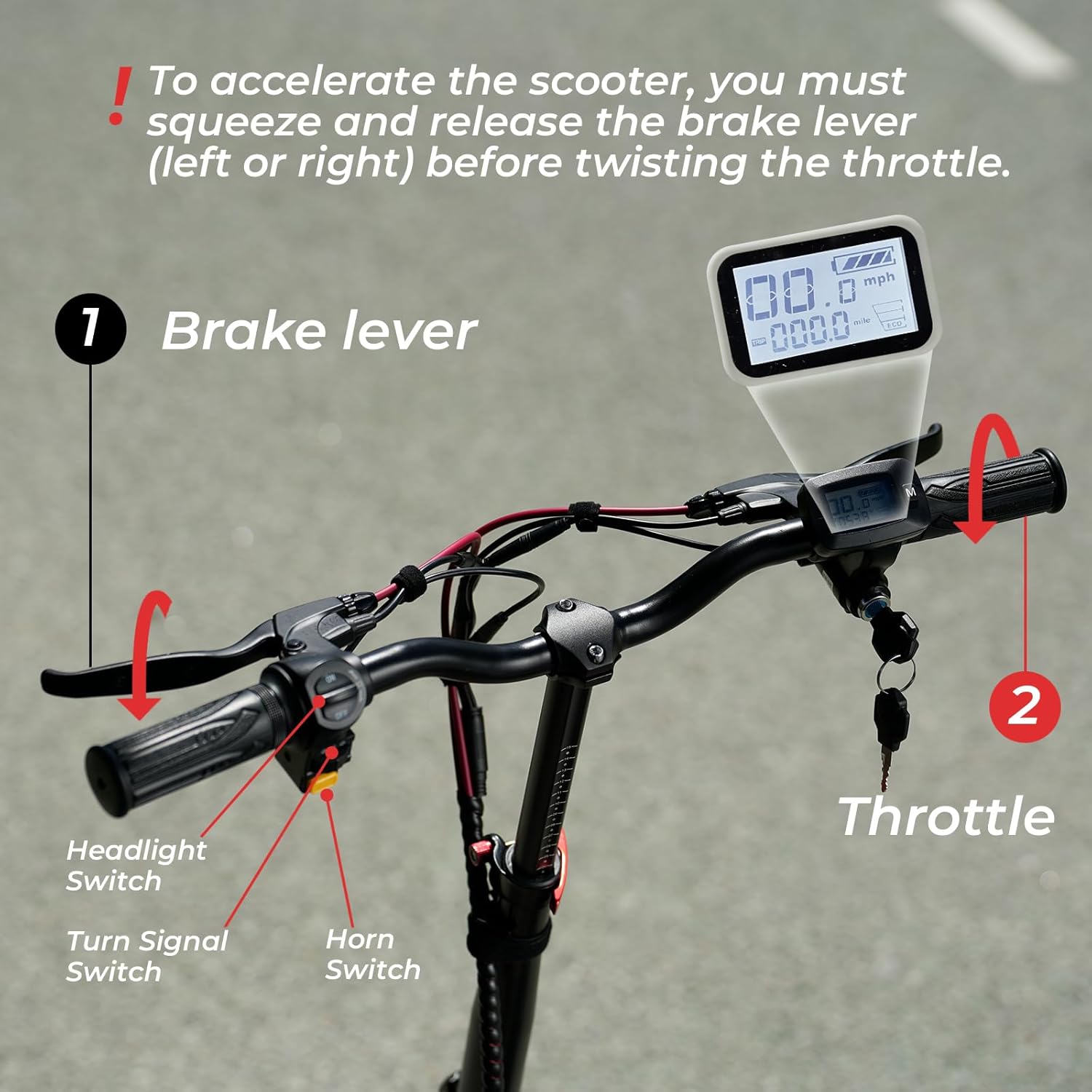
Mufananidzo 5.1: Kupfuuraview of the handlebar controls, including the LCD display, key ignition, and switches.
5.2 Speed Modes
The iScooter i14 offers 3 adjustable speed modes: 9 MPH, 21 MPH, and 28 MPH. To switch between modes, press the 'M' button on the display twice. Select the appropriate speed mode based on your riding environment and experience level.
5.3 Throttle Operation
To accelerate, you must first squeeze and release either the left or right brake lever before twisting the throttle. This safety feature prevents accidental acceleration. Twist the throttle gently to control your speed.
5.4 Lights, Horn, and Turn Signals
Use the dedicated switches on the handlebar to activate the front and rear LED lights for visibility, the horn for alerts, and the turn signals to indicate your direction to others.

Figure 5.2: The bright front LED light enhances visibility during low-light conditions.

Figure 5.3: The rear LED light ensures you are seen from behind, improving safety.
5.5 Braking System
The scooter is equipped with front and rear disc brakes, along with an electric lock system, for powerful and reliable stopping performance. Apply both brake levers gently and evenly to slow down or stop. Avoid sudden, harsh braking, especially at high speeds.

Figure 5.4: The robust disc brake system provides effective stopping power.
6. Kuchaja Operation
To charge your iScooter i14, locate the charging port on the scooter's deck. Connect the charger to the port, then plug the charger into a standard wall outlet. The indicator light on the charger will typically turn red during charging and green when fully charged. A full charge takes approximately 8 hours.
Video 6.1: This video demonstrates the charging process for the iScooter i14 Electric Scooter.
7. Kuchengeta
Kugara kugadziridza kunovimbisa hupenyu hurefu uye kushanda kwakachengeteka kwe scooter yako.
- Tyre Pressure: Check the pressure of the 14-inch pneumatic tires regularly. Maintain the recommended PSI as indicated on the tire sidewall for optimal ride comfort and range.
- Brake Inspection: Periodically inspect the front and rear disc brakes for wear and proper function. Adjust brake cables if necessary to ensure responsive braking.
- Kuchenesa: Chenesa sikuta ne adamp jira. Dzivisa kushandisa majeti emvura ane simba rakawanda zvakananga pamagetsi.
- Battery Care: Store the scooter in a cool, dry place. If storing for extended periods, charge the battery to approximately 50-70% and recharge every 1-2 months to prevent deep discharge.
- Fasteners: Regularly check all screws, bolts, and quick-release mechanisms to ensure they are tight and secure.
8. Kugadzirisa matambudziko
Heano mamwe matambudziko akajairika uye anogona kugadzirisa iwo:
| Dambudziko | Zvinogona Kukonzera | Solution |
|---|---|---|
| Sikuta haibati simba | Low battery; Key not fully turned; Loose connections | Charge battery; Ensure key is in 'ON' position; Check all visible cable connections. |
| Motokari isingabatanidzi | Brake lever not released before throttle; Faulty throttle; Motor issue | Ensure brake lever is released; Contact customer support if issue persists. |
| Mabhureki anonzwa asina simba | Worn brake pads; Loose brake cable; Air in hydraulic system (if applicable) | Inspect brake pads for wear and replace if needed; Adjust brake cable tension; Consult a professional for hydraulic brake issues. |
| Mitsindo isina kujairika panguva yekushanda | Loose components; Debris in wheels/brakes; Motor issue | Check all fasteners; Inspect wheels and brakes for obstructions; Contact customer support. |
9. Zvinotsanangurwa
| Feature | Tsanangudzo |
|---|---|
| Brand | iScooter |
| Model Name | i14 |
| Motor Power | 800W |
| Top Speed | 28 MPH |
| Maximum Distance Range | 34 Maira |
| Bhatiri | 48V 10.4Ah |
| Kuchaja Nguva | 8 Maawa |
| Kukura kweTire | 14 inches |
| Tire Type | Pneumatic |
| Kumiswa Type | Kumiswa Kwemativi Maviri (Kumberi & Kumashure) |
| Brake Style | Double Disc Brakes & EABS Braking Systems |
| Kurema Kurema | 264 Pondo |
| Item Weight | 72 Pondo |
| Zviyero zveChigadzirwa (LxWxH) | 43"L x 17"W x 45"H |
| Frame Material | Aluminium |
| Special Features | 800W Motor, 28MPH Top Speed, 34MILES Long Range, Dual Suspension, Adjustable Height, Adjustable Seat |
| Inokurudzirwa Zvishandiso | Kuenda |
10. Warranty uye Tsigiro
10.1 Ruzivo rweWaranti
iScooter offers a 12-month or 180-day warranty on different components of your product. Please refer to the specific warranty terms provided with your purchase for detailed coverage.
10.2 Mutengi Tsigiro
For any questions, concerns, or assistance with your iScooter i14, please contact our customer support team:
- Call Center: +1 (855) 916-2366
- Kutaurirana Pamoyo/Email: support@iscooterglobal.com
Chikwata chedu chekutsigira vatengi chiripo kuti chikubatsire.

Figure 10.1: iScooter customer support details for assistance.


