1. Chigadzirwa Pamusoroview
The Retekess PR11 is a compact and versatile AM/FM portable radio designed for ease of use and portability. It features an integrated MP3 player with support for USB and Micro SD cards, a headphone jack for private listening, and a built-in LED flashlight. Its rechargeable battery ensures long-lasting performance for various outdoor and indoor activities.
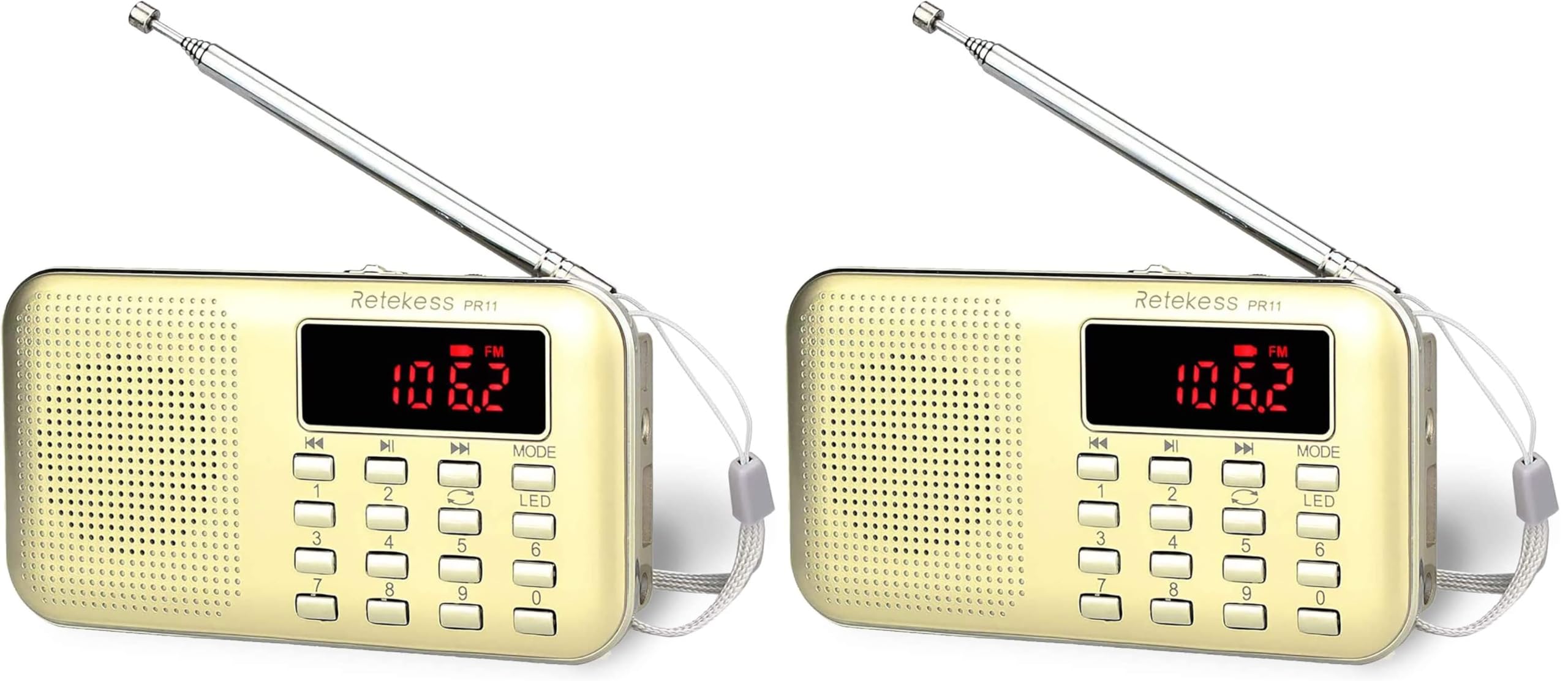
Image: The Retekess PR11 portable radio, showcasing dhizaini yayo diki uye kuratidzwa kwayo kwedhijitari.
2. Package Zviri mukati
Ndokumbira utarise pasuru yezvinhu zvinotevera:
- 1 x Retekess PR11 Redhiyo
- 1 x USB yekuchaja Cable
- 1 x BL-5C Lithium Battery
- 1 x Chinyorwa cheChirungu
- 1 x Packing Bhokisi

Image: A visual representation of the Retekess PR11 radio and its included accessories: USB charging cable, BL-5C battery, and user manual.
3. Component Identification
Familiarize yourself with the radio's buttons and ports:
- Kuchinja Kwemagetsi (KUVAMBIRA/KUDZIMWA): Inowanikwa padivi.
- Kudzora inzwi: Rotary dial, typically on the side.
- Antenna: Extendable telescopic antenna for improved reception.
- Dhijitari Display: Shows frequency, track number, and mode.
- Makiyi eNhamba (0-9): For direct frequency input or track selection.
- Bhotani reMODE: To switch between FM, AM, AUX, USB, and TF card modes.
- Bhatani reTamba/Kumbomira: Also used for auto-scanning in radio mode.
- Previous/Next Track/Frequency Buttons: Yekufambisa.
- Bhatani re LED: To activate the flashlight.
- Headphone Jack (3.5mm): Zvekuterera wega.
- USB Port: Yekutamba MP3 files from a USB disk.
- TF Kadhi Slot: Yekutamba MP3 files kubva pakadhi reMicro SD.
- DC 5V Chaja Port / AUX Input: Nzvimbo ine mabasa akawanda yekuchaja uye yekunze odhiyo.
- Tambo: Kuti zvikwanise kutakurwa.
- Bracket: Integrated stand for tabletop use.

Image: An annotated diagram highlighting the various ports and controls on the Retekess PR11 radio, including the earphone jack, USB disk port, flashlight, DC 5V charging port/AUX input, strap, and bracket.
4. Setup uye Kuchaja
4.1 Kuiswa kwebhatiri uye kuchaja
The Retekess PR11 uses a rechargeable BL-5C lithium battery. Before first use, ensure the battery is fully charged.
- Vhura chifukidziro chebhatiri chiri kumashure kweredhiyo.
- Isa bhatiri reBL-5C, uchivimbisa kuti polarity yacho iri pairi.
- Vhara chivharo chebhatiri.
- Connect the supplied USB charging cable to the DC 5V charging port on the radio and to a USB power source (e.g., computer, USB wall adapter).
- The charging indicator on the display will show charging status. A full charge typically takes about 2 hours.
- Once fully charged, the radio provides approximately 4-8 hours of working time, depending on usage.

Image: The Retekess PR11 radio with a visual representation of its rechargeable BL-5C 800mAh lithium battery, indicating a 50% charge, 2 hours charging time, and 4-8 hours working time.
4.2 Simba On/Kudzima
Slide the ON/OFF switch located on the side of the radio to turn it on or off.
5. Operating Instructions
5.1 Mode Sarudzo
Short Press the MODE button to cycle through the available modes: FM Radio, AM Radio, AUX Input, USB MP3 Player, and TF Card MP3 Player.
Video: Demonstrates how to use the Retekess PR11, including switching between AM, FM, AUX, and TF modes using the MODE button.
5.2 Kushanda kweRedhiyo (AM/FM)
- Sarudza Modhi yeRedhiyo: Press the MODE button until "FM" or "AM" appears on the display.
- Kuskena Chiteshi Otomatiki: Long press the Tamba/Misa button (often labeled with a play/pause icon). The radio will automatically scan for available stations and store them as presets. The display will show "CHXX" (channel number) as it scans.
- Manual Frequency Input: In FM or AM mode, use the number keys (0-9) to directly enter the desired frequency. For exampkuti muteerere 98.5 FM, tinya 9-8-5.
- Navigate Stored Stations: Short Press the Previous/Next Track/Frequency buttons (often labeled with |<< and >>|) to cycle through the automatically stored preset stations.
Video: Demonstrates how the Retekess PR11 searches for and tunes into radio stations, including automatic scanning and manual frequency input.
5.3 MP3 Playback (Kadhi reUSB/TF)
The radio supports MP3 playback from a USB flash drive or a Micro SD (TF) card (up to 16GB).
- Isa Chishandiso Chekuchengetera: Insert a USB flash drive into the USB port or a Micro SD card into the TF card slot. The radio will automatically switch to the corresponding MP3 mode and begin playing.
- Nzira dzekufamba nadzo: Shandisa iyo Previous/Next Track/Frequency buttons to skip between tracks.
- Fast Forward/Rewind: Long press the Previous/Next Track/Frequency mabhatani ekukurumidzisa kumberi kana kudzokera shure mukati menzira.
- Playback Modes: Short Press the MODE button in MP3 mode to cycle through playback options: Single Repeat (ONE), Folder Playback (FOCo), or All Playback (ALL).

Image: The Retekess PR11 radio highlighting the USB and TF card slots, indicating support for MP3 music playback from these storage devices (Max 16G).
Video: Demonstrates the MP3 player functionality of the Retekess PR11, showing how to insert a USB disk and play music.
5.4 AUX Input
The radio can be used as an external speaker for other audio devices.
- Connect a 3.5mm audio cable (not included) from your external device's headphone jack to the AUX input port on the radio.
- Press the MODE bhatani kusvika "AUX" yaonekwa pachiratidziro.
- Play audio from your external device. The radio will output the sound.

Image: The Retekess PR11 radio illustrating its DC 5V charging port also functioning as an AUX audio input, allowing connection to external devices like phones, tablets, or laptops.
5.5 Kushandiswa Kwemahedhifoni
For private listening, plug any standard 3.5mm headphones (not included) into the headphone jack on the side of the radio. The speaker will automatically mute.

Image: The Retekess PR11 radio featuring a 3.5mm headphone jack, allowing users to listen without disturbing others. Headphones are not included.
5.6 Chiedza che LED
The radio includes a built-in LED flashlight for convenience.
- Press the LED bhatani rekubatidza kana kudzima tochi.
- Tochi inogona kushandiswa kunyangwe kana redhiyo yakadzimwa.

Image: The Retekess PR11 radio with its LED flashlight illuminated, demonstrating that the flashlight can be used independently of the radio function.
5.7 Kushandisa Chigadziko
The radio features a small bracket on the back that can be used as a stand.
- Pull out the bracket from the back of the radio.
- Position the radio on a flat surface using the extended bracket for stable viewkunzwa kana kuteerera.
Video: Shows the Retekess PR11 being placed on a table using its integrated support stand.
6. Kuchengeta
- Keep the radio dry and away from moisture.
- Chenesa redhiyo nejira rakapfava, rakaoma. Usashandise zvinochenesa zvinogumbura kana zvinonyungudutsa.
- Dzivisa kupisa kwakanyanya uye chiedza chezuva chakananga.
- If not using the radio for an extended period, fully charge the battery and store it in a cool, dry place.
- Do not attempt to disassemble or repair the radio yourself. Contact customer support for assistance.
7. Kugadzirisa matambudziko
| Dambudziko | Zvinogona Kukonzera | Solution |
|---|---|---|
| Radio haibatike. | Bhatiri rapera kana kuti rakaiswa zvisirizvo. | Chaja bhatiri. Iva nechokwadi chekuti bhatiri rakaiswa ne polarity chaiyo. |
| Kugamuchirwa kweredhiyo kusina kunaka. | Antena haina kurebeswa, chiratidzo chisina simba, kana kupindira. | Fully extend the telescopic antenna. Try repositioning the radio. Perform an auto-scan to find stronger signals. |
| No sound from MP3 player (USB/TF). | Hazvina kururama file fomati, yakaora files, or volume too low. | Iva nechokwadi files are in MP3 format. Check if the volume is turned up. Try a different USB/TF card. |
| Volume yehedhifoni yakadzikira. | This is a known characteristic of the device. | Adjust the volume to maximum for headphone use. Consider using more sensitive headphones if needed. |
| Radio does not respond. | Temporary software glitch. | Turn the radio off and then on again to reset it. |
8. Zvinotsanangurwa
- Zviyero zvechigadzirwa: 4.6 x 0.8 x 2.5 inches
- Chinhu Weight: 13.4 ounces (0.84 pounds)
- Model Number: FAUF9210J (PR11)
- Brand: Retekess
- Ruvara: Ndarama
- Bhatiri: BL-5C 800mAh Lithium Battery (Rechargeable)
- Nguva yekuchaja: Anenge maawa maviri
- Nguva Yekushanda: 4-8 maawa
- Kupinza Kwekunzwa: AUX (3.5mm)
- Media Playback: USB Disk (Max 16G), TF Card (Max 16G) - MP3 format
- Mabhendi eRadio: AM, FM
- Zvimwe Zvimiro: LED Flashlight, Integrated Stand, Headphone Jack
9. Warranty uye Tsigiro
For warranty information, technical support, or any inquiries regarding your Retekess PR11 radio, please contact Retekess customer service. You can often find contact details on the product packaging, the official Retekess webwebhusaiti, kana kuburikidza nenzvimbo yako yekutenga.
Visit the official Retekess Store for more products and support: Chitoro cheRetekess paAmazon


