Nhanganyaya
Thank you for choosing the FiiO EH11 Retro On-Ear Bluetooth Headphones. These headphones combine classic design with modern wireless technology, offering high-resolution audio and versatile connectivity. This manual provides essential information for the proper use, setup, and maintenance of your EH11 headphones.
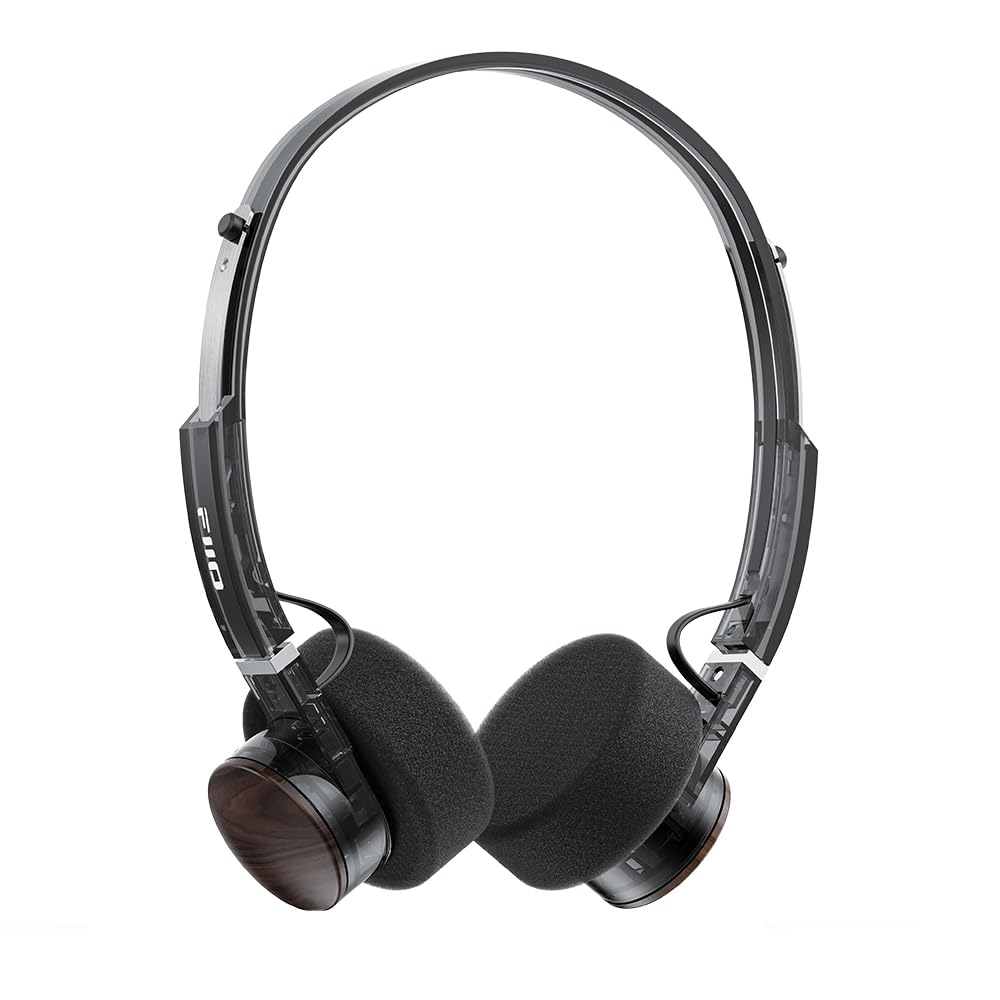
Image: FiiO EH11 Retro On-Ear Bluetooth Headphones, Transparent Black variant. This image displays the overall design of the headphones, highlighting the on-ear form factor and retro aesthetic.
Safety Information
- Usaise mahedhifoni panzvimbo inopisa zvakanyanya, ine hunyoro, kana ine ngura.
- Dzivisa kuteerera nepamusoro-soro mazinga kwenguva yakareba kudzivirira kukuvara kwekunzwa.
- Do not disassemble, repair, or modify the device yourself. Contact authorized service personnel for assistance.
- Chengetedza mudziyo kure nevana uye mhuka dzinovaraidza.
- Rasa chigadzirwa uye bhatiri rayo zvine hungwaru maererano nemitemo yenzvimbo.
Package Zviri mukati
Ndokumbira utarise kuti zvinhu zvese zviripo mupasuru yako:
- FiiO EH11 Retro On-Ear Bluetooth Headphones
- Foam earpads (2 pairs)
- USB A to Type-C charging cable (1)
- Quick guide (1)
Product Overview
Familiarize yourself with the main components and controls of your FiiO EH11 headphones.
Kudzora uye Ports
- Bhatani reSimba/Multi-function: Inoshandiswa pakubatidza/kudzima, kutamba/kumbomira,kupindura/kupedza mafoni.
- Vhoriyamu Knob: Rotatable knob for volume adjustment and track control.
- USB Type-C Port: Zvekuchaja mahedhifoni.
- Maikorofoni: Yakagadzirirwa mafoni nemirairo yezwi.
- Chiratidzo che LED: Inoratidza simba, kuchaja, uye Bluetooth mamiriro.
Note: Specific button functions and LED indicator behaviors are detailed in the 'Operating' section.
Gadzirira
1. Kuchaja mahedhifoni
- Batanidza tambo yekuchaja yeUSB Type-C kune chinongedzo chekuchaja chiri pamahedhifoni.
- Batanidza imwe magumo etambo kune USB magetsi adapta (isina kuisirwa) kana komputa USB port.
- Chiratidzo che LED chicharatidza mamiriro ekuchaja (semuenzaniso, tsvuku paunenge uchichaja, kana wachaja zvizere).
- Kuchaja kwakazara kunotora maawa maviri uye kunoita kuti mutambo urambe uchitamba kwemaawa gumi nemashanu.
Description: Connect the provided USB-C cable to the headphone's charging port and a power source to charge the internal battery.
2. Powering On / Off
- Power On: Press and hold the Power/Multi-function button for approximately 3 seconds until the LED indicator lights up and you hear a power-on prompt.
- Power Off: Press and hold the Power/Multi-function button for approximately 5 seconds until the LED indicator turns off and you hear a power-off prompt.
3. Bluetooth Kubatanidza
- Ita shuwa kuti mahedhifoni akadzimwa.
- Press and hold the Power/Multi-function button for approximately 5-7 seconds until the LED indicator flashes red and blue alternately, indicating pairing mode.
- Pamudziyo wako (smartphone, piritsi, komputa), gonesa Bluetooth uye tsvaga zvishandiso zviripo.
- Select "FiiO EH11" from the list of found devices.
- Once connected, the LED indicator will flash blue periodically, and you will hear a connection prompt.
4. Dual Device Connection
The EH11 supports simultaneous connection to two Bluetooth devices.
- Batanidza mahedhifoni nemudziyo wekutanga sezvatsanangurwa pamusoro.
- Dzima Bluetooth pamudziyo wekutanga. Mahedhifoni achapinda zvakare mumodhi yekuwiriranisa.
- Batanidza mahedhifoni nemudziyo wechipiri.
- Vhura Bluetooth zvakare pamudziyo wekutanga. Mahedhifoni anofanira kubatana otomatiki kumidziyo yese miviri.
- You can now seamlessly switch between audio sources from the two connected devices.
5. FiiO Control App
Download the FiiO Control App from your device's app store to unlock additional features and customization options, including EQ presets and gaming mode settings.
- Tsvaga "FiiO Control" in the App Store (iOS) or Google Play Store (Android).
- Install the app and ensure your EH11 headphones are connected via Bluetooth.
- Open the app to access settings such as EQ, gaming mode, and firmware updates.
Operating Instruction
Music Playback
- Tamba/Kumbomira: Pfupi dzvanya bhatani reSimba/Multi-function.
- Vhoriyamu Kumusoro: Rotate the Volume knob clockwise.
- Vhoriyamu Pasi: Rotate the Volume knob counter-clockwise.
- Next Track: Double-click the Volume knob.
- Previous Track: Triple-click the Volume knob.
Fonera Management
- Pindura/Pedzisa Kufona: Pfupi dzvanya bhatani reSimba/Multi-function.
- Ramba Kufona: Dzvanya uye bata bhatani reSimba/Multi-function kwemasekonzi matatu.
Gaming Mode
Activate Gaming Mode via the FiiO Control App to enhance in-game audio cues like footsteps and gunshots for a more immersive experience. This mode also optimizes latency.
LDAC High-Resolution Audio
The FiiO EH11 supports LDAC codec for high-resolution wireless audio. Ensure your source device also supports LDAC and that it is enabled in your device's Bluetooth settings for the best audio quality.
Maintenance
Kuchenesa
- Pukuta mahedhifoni nemucheka wakapfava, wakaoma, usina lint.
- Usashandise makemikari ane hasha, kuchenesa zvinonyungudutsa, kana mishonga yakasimba.
- Dzivisa kuwana mwando mune chero mazaru.
Ear Pad Replacement
The foam ear pads are detachable for easy cleaning and replacement. Gently pull the ear pads off the earcups to remove them. Align the new ear pads with the earcups and press them firmly into place until they are securely attached.
Two pairs of different-colored official ear pads are included in the package for customization.
Storage
When not in use, store the headphones in a cool, dry place, away from direct sunlight and extreme temperatures. Avoid placing heavy objects on the headphones.
Kugadzirisa matambudziko
- Hapana Simba:
- Ita shuwa kuti mahedhifoni akachajwa zvizere.
- Try connecting to a different charging cable or power source.
- Haikwanise Kubatanidza Nemudziyo:
- Iva nechokwadi chekuti mahedhifoni ari mu pairing mode (LED inopenya tsvuku nebhuruu).
- Ita shuwa kuti Bluetooth yakabatidzwa pane chako kifaa.
- Fambisa mahedhifoni pedyo nemudziyo wako.
- Edza kutangazve mahedhifoni nemudziyo wako.
- Bvisa zvakamboitika kubatanidza neBluetooth pane chako kifaa.
- Hapana Ruzha kana Yakaderera Volume:
- Tarisa huwandu hwevhoriyamu pamahedhifoni nemudziyo wako wakabatana.
- Iva nechokwadi chekuti mahedhifoni akabatana zvakanaka nemudziyo wako.
- Edza kutamba odhiyo kubva kune imwe application kana sosi yakasiyana.
- Hunhu Hwekunzwika Husina kunaka:
- Iva nechokwadi chekuti hapana zvipingamupinyi pakati pemahedhifoni nemudziyo wako.
- Ibva pane zvinokanganisa (semuenzaniso, Wi-Fi routers, mamwe maBluetooth madivayiri).
- If using LDAC, ensure your source device supports it and it is enabled.
Zvinotsanangurwa
| Feature | Tsanangudzo |
|---|---|
| Model Name | EH11 |
| Kubatana Technology | Bluetooth |
| Wireless Communication Technology | Bluetooth |
| Audio Driver Type | Dynamic Driver (40mm) |
| Earpiece Shape | On-Nzeve |
| Hupenyu hwebhatiri | Kusvikira kuMaawa mashanu |
| Kuchaja Nguva | Approx. 1.5 Maawa |
| Kurema | Approx. 92g (3.25 oz) |
| Special Feature | LDAC High-Resolution Bluetooth Audio, Dual Device Connection, FiiO Control App Support, Gaming Mode |
| Inosanganisirwa Zvikamu | Foam earpads*2, Quick guide*1, USB A to Type-C charging cable*1 |
Warranty uye Support
FiiO products come with a limited warranty. For detailed warranty information, technical support, or service inquiries, please refer to the official FiiO websaiti kana kubata muparidzi wenzvimbo yako.
Iwe unogona kuwana rumwe ruzivo uye ruzivo rwekufonera pane iyo FiiO Official Store.