Nhanganyaya
The Havit H2015PRO is a versatile gaming headset designed for multi-platform compatibility and immersive audio experiences. Featuring five distinct connection modes, this headset offers flexibility for various gaming setups and entertainment needs. It delivers high-fidelity sound with 360° spatial audio and low latency, ensuring a competitive edge in gaming. This manual provides essential information for setting up, operating, maintaining, and troubleshooting your Havit H2015PRO headset.
Product Overview
The Havit H2015PRO headset includes the following components:
- Havit H2015PRO Gaming Headset
- Detachable Microphone
- 2.4 GHz USB Wireless Dongle
- USB-C Kuchaja Cable
- 3.5mm Audio Cable
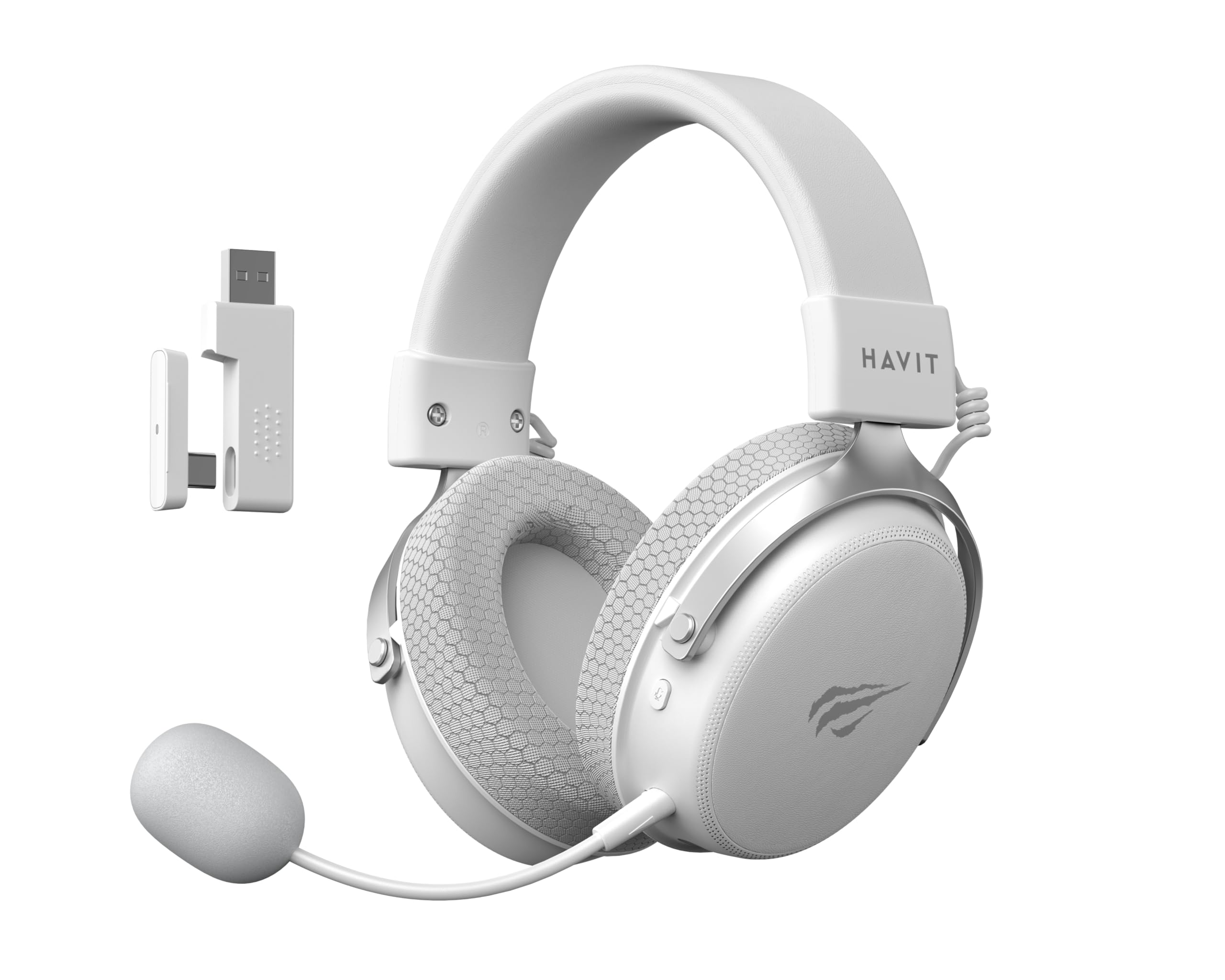
Image: The Havit H2015PRO headset in white, showcasing the main unit, detachable microphone, and the 2.4 GHz USB wireless dongle. This image provides a clear view of the primary components included with the product.
Gadzirira
The Havit H2015PRO offers five connectivity options to suit various devices and preferences.
1. 2.4 GHz Wireless Connection (USB Dongle)
- Insert the 2.4 GHz USB wireless dongle into an available USB port on your PC, PlayStation, or Nintendo Switch (in docked mode).
- Batidza headset. Headset inofanira kubatana otomatiki nedongle.
- Ensure the headset is selected as the audio output and input device in your system settings.
2. Kubatana kweBluetooth
- Power on the headset and switch it to Bluetooth mode (refer to the headset controls for mode selection).
- On your device (smartphone, tablet, PC with Bluetooth), go to Bluetooth settings and enable Bluetooth.
- Select "Havit H2015PRO" from the list of available devices to pair.
3. Kubatanidza Newaya (3.5mm Audio Cable)
- Connect one end of the 3.5mm audio cable to the headset's 3.5mm port.
- Connect the other end to the 3.5mm audio jack on your PC, console controller, or mobile device.
- This mode does not require the headset to be powered on.
4. Wired Connection (USB-C Cable)
- Connect the USB-C cable to the headset's USB-C port.
- Connect the other end to a compatible USB-C port on your PC or device.
- This connection can be used for both audio and charging.

Mufananidzo: An angled view of the Havit H2015PRO headset, highlighting the earcups, headband, and visible controls on the side. This perspective helps in identifying connection ports and buttons.
Operating Instruction
Simba On/Kudzima
- Kuti ubate, tinya wobata bhatani rePower kusvika rambi rechiratidzo ravheneka.
- Kuti udzime, tinya wobata bhatani rePower kusvika rambi rechiratidzo radzima.
Volume Control
- Use the volume roller or buttons located on the earcup to adjust the audio level.
Kushandisa Maikorofoni
- Attach the detachable microphone to the designated port on the headset.
- Adjust the microphone's flexible arm for optimal voice pickup.
- Use the microphone mute button (if available) on the headset to toggle mute on/off.
Kuchaja mahedhifoni
- Connect the USB-C charging cable to the headset's USB-C port and the other end to a USB power source.
- The indicator light will show charging status (e.g., red for charging, off or green for fully charged).
- Kuchaja kwakazara kunowanzo kunotora maawa angangoita 2-3.
Maintenance
Proper care ensures the longevity and performance of your Havit H2015PRO headset.
- Kuchenesa: Shandisa jira rakapfava, rakaoma kupukuta headset. Pamakombi enzeve, pukuta zvishomaamp cloth with mild soap can be used, but ensure no moisture enters the speaker grilles.
- Kuchengeta: Chengetedza mahedhifoni munzvimbo inotonhorera, yakaoma kure nechiedza chezuva uye tembiricha yakanyanyisa.
- Battery Care: Kuti bhatiri rirambe richishanda, dzivisa kuburitsa mahedhifoni ese nguva nenguva. Ichaje nguva dzose, kunyangwe isingashandiswe kwenguva yakareba.
- Dzivisa Zvinwiwa: Do not expose the headset to water or other liquids, as it is not water-resistant.
Kugadzirisa matambudziko
If you encounter issues with your Havit H2015PRO headset, refer to the following common solutions:
| Dambudziko | Solution |
|---|---|
| Hapana ruzha kubva kumahedhifoni |
|
| Maikorofoni haisi kushanda |
|
| Headset not connecting wirelessly |
|
| Nyaya dzekuchaja |
|
Zvinotsanangurwa
Detailed technical specifications for the Havit H2015PRO headset:
- Zita remuenzanisi: HAVIT H2015PRO
- Kubatana Technology: Hybrid (2.4 GHz Wireless, Bluetooth, 3.5mm Jack, USB-C)
- Saizi yemutyairi: 53 mm
- Impedance: 64 Ohms
- Frequency Mhinduro: 20.2 Hz (Specific value provided, typical range is 20Hz-20kHz)
- Battery Capacity: 1500 mAh
- Low Latency: 24 ms
- Audio Features: 360° Spatial Audio, Virtual 7.1 Surround Sound
- Maikorofoni: Inobviswa uye Inogadziriswa
- Kudzora Type: Integrated (Touch controls)
- Material: Plastiki
- Product Weight: 500 magiramu
- Kuenderana: Desktops, PC, PlayStation, Xbox, Nintendo Switch, Mobile Devices
- Mvura Inodzivisa Level: Kwete kudzivirira mvura

Mufananidzo: A kumberi view of the Havit H2015PRO headset, clearly showing the earcups, headband, and the attached microphone. This view emphasizes the ergonomic design and microphone placement.
Warranty uye Support
Warranty Information
The Havit H2015PRO headset comes with a 1-gore mugadziri waranti. Iyi waranti inovhara kukanganisa mune zvigadzirwa uye magadzirirwo pasi pekushandiswa kwakajairwa. Ndapota chengetedza humbowo hwako hwekutenga kwezvichemo zvewaranti.
Mutengi Support
For technical assistance, warranty claims, or further inquiries, please contact Havit customer support through their official website or the retailer where the product was purchased. Provide your product model number (H2015PRO) and proof of purchase when seeking support.


